LikeC4: A Code-First Diagramming Language That Stays in Sync with Your Architecture
GitHub describes it as Visualize, collaborate, and evolve the software architecture with always actual and live diagrams from your code. The repository metadata lists TypeScript as its primary language. The metadata lists the MIT license. This article stays within the project description and details documented in the GitHub repository README.
At a glance
- What is it?
- LikeC4 is a TypeScript-based modeling language and toolchain for generating C4-style architecture diagrams from a textual model. It offers flexibility beyond Structurizr DSL, but its value depends on your team's willingness to maintain the model.
- Who is it for?
- Adopt LikeC4 if you want architecture diagrams that are version-controlled, reviewable, and generated from a single source of truth, and if your team is comfortable writing and maintaining a textual model. Do not adopt it if you expect fully automatic diagram generation from existing code without any modeling effort, or if you need a visual-first editing experience.
- Can I use it commercially?
- Yes. MIT is a permissive licence: you can use, modify and sell software built on it, as long as you keep its copyright and licence notices.
- Is it still maintained?
- Yes. The repository last received commits 19 days ago.
- What is it written in?
- Mainly TypeScript, according to GitHub's language statistics.
Answers come from the project's GitHub data, last synced on October 4, 2026, and from our analysis. They are not legal advice.
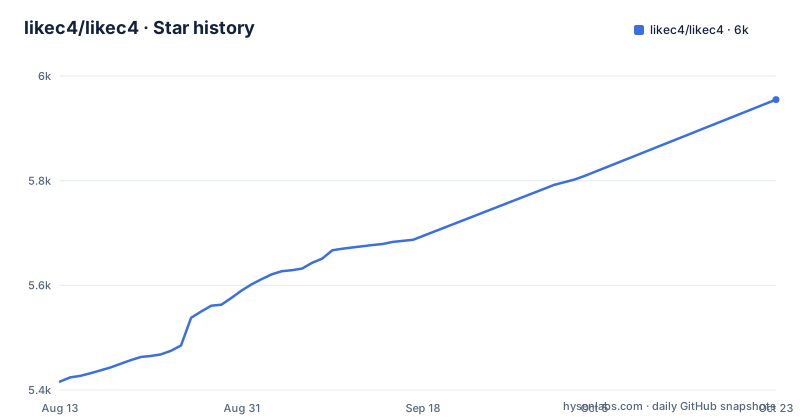
Star history
- likec4/likec45,809 ★ · +393
| Repository | 2026-08-13 | 2026-10-04 |
|---|---|---|
| likec4/likec4 | 5.4k | 5.8k |
393 Stars in the last 52 days, measured from the daily GitHub snapshot. Compare with other projects
Editorial analysis
The Problem: Architecture Diagrams That Drift from Reality
Software architecture diagrams often become outdated the moment they are drawn. Teams draw them once, share them in a wiki, and then forget to update them as the system evolves. LikeC4 addresses this by treating architecture as a code artifact. The README positions it as a way to "visualize, collaborate, and evolve" architecture with "always up-to-date, live diagrams generated from your code." The key word is "code." Instead of dragging boxes on a canvas, you write a textual model. That model is the single source of truth. Diagrams are derived from it, so they cannot drift from the model. The target user is a software engineer or architect who is comfortable with version control, code review, and text-based tooling. It is not aimed at non-technical stakeholders who want to draw diagrams by hand.
How LikeC4 Works: A DSL Inspired by C4 and Structurizr
LikeC4 is a modeling language, not a drawing tool. The README states it is "inspired by C4 Model and Structurizr DSL, but provides some flexibility." The C4 Model is a hierarchical approach to diagramming software: context, containers, components, and code. Structurizr DSL is a textual format for that model. LikeC4 takes that idea further. You can "customize or define your own notation, element types, and any number of nested levels in the architecture model." That means you are not locked into the four standard C4 levels. You can add your own element types and define your own notation. The actual mechanism is a compiler-like pipeline: you write a source file in the LikeC4 language, then run a CLI command to generate diagrams. The README gives a concrete example: `npx likec4 start` runs a preview server. The generated output is a live, interactive view, as shown in the deployed template at template.likec4.dev. The model is text, so it can be diffed, reviewed, and merged like any other code.
Getting Started: Commands and Tooling
The README is sparse on detailed setup instructions, but it points to the CLI package at `./packages/likec4/README.md` and a tutorial at likec4.dev/tutorial. The primary command is `npx likec4 start`, which runs a local preview. That command is the entry point for iterating on your model. There is also a VS Code extension, linked from the README, which likely provides syntax highlighting and live preview within the editor. The project has a template repository at `likec4/template`, which you can fork or use as a starting point. The template is also deployed at template.likec4.dev, so you can see what the output looks like before writing any code. There is a playground at playground.likec4.dev, which is probably the fastest way to experiment without installing anything. The README also mentions an MCP (Model Context Protocol) server, linked via mcptoplist.com, which suggests you can integrate LikeC4 with AI assistants or other tools. However, the README does not explain how to install or configure that MCP server, so you would need to check the docs or the repository for details.
A Real Limitation: It Requires Active Model Maintenance
The biggest limitation is that LikeC4 does not automatically reverse-engineer your architecture from source code. The README says "generated from your code," but that is misleading. The diagrams are generated from a textual model that you write. The model is not inferred from your application's code. If you have a large existing codebase, you will have to manually describe the components, their relationships, and the levels of abstraction in the LikeC4 language. That is a significant upfront cost. The tool helps you keep diagrams in sync with the model, but it does not keep the model in sync with the actual system. If your code changes and you forget to update the model, the diagrams will be just as stale as before. The only difference is that the source of truth is a text file instead of a canvas. That is an improvement for versioning and review, but it is not automation. Teams that expect a zero-maintenance solution will be disappointed.
The Alternative: Structurizr DSL and Visual Editors
The most direct alternative is Structurizr DSL, which LikeC4 explicitly cites as an inspiration. Structurizr DSL is a mature, widely used textual format for C4 models. It has a command-line tool and a paid hosting service. The difference in approach is that Structurizr DSL is strictly tied to the C4 Model's four levels: context, containers, components, and code. LikeC4 allows you to break out of that hierarchy with custom element types and nested levels. If you want a battle-tested tool with a larger ecosystem and more documentation, Structurizr DSL is a safe choice. If you need flexibility to model beyond C4, LikeC4 is the more adaptable option. Another alternative is a visual diagramming tool like draw.io or Lucidchart, which have no code model at all. Those are easier for non-technical users but have no version control story. The choice comes down to whether you want a strict standard (Structurizr) or a flexible one (LikeC4).
Maintenance and Upgrade Cost
LikeC4 is under active development. The latest release at the time of writing is v1.59.2, pushed on 2026-07-22, with multiple releases in the same week (v1.59.0, v1.59.1, v1.59.2). That high release cadence suggests a fast-moving project. The upside is that bugs get fixed quickly and features are added regularly. The downside is that the DSL syntax and CLI behavior may change between minor versions. You will need to track the changelog and update your model files if breaking changes occur. The project is MIT-licensed, so you can use it freely in commercial projects without paying licensing fees. There is no mention of a paid support option. The README asks for financial contributions via OpenCollective or GitHub Sponsors, which indicates the project relies on community funding. That means long-term maintenance is not guaranteed. If the maintainers lose interest, you may be left with a tool that no longer evolves. Before adopting it, check the project's contribution activity and issue tracker to gauge health. The README lists a Discord community and GitHub Discussions, which are good places to ask about the project's roadmap.
Who Should Adopt LikeC4 and What to Verify First
LikeC4 is a good fit for teams that already practice architecture as code, meaning they are comfortable writing and reviewing text-based models. It is also a good fit for teams that find the strict C4 hierarchy too limiting. If you need custom element types or deeper nesting, LikeC4 gives you that flexibility. It is not a good fit for teams that want a push-button solution to generate diagrams from existing code, because that does not exist. It is also not a good fit for teams that need to collaborate with non-technical stakeholders who expect a visual editor. Before adopting it, verify that the DSL supports your specific modeling needs. Try the playground at playground.likec4.dev and build a small model of your system. Test the CLI command `npx likec4 start` on a sample project. Check the documentation at likec4.dev for a full language reference. Most importantly, check the project's recent releases and commit history to ensure it is still actively maintained. The release cadence as of July 2026 looks healthy, but that can change. If you are comfortable with the maintenance burden, LikeC4 offers a flexible, code-first approach to architecture diagrams that stays true to the C4 spirit without being boxed in by it.
Editorial conclusion
Adopt LikeC4 if you want architecture diagrams that are version-controlled, reviewable, and generated from a single source of truth, and if your team is comfortable writing and maintaining a textual model. Do not adopt it if you expect fully automatic diagram generation from existing code without any modeling effort, or if you need a visual-first editing experience. Before committing, verify that the DSL's flexibility meets your needs, test the VS Code extension and CLI workflow on a sample project, and confirm that the active release cycle (v1.59.x as of July 2026) aligns with your stability requirements.
Frequently asked questions
what is likec4
LikeC4 is a modeling language for describing software architecture and a set of tools to generate diagrams from that model. It is inspired by the C4 model and the Structurizr DSL, but adds flexibility by letting you define your own notation, element types and any number of nested levels.
how to use likec4
Write a model in the language and run the command line tool to preview the generated diagram, with npx likec4 start given as the example. There is a tutorial for a quick overview, a template repository that is also deployed live and editable in a browser sandbox, and a playground on its own site.
How does likec4 differ from the C4 model?
It takes the C4 model and the Structurizr DSL as inspiration but does not fix the notation. You can define your own element types and choose any number of nested levels in the model, rather than working within four defined levels. That flexibility is the project's stated reason for existing alongside those references.
Where can I get the likec4 diagram renderer?
The container image is built in two stages, compiling Graphviz from source because recent versions have no binary distributions, then copying the result into a slim Node runtime image. The Graphviz version is discovered from an upstream API at build time unless a build argument supplies it, and the published image overrides it with an exact version.
What runtime does likec4 need for development?
Node.js 22.22.3 or newer, declared both as an engine requirement and as the base image tag for both container stages, with two version pin files at the repository root. The workspace uses pnpm as its package manager, and most build and typecheck commands run through a task runner with the apps directory filtered out.
Official sources
Add this badge to your README
If you maintain this project, the badge below links readers to this analysis and shows its maintenance status from the daily GitHub snapshot. Paste the markdown into your README; add ?metric=license or ?metric=stars to the image URL for a different field.

[](https://hysenlabs.com/projects/likec4-likec4)Star history chart for your README
[](https://hysenlabs.com/projects/likec4-likec4)