Crush: a Rust shell with programming-language features
Crush is a command line shell that is also a powerful modern programming language.
At a glance
- What is it?
- Crush combines an interactive command line shell with a language that supports types, closures, lexical scoping, error handling, background jobs, warnings, and pattern matching. It targets developers who want shell commands and structured programs in one environment, but its early version and limited release history require careful evaluation.
- Who is it for?
- Developers should consider Crush when they want to work with shell commands and structured language constructs in one environment. Teams needing a stable shell with a documented release and upgrade path should verify compatibility first, because the repository is not archived but has no GitHub releases.
- Can I use it commercially?
- Yes. MIT is a permissive licence: you can use, modify and sell software built on it, as long as you keep its copyright and licence notices.
- Is it still maintained?
- Yes. The repository last received commits 31 days ago.
- What is it written in?
- Mainly Rust, according to GitHub's language statistics.
Answers come from the project's GitHub data, last synced on October 23, 2026, and from our analysis. They are not legal advice.
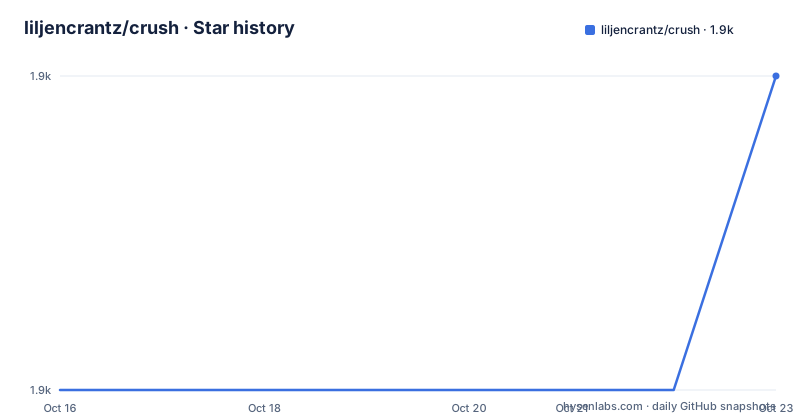
Star history
- liljencrantz/crush1,890 ★ · +1
| Repository | 2026-10-16 | 2026-10-23 |
|---|---|---|
| liljencrantz/crush | 1.9k | 1.9k |
1 Stars in the last 7 days, measured from the daily GitHub snapshot. Compare with other projects
Editorial analysis
Crush's shell and programming-language boundary
Crush addresses the space between a traditional shell and a general-purpose programming language. A traditional shell is convenient for launching commands and working interactively, while a programming language provides constructs for organizing larger programs. Crush attempts to keep both activities in one command line environment rather than requiring scripts to move between shell code and another language.
The project identifies developers who want shell syntax without giving up language features such as a type system, closures, and lexical scoping. Its syntax is designed for both batch files and interactive sessions. The README points to a narrative overview, a language reference, configuration documentation, and a searchable builtin reference. That separation is useful because the repository presents Crush as both an executable shell and a language environment, not merely as a wrapper around existing commands.
The repository is written primarily in Rust and identifies the package as `crush`, version `0.1.0`. It uses edition 2024 and specifies Rust `1.88.0` as its minimum version. The package description explicitly calls Crush a command line shell and a modern programming language. Its API and language surface are therefore central to adoption, while the README presents compilation and shell startup as the initial path into the project.
Crush language features documented by the repository
The language reference is the main source for understanding Crush programs. The README specifically identifies error handling, background jobs, warnings, and pattern matching as documented areas, in addition to the type system, closures, and lexical scoping listed as headline features. This indicates a language with control-flow and diagnostic features beyond basic command substitution.
Background jobs are particularly relevant for a shell because they affect how work is scheduled and how output is handled. The available documentation should be consulted for their syntax and semantics, because the README does not provide an example. Pattern matching can make it easier to express branching over structured values, while error handling and warnings provide explicit mechanisms for communicating failures or potentially problematic conditions.
The presence of closures and lexical scoping makes Crush relevant beyond one-line administration. A closure can capture its surrounding environment, and lexical scoping controls where names resolve. Those features support reusable behavior and more structured shell scripts, although the README does not document performance characteristics, module loading rules, or compatibility with existing POSIX shell scripts. A team should not assume that familiarity with Bash or another shell automatically transfers to Crush.
Crush repository architecture and builtin surface
The repository layout shows that Crush is not a single small Rust binary source directory. It contains `src/`, tests, documentation, build tooling, and several workspace members: `signature`, `test_finder`, `ordered_map`, `grpc-service`, `ssh-service`, and `dns-service`. The root `Cargo.toml` declares those members in its workspace and also declares local dependencies on `signature`, `test_finder`, and `ordered_map`.
The dependency list gives clues about the implementation areas. `rustyline` supplies interactive line editing with file history enabled, while `termion` is included for terminal handling. `nix` includes process, user, signal, filesystem, and hostname features, and `os_pipe` appears as a separate process-oriented dependency. `notify` is present for filesystem notification, and `crossbeam` provides concurrency utilities. `prost`, `tonic`, and `prost-build` are associated with protocol-buffer and network service components.
This layout does not by itself prove that Crush exposes all those services through its shell interface. It does show that the project has service-oriented workspace components in addition to the shell language. Crush also includes `generate_docs.crush`, which shows that the project has at least some documentation generation represented as Crush code. The README says the builtin reference is generated from the running binary. That approach is valuable for keeping commands and namespaces aligned with the executable, but it also means users should consult the generated reference for the exact builtin surface available in their build.
Building Crush from source on macOS and Ubuntu
Crush does not provide a release binary in the repository information available here, so the documented installation route is source compilation. On OS X, the README lists Brew, OpenSSL, protobuf, and Git as dependencies. Install Git through Xcode tools with `xcode-select --install`.
xcode-select --installThe README then gives the Brew commands for OpenSSL and protobuf. These commands prepare the platform dependencies named by the project before Rust is installed.
brew install openssl
brew install protobuf
On Ubuntu, update the package index and install the listed build and service dependencies.
sudo apt update
sudo apt install build-essential git curl pkg-config libssl-dev libdbus-1-dev libsystemd-dev protobuf-compiler-grpc
Install Rust with the rustup command from the README.
curl --proto '=https' --tlsv1.2 -sSf https://sh.rustup.rs | shThe installer adds `~/.cargo/bin` to the path in new shells. For the shell used during installation, the README gives this command:
. "$HOME/.cargo/env"Clone the repository and compile the local package.
git clone https://github.com/liljencrantz/crush.git
cd crush && cargo install --path .
The README says the resulting binary should be available in `~/.cargo/bin`. Start the shell by running `crush`. Because the repository specifies Rust `1.88.0`, the installation should use a Rust toolchain that satisfies that declared requirement. The README does not include a separate configuration example, so first use should begin with the language and builtin references rather than an assumed config file.
Configuration and builtin discovery in Crush
Crush has separate documentation for configuration and builtins. The configuration file is described in `docs/config.md`, while the README links to a searchable builtin reference generated directly from the running binary. This arrangement gives users two distinct sources: configuration controls shell behavior, and the builtin reference describes the commands and namespaces exposed by the build.
The README also points to `docs/overview.md` for a narrative tour and `docs/language_reference.md` for syntax and core language features. That is a useful progression for a new user. Start with the overview to understand the intended shell and language model, then use the language reference when writing scripts. Consult the builtin reference before assuming that a command behaves like a command from Bash, Zsh, Fish, or another shell.
The repository contains `docs/builtins.html`, which GitHub displays as raw source rather than rendering, according to the README. The rendered documentation is hosted through the GitHub Pages URL given in the README. Since the builtin page is generated from the running binary, a locally compiled version may be the most direct way to inspect the commands available in that build. The README does not document configuration keys, startup files, environment variables, or a configuration search path, so those details must not be inferred from the existence of `docs/config.md`.
Crush limitations, release history, and adoption constraints
Crush has an early release profile. The repository reports no GitHub releases, and `Cargo.toml` identifies the package as version `0.1.0`. The repository is not archived, and its last push was on 2026-09-22. That status means the project is not archived, but the absence of GitHub releases means the repository does not document a stable release cadence or a published upgrade path through that channel.
The language features create a clear difference from a conventional shell, but they also make compatibility questions more important. The README does not state whether existing shell scripts can be run unchanged, whether Bash syntax is accepted, or how behavior differs from other programmable shells. It also does not document rollback procedures, release notes, supported operating system versions, or a formal compatibility policy. These omissions matter for production automation, where a tool that is expressive interactively may still be unsuitable for a stable deployment pipeline.
The dependency and workspace layout also increases the build surface. A source build needs platform packages and a specific Rust toolchain, while the workspace includes service and supporting components. A user seeking a drop-in shell with existing scripts and operational documentation should compare these requirements against the missing release and compatibility information before selecting Crush.
Crush compared with Bash and Zsh
Bash and Zsh are relevant alternatives to compare with Crush. Crush takes a different approach by treating the shell as a programming language with documented types, closures, lexical scoping, error handling, warnings, pattern matching, and background jobs. Its syntax is explicitly intended for interactive use and batch files, so the goal is not simply to reproduce traditional shell behavior.
The practical difference is language structure. The repository does not document compatibility with existing Bash or Zsh scripts and syntax. Crush instead emphasizes language constructs and a builtin reference generated from its executable. That can make it more suitable for users who want program organization without leaving the shell environment, but the README does not provide a migration guide or compatibility matrix for either alternative.
The correct comparison is therefore not feature count. Compare the semantics of the commands and scripts you already use, then inspect Crush's language reference and generated builtin reference. If existing automation depends on undocumented shell behavior, that behavior must be checked directly. If the requirement is an interactive shell with typed program structure, Crush has a more relevant design than a conventional shell alone.
Editorial conclusion
Developers should consider Crush when they want to work with shell commands and structured language constructs in one environment. Teams needing a stable shell with a documented release and upgrade path should verify compatibility first, because the repository is not archived but has no GitHub releases. The first checks should be the required Rust version, platform dependencies, configuration documentation, and the specific builtins required by the intended workflow.
Frequently asked questions
How do I install Crush from source?
Install the platform dependencies, install Rust, clone the repository, and run `cargo install --path .` from the cloned directory. The README says the resulting binary should be in `~/.cargo/bin`.
What programming-language features does Crush support?
The README lists a type system, closures, and lexical scoping. It also directs users to the language reference for error handling, background jobs, warnings, and pattern matching.
Where can I find the available Crush builtin commands?
The README links to a searchable builtin reference generated directly from the running binary. The generated source is also stored at `docs/builtins.html` in the repository.
Official sources
Add this badge to your README
If you maintain this project, the badge below links readers to this analysis and shows its maintenance status from the daily GitHub snapshot. Paste the markdown into your README; add ?metric=license or ?metric=stars to the image URL for a different field.

[](https://hysenlabs.com/projects/liljencrantz-crush)Star history chart for your README
[](https://hysenlabs.com/projects/liljencrantz-crush)Was this useful?