Frpc-Desktop: a visual frpc client caught between its Electron releases and a Tauri 2.0 rewrite
Cross-platform desktop client for FRP, visual configuration, easily achieve intranet penetration!
At a glance
- What is it?
- Frpc-Desktop is an MIT-licensed desktop front end for the frp client that manages proxies, frpc downloads and auto-start through a GUI. The published installers are the 1.x line, last tagged v1.2.7, while the main branch already carries a 2.0.0 rebuild on Tauri 2 and Vue 3, and that split shapes what you install and what you build.
- Who is it for?
- Frpc-Desktop suits people who already have an frps server and want to manage frpc proxies, versions and auto-start from a desktop window instead of editing frpc.toml by hand. It does not suit headless servers, Docker hosts or Android devices, and people who want a browser interface are pointed to Podux by the same author.
- Can I use it commercially?
- Yes. MIT is a permissive licence: you can use, modify and sell software built on it, as long as you keep its copyright and licence notices.
- Is it still maintained?
- Yes. The repository last received commits 1 day ago.
- What is it written in?
- Mainly TypeScript, according to GitHub's language statistics.
Answers come from the project's GitHub data, last synced on November 14, 2026, and from our analysis. They are not legal advice.
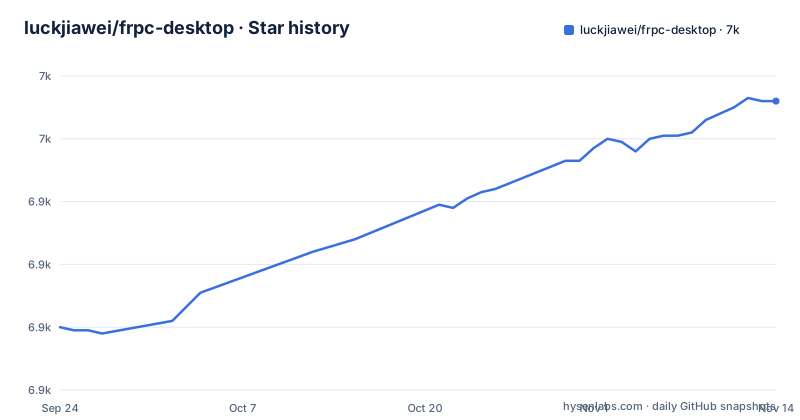
Star history
- luckjiawei/frpc-desktop6,972 ★ · +72
| Repository | 2026-09-24 | 2026-11-14 |
|---|---|---|
| luckjiawei/frpc-desktop | 6.9k | 7k |
72 Stars in the last 51 days, measured from the daily GitHub snapshot. Compare with other projects
Editorial analysis
The app manages frpc binaries for you, including the download path
Frpc-Desktop is a client for an existing frp setup: you point it at a server and it runs frpc locally with the proxies you define in the GUI. It claims support for all frp versions, and rather than shipping one frpc binary it downloads the version you choose. That download path has been reworked several times. v1.0.9 added downloads through mirror sites, v1.1.5 addressed GitHub rate limit issues, and v1.2.6 added download proxy selection. The app also supports deleting downloaded frp versions, added in v1.0.3. In practice this means a machine behind a restrictive network can pick a mirror or a proxy to fetch frpc, and that you can keep more than one frp version on disk and switch between them to match the server you connect to.
Proxy types and server options exposed in the GUI
The configuration screens cover TCP and UDP proxies with batch port ranges, STCP added in v1.0.8, and XTCP added in v1.1.3. HTTP proxies gained basic auth and subdomains in v1.1.2 and HTTP Locations in v1.2.2, and v1.2.3 added proxy protocol support. On the server side it supports multiple users through user and meta_token, adapted for the frp multi-user plugin in v1.0.4, and v1.1.5 made the web port configurable. Each proxy has its own on and off switch since v1.1.0, so you can disable one tunnel without deleting it. A quick local port selector, fast proxy search with card or list pagination, and a quick sharing feature for frps settings round out the day-to-day controls.
Importing an existing frpc.toml and moving configurations between machines
If you already run frpc from a hand-written file, Frpc-Desktop can import and recognize frpc.toml, so you do not have to recreate every proxy by hand. It also supports exporting and importing all configurations, which arrived with v1.0.9, and a one-click option that clears every configuration at once. The clear-all action deserves care: it is a single click, so export a copy first if the setup took real effort to build. A portable version is also available, which helps when you want to carry the same client and settings on removable storage rather than install it on each machine.
Releases are still 1.x while main has moved to a 2.0.0 Tauri rebuild
The newest tagged releases are v1.2.5 on 26 March 2026, v1.2.6 on 21 May 2026 and v1.2.7 on 7 September 2026. The package.json on main, however, is at version 2.0.0 and describes the app as built on Tauri 2 and Vue 3, with dependencies such as @tauri-apps/api ^2.12.0, element-plus 2.13.6 and vue 3.5.31. Version 2.0 replaces the 1.x Electron app in place. Server settings, proxies, desktop settings and downloaded frpc versions are kept automatically, and data still stored in the older NeDB format, which covers 1.2.6 and earlier, is imported on first launch with the original files kept as *.bak. The consequence for users is twofold: what you download from the releases page and what you build from main are different applications, and after the 2.0 upgrade the *.bak files are your rollback copy, so do not delete them until the imported data checks out. The repository is not archived and was last pushed on 14 October 2026.
Building from source needs both Node and a Rust toolchain
Because the current code is a Tauri app, a source build requires Node.js 22.12 or newer, npm, and a stable Rust toolchain set up according to the Tauri prerequisites. The package.json enforces the Node floor through an engines field of >= 22.12.0. The development commands are:
npm ci
npm run tauri:dev    # run the desktop app in development mode
npm run tauri:build  # build installers for the current platform
Both Tauri scripts go through node scripts/run-tauri.mjs. The build target is the current platform only, so producing a Windows installer and a macOS app means running the build on each operating system. Teams without Rust in their toolchain will find the 2.0 source build heavier than the old Electron one.
macOS may refuse to open the app as damaged
A known problem on macOS is a warning that the app is damaged. The fix given by the project is to strip extended attributes from the bundle:
sudo xattr -cr Frpc-Desktop.appThis needs administrator rights, and it has to be done by the user rather than by the installer. In a managed Mac fleet where users cannot run sudo, someone with admin access will need to run it, or the app will not launch. It is the only platform-specific failure called out in the project's common issues.
Desktop only: no Docker, Android or browser interface in this repository
Frpc-Desktop is a desktop GUI. A Linux client was added in v1.0.2 in January 2024, alongside Windows and macOS builds, but nothing in this repository targets Android, and it is not a container image for running frpc on a headless server. For a browser-based frpc manager, the README points to Podux, another project by the same author. Anyone searching for an Android build or a Docker deployment of Frpc-Desktop is looking for something this project does not offer, and should plan to run plain frpc or a separate tool on those targets.
Support runs through Telegram and a full WeChat group
Community discussion happens in a Telegram group and a WeChat group. The WeChat group has passed 200 members, so it can no longer be joined by scanning a QR code; new members have to follow the official account to get in. Documentation lives at jwinks.com/p/frp/, and there are English and Chinese README files. The project marks more than 10,000 downloads and accepts donations through jwinks.com/donate/.
Editorial conclusion
Frpc-Desktop suits people who already have an frps server and want to manage frpc proxies, versions and auto-start from a desktop window instead of editing frpc.toml by hand. It does not suit headless servers, Docker hosts or Android devices, and people who want a browser interface are pointed to Podux by the same author. Before adopting it, check whether the release you download is still the 1.x Electron line or the 2.0 Tauri build, keep the *.bak files the 2.0 upgrade leaves behind, and on macOS be ready to clear extended attributes before the app will open.
Frequently asked questions
How do I fix the Frpc-Desktop app is damaged message on macOS?
Run sudo xattr -cr Frpc-Desktop.app to clear the extended attributes on the app bundle, then open it again.
Will upgrading Frpc-Desktop from 1.x to 2.0 keep my proxies?
Yes. Version 2.0 upgrades the 1.x Electron app in place and keeps server settings, proxies, desktop settings and downloaded frpc versions; older NeDB data is imported on first launch and the originals are kept as *.bak.
Is there a web version of Frpc-Desktop?
Frpc-Desktop itself is a desktop app. For a browser-based frpc manager, the same author maintains a separate project called Podux.
Official sources
Add this badge to your README
If you maintain this project, the badge below links readers to this analysis and shows its maintenance status from the daily GitHub snapshot. Paste the markdown into your README; add ?metric=license or ?metric=stars to the image URL for a different field.

[](https://hysenlabs.com/projects/luckjiawei-frpc-desktop)Star history chart for your README
[](https://hysenlabs.com/projects/luckjiawei-frpc-desktop)Was this useful?