lightGallery: a lightbox where you opt in to one plugin at a time
A customizable, modular, responsive, lightbox gallery plugin.
At a glance
- What is it?
- lightGallery is a TypeScript lightbox with no runtime dependencies, where thumbnails, zoom, video and the rest are separate files you attach deliberately. The cost of that design shows up in three places: load order in the page, a licenceKey in commercial use, and a monorepo of framework packages if you fork it.
- Who is it for?
- Pick lightGallery when you want a lightbox you can assemble one plugin at a time, you are willing to pass a licenseKey in the settings for commercial work, and you can live with the script order the page demands. Skip it when your application cannot carry GPLv3 obligations, when the commercial licence is not on the table, or when you need a plugin that is not among the 15.
- Can I use it commercially?
- Yes, with conditions. GPL-3.0 is a copyleft licence: if you distribute software that includes it, you must release that software's source code under the same licence. Running it internally without distributing it does not trigger that obligation.
- Is it still maintained?
- Yes. The repository last received commits 10 days ago.
- What is it written in?
- Mainly TypeScript, according to GitHub's language statistics.
Answers come from the project's GitHub data, last synced on November 14, 2026, and from our analysis. They are not legal advice.
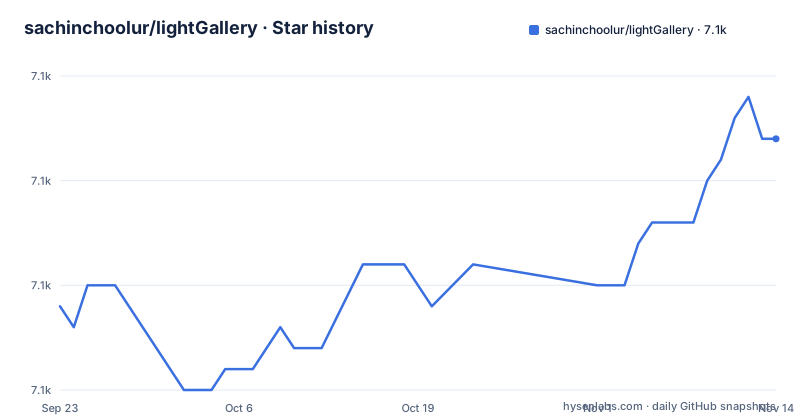
Star history
- sachinchoolur/lightGallery7,062 ★ · +8
| Repository | 2026-09-23 | 2026-11-14 |
|---|---|---|
| sachinchoolur/lightGallery | 7.1k | 7.1k |
8 Stars in the last 52 days, measured from the daily GitHub snapshot. Compare with other projects
Editorial analysis
The plugins array decides which files you ship
The core is small and the rest is opt-in. `dist/lightgallery.umd.js` is the gallery, and each capability is a separate file loaded after it: `js/plugins/lg-thumbnail.umd.js`, `js/plugins/lg-zoom.umd.js`, and so on. Styles follow the same split. You link `css/lightgallery.css` and add `css/lg-zoom.css` or `css/lg-thumbnail.css` for the plugins you actually enabled, or you link `css/lightgallery-bundle.css`, which carries lightGallery and all plugin styles in one stylesheet instead of separate ones. If you want the source rather than compiled CSS, the stylesheets also sit as SCSS in an `scss` folder.
The README now counts 15 plugins, and you can write your own.
The same choice exists at the module level, where the paths are directories rather than globals:
import lightGallery from 'lightgallery';
import lgThumbnail from 'lightgallery/plugins/thumbnail'
import lgZoom from 'lightgallery/plugins/zoom'
Four entry fields in package.json pick the file your bundler sees
The published shape is unusually explicit. `main` is `dist/lightgallery.umd.js`, `min` is `dist/lightgallery.min.js`, `module` is `dist/lightgallery.es5.js`, and `typings` is `dist/types/index.d.ts`. Four fields, four different builds, and the choice is made by whoever consumes the package rather than by the author.
package.json also defines an `exports` map with separate entries per plugin, such as `./plugins/thumbnail` and `./plugins/video`.
npm install, one stylesheet, one init call
Two package managers are given a one-line install, and releases can also be downloaded from GitHub:
npm install lightgallery
yarn add lightgallery
The fourth route matters for the page rather than the build: `jsdelivr`, `cdnjs` and `unpkg` all host the package, so a static page can skip npm entirely. Downloading a release directly from GitHub works too.
With the package in place, the page needs a stylesheet in the head:
<link type="text/css" rel="stylesheet" href="css/lightgallery.css" />
<link type="text/css" rel="stylesheet" href="css/lg-zoom.css" />
<link type="text/css" rel="stylesheet" href="css/lg-thumbnail.css" />
and the library plus its plugins at the end of the body, core first:
<script src="js/lightgallery.umd.js"></script>
<script src="js/plugins/lg-thumbnail.umd.js"></script>
<script src="js/plugins/lg-zoom.umd.js"></script>
The markup itself is deliberately unconstrained. Any element can hold the gallery, and an anchor carrying the image dimensions is enough to drive the opening zoom animation:
<div id="lightgallery">
    <a href="img/img1.jpg" data-lg-size="1600-2400">
    </a>
</div>
One call finishes it, passing the container, the plugins and the settings:
lightGallery(document.getElementById('lightgallery'), {
    plugins: [lgZoom, lgThumbnail],
    speed: 500,
    licenseKey: 'your_license_key'
});
Clicking an anchor then opens the lightbox with zoom and the thumbnail strip, and `speed: 500` sets how long the transition takes.
lightgallery is not defined comes down to load order
The most common failure is a global that does not exist yet, and it has two separate causes.
The first is ordering. `lightgallery.umd.js` has to be in the document before any plugin file, and the plugin files have to be in the document before the init call runs. Move the scripts into the head, or run the init before the DOM exists, and the global is simply undefined even though every file loaded without a network error.
The second cause is naming, and it only bites the script-tag route. Under modules you import `lgThumbnail` from `lightgallery/plugins/thumbnail`, so the binding and the file agree by construction. Under script tags the file is `lg-thumbnail.umd.js` while the identifier you must pass in the settings is `lgThumbnail`, and the same transformation applies to the other plugin names. A page that loads the file but passes the filename instead of the identifier gets a gallery that opens and a plugin that never activates.
Neither failure is loud. A reader who assumed the plugin was enabled will usually conclude the gallery is at fault. Checking the settings array against the documented plugin names is the fastest way to settle it.
GPLv3 in package.json, two licence paths in the README
The repository metadata reports the licence as GPL-3.0, and the repository also carries LICENSE-COMMERCIAL.md. The README then splits the question in two.
For commercial sites, themes, projects and applications, a commercial licence is the appropriate one, and under that option your source code stays proprietary. For an open source application whose own licence is compatible with the GNU GPL v3, the project is usable under GPLv3 terms. There is no permissive branch in that description.
The wiring matters as much as the choice: `licenseKey` sits in the same settings object as `speed` and `plugins`, and the key arrives by email once a licence is purchased. That single field is the difference between the two paths, so a project that copies the init snippet from a demo and never replaces `your_license_key` is running the commercial branch's code path without a commercial licence behind it.
The dependency-free claim deserves the same reading. It describes runtime JavaScript dependencies, of which there are none, and says nothing about the licence you inherit by linking the code.
Building dist means running twelve chained npm scripts
package.json declares pnpm 9.15.0 as the package manager, and the root carries `pnpm-workspace.yaml` and `turbo.json`.
The rest of the tree tells you what a contributor is signing up for: a `plugins-config-rollup.json` and a `selection.json` that drive the bundle contents, `tools/`, `test/`, `tsconfig.json`, and two linters configured side by side in `tslint.json` and `.eslintrc.js` with `.prettierrc.js` on top.
The README lists SVG icons and 20+ smooth CSS3 transitions.
Four framework wrappers sit beside the core, not inside it
React, Vue, Angular and TypeScript are all offered, and the tree shows how: `lightgallery-react/`, `lightgallery-vue/`, `lightgallery-angular/` and `lightgallery-lit/` are four sibling directories next to `src/`, with `packages/` holding the pieces they are built from. The README links separate documentation pages for React, Vue and Angular.
So the core package stays framework-agnostic and you pick exactly one wrapper. That is a real advantage when a codebase has mixed frontends, because there is one gallery implementation and several thin bindings. It also means the wrappers are versioned against the core, and the release you install has to match the wrapper you install.
What the core handles on its own is worth listing, because the feature bullets read as one undifferentiated list. Multiple instances on one page, dynamic mode for galleries assembled after load, inline galleries, deep linking through the browser history API, HTML iframe sources alongside images, YouTube, Vimeo, Wistia and HTML5 video, responsive images, pinch and zoom, drag up or down to dismiss, full screen, keyboard navigation, SVG icons and an accessibility pass.
Editorial conclusion
Pick lightGallery when you want a lightbox you can assemble one plugin at a time, you are willing to pass a licenseKey in the settings for commercial work, and you can live with the script order the page demands. Skip it when your application cannot carry GPLv3 obligations, when the commercial licence is not on the table, or when you need a plugin that is not among the 15. Before you commit, check the version you install against the 3.0.0 tag, then open one of the CodePen demos and copy its plugin list rather than guessing.
Frequently asked questions
How do I use lightGallery?
Install it with `npm install lightgallery`, link lightgallery.css in the head and lightgallery.umd.js at the end of the body, then call lightGallery on your container element. Plugins have to be passed through the settings, for example plugins: [lgZoom, lgThumbnail], and each needs its own stylesheet unless you use lightgallery-bundle.css.
Is lightGallery free?
Two paths are offered. A commercial licence covers commercial sites, themes, projects and applications and keeps your source code proprietary. For an open source application under a licence compatible with the GNU GPL v3, the project is usable under GPLv3 terms, and the repository metadata records the licence as GPL-3.0.
lightgallery is not defined, what went wrong?
Usually load order. lightgallery.umd.js has to come before every plugin script, and the plugin scripts have to come before the init call. Under script tags the file name and the settings identifier differ: lg-thumbnail.umd.js has to be passed as lgThumbnail, and the same holds for the other documented plugin names.
lightGallery vs PhotoSwipe
On lightGallery's own terms: no runtime dependencies, plugins attached one at a time through the settings array, and either a commercial licence or GPLv3 rather than a permissive default.
Official sources
Add this badge to your README
If you maintain this project, the badge below links readers to this analysis and shows its maintenance status from the daily GitHub snapshot. Paste the markdown into your README; add ?metric=license or ?metric=stars to the image URL for a different field.

[](https://hysenlabs.com/projects/sachinchoolur-lightgallery)Star history chart for your README
[](https://hysenlabs.com/projects/sachinchoolur-lightgallery)Was this useful?