The Python for Data Analytics course repository is a notebook track, not a library
My 'Python for Data Analytics' course on YouTube
At a glance
- What is it?
- The Python_Data_Analytics_Course repository holds the Jupyter notebooks behind a free YouTube course, organised as three chapters and a set of practice problems. It is worth reading as a learning path with a deliberate order rather than as a Python package, and it comes with one caveat that matters for reuse: the licence field is unknown.
- Who is it for?
- This repository suits a developer who wants the exact notebooks behind a structured Python for data analytics course, and who is willing to work in the Google Colab environment the first chapter is written for. It does not suit a team looking for a maintained library, an installable package or reusable production code, because the repository contains notebooks and the licence field is unknown, which leaves you without clear permission to reuse the notebooks in a product.
- Can I use it commercially?
- Not without permission. GitHub finds no licence file in the repository, and without a licence all rights are reserved by default: you may read the code but not reuse it. Check the README, or ask the authors, before using it.
- Is it still maintained?
- Yes. The repository last received commits 33 days ago.
- What is it written in?
- Mainly Jupyter Notebook, according to GitHub's language statistics.
Answers come from the project's GitHub data, last synced on November 7, 2026, and from our analysis. They are not legal advice.
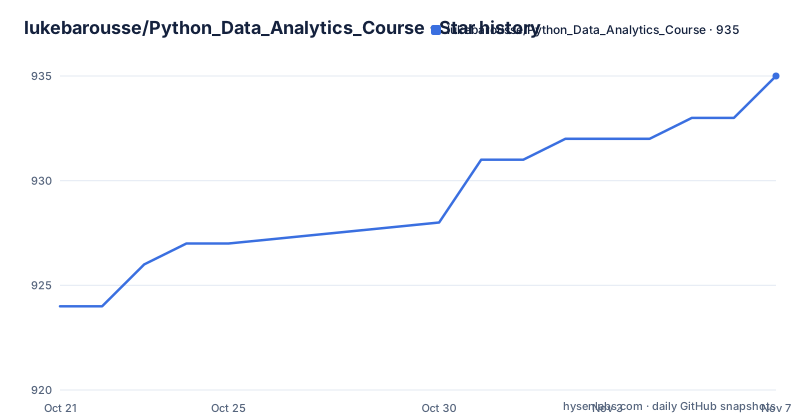
Star history
- lukebarousse/Python_Data_Analytics_Course935 ★ · +11
| Repository | 2026-10-21 | 2026-11-07 |
|---|---|---|
| lukebarousse/Python_Data_Analytics_Course | 924 | 935 |
11 Stars in the last 17 days, measured from the daily GitHub snapshot. Compare with other projects
Editorial analysis
Four directories that map onto a course structure
The repository top level is unusually short: a .gitignore, a README, and four numbered directories. They are 1_Basics/, 2_Advanced/, 3_Project/ and 4_Problems/. That naming is the whole organisation of the project, and it tells you what kind of artefact you are looking at before you open a single notebook. The primary language recorded for the repository is Jupyter Notebook, and there is no package metadata, no build script and no test suite in the tree. The README describes the repository as containing all the notebooks needed to follow along a free course called Python for Data Analytics, hosted at lukebarousse.com/python and paired with a YouTube video. So this is course content published as a codebase, not a library that other software depends on.
Chapter 1 mixes Python basics with the data stack
The first chapter, linked from the table of contents as Chapter 1: Python Basics, opens with a note that it is meant for Google Colab. That single line tells you the intended runtime. Inside the chapter the order runs from an introduction to Python through variables, data types, operators, functions and classes, then into the Python standard libraries with datetime, random and ast, and finally into libraries for data science with Numpy, Matplotlib and Pandas. Putting ast in a beginner chapter is an unusual choice, and putting the three data libraries at the end of the fundamentals rather than in a separate track is a decision that shapes the first hours of the course. The chapter is deliberately wide, and it ends with the reader holding the full vocabulary the later chapters assume.
Chapter 2 is where Pandas and Matplotlib stop being introductions
Chapter 2, Advanced Python, drops the Colab framing and splits into two blocks. Advanced Pandas covers data cleaning, data manipulation and data visualization. Advanced Matplotlib covers statistical plots, customizing plots and subplots. That split is worth noticing because it draws a line the earlier chapter did not. In the first chapter Numpy, Matplotlib and Pandas appear as things you install and call; in the second they are treated as subjects you get better at. The subplots topic in particular is the kind of item that only matters once you are building multi-panel figures rather than a single chart, which suggests the chapter assumes you have already produced plots that were merely acceptable.
Chapter 3 is a single project about data science skills
The third chapter is titled Project Build and contains one investigation: Top Skills in Data Science. Underneath that headline are four steps, data cleaning, data analysis, data visualization and data interpretation. It is the only part of the repository that describes an end to end task rather than a topic, and the last stage is the one that distinguishes it from a tutorial. Interpreting the result is listed as its own step alongside cleaning, analysis and visualization, which means the project expects you to say something about what the numbers mean, not just produce a plot. For a reader evaluating the course, this is the chapter that reveals the level the course aims at, and it is the part most likely to be skipped by people who already know Pandas.
The practice notebooks are the paid part
The fourth directory is titled Course Problem Notebooks, and the README describes it as the notebooks to solve practice problems. Immediately under that line, the description links to Purchase the problems here, pointing at the same lukebarousse.com/python page as the free course. So the repository is split in a specific way. Chapters one to three, the teaching notebooks, are openly available here. The extra problem notebooks are distributed through a purchase. That is a straightforward arrangement for a course business, and it also means that the repository is not a complete picture of the course content, so judging the full scope from what is committed here will understate it. It also means the 4_Problems/ directory in a checkout is not the same set of notebooks a buyer receives.
Contributions run through a plain fork and pull request
The README has one section on contributing, and it is four lines long. If you find an error in the codebase, you are invited to make a pull request by forking the repository, making any changes and submitting the pull request. The wording treats the notebooks as a codebase, which is consistent with the fact that the course is described as being on YouTube with a named course leader, course producer and video editor. The repository also ships a .gitignore, so at least generated notebook artefacts are handled. Beyond that, the documentation says nothing about how notebooks are versioned against the video timeline, whether there is a review process, or how the four directories map onto the course chapters in the published videos, so a reader who wants to align a notebook with a specific lesson has to work that out from the file names.
The unknown licence is the real obstacle to reuse
This is the part to check before you plan around the notebooks. The licence field on the repository is unknown, and the README contains no licence section at all. For a repository of notebooks that people are explicitly invited to fork and pull request against, that gap is worth raising rather than glossing over, because the permission to contribute is not the same as the permission to reuse, and it is certainly not the same as the permission to redistribute a derived work in a paid course or a product. The maintenance picture is healthier. The last push was on 2026-10-05 and the repository is not archived, so the notebooks are being updated, and you can inspect the commit history and pin a commit when you need a reproducible snapshot.
Editorial conclusion
This repository suits a developer who wants the exact notebooks behind a structured Python for data analytics course, and who is willing to work in the Google Colab environment the first chapter is written for. It does not suit a team looking for a maintained library, an installable package or reusable production code, because the repository contains notebooks and the licence field is unknown, which leaves you without clear permission to reuse the notebooks in a product. Before you build on it, read the licence situation in the repository itself, decide whether the course order suits you, and remember that the practice notebooks in 4_Problems/ are linked to a purchase page rather than distributed openly.
Frequently asked questions
What is in the Python_Data_Analytics_Course repository?
It contains the Jupyter notebooks for a free Python for Data Analytics course, split into 1_Basics/, 2_Advanced/, 3_Project/ and 4_Problems/, with a README pointing at the course page at lukebarousse.com/python.
Do I need Google Colab to follow the course?
The first chapter is explicitly meant for Google Colab, as the README notes in the Chapter 1: Python Basics section. Later chapters do not repeat that instruction.
What does the project chapter cover?
Chapter 3, Project Build, contains one investigation into top skills in data science, broken into data cleaning, data analysis, data visualization and data interpretation.
Are the practice problem notebooks free?
The practice problems in 4_Problems/ are linked to a purchase page on lukebarousse.com/python. The teaching chapters are openly available in the repository.
Can I use these notebooks in my own project?
The licence field on the repository is unknown and the README has no licence section, so the terms for reuse are not stated. Check the repository itself before copying notebook content into another project.
Official sources
Add this badge to your README
If you maintain this project, the badge below links readers to this analysis and shows its maintenance status from the daily GitHub snapshot. Paste the markdown into your README; add ?metric=license or ?metric=stars to the image URL for a different field.

[](https://hysenlabs.com/projects/lukebarousse-python-data-analytics-course)Star history chart for your README
[](https://hysenlabs.com/projects/lukebarousse-python-data-analytics-course)Was this useful?