LXGW WenKai Screen relabels the Medium weight as Regular, and its own README warns about macOS blur
LXGW WenKai for Screen Reading.
At a glance
- What is it?
- This is a ttf-only variant of LXGW WenKai tuned for PC and Android screens, with Roboto's metrics. The README's cautions come first: it can blur on macOS, it may be withdrawn, and the Xiaomi theme store copy is not the author's.
- Who is it for?
- Pick LXGW WenKai Screen if you read Chinese on a PC or an Android phone and find the Regular weight of the original LXGW WenKai too thin. Skip it on macOS, where the README itself recommends the original or the GB version at Regular weight, and do not build a product that depends on it staying available.
- Can I use it commercially?
- Check first. The repository uses a licence we do not classify automatically, so read its LICENSE file before any commercial use.
- Is it still maintained?
- Yes. The repository last received commits 39 days ago.
- What is it written in?
- GitHub does not report a main language for this repository.
Answers come from the project's GitHub data, last synced on November 25, 2026, and from our analysis. They are not legal advice.
Star history
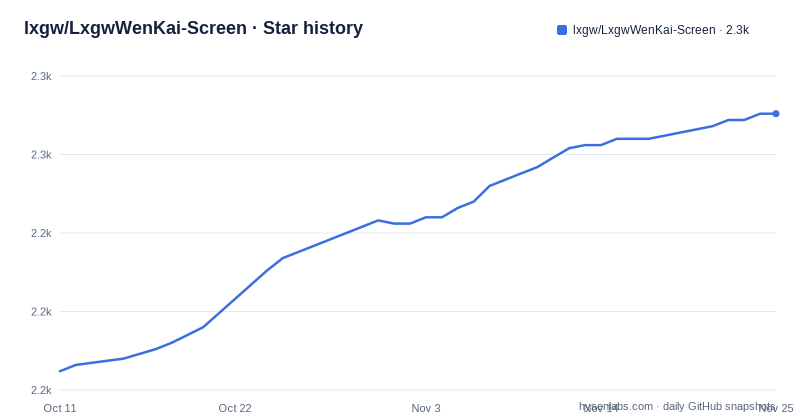
- lxgw/LxgwWenKai-Screen2,263 ★ · +82
| Repository | 2026-10-11 | 2026-11-25 |
|---|---|---|
| lxgw/LxgwWenKai-Screen | 2.2k | 2.3k |
82 Stars in the last 45 days, measured from the daily GitHub snapshot. Compare with other projects
Editorial analysis
The warnings come before the description, and the first one is macOS blur
The README opens with a caution block, ahead of any font description. The first warning says the font may turn into a smear on macOS. Mac users are told to use the original LXGW WenKai, or the GB version, at Regular weight instead.
That advice comes from the author, so it settles the platform question before any other. This variant is meant for PC and Android screens, and the README does not claim it works well elsewhere. It also gives no explanation of why macOS rendering suffers, so the blur is a reported outcome and nothing more. If you read mostly on a Mac, installing the original at Regular is the path the author names.
It is the Medium weight of LXGW WenKai with its weight attribute set to Regular
The README explains that the original LXGW WenKai Regular looks thin on PC and Android screens. To fix that, it takes the original's Medium weight and changes its weight attribute to Regular. The text shows Bold struck through and Medium written beside it, so the correction is visible in the source. It also adjusts the metrics to match Roboto, the default Android font.
The pairing example in the README uses Segoe UI, the font GitHub pages call. The README says that bold LXGW WenKai matches Segoe UI Regular in stroke weight, which makes the combination comfortable to read on PC and Android phone screens. The comparison is the author's, so treat the result as a visual judgment to check on your own display.
Three tools rebuilt the font, and two fallback fonts sit underneath it
The README lists the tools used. otRebuilder scaled the font's UPM. The Warcraft Font Merger, a merging and gap-filling tool, merged in the base fonts. ttfname3 merged the font information.
The licensing section names the base fonts under it. Roboto v2.138 is the base font and carries the Apache License 2.0. Inconsolata is the monospaced base font and carries SIL OFL 1.1. The original LXGW WenKai family is SIL OFL 1.1. The README says that, given licence compatibility and the way the licences propagate, the project font is released under SIL OFL 1.1. The repository itself holds only OFL.txt and Readme.md, so there is no source tree to build from, only the font as released.
The font may be withdrawn, and the Xiaomi theme copy is third party
Two more cautions concern availability. The author says that, given how well or badly Android vendor systems patch third-party font vulnerabilities now and later, the font may be cancelled at any time, and users should not depend on it too heavily.
The third caution is about Xiaomi. The font listed in the Xiaomi theme store as the screen-reading edition of LXGW WenKai is a third-party port. The author did not upload it, does not endorse it and cannot control its updates, and asks readers not to press the author to update it. The author also says they cannot list LXGW WenKai or other open-source fonts officially in phone-maker theme stores, through ordinary or unusual channels, because of store qualification limits and the limits of open-font licences. The practical consequence: a Xiaomi user who installs from the store gets a copy whose version and fixes are out of the author's hands.
You download a ttf from Releases, and updates follow the parent font
The font is distributed in ttf format from the Releases page. There is no package manager route, no webfont file and no install command in the README. The listed releases are v1.521 on 2025-10-10, v1.522 on 2026-03-18 and v1.530 on 2026-10-18.
The README sets an expectation about update frequency: if the parent LXGW WenKai gets a major update worth following, this font follows it, and otherwise it updates at the author's leisure. The last push was on 2026-10-18, the same day as v1.530, and the repository is not archived. That cadence is a stated policy, so a gap of many months between releases fits the README and should not be read as abandonment, but it also means you cannot count on a fix on a schedule.
Free for personal and commercial use, but the font file cannot be sold on its own
The permissions are generous. Individuals and companies may use the font freely, including commercially, without paying or telling the author, though the author says they would be grateful for a note. It can be shared, installed in a system, embedded in software or apps, bundled with any software and sold together with it. It can be modified to make derivative fonts, and those must follow SIL Open Font License 1.1 as well.
The restrictions come from OFL 1.1. Under clause 1, selling the font files themselves (OTF or TTF) on their own is forbidden. Under clause 5, the font cannot be distributed under any licence other than OFL 1.1, and it cannot be mixed into one font file with fonts under conflicting licences such as GNU GPL or IPA. These are the limits that matter if you plan to bundle the font in a product.
Reserved names block derived fonts, with an exception for webfont subsetting
Clause 3 of OFL 1.1 limits naming. The reserved names are 霞鹜 (霞鶩), 落霞孤鹜 (落霞孤鶩) and LXGW. A derived font may not use these in its name without written authorization from the author, @lxgw. Clause 4 adds that derived fonts may not be promoted or endorsed in the author's name without the same written permission.
Two exceptions are described. A font recompiled without any change to the source may keep the reserved names. So may a font that was only subset or converted for web rendering, such as to WOFF or WOFF2, as long as it is not offered to the public as an installable desktop file. The README gives Google Fonts and ZSFT as examples of hosting platforms covered by that exception, and says other platforms should ask the author first.
Editorial conclusion
Pick LXGW WenKai Screen if you read Chinese on a PC or an Android phone and find the Regular weight of the original LXGW WenKai too thin. Skip it on macOS, where the README itself recommends the original or the GB version at Regular weight, and do not build a product that depends on it staying available. Before redistributing or deriving anything, read the reserved-name rule: the words 霞鹜, 落霞孤鹜 and LXGW cannot appear in a derived font's name without written permission.
Frequently asked questions
Does LXGW WenKai Screen work well on macOS?
The README warns it may look blurred on macOS and recommends macOS users use the original LXGW WenKai or LXGW WenKai GB at Regular weight instead.
Can I use LXGW WenKai Screen in a commercial product?
Yes. The README says individuals and companies can use it freely, including commercially, without payment. The font files themselves cannot be sold on their own under OFL 1.1.
Where do I download LXGW WenKai Screen?
Download the ttf file from the Releases page of the lxgw/LxgwWenKai-Screen repository. The README gives no package manager or webfont route.
Is the Xiaomi theme store version official?
No. The README says the version on the Xiaomi theme store is a third-party port that the author did not upload and does not endorse.
Official sources
Add this badge to your README
If you maintain this project, the badge below links readers to this analysis and shows its maintenance status from the daily GitHub snapshot. Paste the markdown into your README; add ?metric=license or ?metric=stars to the image URL for a different field.

[](https://hysenlabs.com/projects/lxgw-lxgwwenkai-screen)Star history chart for your README
[](https://hysenlabs.com/projects/lxgw-lxgwwenkai-screen)Was this useful?