LRC Maker: browser-based timed lyric editing with keyboard control
歌词滚动姬|可能是你所能见到的最好用的歌词制作工具
At a glance
- What is it?
- LRC Maker is a browser-based editor for adding time tags to lyrics while audio playback supplies the timing reference. Its main appeal is direct keyboard control and deployment as a static site, although the documentation says little about exporting or storing projects.
- Who is it for?
- LRC Maker fits users who want a cross-platform browser editor with precise, keyboard-driven timestamp entry. It does not fit workflows that require documented collaboration, project storage, or a described export process.
- Can I use it commercially?
- Yes. MIT is a permissive licence: you can use, modify and sell software built on it, as long as you keep its copyright and licence notices.
- Is it still maintained?
- Yes. The repository last received commits 1 day ago.
- What is it written in?
- Mainly TypeScript, according to GitHub's language statistics.
Answers come from the project's GitHub data, last synced on November 6, 2026, and from our analysis. They are not legal advice.
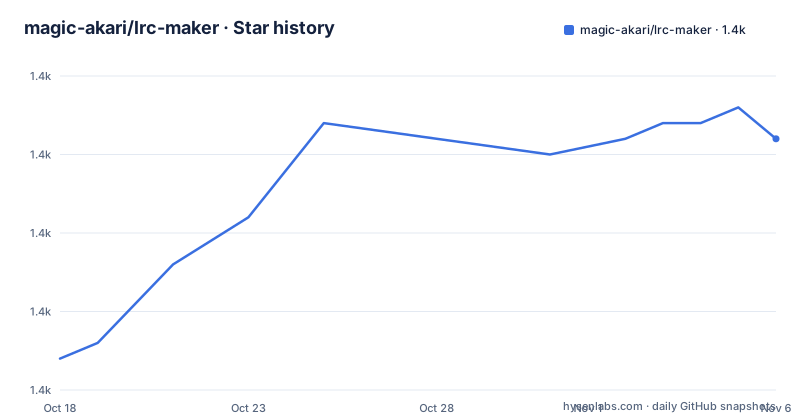
Star history
- magic-akari/lrc-maker1,411 ★ · +14
| Repository | 2026-10-18 | 2026-11-06 |
|---|---|---|
| magic-akari/lrc-maker | 1.4k | 1.4k |
14 Stars in the last 19 days, measured from the daily GitHub snapshot. Compare with other projects
Editorial analysis
Why LRC Maker targets timed lyric editing
LRC Maker solves a narrow but recurring task: placing time tags on lyric text so that each line scrolls at the intended moment. The repository describes the result as scrolling LRC files, which are text files containing timed tags. Its intended users are people preparing synchronized lyrics for music playback, particularly those who work through a browser rather than a platform-specific desktop editor.
The project does not present itself as a general digital audio workstation. Audio is the timing reference for lyric annotation, while the central editing operation is inserting, removing, selecting, and adjusting time tags. The README gives a concrete workflow: open the hosted application, drag a file onto the page, use the arrow and space keys, and inspect the result through the editor. That narrow focus makes LRC Maker easier to understand than a full media suite, but it also means the repository does not document features such as project databases, team review, or version history.
The cross-platform premise is explicit. The author created the tool because existing options were not available across platforms. That claim does not prove that every alternative is closed or inferior, and the README provides no comparison test. It does establish the design target: a browser application that avoids requiring a particular desktop operating system. The published site can also be bookmarked, which suits repeat use without installation.
The browser editing path for LRC files
The README documents a direct editing path that starts with the hosted application at `https://lrc-maker.github.io`. Open that page, drag an LRC file into it, and the editor loads the file for timed lyric work. The keyboard then handles the repetitive actions: space inserts a timestamp, deletion keys remove one, vertical movement selects lyric lines, and plus or minus adjusts the selected tag.
Playback is bound to the same keyboard scheme. `Ctrl` with `Enter`, or `Command` with Return on the documented Mac-style mapping, plays or pauses audio. Left and right move backward or forward by five seconds. Playback speed can be increased or decreased with the corresponding modifier and arrow combination, while `R` resets it. This arrangement keeps lyric selection, timing, and audio review in one interface without requiring a pointer for every action.
The repository layout and dependency list add detail that the README does not spell out. The package is written primarily in TypeScript, uses React and `react-dom`, and depends on `@lrc-maker/lrc-parser`, `wavesurfer.js`, and `@wavesurfer/react`. Based on those dependencies, lyric parsing and waveform-based audio presentation are separate parts of the client application rather than features of a native binary. The project is built with Vite and produces static files, which explains why the same interface can be hosted through a CDN, static server, or nginx container.
That architecture is convenient for distribution, but it also makes browser capability part of the contract. The documented minimums are Edge 16 or later, Firefox 60 or later, Chrome 61 or later, Safari 11 or later, and iOS Safari 11 or later. Older browsers without ES Module support receive a fallback script, but the README says that fallback is not tested and may cause CSS layout problems.
Running version 6.0.0 on a local development machine
For the hosted tool, installation is unnecessary. Open `https://lrc-maker.github.io`, then drag a lyric file onto the page. A first practical check is to press space while audio is at a recognizable lyric entry, select the next line with a down-arrow key, and repeat. The README does not document a separate save or export command, so this initial check should focus on whether loading and timestamp editing work in the selected browser. It does not explain whether the edited file is saved in place or downloaded through another control.
For local development, the README supplies a clone-and-build sequence. Its commands use `npm`, while `package.json` declares `[email protected]` as the package manager and the repository includes `pnpm-lock.yaml`. The documented npm commands remain valid instructions to reproduce, but package-manager consistency should be checked before relying on an exact lockfile install.
The following commands clone the default branch, install dependencies, and create a production build:
git clone https://github.com/magic-akari/lrc-maker.git

cd lrc-maker

npm i
npm run build
After a successful build, the README identifies `build` as the static website directory. For iterative local work, the documented start command runs Vite:
npm startThe README does not state the development server URL or print terminal output, so it does not support inventing either. The project also offers `npm run fix:fmt`, `npm run check:fmt`, and `npm run check:lint`, but their descriptions are limited to formatting and lint scripts in `package.json`.
Deploying the generated static site with Docker
LRC Maker can run as static content rather than a persistent application server. After `npm run build`, the README says that the `build` folder can be placed on a CDN or static file server. This is useful when an organization already controls its web infrastructure and only needs a browser UI for lyric editing.
The repository includes a multi-stage `Dockerfile`. Its first stage copies the source into a Node image, enables Corepack, installs from the lockfile with strict peer dependency handling, and runs the Vite build. The second stage copies only `/app/build` into `nginx:alpine`. It also runs `apk update` and `apk upgrade` during the image build, so the resulting base packages are selected when that build executes rather than being pinned by the repository.
The README gives these exact commands for building and serving the image:
docker build -t lrc-maker .This creates a local image named `lrc-maker`. After that build succeeds, the documented run command starts the nginx container and maps host port 8080 to container port 80:
docker run -d -p 8080:80 lrc-makerThe application should then be addressed through port 8080 on the Docker host. The documentation does not provide health checks, authentication, persistence settings, or a reverse-proxy configuration. Since the final image contains static files, adding a database volume would not preserve editor state unless the application had a storage mechanism, and the README does not identify one.
Repository maintenance, releases, and license implications
The repository is not archived. Recent repository activity does not by itself define an upgrade policy, however. GitHub has no releases for this project, so `package.json` records version `6.0.0`, but there is no release note set here that explains migration from earlier versions or changes in exported files.
Upgrade cost depends on which part is being maintained. End users visiting the hosted site receive the deployed build without a package installation step. Self-hosters own the static deployment and must rebuild when they choose a newer repository revision. Local developers deal with the JavaScript toolchain, browser compatibility floor, and the mismatch between README commands using `npm` and package metadata naming `[email protected]`. The lockfile and Corepack-based Docker build favor pnpm for reproducible builds, although the README should be treated as the source for its published tutorial.
The package declares the MIT license, and a `LICENSE` file is present at the repository root. The `files` array includes `src` and `build`, which matters when the package is published as a package. MIT licensing permits reuse and modification under its conditions, but operators still need to read the actual license text and preserve required notices. This is a licensing note rather than legal advice.
Where LRC Maker is the wrong choice
The clearest limitation is not an audio feature but missing operational documentation. The README does not explain how edited lyrics are saved, downloaded, or named, nor does it describe undo history beyond the listed timestamp-removal key. That omission matters because timestamp editing is only useful if the user can retain the finished LRC file. The repository dependencies may contain supporting code, but the supplied documentation does not establish the exact save path or file behavior.
LRC Maker is also a poor fit for environments restricted to old browsers. The project states that IE is unsupported and points ancient-browser users to version 3.x. Its fallback for browsers without ES Module support is explicitly untested and may produce CSS layout confusion. A workflow built around controlled desktop software on a supported operating system may therefore have fewer browser-related surprises.
That approach usually keeps timing and lyrics inside a desktop application, while LRC Maker moves the same category of work into browser storage-free static delivery. The documented difference is architectural, not a claim about output quality: LRC Maker emphasizes cross-platform browser access, keyboard timing, and static deployment, while a desktop editor can offer explicit local files and application menus. Neither approach is documented here as providing collaborative review, account management, or automatic lyric transcription.
Editorial conclusion
LRC Maker fits users who want a cross-platform browser editor with precise, keyboard-driven timestamp entry. It does not fit workflows that require documented collaboration, project storage, or a described export process. Before adopting it as an internal tool, first open an existing LRC file, verify that its timing controls match your editing process, and confirm how your deployment must serve the generated static build.
Frequently asked questions
How do I run LRC Maker locally?
The README instructs developers to clone the repository, run `npm i`, and build it with `npm run build`. The package metadata separately declares `[email protected]`, and the Docker build uses pnpm.
Which keyboard shortcut inserts an LRC timestamp in LRC Maker?
Press space to insert a time stamp tag. Delete, Backspace, and the documented `⌫` mapping remove a time tag.
Can LRC Maker run in an old browser?
IE is not supported, and the README directs ancient-browser users to version 3.x. Browsers without ES Module support receive an untested fallback that may cause CSS layout confusion.
Official sources
Add this badge to your README
If you maintain this project, the badge below links readers to this analysis and shows its maintenance status from the daily GitHub snapshot. Paste the markdown into your README; add ?metric=license or ?metric=stars to the image URL for a different field.

[](https://hysenlabs.com/projects/magic-akari-lrc-maker)Star history chart for your README
[](https://hysenlabs.com/projects/magic-akari-lrc-maker)Was this useful?