Manael: A Minimal HTTP Proxy That Converts Images on the Fly
Manael is a simple HTTP proxy for processing images.
At a glance
- What is it?
- Manael is a small Go-based HTTP proxy that converts JPEG and PNG images to WebP when a client requests it. It is a focused tool for developers who want format negotiation without touching their upstream server.
- Who is it for?
- Adopt Manael if you run an upstream image server that you cannot modify and need to serve WebP to modern browsers without changing your storage or application logic. Skip it if you need resizing, cropping, or other transformations, or if you require conversion on HEAD requests.
- Can I use it commercially?
- Yes. MIT is a permissive licence: you can use, modify and sell software built on it, as long as you keep its copyright and licence notices.
- Is it still maintained?
- Yes. The repository received new commits within the last day.
- What is it written in?
- Mainly Go, according to GitHub's language statistics.
Answers come from the project's GitHub data, last synced on October 22, 2026, and from our analysis. They are not legal advice.
Star history
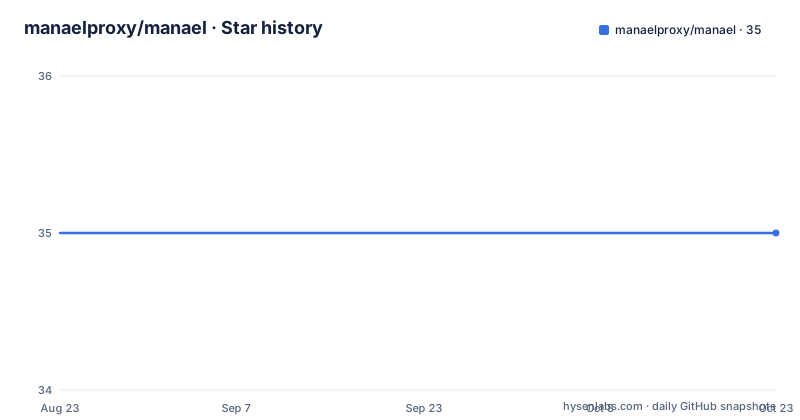
- manaelproxy/manael35 ★ · +0
| Repository | 2026-08-23 | 2026-10-22 |
|---|---|---|
| manaelproxy/manael | 35 | 35 |
0 Stars in the last 60 days, measured from the daily GitHub snapshot. Compare with other projects
Editorial analysis
What Manael Solves and Who It Is For
Manael addresses a narrow but real problem: you have an existing HTTP server that returns images in JPEG or PNG, and you want to serve WebP to clients that accept it. Rather than re-encoding every image at rest or adding a processing layer to your application, you place Manael in front of the upstream server. It inspects the incoming request's Accept header, fetches the image from upstream, and converts the format if needed. This is aimed at developers who control the proxy layer but not necessarily the upstream codebase, or who want a lightweight, standalone solution without embedding an image library into their app. It is not a full image processing suite; it is a single-purpose proxy.
How the Conversion Mechanism Works
The core mechanism is HTTP content negotiation plus server-side transcoding. When a client sends a GET request with an Accept header that includes image/webp, Manael forwards the request to the upstream URL. If the upstream responds with a JPEG or PNG, Manael converts that image to WebP and returns it with Content-Type: image/webp. The README gives a concrete example: curl -sI -X GET -H "Accept: image/webp" http://localhost:8080/image.jpg. The -I flag is used to fetch headers only, but the note warns that HEAD requests are passed through unchanged. So you must use -X GET to force a GET request and see the converted content type. This design means the conversion decision is purely header-driven; there is no URL parameter or query string to request a different format. The proxy does not cache results, based on what is documented; each request triggers a fresh upstream fetch and conversion.
Getting It Running: Commands and Dependencies
The fastest route is to download a prebuilt binary from the releases page. If you build from source, you need Go, Git, and libvips development headers. On Debian or Ubuntu, install libvips-dev with apt-get. On macOS, use brew install vips. The build process is not described beyond that, but the dependency on libvips suggests that cgo is involved. To start the proxy, run: manael -http=:8080 -upstream_url=http://localhost:9000. This binds the proxy to port 8080 and points it at an upstream server on port 9000. You then send requests to the proxy as if it were the origin. The configuration is minimal: two flags. There is no mention of a config file, environment variables, or TLS termination, so expect to handle those externally if needed.
A Genuine Limitation: HEAD Requests and Non-Image Traffic
The most notable limitation is that Manael only converts images for GET requests. HEAD requests, and any other HTTP method, are passed through to the upstream server unchanged. This is a deliberate design choice, but it has practical consequences. Many monitoring tools, CDN health checks, and clients use HEAD to check resource existence. Those requests will receive the original content type, which may be JPEG or PNG, not WebP. If your client relies on HEAD to decide what format to request, it might get inconsistent signals. Also, the proxy does not appear to filter by path or extension; it processes any GET request that returns a JPEG or PNG. That means a GET to a non-image resource would pass through without conversion, but the proxy still has to fetch it, adding a hop. This is a tool for a specific traffic pattern, not a general reverse proxy.
When Manael Is the Wrong Tool
If your needs go beyond format conversion, Manael is not the right fit. It does not resize, crop, rotate, or apply filters. There is no support for generating thumbnails or serving responsive images with different dimensions. For those tasks, you would need a dedicated image processing server like Thumbor or imgproxy. Another case where Manael falls short is when your upstream returns images with unusual formats like GIF or SVG. The README only mentions JPEG and PNG as convertible sources. If a client sends Accept: image/webp and the upstream returns a GIF, it is unclear whether Manael converts it or passes it through; the documentation does not specify. That ambiguity is a reason to test before relying on it for heterogeneous image libraries.
A Real Alternative: imgproxy and Its Different Approach
A common alternative is imgproxy, a Go-based image proxy that also uses libvips. The key difference is that imgproxy is URL-driven, not header-driven. You request a transformed image by constructing a path like /width:400/quality:80/example.jpg, and it returns the processed image in the format you specify via the URL extension or a format parameter. Manael, by contrast, relies on the Accept header and only converts to WebP. That means with Manael you cannot request a specific size or quality; you get a default WebP conversion. imgproxy also supports caching, signing, and many more operations. The trade-off is complexity: imgproxy has a larger configuration surface and a steeper learning curve. Manael's simplicity is its appeal, but it is also its ceiling.
Maintenance, Upgrade Cost, and License
Manael is written in Go and licensed under MIT, which means you can use it in commercial projects without copyleft obligations, though you should read the license text for exact terms. The repository shows regular releases, with v3.2.0 in August 2026, v3.1.1 in April 2026, and v3.1.0 earlier that month. That cadence suggests active maintenance, but the project is small and the feature set is fixed. Upgrading is likely straightforward because the configuration surface is only two flags. The main operational cost is the libvips dependency. You must keep libvips updated on your servers, and because it is a C library, you need to handle system-level upgrades. There is no mention of a Docker image, so you will need to package the binary yourself. The absence of a config file means you cannot change behavior without recompiling or adding an external config layer.
Editorial conclusion
Adopt Manael if you run an upstream image server that you cannot modify and need to serve WebP to modern browsers without changing your storage or application logic. Skip it if you need resizing, cropping, or other transformations, or if you require conversion on HEAD requests. Before deploying, verify that libvips is available in your production environment and that your upstream URLs are correctly configured, since Manael only handles GET requests and passes everything else through unchanged.
Frequently asked questions
What does manoel mean in this project?
Manael is a Go HTTP proxy for processing images, published as a module under the path manael.org with a version suffix on the major. It re-encodes images on the fly when a request carries an Accept header asking for WebP and the upstream returns a JPEG or a PNG.
What is Manuel, and how do I build manael?
The repository is about software, not a person. To build from source you need Go, Git and the libvips development headers, installed on Debian or Ubuntu with the libvips development package and on macOS with the library through Homebrew. Alternatively, a prebuilt binary is published on the latest release page.
What does "manuel" mean in French, according to this repo?
The repository says nothing about the French language or the word. What it does define is the Go module path, which uses a vanity domain with a version suffix, and the two command line flags the binary accepts: an HTTP listen address and an upstream URL pointing at the origin image server.
Official sources
Add this badge to your README
If you maintain this project, the badge below links readers to this analysis and shows its maintenance status from the daily GitHub snapshot. Paste the markdown into your README; add ?metric=license or ?metric=stars to the image URL for a different field.

[](https://hysenlabs.com/projects/manaelproxy-manael)Star history chart for your README
[](https://hysenlabs.com/projects/manaelproxy-manael)