PyTorch Ignite: engines, events and the loop you stop writing by hand
High-level library to help with training and evaluating neural networks in PyTorch flexibly and transparently.
At a glance
- What is it?
- PyTorch Ignite wraps PyTorch training in an engine that you run instead of a loop you write, attaches plain functions to named events, and ships metrics and handlers. It depends only on torch and packaging, supports Python 3.10 through 3.14 and torch 2.2 or newer, and its thirteen example directories carry more of its documentation than the readme does.
- Who is it for?
- PyTorch Ignite fits a team that has outgrown a hand-written epoch loop but does not want a training framework with its own opinions, because the engine takes one step function and the rest is ordinary PyTorch. It does not fit a project that needs a released, stable API surface to pin against, since the version line is still pre-1.0, with v0.5.5 the latest release.
- Can I use it commercially?
- Yes. BSD-3-Clause is a permissive licence: you can use, modify and sell software built on it, as long as you keep its copyright and licence notices.
- Is it still maintained?
- Yes. The repository last received commits 11 days ago.
- What is it written in?
- Mainly Python, according to GitHub's language statistics.
Answers come from the project's GitHub data, last synced on November 14, 2026, and from our analysis. They are not legal advice.
Star history
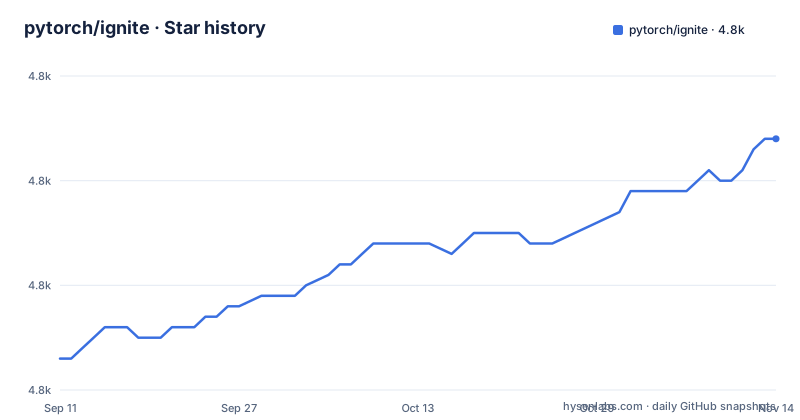
- pytorch/ignite4,804 ★ · +21
| Repository | 2026-09-11 | 2026-11-14 |
|---|---|---|
| pytorch/ignite | 4.8k | 4.8k |
21 Stars in the last 64 days, measured from the daily GitHub snapshot. Compare with other projects
Editorial analysis
Three features, and an explicit refusal to take over
The file states what the library is for in one sentence, training and evaluating neural networks in PyTorch flexibly and transparently, then names three things it provides. An engine and event system that is described as extremely simple. Out-of-the-box metrics for evaluating models. And built-in handlers that compose a training pipeline, save artifacts and log parameters and metrics. The fourth item is a constraint rather than a feature, and it is the one to understand first. Ignite is a library with no control inversion, meaning you use it where and when you need it, and the file pairs that with a claim of less code than pure PyTorch while keeping maximum control. Nothing in the design asks to own your training script, which is the difference between this and a framework that supplies the whole loop.
A handler is any callable, not a class you subclass
The event system's design decision is that handlers are ordinary functions. The file contrasts this with callbacks and says the flexibility is the point: a handler can be a lambda, a simple function or a class method, so you are not required to inherit from an interface and override abstract methods that would bulk up your code. Attaching one is a method call, and you can attach as many as you want to the same event:
trainer.add_event_handler(Events.STARTED, lambda _: print("Start training"))Extra arguments are passed positionally to the handler, so a function defined outside the training scope can receive the data it needs, and a decorator form exists for the common case, where a function is marked with the event it belongs to. Two handlers can be registered on the same event, and both run.
Event frequency is an argument on the event, not a counter
The standard events take filtering arguments, which is how you avoid writing your own step counters. Every takes a period, so validation can run on a schedule:
@trainer.on(Events.EPOCH_COMPLETED(every=5))
def run_validation():
    # run validation
Once takes an absolute position, so a training variable can be changed on the twentieth epoch and never again, which is different from every. A third argument, event_filter, takes a callable such as first_x_iters for cases the built-in arguments do not cover. Events also combine with the bitwise or operator, so a single handler can be attached to completion and to every tenth epoch at once with Events.COMPLETED | Events.EPOCH_COMPLETED(every=10). The result is that scheduling decisions live in the subscription site, next to the code that cares, rather than in one dispatch method at the top of the file.
Custom events are your own enum, fired from your own code
When the standard events are not enough, the file shows how to define your own, and the mechanism is an enum subclass plus an explicit fire call. A class inheriting from EventEnum declares string values, for example BACKWARD_STARTED and OPTIM_STEP_COMPLETED, and the step function fires them at the right places with engine.fire_event. The consequence is that hooks attach to your training internals at the granularity you choose, which is how you would instrument a backward pass or an optimizer step without wrapping the model. The catch is that the firing points are your responsibility.
The engine replaces the epoch and iteration loop
The simplified loop is the headline feature, stated as no more coding for and while loops on epochs and iterations: you instantiate engines and run them. What you supply is one function per iteration, and the file is explicit that this is where you do whatever you need, a forward and backward pass for any number of models or optimizers, for instance. Setup looks like this:
from ignite.engine import Engine, Events, create_supervised_evaluator
from ignite.metrics import Accuracy

trainer = Engine(train_step)

evaluator = create_supervised_evaluator(model, metrics={"accuracy": Accuracy()})
The evaluator factory takes a model and a dictionary of metrics, and running it returns a state object holding the computed values, so validation becomes a call rather than a second loop. The design keeps your model, your optimizer and your loss untouched, which is exactly why the file claims transparency, and also why it claims less code than pure PyTorch rather than more.
Two runtime dependencies and a narrow Python range
The manifest is short, which is unusual for a framework of this size. Dependencies are torch at a version of 2.2 or newer and below 3, plus packaging; nothing else is pulled in at runtime. Python support runs from 3.10 up to but not including 3.15. The license is BSD-3-Clause with the license file shipped in the wheel, and the version is not hardcoded in the build configuration at all, since it is read from ignite/__init__.py at build time. The wheel is restricted to the ignite package with *.typed artifacts included, so type information ships with the install. The description in the manifest calls the library lightweight while the repository description calls it high-level, and both are true of a project whose weight is mostly in the training loop you keep writing yourself.
Nightly builds, container images and a conda recipe
The table of contents shows three distribution channels and one of them is a nightly track. Installation has subsections for nightly releases and for Docker images, with a further section on using pre-built images, and the badges at the top of the file point at a conda channel for the stable package, a separate pytorch-nightly channel for nightly builds, PyPI with its version history, a download counter and a Docker Hub namespace. The repository carries a conda.recipe directory and a docker directory for those paths, plus a .devcontainer directory for contributors who want the environment described in the repository rather than configured by hand. The repository also carries a netlify.toml file. The consequence of three channels is a version question at install time.
Thirteen example directories do the documentation work
The examples directory is where this project explains itself. Thirteen directories are present, and each names a task rather than an API: cifar10 and mnist for the classics, cifar100_amp_benchmark and cifar10_qat for mixed precision and quantization, cifar10_raytune for hyperparameter search, gan, siamese_network, super_resolution and fast_neural_style for specific architectures and problems, reinforcement_learning, transformers, notebooks and references. Alongside them, the documentation section lists tutorials and reproducible training examples, and the repository root carries a CITATION file with a citing section in the readme, a requirements-dev.txt, a pyrefly type checker configuration, a pre-commit configuration, a codecov configuration and a git-blame-ignore-revs file that keeps listed revisions out of git blame. If you are evaluating this library, reading one of those example directories tells you more than the readme does.
Editorial conclusion
PyTorch Ignite fits a team that has outgrown a hand-written epoch loop but does not want a training framework with its own opinions, because the engine takes one step function and the rest is ordinary PyTorch. It does not fit a project that needs a released, stable API surface to pin against, since the version line is still pre-1.0, with v0.5.5 the latest release. Before you adopt it, check four things: that your torch version falls inside the supported range, that Python is at least 3.10 and below 3.15, which of the example directories matches the task you are trying to do rather than reinventing it, and whether the custom-event pattern, where you subclass EventEnum and fire your own names, fits how your team already names its steps.
Frequently asked questions
What is PyTorch Ignite?
A high-level library for training and evaluating neural networks in PyTorch. It provides three things: a simple engine and event system, out-of-the-box metrics for evaluation, and built-in handlers that compose the training pipeline, save artifacts and log parameters and metrics. It is BSD-3-Clause licensed.
How do I install PyTorch Ignite?
The package is pytorch-ignite on PyPI and its only runtime dependencies are torch at 2.2 or newer and packaging, with Python support from 3.10 up to below 3.15. The file also documents a nightly release channel and pre-built Docker images, with a conda recipe in the repository for the stable channel.
How do I add a callback to an Ignite engine?
Attach a plain function rather than subclassing anything: the file says handlers can be a lambda, a simple function or a class method, and shows `trainer.add_event_handler(Events.STARTED, ...)` with extra arguments passed through. You can register as many handlers on one event as you want, or use the decorator form to mark a function with its event.
How do I run validation every N epochs in Ignite?
Pass the period to the event itself, for example Events.EPOCH_COMPLETED(every=5). There is also once for an absolute position such as the twentieth epoch, and event_filter for a custom callable such as first_x_iters. Events can also be combined, as in Events.COMPLETED | Events.EPOCH_COMPLETED(every=10).
Does Ignite replace my PyTorch training loop?
It replaces the loop, not your code. You write the function that runs on a single iteration, with the forward and backward pass for any number of models or optimizers, hand it to an Engine, and run the engine. The file stresses the library approach: use Ignite where and when you need it, with no control inversion over your program.
What metrics ship with PyTorch Ignite?
Out-of-the-box metrics for evaluating models, with an extensible API for metrics and other components. The example wires one in by passing a dictionary to the evaluator factory, `create_supervised_evaluator(model, metrics={"accuracy": Accuracy()})`, and running the evaluator returns a state object holding the computed values.
Official sources
Add this badge to your README
If you maintain this project, the badge below links readers to this analysis and shows its maintenance status from the daily GitHub snapshot. Paste the markdown into your README; add ?metric=license or ?metric=stars to the image URL for a different field.

[](https://hysenlabs.com/projects/pytorch-ignite)Star history chart for your README
[](https://hysenlabs.com/projects/pytorch-ignite)Was this useful?