marimo: A Reactive Notebook That Stores Notebooks as Pure Python
A reactive notebook for Python : run reproducible experiments, query with SQL, execute as a script, deploy as an app, and version with git. Stored as pure Python. All in a modern, AI-native editor.
At a glance
- What is it?
- marimo is a reactive Python notebook that stores notebooks as .py files, runs dependent cells automatically, and can be deployed as scripts or apps. This review covers its mechanism, setup, real limitations, and who should adopt it.
- Who is it for?
- Adopt marimo if you are a data scientist or Python developer who is tired of Jupyter's hidden state, wants git-friendly notebooks, and needs to deploy notebooks as scripts or apps without learning a separate framework. Avoid it if you rely on Jupyter's rich ecosystem of extensions.
- Can I use it commercially?
- Yes. Apache-2.0 is a permissive licence: you can use, modify and sell software built on it, as long as you keep its copyright and licence notices.
- Is it still maintained?
- Yes. The repository received new commits within the last day.
- What is it written in?
- Mainly Python, according to GitHub's language statistics.
Answers come from the project's GitHub data, last synced on November 13, 2026, and from our analysis. They are not legal advice.
Star history
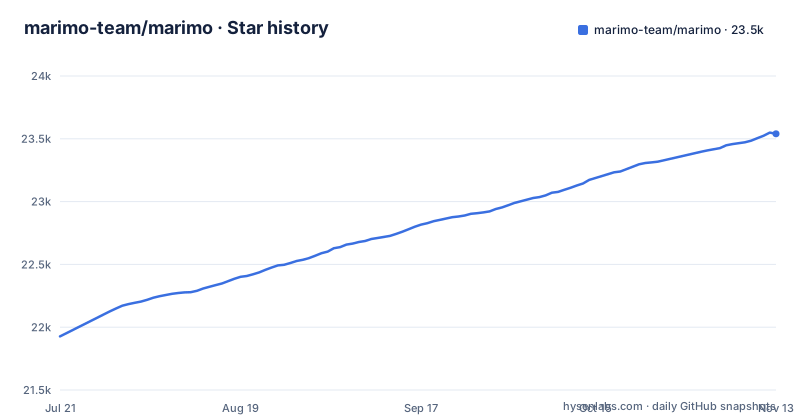
- marimo-team/marimo23,540 ★ · +1,613
| Repository | 2026-07-21 | 2026-11-13 |
|---|---|---|
| marimo-team/marimo | 21.9k | 23.5k |
1,613 Stars in the last 115 days, measured from the daily GitHub snapshot. Compare with other projects
Editorial analysis
What marimo Solves: Hidden State and Manual Re-runs
Traditional notebooks like Jupyter let you run cells in any order, which leads to inconsistent state: a variable may be defined in a cell you ran long ago, then deleted or changed, but later cells still use the old value. marimo eliminates this by making execution reactive. When you run a cell, marimo automatically runs all cells that reference its variables. Delete a cell and marimo scrubs its variables from program memory. This is a direct answer to the reproducibility problem that plagues Jupyter workflows. The README states that marimo 'guarantees your notebook code, outputs, and program state are consistent.' For engineers who have debugged a notebook where the output does not match the code, that promise is the core value.
How marimo Works: Reactive Execution and Stale Marking
The mechanism is a dependency graph built from variable references. When a cell defines a variable, marimo tracks which other cells read that variable. Running a cell triggers a cascade of dependent cells. The README notes that you can configure the runtime to be lazy, marking affected cells as stale instead of running them automatically. That is a critical feature for expensive notebooks: you get the consistency guarantee without accidentally triggering a long computation. The stale marking is a pragmatic compromise between full reactivity and practicality. It does not replace the user's judgment, but it prevents silent inconsistency. The README also mentions that marimo supports UI elements like sliders and dropdowns that are synchronized to Python variables, so interacting with a slider re-runs dependent cells with the new value.
Getting Started: Installation and First Run
The README gives a simple command to start: `pip install marimo && marimo tutorial intro`. That installs the package and launches a tutorial notebook in your browser. The CLI is the primary entry point; you use `marimo` commands to create, edit, and run notebooks. The README also points to a free online notebook called molab at molab.marimo.io, which requires no installation. For local use, you can also run marimo in VS Code or Cursor via the marimo-team.vscode-marimo extension, or in PyCharm via a JetBrains plugin. The notebook files are stored as `.py` files, so you can edit them in any text editor, and the README mentions watching files in neovim or Zed. That is a significant departure from Jupyter's `.ipynb` JSON format, and it makes git diffs readable.
Notebooks as Scripts and Apps: The Deployment Story
Because a marimo notebook is pure Python, you can execute it as a script with CLI arguments. The README highlights that notebooks are 'executable as a Python script, parameterized by CLI args.' That means you can take a notebook that was interactive in the editor and run it in a batch pipeline, passing parameters from the command line. You can also deploy a notebook as an interactive web app, which replaces a tool like Streamlit. The README also mentions running in the browser via WASM, which means a notebook can be shared as a static site that runs entirely client-side. This dual nature, script and app, is a strong selling point for teams that want to prototype in a notebook and then ship the same code without rewriting it.
SQL and Dataframe Interactivity: Built-in, Not an Afterthought
marimo is designed for data work. The README says you can 'query dataframes, databases, warehouses, or lakehouses with SQL.' What is unusual is that SQL queries can depend on Python values, and the result comes back as a Python dataframe. The README claims your notebooks are still pure Python even when they use SQL. That means the SQL is embedded in a cell but parsed and executed by marimo's built-in SQL engine. Interactive dataframes let you page, search, filter, and sort millions of rows without writing code. This is a different approach from Jupyter, where you would need to load data into a dataframe and then use pandas or a separate SQL client. marimo's interactivity is a real productivity boost for exploratory data analysis.
AI Features and Editor Integration: What Is Actually Offered
The README emphasizes marimo's 'AI-native' design. There are two distinct AI features. First, you can pair marimo with external agents like Claude Code, Codex, or OpenCode using 'marimo pair.' Second, the editor has built-in AI assistance that has context about your variables in memory. You can customize the system prompt, bring your own API keys, or use local models. The README also mentions GitHub Copilot integration, vim keybindings, and a variable explorer. The AI features are not gimmicks; they are aimed at generating cells that reference existing variables correctly. Test it with your own data before relying on it.
Limitations and When marimo Is the Wrong Tool
marimo's reactive model is a double-edged sword. If you have a notebook with many interdependent cells, a single change can trigger a long chain of executions. The lazy runtime mitigates that, but it requires you to configure it and to manually review stale cells. Also, marimo is not a drop-in replacement for Jupyter; it has its own API and editor, so existing Jupyter extensions and workflows will not carry over. The README lists alternatives it replaces, including Jupyter and Streamlit, but that does not mean migration is trivial.
Alternatives: How Jupyter and Streamlit Differ
The most direct alternative is Jupyter, which stores notebooks as `.ipynb` JSON and does not enforce reactive execution. Jupyter's model is manual: you run cells in any order, and you are responsible for consistency. marimo's reactive model is the opposite. If you value the freedom of Jupyter's chaotic but flexible execution, marimo will feel restrictive. Another alternative is Streamlit, which is also a Python-to-web-app framework. Streamlit re-runs the entire script on every interaction, whereas marimo only re-runs dependent cells. That makes marimo more efficient for large notebooks. However, Streamlit is a framework for building apps, not a notebook environment, so it does not provide the same editing experience. If your goal is a quick dashboard, Streamlit may be simpler. marimo's advantage is the notebook-to-app continuum.
Maintenance, Licensing, and Upgrade Considerations
marimo is licensed under Apache-2.0, which is permissive for commercial use. The project is actively maintained, with releases like 0.25.2 on 2026-10-19, and the default branch is main. The release cadence appears frequent, with 0.25.1 on 2026-10-01 and 0.25.0 on 2026-09-23 before it. That suggests active development, but it also means you should expect changes. The README mentions built-in package management, which can help with reproducibility. Upgrading marimo is a standard `pip install -U marimo`, but you should read the changelog for breaking changes, especially if you have custom UI elements or SQL queries that might depend on internal APIs. The project's growth is a positive sign, but it also means the ecosystem is young, so you may need to build integrations yourself.
Editorial conclusion
Adopt marimo if you are a data scientist or Python developer who is tired of Jupyter's hidden state, wants git-friendly notebooks, and needs to deploy notebooks as scripts or apps without learning a separate framework. Avoid it if you rely on Jupyter's rich ecosystem of extensions. Before adopting, verify that its reactive execution model fits your workflows, especially for expensive cells, and test that the SQL engine and UI elements support your data sources. The project is under active development with frequent releases, so check the changelog for breaking changes.
Frequently asked questions
how to install marimo
The project gives a single line: pip install marimo && marimo tutorial intro. Packages are published to PyPI and conda-forge, and a hosted notebook at molab.marimo.io works before anything is installed locally.
how to use marimo notebook in vscode
There is a marimo extension in the VS Code marketplace (marimo-team.vscode-marimo) and a PyCharm plugin, and you can also edit notebook files in neovim, Zed, or any other text editor through the watching support.
how to use marimo python
A notebook is a plain Python file, so it can be executed as a script parameterized by command line arguments, collected by pytest, and imported for its functions and classes by another notebook.
how to use marimo
Run a cell and marimo runs the cells that reference its variables, or marks them stale when the runtime is set to lazy. Bind a slider, dropdown, dataframe transformer, or chat input and the cells using it re-run with the new value, then deploy the notebook as an app or as slides.
how to use marimo notebook
Open the notebook file in the marimo editor or in an extension such as marimo-team.vscode-marimo for VS Code and Cursor, then run a cell and watch the cells that reference its variables re-run, or get marked stale when the runtime is lazy. Queries can be written as SQL against dataframes, databases, warehouses, CSVs, or Google Sheets and come back as dataframes.
Official sources
Add this badge to your README
If you maintain this project, the badge below links readers to this analysis and shows its maintenance status from the daily GitHub snapshot. Paste the markdown into your README; add ?metric=license or ?metric=stars to the image URL for a different field.

[](https://hysenlabs.com/projects/marimo-team-marimo)Star history chart for your README
[](https://hysenlabs.com/projects/marimo-team-marimo)Was this useful?