HivisionIDPhotos: an offline CPU ID photo pipeline where the model pick is the whole design
HivisionIDPhotos: a lightweight and efficient AI ID photos tools. AI .
At a glance
- What is it?
- HivisionIDPhotos is a Python toolkit that turns a casual photo into an ID photo or a layout sheet on a machine with no GPU, built from a small set of ONNX models you download yourself. The interesting decisions are the matting model, the face detector and the fact that the tagged release line stopped in January 2025.
- Who is it for?
- Pick HivisionIDPhotos when a CPU-only machine has to produce an ID photo offline and you are willing to choose the matting model yourself: MODNet for a fraction of a second and 410MB, birefnet-v1-lite for the best segmentation accuracy at 7.063s and 6.20GB, plus an NVIDIA card with about 16GB of VRAM if you want that accuracy quickly.
- Can I use it commercially?
- Yes. Apache-2.0 is a permissive licence: you can use, modify and sell software built on it, as long as you keep its copyright and licence notices.
- Is it still maintained?
- Yes. The repository last received commits 135 days ago.
- What is it written in?
- Mainly Python, according to GitHub's language statistics.
Answers come from the project's GitHub data, last synced on November 14, 2026, and from our analysis. They are not legal advice.
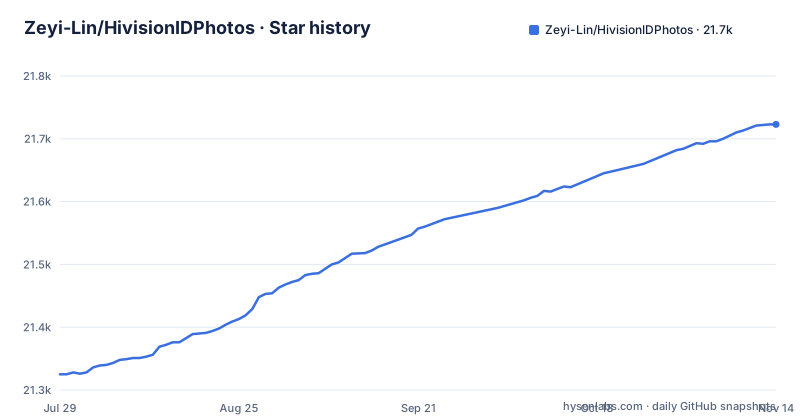
Star history
- Zeyi-Lin/HivisionIDPhotos21,723 ★ · +398
| Repository | 2026-07-29 | 2026-11-14 |
|---|---|---|
| Zeyi-Lin/HivisionIDPhotos | 21.3k | 21.7k |
398 Stars in the last 108 days, measured from the daily GitHub snapshot. Compare with other projects
Editorial analysis
A clone and two pip installs, then the weights decide everything
The install path is a clone, two pip installs, and a set of model files. Python >= 3.7 is the stated floor, the project says it is mainly tested on Python 3.10, and the listed operating systems are Linux, Windows and MacOS. Creating a conda environment on 3.10 is the recommended way in, then:
git clone https://github.com/Zeyi-Lin/HivisionIDPhotos.git
cd  HivisionIDPhotos
pip install -r requirements.txt
pip install -r requirements-app.txt
Two requirement files rather than one. The first is the inference stack; the second is installed beside it in the project Dockerfile that builds the demo and API image, and the README tells you to install both. Nothing else is needed before the weights, and the weights are the part people forget.
Weights land in hivision/creator/weights, and the four models span 24MB to 224MB
Nothing works until the matting models are present, and they go into hivision/creator/weights. The scripted route takes a single flag:
python scripts/download_model.py --models allPass a model name instead of all to fetch one, for example modnet_photographic_portrait_matting. Four files are on offer. MODNet and hivision_modnet are both 24.7MB, and hivision_modnet is the one written for swapping onto solid backgrounds. rmbg-1.4 is the open sourced BRIA AI model at 176.2MB and must be renamed to rmbg-1.4.onnx. birefnet-v1-lite is 224MB, is credited with the best segmentation accuracy, and carries the same rename requirement. If a download crawls, the project points you at SwanHub as the mirror instead.
MTCNN is the default detector, and choosing Face++ sends the photo away
Face detection is a second decision, independent of matting. MTCNN ships as the default: it runs offline, is described as millisecond class on CPU, and works straight after the clone, but it also has the lowest detection accuracy of the three. RetinaFace is also offline, takes seconds per image on CPU, is more accurate, and is not in the repository, so you download retinaface-resnet50.onnx and place it in hivision/creator/retinaface/weights yourself. The third option, Face++, is an online detection API from Megvii with its own guide in docs/face++_CN.md. The README's offline, CPU-only claim is made for matting, and it separately lists support for both pure offline and edge-cloud inference; choosing Face++ means photos go to an online API.
The accuracy jump costs 7.063s and 6.20GB, and only one model can use a GPU
The README measures three pairings on a Mac M1 Max 64GB with no GPU acceleration, on images of 512x715 and 764x1146. MODNet with the default MTCNN detector takes 0.207s and 0.246s using 410MB. MODNet with RetinaFace uses 405MB but stretches to 0.571s and 0.971s. birefnet-v1-lite with RetinaFace takes 7.063s and 7.128s and pulls 6.20GB into memory. Going from the cheap pairing to the accurate one is a jump from a fraction of a second and about 400MB to seven seconds and gigabytes, which makes the model choice a capacity decision before it is a quality decision. GPU acceleration is narrower than the table suggests: only birefnet-v1-lite can be accelerated on an NVIDIA card, and the project asks for around 16GB of VRAM, with CUDA and cuDNN installed and a matching onnxruntime-gpu build. Everyone without that card is left with the CPU numbers above.
Compose publishes 7860 and 8080 from one image and mounts nothing
The container route starts from a Dockerfile based on python:3.10-slim, which installs ffmpeg, libgl1-mesa-glx and libglib2.0-0 before the pip step and exposes 7860 and 8080. Two services are declared and both name the same image:
  hivision_idphotos:
    build:
      context: .
      dockerfile: Dockerfile
    image: linzeyi/hivision_idphotos
    command: python3 -u app.py --host 0.0.0.0 --port 7860
    ports:
      - '7860:7860'
app.py is the server hosting the Gradio demo and deploy_api.py is the HTTP API, one service per port. The shown port mappings publish these services on host interfaces by default; bind them to localhost or use appropriate network access controls when processing private photos. What the compose file does not declare is the part that bites. It maps ports and nothing else, with no volume for hivision/creator/weights, so the container runs on whatever the build context happened to contain. Download the models before you build, and remember that moving weights in afterwards is your job, not compose's.
numpy<=1.26.4 forces a separate environment
The inference dependencies are short enough to quote whole:
opencv-python>=4.8.1.78
onnxruntime>=1.15.0
numpy<=1.26.4
requests
mtcnn-runtime
tqdm
starlette
The numpy line is the one that shapes your setup. An upper bound on numpy, inside an environment that must also satisfy opencv-python and onnxruntime, means this project cannot simply be dropped into a current shared environment, which fits the README's advice to create a separate conda environment. mtcnn-runtime explains where the default face detector comes from, and starlette ships alongside the rest, with deploy_api.py as the API entry point in the repository root. The layout mirrors the split: app.py for the demo, inference.py for direct calls, a demo/ package holding config.py, processor.py, ui.py, utils.py and locales.py, and the hivision/ tree carrying creator/weights and creator/retinaface/weights.
Tags stop at v1.3.1 while master kept moving through 2026
Versioning is what to settle before planning an upgrade. The published tags are v1.3.1 on 2025-01-21, v1.3.0 on 2024-11-16 and v1.2.9 on 2024-09-25, while the last push to the master branch is dated 2026-07-03. The feature log stops in the same window as the tags. The 2024-09-16 entry added face rotation alignment, the 2024-09-22 entry added the API dpi and face_alignment parameters, and the last dated entry, 2024-11-20, added a print layout tab covering six-inch, five-inch, A4, 3R and 4R paper sizes. Nothing after that is described, so pinning v1.3.1 buys a documented feature set and tracking master buys code nobody has written notes for. One advertised capability is still open: smart suit change is marked waiting.
The community ports are separate products with their own version lag
Most of what gets built around HivisionIDPhotos does not live in this repository. The project lists a ComfyUI workflow, a WeChat mini program with a Java backend and native frontend, a uniapp port, a web version, a C++ rewrite, a Windows GUI client, a multi-device compatibility variant and a Synology NAS deployment guide written in Chinese. Each one is somebody else's repository, and nothing in this README states which core version any of them tracks. Adopting one means taking on an unpinned dependency that can sit well behind the 2026-07-03 state of master, and you will be the one filing the mismatch. The same caution applies to the C++ rewrite: it is credited to a contributor and linked as an alternative, but its release cadence is not the core project's problem.
Editorial conclusion
Pick HivisionIDPhotos when a CPU-only machine has to produce an ID photo offline and you are willing to choose the matting model yourself: MODNet for a fraction of a second and 410MB, birefnet-v1-lite for the best segmentation accuracy at 7.063s and 6.20GB, plus an NVIDIA card with about 16GB of VRAM if you want that accuracy quickly. Leave it if you need the smart suit change, which the README still marks as waiting, or if a Face++ detector is on your list, since that path puts your photos on someone else's service. Before you build, decide whether you pin v1.3.1 from 2025-01-21 or track the master branch, whose last push was 2026-07-03.
Frequently asked questions
How can I turn a photo into an ID photo with HivisionIDPhotos?
The toolkit detects a face, removes the background and produces an ID photo or layout sheet at the requested size. The Gradio interface is accessed in a browser, while app.py processes requests on the machine hosting the service; deploy_api.py exposes an HTTP API.
Does HivisionIDPhotos need a GPU to work?
No. Matting is presented as fully offline with CPU only inference, and the published reference numbers were measured on a Mac M1 Max 64GB with no GPU acceleration. Only birefnet-v1-lite can be accelerated on an NVIDIA card, and that path asks for around 16GB of VRAM plus CUDA and cuDNN.
Which matting model should I download for HivisionIDPhotos?
MODNet and hivision_modnet are both 24.7MB and fast, with hivision_modnet better adapted to solid backgrounds. rmbg-1.4 is 176.2MB, and birefnet-v1-lite is 224MB with the best segmentation accuracy. The two larger files have to be renamed to rmbg-1.4.onnx and birefnet-v1-lite.onnx inside hivision/creator/weights.
How is the HivisionIDPhotos Docker setup wired up?
The repository ships a Dockerfile based on python:3.10-slim and a compose file with two services from the same image. One runs python3 -u app.py --host 0.0.0.0 --port 7860 for the demo, the other runs python3 deploy_api.py, with ports 7860 and 8080 mapped. The compose file declares no volume for the model weights.
Official sources
Add this badge to your README
If you maintain this project, the badge below links readers to this analysis and shows its maintenance status from the daily GitHub snapshot. Paste the markdown into your README; add ?metric=license or ?metric=stars to the image URL for a different field.

[](https://hysenlabs.com/projects/zeyi-lin-hivisionidphotos)Star history chart for your README
[](https://hysenlabs.com/projects/zeyi-lin-hivisionidphotos)Was this useful?