Marpit: Building Slide Decks from Markdown and CSS
The skinny framework for creating slide deck from Markdown
At a glance
- What is it?
- Marpit converts Markdown and theme CSS into static HTML and CSS slide decks, with optional inline SVG output. It suits application developers who need a small rendering layer rather than a ready-made presentation tool.
- Who is it for?
- Adopt Marpit when the deliverable is an embeddable Markdown-to-slide rendering component with tightly controlled HTML and CSS. Do not choose it if you need bundled themes, a complete command-line presentation workflow, or the ready-made features documented for @marp-team/marp-core.
- Can I use it commercially?
- Yes. MIT is a permissive licence: you can use, modify and sell software built on it, as long as you keep its copyright and licence notices.
- Is it still maintained?
- Yes. The repository last received commits 7 days ago.
- What is it written in?
- Mainly JavaScript, according to GitHub's language statistics.
Answers come from the project's GitHub data, last synced on November 7, 2026, and from our analysis. They are not legal advice.
Star history
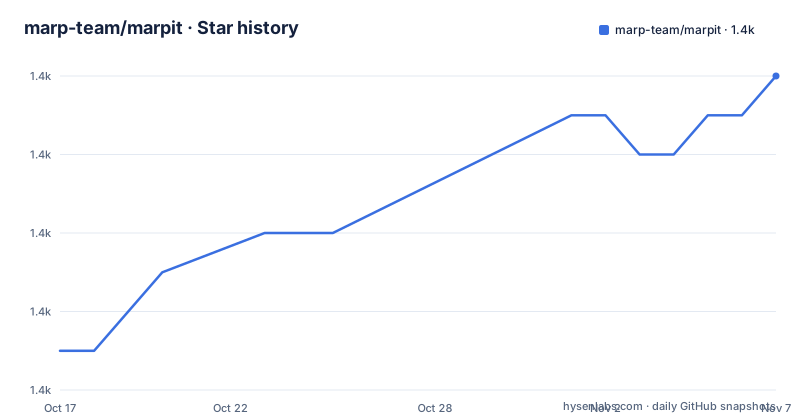
- marp-team/marpit1,394 ★ · +7
| Repository | 2026-10-17 | 2026-11-07 |
|---|---|---|
| marp-team/marpit | 1.4k | 1.4k |
7 Stars in the last 21 days, measured from the daily GitHub snapshot. Compare with other projects
Editorial analysis
Marpit's Markdown-to-HTML Boundary
Marpit solves a narrow but consequential problem: turning Markdown and CSS themes into slide decks that are composed primarily of static HTML and CSS. It is intended for developers embedding slide rendering in other tools and applications, not primarily for someone opening a graphical editor and presenting immediately. The repository describes it as the base of the core converter in the Marp ecosystem.
That boundary explains both its appeal and its limitations. Marpit does not bundle themes because it is a framework rather than a finished presentation product. It provides the conversion mechanism, slide-specific Markdown extensions, theme CSS processing, and optional inline SVG output. Users still need to decide how pages are hosted, navigated, scaled, printed, or integrated into the surrounding application.
The resulting HTML is described as a logicless slide deck when used directly as bare assets. In practice, that phrase means the presentation output does not need application logic to display its basic content. It does not mean Marpit supplies a complete viewer, authoring interface, theme catalog, or PDF export command. The README directs users to the Marpit documentation for a complete first-use path and to the JSDoc site for API details.
From Markdown Input to Static Slide Assets
Marpit extends the markdown-it parser with syntax intended specifically for slides. Its documented additions include directives and slide backgrounds. The project places importance on retaining compatibility with ordinary Markdown documents, which reduces the risk that a deck source becomes impossible to read outside the rendering environment.
The conversion pipeline accepts Markdown and one or more CSS themes, then produces a deck represented by static HTML and CSS. A print-oriented web page can convert that deck into a slide PDF. The README does not document the internal functions, rendering passes, or API calls needed to implement that pipeline, so this boundary should not be filled with assumptions. The public documentation and generated API reference are the appropriate places to verify the current invocation.
CSS themes are plain CSS rather than collections of predefined framework classes and mixins. A theme author styles the generated HTML elements directly, and Marpit performs the conversion required for the selected theme. This arrangement gives an application author precise control over selectors, typography, backgrounds, and layout. It also means theme authors must understand the slide HTML structure and cannot rely on Marpit supplying a large styling vocabulary.
Marpit Directives, Backgrounds, and DOM Control
The slide-specific syntax is where Marpit departs from a plain Markdown renderer. Directives provide slide-level control, while the documented image syntax supports slide backgrounds and advanced backgrounds. Compatibility remains an explicit design goal, so these extensions should be treated as additions to normal Markdown rather than a replacement for it.
Marpit's ordinary HTML representation keeps styling concerns in CSS. Its optional inline SVG mode changes the container for each slide page to an `<svg>` element. According to the README, the page can then be scaled to an exact size through CSS, which can simplify handling in integrated applications. An isolated layer created with `<foreignObject>` supports advanced backgrounds while retaining the original Markdown DOM structure.
This mode is explicitly marked experimental. It also adds a browser compatibility concern. The repository identifies `@marp-team/marpit-svg-polyfill` as a separate sub-project for the inline SVG slide in Safari-based browsers. Applications targeting Safari should determine whether that dependency is required for their deployment rather than assuming the standard HTML output and SVG output have identical support.
Installing Marpit for Local Development
The README does not provide an application installation command or a first API example. It directs new users to https://marpit.marp.app/?id=getting-started for setup guidance and documents only this repository development sequence. Contributors can clone the project, install its dependencies, and compile `src` into the published `lib` directory.
The commands below are the README's development commands, not an npm consumer installation tutorial. After `npm install`, `npm run build` removes `lib`, compiles `src` with Babel, and writes the build output to `lib`. Based on `package.json`, the package requires Node.js 18 or later.
git clone https://github.com/marp-team/marpit
cd marpit

npm install
npm run build
The `main` package entry is `lib/index.js`, and TypeScript declarations are published through `index.d.ts`. However, the README does not show how to import that entry, instantiate Marpit, or render a deck. A reader who needs a first executable presentation example must follow the linked getting-started documentation rather than infer an API from repository build commands. The documented development sequence also does not open a browser, export a PDF, or demonstrate a theme.
HTML Output Versus @marp-team/marp-core
The clearest alternative identified by the project itself is `@marp-team/marp-core`. The README describes that package as the home of official themes and practical features extended from Marpit. In other words, Marpit Core adds a more complete layer above or around the same general Marp ecosystem, while Marpit remains the low-level conversion framework.
Choose Marpit Core when the immediate requirement is to create slides using official themes or use the practical features that package extends from Marpit. Choose Marpit directly when an application needs the smaller rendering foundation and intends to supply its own themes, assets, navigation, print path, or integration behavior.
There is also a conceptual alternative in ordinary hand-authored HTML and CSS. Marpit removes the need to write every slide container and parse Markdown yourself, but it introduces a dependency on Marpit's Markdown extensions and generated markup. For a fixed deck with unusual interactions, hand-authored HTML may provide direct control. For reusable Markdown rendering across an application, Marpit offers the more relevant abstraction, provided its generated structure fits the design.
Marpit's Experimental SVG Trade-off
Inline SVG output is useful when an integrated application needs CSS-based pixel-perfect slide scaling. The `<svg>` page container and `<foreignObject>` layer can simplify placement of slides within a larger interface, while retaining the Markdown DOM for backgrounds and styling. That is a concrete engineering benefit rather than a generic rendering claim.
The cost is an explicit experimental label and separate Safari support work through `@marp-team/marpit-svg-polyfill`. An application may also have to account for the interaction between SVG, foreign content, print output, and surrounding CSS. The README does not claim that inline SVG is the default or that it should replace the standard static HTML mode.
Static HTML and CSS remains the safer baseline when the host does not need exact SVG scaling or advanced SVG-specific backgrounds. The SVG mode should be evaluated against the actual browser matrix and output requirements. Since the repository does not provide a compatibility matrix, claims beyond the Safari polyfill should not be inferred.
Marpit Releases, Upgrades, and MIT Licensing
The repository is not archived, and its last push was on 2026-10-14. Recent releases include v3.2.3 on 2026-09-04, v3.2.2 on 2026-07-04, and v3.2.1 on 2026-02-28. Those repository and release facts indicate recent project activity, but they do not by themselves describe API stability or the work required by a particular upgrade.
The package is published as `@marp-team/marpit`, has a versioned dependency tree through `package-lock.json`, and declares Node.js 18 or later as its minimum engine. Upgrading a consuming application therefore involves checking its Node.js version and reviewing the release notes for converter, Markdown syntax, CSS processing, or generated markup changes. The README does not define a long-term support policy or a migration guide for every major version.
Marpit is released under the MIT License. That permits use and modification under the license's stated conditions, but application owners still need to review the actual `LICENSE` file and retain required notices. This is a licensing note rather than legal advice.
Editorial conclusion
Adopt Marpit when the deliverable is an embeddable Markdown-to-slide rendering component with tightly controlled HTML and CSS. Do not choose it if you need bundled themes, a complete command-line presentation workflow, or the ready-made features documented for @marp-team/marp-core. Before adoption, verify Node 18 or later, inspect the intended rendering and PDF path, and confirm whether the experimental inline SVG mode fits the target browsers.
Frequently asked questions
What is Marpit used for?
Marpit transforms Markdown and CSS themes into slide decks made from static HTML and CSS. It is primarily a framework for developers integrating slide rendering into other applications.
Does Marpit include presentation themes?
No. Marpit does not provide themes because it is designed as a framework. The README points users to `@marp-team/marp-core` for official themes and practical extensions.
How do I build Marpit from the repository?
The README directs contributors to clone the repository, run `npm install`, and then run `npm run build`. The package requires Node.js 18 or later.
Official sources
Add this badge to your README
If you maintain this project, the badge below links readers to this analysis and shows its maintenance status from the daily GitHub snapshot. Paste the markdown into your README; add ?metric=license or ?metric=stars to the image URL for a different field.

[](https://hysenlabs.com/projects/marp-team-marpit)Star history chart for your README
[](https://hysenlabs.com/projects/marp-team-marpit)Was this useful?