M13ProgressSuite: A Progress View Toolkit Frozen in 2016
GitHub describes it as A suite containing many tools to display progress information on iOS.. The repository metadata lists Objective-C as its primary language. This article stays within the project description and details documented in the GitHub repository README.
At a glance
- What is it?
- M13ProgressSuite bundles nine interchangeable iOS progress views, a navigation bar progress bar, a HUD, and a terminal-style console. It is well documented and MIT licensed, but the last commit was in 2016 and the project targets an older Objective-C era.
- Who is it for?
- Adopt M13ProgressSuite if you maintain an Objective-C app that still supports pre-iOS 13 deployment targets and you need a wide variety of progress styles without writing custom drawing code. Do not adopt it for a new Swift project or one that targets modern iOS versions, because the project has been dormant since 2016, lacks Swift Package Manager support, and likely requires manual dependency integration.
- Can I use it commercially?
- Not without permission. GitHub finds no licence file in the repository, and without a licence all rights are reserved by default: you may read the code but not reuse it. Check the README, or ask the authors, before using it.
- Is it still maintained?
- Probably not. The repository last received commits 56 months ago, on March 5, 2022.
- What is it written in?
- Mainly Objective-C, according to GitHub's language statistics.
Answers come from the project's GitHub data, last synced on October 21, 2026, and from our analysis. They are not legal advice.
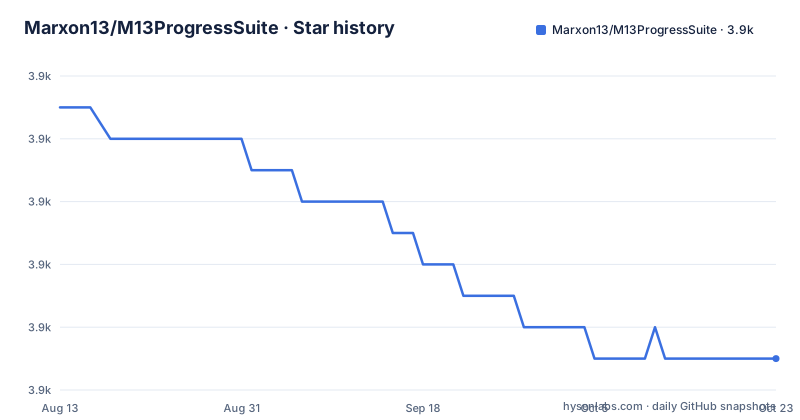
Star history
- Marxon13/M13ProgressSuite3,893 ★ · -8
| Repository | 2026-08-13 | 2026-10-21 |
|---|---|---|
| Marxon13/M13ProgressSuite | 3.9k | 3.9k |
-8 Stars in the last 69 days, measured from the daily GitHub snapshot. Compare with other projects
Editorial analysis
What M13ProgressSuite Solves and Who It Serves
M13ProgressSuite addresses a narrow but recurring problem: showing progress to an iOS user in a way that matches the app's visual style. The README lists nine progress views: Bar, Bordered Bar, Filtered Image, Image, Pie, Ring, Segmented Bar, Segmented Ring, and Striped Bar. All are based on the same superclass, so swapping one for another is a matter of changing the class name. The suite also includes a progress bar that sits in a UINavigationBar, similar to what Apple's Messages app uses, plus an indeterminate mode for that bar. A HUD overlay works over any UIView and reuses the same progress view classes. The intended audience is an iOS developer who wants a ready-made set of progress indicators with consistent behavior, rather than building each one from scratch. The project is written in Objective-C, which narrows the audience further. A Swift-only team would need to use bridging headers or rewrite the code.
The Architecture: One Superclass, Many Styles
The key design decision in M13ProgressSuite is a common superclass for all progress views. The README says this allows any progress view to be switched with any other easily. In practice, that means a developer can start with a ring and later change to a pie by replacing the class instantiation, while keeping the same methods for setting progress and configuring appearance. Each progress view has success and failure actions, an indeterminate mode, and appearance customization features. The HUD takes this further: it accepts any M13ProgressView subclass, so the HUD's look changes without altering the HUD's logic. The navigation bar progress view is controlled through the UINavigationController, which is a different mechanism from the standalone views. The terminal-style M13ProgressConsole is a separate component. This structure is clean for its time, but it also means the project is a monolith. You cannot pick just one progress view without pulling in the whole suite, unless you manually copy files.
Getting It Running: Commands and Configuration
The README gives two usage examples. For a standalone progress view, you create an instance with a frame, configure it, add it to a view, and call setProgress:animated:. The example uses M13ProgressViewBar with a frame of 50.0 by 5.0 points. For the HUD, you initialize M13ProgressHUD with a progress view, such as M13ProgressViewRing. Then you set properties like progressViewSize and animationPoint. The animationPoint is set to the center of the screen using UIScreen mainScreen bounds, which suggests the HUD is added directly to a UIWindow. The README shows adding the HUD to the window via the app delegate. There are no installation instructions in the README, no CocoaPods podspec mentioned, and no Carthage or Swift Package Manager support. The repository has a master branch and tags up to v1.2.9, but the README does not explain how to integrate the code into a project. A developer must manually add the source files or create their own dependency setup.
Real Limitations: Age, Integration, and iOS Compatibility
The most obvious limitation is the project's age. The last release, v1.2.9, was pushed on November 10, 2016. That predates Swift 4, iOS 11, and every major iOS update since. The code is Objective-C, which still works on modern iOS, but it may not compile without warnings or errors under current Xcode versions. The README mentions an indeterminate mode for the navigation bar progress view, but it does not document how that mode is triggered. The HUD's animationPoint property implies a screen-centered approach, which is less flexible than Auto Layout-based HUDs. There is no mention of support for safe areas, dark mode, or dynamic type. The project is also a suite, so you get all components even if you need only one. For a simple progress bar, this is overkill. The README itself is truncated in the provided material, so some documentation may be missing, but what is visible lacks any troubleshooting section or known issues list.
Alternative Approaches: UIKit and Modern Libraries
A developer evaluating M13ProgressSuite should consider what Apple provides natively. Since iOS 13, SwiftUI includes ProgressView, and UIKit has UIActivityIndicatorView and UIProgressView. These cover basic progress display, but they do not offer the variety of styles or the success and failure animations that M13ProgressSuite does. For a custom progress view with more modern support, a library like KDCircularProgress or NextLevelProgress might be a better fit, but those are not mentioned in the project material. The key difference is approach: M13ProgressSuite gives you a fixed set of pre-built views with a common interface, while a modern library or a custom UIView subclass gives you full control over rendering and animations. If you need a pie chart progress view and you are already using Swift, writing a small custom view with Core Graphics is often simpler than integrating a dormant Objective-C suite. The trade-off is that you lose the interchangeable architecture and the HUD integration.
Maintenance and License Implications
The project has no recent commits and no indication of active maintenance. The last push was in 2016, and there are releases up to v1.2.9. There is no issue tracker activity visible in the material, and no contribution guidelines. The license is MIT, as stated in the README, with copyright to Brandon McQuilkin. That means you can use, modify, and distribute the code, provided you include the copyright notice and the permission notice in substantial portions of the software. The license does not impose a copyleft requirement, so you can incorporate the code into a proprietary app. However, because the project is unmaintained, any bugs you find are yours to fix. The documentation is described as complete, but it is frozen at the 2016 state. There is no guarantee that the code works with the latest iOS SDK. The MIT license is permissive, but it also disclaims warranty, so you cannot expect support from the author. For a production app, you would need to fork the repository and maintain it yourself.
Who Should Adopt This Now
The realistic adopter is a developer working on a legacy Objective-C app that targets iOS versions before the modern UI paradigms. If you need a terminal-style progress console or a segmented ring, and you are already using manual dependency management, M13ProgressSuite could save you days of drawing code. The common superclass is a genuine advantage if you plan to switch progress styles frequently. But if you are starting a new project, or if you use Swift, or if you expect to deploy on iOS 13 or later, the project will likely cause more integration pain than it saves. The lack of a package manager integration is a deal-breaker for many teams. The code is not likely to be updated, so you must be prepared to read Objective-C and fix any compatibility issues yourself. Before adopting, compile the project in a test app with your current Xcode version. Verify that the HUD's animationPoint works with your view controller's view, not just the window. And check that the MIT license text is included in the source files you copy, because the README's license section is not enough for redistribution.
Editorial conclusion
Adopt M13ProgressSuite if you maintain an Objective-C app that still supports pre-iOS 13 deployment targets and you need a wide variety of progress styles without writing custom drawing code. Do not adopt it for a new Swift project or one that targets modern iOS versions, because the project has been dormant since 2016, lacks Swift Package Manager support, and likely requires manual dependency integration. Before adopting, verify that the classes compile under your current Xcode version, confirm that the MIT license text is present in the files you actually use, and check whether the HUD's animation point approach works with your view hierarchy. The project is a snapshot of a specific time; treat it as a reference or a base for your own code, not as a maintained dependency.
Frequently asked questions
What is M13ProgressSuite?
A set of Objective-C classes for showing progress on iOS: a progress bar for the navigation bar, a HUD overlay, a view styled like a terminal, and a set of interchangeable progress views that share one superclass.
How do I use M13ProgressSuite?
Allocate a progress view with a frame, add it as a subview, and update it with an animated progress setter. For the overlay, allocate it with a progress view, set its size and its animation point, add it to the window from the application delegate, and show it.
How many progress styles does M13ProgressSuite ship?
Nine, listed in the readme: a plain bar, a bordered bar, a filtered image, an image, a pie, a ring, a segmented bar, a segmented ring and a striped bar.
How do I install M13ProgressSuite?
The readme has no installation section. The repository ships a pod specification and an Xcode project, and the readme asks you to contact the author directly for questions, bug reports and pull requests rather than pointing at an issue tracker.
Where is the M13ProgressSuite class documentation?
In a documentation directory in the repository, which the readme calls complete documentation of each class. The readme itself only covers usage with two short code samples.
Official sources
Add this badge to your README
If you maintain this project, the badge below links readers to this analysis and shows its maintenance status from the daily GitHub snapshot. Paste the markdown into your README; add ?metric=license or ?metric=stars to the image URL for a different field.

[](https://hysenlabs.com/projects/marxon13-m13progresssuite)Star history chart for your README
[](https://hysenlabs.com/projects/marxon13-m13progresssuite)