ForecasWatch2: A Pebble Watchface Revival with Weather Underground Workarounds
Open source revival of the beloved ForecasWatch Pebble watchface
At a glance
- What is it?
- ForecasWatch2 brings back a beloved Pebble watchface with support for Weather Underground and OpenWeatherMap, but its reliance on a hacky API workaround and GPL-3.0 license shape who should adopt it.
- Who is it for?
- Adopt ForecasWatch2 if you own a rectangular Pebble watch and want a feature-rich forecast watchface with multiple weather providers, including a workaround for Weather Underground. Skip it if you need a supported, actively maintained watchface with guaranteed API stability or if you object to GPL-3.0 licensing.
- Can I use it commercially?
- Yes, with conditions. GPL-3.0 is a copyleft licence: if you distribute software that includes it, you must release that software's source code under the same licence. Running it internally without distributing it does not trigger that obligation.
- Is it still maintained?
- Yes. The repository last received commits 31 days ago.
- What is it written in?
- Mainly JavaScript, according to GitHub's language statistics.
Answers come from the project's GitHub data, last synced on October 22, 2026, and from our analysis. They are not legal advice.
Star history
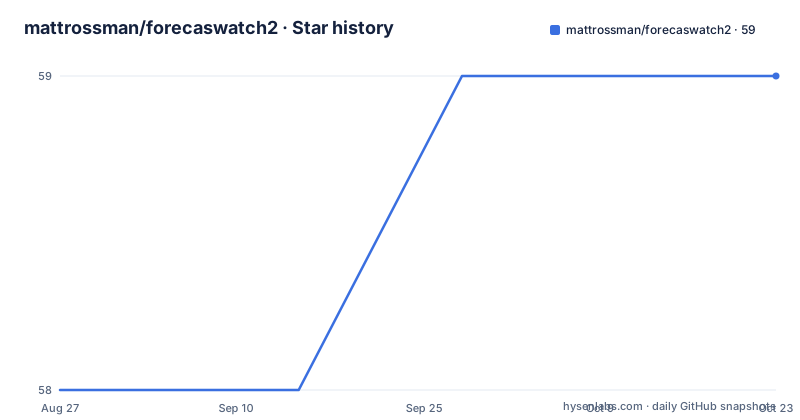
- mattrossman/forecaswatch259 ★ · +1
| Repository | 2026-08-27 | 2026-10-22 |
|---|---|---|
| mattrossman/forecaswatch2 | 58 | 59 |
1 Stars in the last 56 days, measured from the daily GitHub snapshot. Compare with other projects
Editorial analysis
Why ForecasWatch2 Exists
The original ForecasWatch watchface broke when the free Weather Underground API was shut down. ForecasWatch2 is an open source revival that restores Weather Underground support through a workaround and adds OpenWeatherMap as a second provider. It targets Pebble watch owners, specifically those with rectangular models: Classic, Steel, Time, Time Steel, and Pebble 2. The project fills a gap for users who relied on the original watchface and want a modern, community-maintained alternative. It is not for round Pebble watches, which are explicitly unsupported.
Core Features and Data Flow
The watchface displays current time, battery level, a 3-week calendar, a 24-hour weather forecast that updates every 30 minutes, and a Bluetooth connection indicator with vibration on disconnect. It also shows a quiet time indicator, night shading, current temperature, a red line for temperature forecast, a blue area for precipitation probability, the city where the forecast was fetched, and the next sunrise or sunset time. Weather data comes from either Weather Underground or OpenWeatherMap, selected in settings. Location can be set manually or via GPS. The forecast data flows from the chosen provider to the watchface, which renders it on screen with customizable fonts and colors for Sundays, Saturdays, and US federal holidays. The 30-minute update interval suggests a background fetch mechanism, though the README does not detail the exact Pebble app architecture.
Installation Paths: App Store and Sideloading
Installation is straightforward. Users on the modern Pebble app can install from the RePebble store, which uses Rebble's backend, or follow the Rebble setup flow for the Rebble store. Both point to the same catalog. For sideloading, download the latest forecaswatch2.pbw release and install it with the modern Pebble app on iOS or Android. The README links directly to the .pbw file in the GitHub releases. This flexibility means you can get the watchface running without touching a command line, which is rare for an open source project. Developers who want to build from source should consult CONTRIBUTING.md, but the README does not list specific build commands, so the developer workflow is not fully documented here.
The Weather Underground Workaround: A Fragile Dependency
The README explicitly calls the Weather Underground support a 'hacky workaround'. This is a honest admission of fragility. The original API was shut down, so the workaround likely reverse-engineers an endpoint or uses an unofficial method. That means it can break without notice if the service changes. Users who rely on Weather Underground should expect occasional failures and be ready to switch to OpenWeatherMap. The workaround is also why the project exists in the first place, so it is a core feature, not an afterthought. The risk is real, and the README does not describe the exact mechanism, so you cannot assess its stability from the material alone.
Privacy Telemetry: What It Collects and What It Does Not
ForecasWatch2 includes telemetry that the README describes as privacy-respecting. It collects each weather fetch's outcome and duration, provider, coarse country code when available, app and watch metadata, and an allowlist of non-sensitive settings. It does not collect precise location, API keys, coordinates, city/state, or manual location strings. Account and watch identifiers are stored as server-side HMAC hashes, which the author says are enough for rough usage stats like daily active users but not readable IDs. You can opt out in settings. This is a notable design choice for a watchface, as telemetry is often absent or opaque. The opt-out is a plus, but the README does not specify where in the settings the toggle lives, so you will need to find it.
Licensing and Maintenance Costs
The project is licensed under GPL-3.0. That means if you modify and distribute the watchface, your changes must also be GPL-3.0. For personal use, this is a non-issue, but if you plan to fork or build on it, you must comply with the license terms. The repository is not archived, and the last push was August 2026, with recent releases v1.34.0 through v1.36.0. The release cadence suggests active maintenance, but the README does not mention a changelog or upgrade path. Upgrading likely means downloading a new .pbw and reinstalling, which is simple. The telemetry server is a hidden maintenance cost: the author must keep it running, and if it goes down, the watchface may still work but lose usage stats. The README does not state whether the telemetry server is open source or self-hostable.
Alternatives and Trade-offs
The obvious alternative is a different Pebble watchface that does not rely on Weather Underground, such as a native OpenWeatherMap-only face. The difference is in approach: ForecasWatch2 tries to preserve a legacy provider through a workaround, while a simpler face would avoid that fragility entirely. Another alternative is to use the Rebble app's built-in weather features, which may pull from a different backend. The trade-off is feature richness versus reliability. ForecasWatch2 offers a 3-week calendar, holiday coloring, and multiple providers, which a minimal face likely lacks. But you pay for that with a dependency on a hacky workaround. If you only need current conditions and a basic forecast, a simpler face may be more robust.
Editorial conclusion
Adopt ForecasWatch2 if you own a rectangular Pebble watch and want a feature-rich forecast watchface with multiple weather providers, including a workaround for Weather Underground. Skip it if you need a supported, actively maintained watchface with guaranteed API stability or if you object to GPL-3.0 licensing. Before installing, verify that your watch model is supported and that the Weather Underground workaround still functions with your API key, as the README explicitly labels it hacky.
Frequently asked questions
Which Pebble watches does forecaswatch2 support?
All rectangular watches: Classic, Steel, Time, Time Steel and Pebble 2. Round watches are not listed as supported.
Does forecaswatch2 send my location to its servers?
No. Coordinates, city, state, manual location strings and your API keys are not collected. What is sent is each weather fetch's outcome and duration, the provider, a coarse country code, app and watch metadata, and an allowlist of non-sensitive settings.
How do I install forecaswatch2 on my Pebble?
Through the RePebble or Rebble appstore listing, or by downloading the pbw file from the latest GitHub release and installing it with the modern Pebble app on iOS or Android. Both store listings resolve to the same catalogue.
How do I turn telemetry off in forecaswatch2?
Disable it in the watch's settings. Separately, a self-hosted build has telemetry disabled by default, because omitting the telemetry endpoint variable turns it off.
Official sources
Add this badge to your README
If you maintain this project, the badge below links readers to this analysis and shows its maintenance status from the daily GitHub snapshot. Paste the markdown into your README; add ?metric=license or ?metric=stars to the image URL for a different field.

[](https://hysenlabs.com/projects/mattrossman-forecaswatch2)Star history chart for your README
[](https://hysenlabs.com/projects/mattrossman-forecaswatch2)