Nukkit-MOT: A Multi-Version Bedrock Server Fork That Trades Upstream Purity for Client Reach
Support for multiple versions of Nukkit Minecraft Bedrock Edition Server Software
At a glance
- What is it?
- Nukkit-MOT is a Nukkit fork that supports Minecraft Bedrock clients from 1.2 to 1.26.45, including NetEase editions, and ships as a Java jar or Docker image. Its breadth is its selling point, but that breadth comes with a snapshot-heavy release model and a config-driven protocol floor.
- Who is it for?
- Adopt Nukkit-MOT if you run a Bedrock server that must accept clients from old versions, especially NetEase clients, and you are comfortable with a fork that moves faster than upstream. Do not adopt it if you need a stable, long-term release line or if your player base is exclusively on the latest Bedrock version, where PowerNukkitX or Lumi may be cleaner fits.
- Can I use it commercially?
- Yes, with conditions. LGPL-3.0 is a weak copyleft licence: you can use it inside commercial and closed-source software, but if you distribute changes to its own files, you must publish those changes under the same licence.
- Is it still maintained?
- Yes. The repository received new commits within the last day.
- What is it written in?
- Mainly Java, according to GitHub's language statistics.
Answers come from the project's GitHub data, last synced on October 22, 2026, and from our analysis. They are not legal advice.
Star history
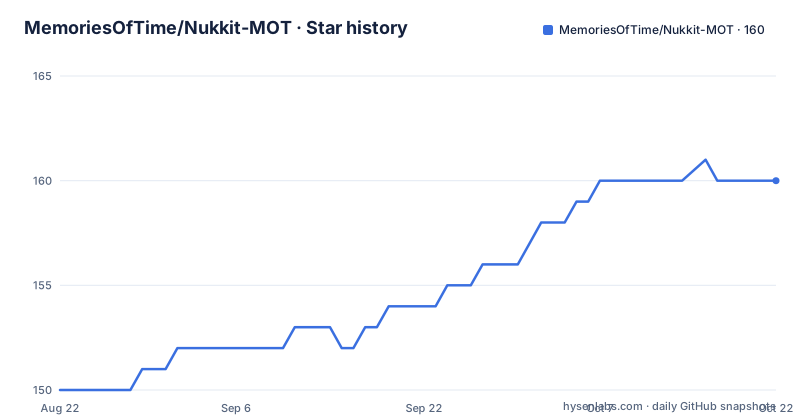
- MemoriesOfTime/Nukkit-MOT160 ★ · +10
| Repository | 2026-08-22 | 2026-10-22 |
|---|---|---|
| MemoriesOfTime/Nukkit-MOT | 150 | 160 |
10 Stars in the last 61 days, measured from the daily GitHub snapshot. Compare with other projects
Editorial analysis
What Nukkit-MOT Actually Solves
Nukkit-MOT addresses a specific pain: Bedrock Edition clients do not all speak the same protocol version, and official or upstream Nukkit builds often track only the newest release. The README states the fork supports versions from 1.2 to 1.26.45, and you can set the minimum protocol in the config. That range is the core value proposition. If you run a server that must serve players who have not updated their game in years, or who use the NetEase client popular in some regions, upstream Nukkit will likely reject them. Nukkit-MOT widens the door. It is aimed at server administrators who prioritize player reach over staying on the bleeding edge of Bedrock updates. The project also claims support for most entities with AI, the Nether, The End, dungeon and cave generation, and vanilla commands, which moves it beyond a protocol shim into a fuller server implementation.
The Multi-Version Mechanism and Its Limits
The README does not describe the internal protocol handling in detail, but the configurable minimum protocol is the key mechanism. You set a floor, and the server presumably negotiates upward with clients that support newer protocols. The documentation gives no example config key, only the statement that you can set the minimum protocol in the config. That omission matters. Without a documented key, an administrator must guess or dig into the source. The version range is wide, but wide ranges usually mean compromises. Supporting 1.2 through 1.26.45 means the server must handle protocol changes, block ID shifts, and entity data differences across years of game updates. The README does not claim perfect fidelity for every version, only support. Expect edge cases where an old client can join but sees missing blocks or broken AI. The trade-off is explicit: you get reach, but you lose the polished single-version focus that upstream Nukkit or PowerNukkitX offers.
Installing and Running: Java, Jar, or Docker
Installation is straightforward. You need Java 17 or higher. Download the .jar from the provided Jenkins or GitHub Actions links, then run `java -jar Nukkit-MOT-SNAPSHOT.jar`, adjusting the filename to match what you downloaded. The Docker route is equally simple. The README gives this command: `docker run -d --name nukkit-mot -p 19132:19132/udp -v $(pwd)/data:/data -e JAVA_OPTS="-Xms2G -Xmx2G" --restart unless-stopped memoriesoftime/nukkit-mot:latest`. The volume mount is important: all worlds, plugins, players, and `server.properties` live under `/data`. That makes backups and migrations predictable. The image tags are explicit: `:latest` and `:<short-sha>` are development snapshots from master, while `:1.26.30-R1` style tags mirror Maven Central releases. If you use Docker, pin a stable tag for production. The snapshot tags will change with every push to master, which is fine for testing but risky for a server you want to keep running.
Building Plugins Against Nukkit-MOT
For plugin developers, the project publishes to Maven Central for releases and to a separate repository for snapshots. The README shows a Maven repository block for `repo.lanink.cn` for SNAPSHOT builds, and a dependency on `com.nukkit-mot:nukkit-mot` version `1.26.40-R1` with scope `provided`. For Gradle, the equivalent is `compileOnly("com.nukkit-mot:nukkit-mot:1.26.40-R1")`. The SNAPSHOT dependency uses a different group and artifact: `cn.nukkit:Nukkit:MOT-SNAPSHOT`. That split is a warning sign. If you develop against the release artifact, you get a stable API. If you develop against the snapshot, you are tracking master and the API can change underneath you. The README lists a well-established plugin ecosystem, but it does not guarantee that every Nukkit plugin works unchanged. Plugins written for upstream Nukkit may depend on classes or behaviours that Nukkit-MOT altered for multi-version support. Test each plugin against your target version before trusting it.
The Snapshot-Centric Release Model
The project has no recent releases listed in the repository metadata, and the README pushes users toward Jenkins and GitHub Actions for downloads. The only stable tags mentioned are `:1.26.30-R1` and the Maven Central version `1.26.40-R1`. That is a thin stable line. The default branch is master, and the Docker `:latest` tag is a development snapshot. For a server software project, this is a real operational concern. A bug fix or a breaking change can land in master at any time, and if you pull `:latest`, you get it without review. The README does not state a release cadence or a support policy for older versions. You are effectively choosing between a snapshot that may be ahead of the latest game version or a stable tag that may lag behind. The project does not appear to offer long-term support branches, so upgrading Bedrock clients may force you to chase new tags. This is acceptable for a hobby server, but it is a poor fit for a production environment that needs predictability.
Licence and Maintenance Reality
The project is licensed under LGPL-3.0. That means you can use it as a library in your own project under certain conditions, but if you modify the server itself and distribute it, you may need to share those changes. The README does not provide a contributor guide or a code of conduct, and the maintenance signals are mixed. The repository is not archived, but the last push is unknown from the metadata, and there are no recent releases. The README lists five upstream projects as credits, including Nukkit, NukkitPetteriM1, EaseCation/Nukkit, PowerNukkitX, and Lumi. That lineage suggests the project is a merger of several forks, which can make upstream merges complex. If you adopt Nukkit-MOT, you inherit not just its code but its maintenance risk. Verify that the Jenkins build is green before relying on it. The YourKit sponsorship is a positive signal for profiling support, but it does not indicate community activity.
Alternatives and Where Nukkit-MOT Fits
The README itself points to two alternatives: Lumi and PowerNukkitX. PowerNukkitX is a separate Nukkit fork that focuses on newer Bedrock versions and has its own plugin ecosystem. Lumi is described as a project for those only interested in newer versions. The difference in approach is clear: Nukkit-MOT prioritizes backward compatibility and NetEase support, while PowerNukkitX and Lumi chase the latest protocol. If your player base is on current Bedrock, PowerNukkitX may offer better performance and more active development, but you lose the old-client reach. If you need NetEase compatibility, Nukkit-MOT appears to be the only one of the three that explicitly claims it. The choice is not about which is better in the abstract; it is about which client versions you must serve. Nukkit-MOT is the right tool when your server must accept a wide range of clients. It is the wrong tool when you want a single, well-tested version with minimal compatibility baggage.
Editorial conclusion
Adopt Nukkit-MOT if you run a Bedrock server that must accept clients from old versions, especially NetEase clients, and you are comfortable with a fork that moves faster than upstream. Do not adopt it if you need a stable, long-term release line or if your player base is exclusively on the latest Bedrock version, where PowerNukkitX or Lumi may be cleaner fits. Before deploying, verify the exact protocol range your clients use, test your plugins against the MOT-SNAPSHOT API, and pin a stable tag like 1.26.30-R1 rather than :latest for production.
Frequently asked questions
What is Nukkit-MOT and what does it add to Nukkit?
It is a Java fork of CloudburstMC's Nukkit for Minecraft Bedrock Edition. The stated additions are support for versions 1.2 through 1.26.50 with a configurable minimum protocol, most entities with AI, the nether world and The End, dungeon and cave generation, vanilla commands, and NetEase client compatibility.
Which Minecraft Bedrock versions does Nukkit-MOT support?
Versions 1.2 through 1.26.50, with the minimum protocol set in the configuration file. The same documentation suggests Lumi or PowerNukkitX instead for anyone who only wants newer versions.
How do I run Nukkit-MOT with Docker?
The documented command runs the image memoriesoftime/nukkit-mot:latest with port 19132 published on both UDP and TCP, the local data directory mounted at /data, and JAVA_OPTS set to -Xms2G -Xmx2G. The UDP mapping is RakNet and the TCP mapping is NetherNet WebRTC signaling.
What is the difference between the latest tag and an R1 tag for Nukkit-MOT?
The :latest and :short-sha tags are development snapshots built from the master branch. Tags in the 1.26.30-R1 style are stable releases that mirror Maven Central, and those are the versions plugin authors should depend on.
What Java version does Nukkit-MOT need?
Java 17 or higher. The Dockerfile pins the build stage to JDK 17 to match maven.compiler.target, and passes the runtime Java major version as a build argument that defaults to 17.
How do plugins depend on Nukkit-MOT?
Releases use the dependency com.nukkit-mot:nukkit-mot with a version such as 1.26.40-R1 and resolve from Maven Central. Snapshots use cn.nukkit:Nukkit with the version MOT-SNAPSHOT and require the repo.lanink.cn repository, and both are declared compileOnly in the Gradle example.
Official sources
Add this badge to your README
If you maintain this project, the badge below links readers to this analysis and shows its maintenance status from the daily GitHub snapshot. Paste the markdown into your README; add ?metric=license or ?metric=stars to the image URL for a different field.

[](https://hysenlabs.com/projects/memoriesoftime-nukkit-mot)Star history chart for your README
[](https://hysenlabs.com/projects/memoriesoftime-nukkit-mot)