MetingJS 2.0.2 for adding music to APlayer
:cake: A powerful plugin connect APlayer and Meting
At a glance
- What is it?
- MetingJS is a JavaScript custom element that connects APlayer with the Meting API. It suits web developers who need configurable music players for supported services or self-hosted media, but it depends on APlayer, custom element support, and reachable API endpoints.
- Who is it for?
- Adopt MetingJS when the page already uses APlayer and its required custom element behavior, and when the selected service or self-hosted Meting API fits the deployment. Do not treat it as a standalone player or assume that the built-in API covers every music source.
- Can I use it commercially?
- Yes. MIT is a permissive licence: you can use, modify and sell software built on it, as long as you keep its copyright and licence notices.
- Is it still maintained?
- Activity is slowing. The repository last received commits 6 months ago.
- What is it written in?
- Mainly JavaScript, according to GitHub's language statistics.
Answers come from the project's GitHub data, last synced on November 7, 2026, and from our analysis. They are not legal advice.
Star history
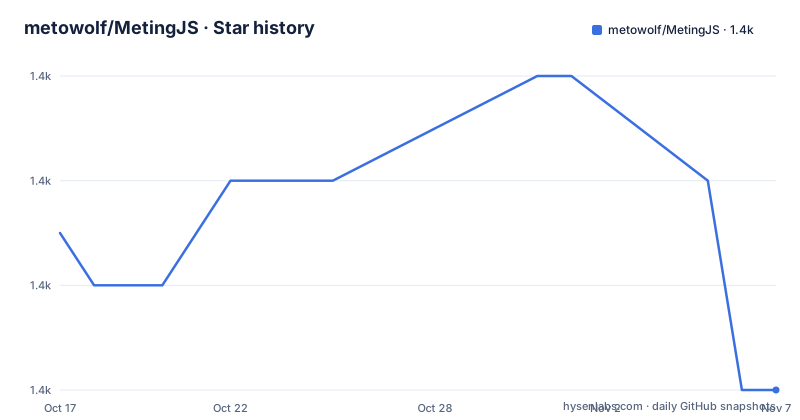
- metowolf/MetingJS1,406 ★ · -3
| Repository | 2026-10-17 | 2026-11-07 |
|---|---|---|
| metowolf/MetingJS | 1.4k | 1.4k |
-3 Stars in the last 21 days, measured from the daily GitHub snapshot. Compare with other projects
Editorial analysis
MetingJS's role between APlayer and music metadata
MetingJS solves a specific integration problem. APlayer supplies the HTML5 audio interface, while MetingJS turns a declarative `<meting-js>` element into player configuration and media data. The intended users are web developers adding music to pages without wiring APlayer controls, playlist state, and source metadata together in application code. The component supports IDs and playlists from NetEase, Tencent, Kugou, Xiami, and Baidu according to the option table. It can also use an explicit `url`, `cover`, `name`, and `artist` tuple for self-hosted media.
That boundary matters. MetingJS is not presented as an independent audio engine. Its README lists APlayer as a requirement and provides the APlayer stylesheet and script before the MetingJS script. The package describes itself as a plugin with the Meting API, and its homepage points to a player demonstration. Consumers therefore need to decide how the APlayer dependency will be loaded, cached, and upgraded along with MetingJS.
The README identifies APlayer 1.2.x and 2.0.x as supported API statuses, although the compatibility table visually references APlayer `^1.10.0`. This documentation detail should be checked against the exact APlayer release selected for a site rather than inferred from the status labels.
Declarative element attributes and their defaults
The main data flow begins in HTML attributes. A typical remote-source element supplies `server`, `type`, and `id`; MetingJS uses those values to request track information and construct the APlayer instance. The documented `server` values are `netease`, `tencent`, `kugou`, `xiami`, and `baidu`. The documented `type` values are `song`, `playlist`, `album`, `search`, and `artist`. The option table marks `id`, `server`, and `type` as required, although the separate `auto` and self-hosted examples omit some of them because those examples provide another source of data.
Playback behavior remains declarative. `autoplay` defaults to `false`, while `loop` defaults to `all` and accepts `all`, `one`, or `none`. `order` defaults to `list` and can be `list` or `random`. `preload` supports `none`, `metadata`, and `auto`. The documented default volume is `0.7`, with an explicit warning that the player remembers a user's later volume adjustment, so the initial value will no longer control that saved preference.
Other attributes affect presentation and coordination. `theme` defaults to `#2980b9`, `mini` and `fixed` default to `false`, and `mutex` defaults to `true`, meaning that starting one player pauses other players. The list can begin folded and can have a maximum height of `340px`. Player settings are stored under the `localStorage` key `metingjs`. These options expose APlayer behavior through MetingJS rather than creating a separate state model.
Loading MetingJS and creating the first remote playlist
The README gives this HTML sequence for a first playlist:
<link rel="stylesheet" href="https://cdn.jsdelivr.net/npm/aplayer/dist/APlayer.min.css">
<script src="https://cdn.jsdelivr.net/npm/aplayer/dist/APlayer.min.js"></script>
<script src="https://cdn.jsdelivr.net/npm/meting@2/dist/Meting.min.js"></script>

<meting-js
  server="netease"
  type="playlist"
  id="60198">
</meting-js>
This example depends on the linked NetEase playlist remaining available and on the default Meting API being reachable from the browser. It also assumes that APlayer's package URL resolves to a version compatible with MetingJS. The README also lists `https://unpkg.com/meting@2/dist/Meting.min.js` as an alternative CDN, but it does not give a complete equivalent HTML example for that URL.
Self-hosted audio without service metadata
MetingJS can initialize a player from direct media attributes, which is useful when a site already hosts the audio and cover image. This path avoids the `server`, `type`, and `id` attributes shown in the playlist example. The README uses a Rainymood audio URL, but the mechanism is more important than that particular example: the element receives a track name, artist, media URL, and cover URL directly.
<meting-js
  name="rainymood"
  artist="rainymood"
  url="https://rainymood.com/audio1110/0.m4a"
  cover="https://rainymood.com/i/badge.jpg">
</meting-js>
The host must allow the browser to retrieve the audio and image. The README does not document CORS requirements, supported media codecs, authentication headers, or range-request behavior, so those points cannot be assumed from the example. A direct `.m4a` URL may involve browser and server behavior beyond the custom element itself.
For lyrics, the documentation adds `fixed="true"` and places timestamped lyric lines inside a hidden `<pre>` element. That is a separate input mode, not an automatic lyric lookup. The site author must provide correctly formatted lyric text.
Choosing and overriding the Meting API endpoint
Remote music examples normally depend on API resolution. MetingJS documents three levels of configuration. An element's `api` attribute has highest priority, followed by the global `window.meting_api` variable, then the built-in default API. This ordering gives a page a clear path for routing requests through a deployment-specific service.
A global endpoint is declared before the MetingJS bundle is loaded:
<script>
var meting_api='http://example.com/api.php?server=:server&type=:type&id=:id&auth=:auth&r=:r';
</script>

<script src="dist/Meting.min.js"></script>
The placeholders tell MetingJS which query values to insert. The global example uses plain HTTP and includes `auth` and `r`, while the per-element example uses an HTTPS URL with `server`, `type`, `id`, and `r`. The README does not define the API's response schema, authentication rules, rate limits, or caching behavior in this repository, so operators must consult the linked Meting API project and their own deployment.
An individual element can override the global value:
<meting-js
  server="netease"
  type="song"
  id="28391863"
  api="https://your-custom-api.com/meting?server=:server&type=:type&id=:id&r=:r">
</meting-js>
This is the clearest option when only one player needs a different backend. It also shifts responsibility for availability and compatibility to that endpoint.
Browser support, packaging, and build cost
MetingJS relies on the browser's native custom element API. The README says browsers without native custom element support require a polyfill, and it lists Chrome, Firefox, Safari, Internet Explorer 11, and Microsoft Edge. For an older browser, the missing component is explicit: load a custom-elements polyfill rather than assuming the `<meting-js>` tag will initialize.
The npm package is named `meting`, is an ES module, and publishes only `dist`. Its build removes and recreates that directory before running Rollup. The package also defines `npm run build`, `npm run lint`, and `npm run test`; here, `test` runs the build rather than a separate behavior test suite. That is an important limitation for adoption decisions, because the documented package script does not establish browser behavior, API integration correctness, or playback coverage.
The repository is not archived, and its last push was on 2026-04-12. That date indicates recent repository activity, but it is not evidence of a release cadence or compatibility guarantee. The listed releases are `v2.0.2` from 2025-09-23 and `v1.2` from 2019-02-16. Upgrading can therefore involve reviewing APlayer compatibility, custom API changes, and the options used by each player rather than simply replacing a script URL.
The MIT license permits use and modification under its terms, but deployments should retain the required license notice and review the complete `LICENSE` file. No legal interpretation is supplied here.
Failure modes and the boundary against APlayer
The clearest failure mode is missing script order. Loading MetingJS before APlayer can leave the component without the player implementation it expects. A second failure is API reachability. A page can have valid HTML and still display no playable media if the default or custom endpoint cannot return data for the requested service and identifiers. Direct media has its own boundary: browser access to the audio URL, image URL, media format, and server responses is outside what the README promises.
MetingJS also does not explain automatic source portability. Although several platform names appear in the options table, the documentation does not state that one platform identifier can be transferred to another or that the same API endpoint remains available indefinitely. Nor does it describe retry behavior, offline handling, or a documented rollback procedure. Those omissions make an API outage and remote catalog changes deployment concerns.
The real alternative is to integrate APlayer directly with application-controlled JavaScript and media metadata. That approach avoids the MetingJS custom element and its API-resolution layer, but the developer must supply track data, controls, state handling, and any playlist behavior. MetingJS is more convenient when its declarative attributes and supported Meting API match the page. Direct APlayer integration is the better fit when media originates from a proprietary in-house catalog or when API routing and failure handling require full control.
Editorial conclusion
Adopt MetingJS when the page already uses APlayer and its required custom element behavior, and when the selected service or self-hosted Meting API fits the deployment. Do not treat it as a standalone player or assume that the built-in API covers every music source. Verify first that the referenced APlayer version works with MetingJS 2.0.2, that the API endpoint returns playable media in the intended environment, and that the browser has the required custom element support or polyfill.
Frequently asked questions
What does MetingJS require before it can create a music player?
MetingJS requires APlayer. The documented CDN setup loads APlayer's CSS and JavaScript before `Meting.min.js`, then uses a `<meting-js>` element. Browsers without native custom element support also require a polyfill.
How do I configure a MetingJS player for a NetEase playlist?
Set `server="netease"`, choose a documented `type`, and provide the playlist `id`. The README's first example uses `type="playlist"` and `id="60198"`.
Can MetingJS use my own API or self-hosted audio?
Yes. The `api` attribute can override the endpoint for an individual element, while `window.meting_api` sets a global endpoint. For direct media, the README documents `url` and `cover` attributes alongside `name` and `artist`.
Official sources
Add this badge to your README
If you maintain this project, the badge below links readers to this analysis and shows its maintenance status from the daily GitHub snapshot. Paste the markdown into your README; add ?metric=license or ?metric=stars to the image URL for a different field.

[](https://hysenlabs.com/projects/metowolf-metingjs)Star history chart for your README
[](https://hysenlabs.com/projects/metowolf-metingjs)Was this useful?