pyannote.audio: the token gate, the hosted tier
Neural building blocks for speaker diarization: speech activity detection, speaker change detection, overlapped speech detection, speaker embedding
At a glance
- What is it?
- pyannote.audio ships two diarization pipelines behind the same Python call. community-1 runs on your machine once you accept its user conditions and pass a Hugging Face token; precision-2 uploads the audio to pyannoteAI servers and draws on credits. Same output type, very different contracts,.
- Who is it for?
- Pick community-1 when the audio cannot leave your machine and you can accept the model terms and supply a token; pick precision-2 only when uploading recordings to a hosted service is acceptable and a pyannoteAI key plus credits are in hand. Before either, confirm ffmpeg is present, read the Telemetry section end to end, and time one real hour of your own audio on the hardware you already own, because the published speed numbers come from an H100.
- Can I use it commercially?
- Yes. MIT is a permissive licence: you can use, modify and sell software built on it, as long as you keep its copyright and licence notices.
- Is it still maintained?
- Yes. The repository last received commits 6 days ago.
- What is it written in?
- Mainly Jupyter Notebook, according to GitHub's language statistics.
Answers come from the project's GitHub data, last synced on November 14, 2026, and from our analysis. They are not legal advice.
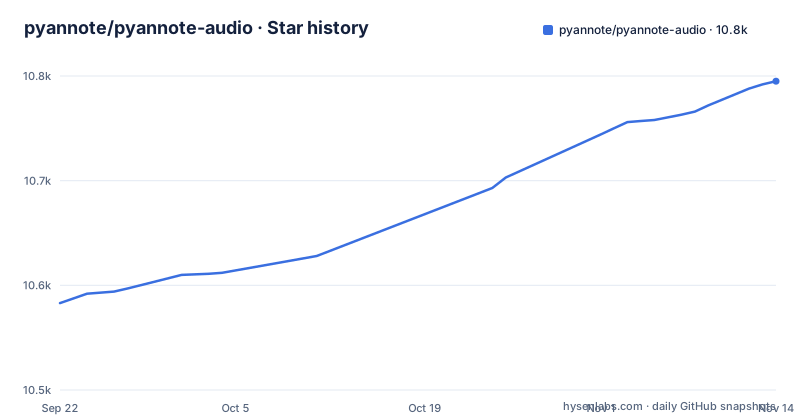
Star history
- pyannote/pyannote-audio10,795 ★ · +212
| Repository | 2026-09-22 | 2026-11-14 |
|---|---|---|
| pyannote/pyannote-audio | 10.6k | 10.8k |
212 Stars in the last 53 days, measured from the daily GitHub snapshot. Compare with other projects
Editorial analysis
Both pipelines are gated by a token, and community-1 needs a license click first
Two things have to line up before a single turn comes out. ffmpeg has to be installed on your machine, because torchcodec, the audio decoding library, depends on it. Then install with `uv add pyannote.audio`, which the README calls the recommended path, or `pip install pyannote.audio`. After that you still accept the user conditions on pyannote/speaker-diarization-community-1 and create a Hugging Face access token at hf.co/settings/tokens. Skip either step and `from_pretrained` has nothing to fetch, so the failure lands on the first line of your script rather than at install time, where a dependency error would have told you more.
import torch
from pyannote.audio import Pipeline
from pyannote.audio.pipelines.utils.hook import ProgressHook

# Community-1 open-source speaker diarization pipeline
pipeline = Pipeline.from_pretrained(
    "pyannote/speaker-diarization-community-1",
    token="HUGGINGFACE_ACCESS_TOKEN")

# send pipeline to GPU (when available)
pipeline.to(torch.device("cuda"))

# apply pretrained pipeline (with optional progress hook)
with ProgressHook() as hook:
    output = pipeline("audio.wav", hook=hook)  # runs locally

# print the result
for turn, speaker in output.speaker_diarization:
    pri
Two details in that snippet are load bearing. `pipeline.to(torch.device("cuda"))` is what puts the work on a GPU, and `ProgressHook` is imported from `pyannote.audio.pipelines.utils.hook` and handed in as the `hook` argument, which is how a long file reports progress. The comment on the pipeline call marks the part that matters most: runs locally. One more thing to know before this enters a regulated pipeline. The optional telemetry feature attaches to each call to `Pipeline.from_pretrained` or `Model.from_pretrained`, describes the metrics as anonymous and privacy preserving, and its tracking list branches first on whether the origin is an official pyannote or pyannoteAI project. Read the Telemetry section in full rather than assume the word anonymous settles the question.
precision-2 keeps the same call signature but moves the audio off your machine
The two pipelines differ by one model string and by where your recording ends up. Same import, same `from_pretrained` shape, same walk over `output.speaker_diarization`; what changes is the identifier passed in and the token you hand over. Underneath, the precision-2 call is marked runs on pyannoteAI servers, so the audio is uploaded to be processed and a credit balance attached to your key pays for it. You create that key at dashboard.pyannote.ai, where the README says you start with free credits. That is a hard constraint for a lot of teams, and this tier is not the local one.
from pyannote.audio import Pipeline

# Precision-2 premium speaker diarization service
pipeline = Pipeline.from_pretrained(
    "pyannote/speaker-diarization-precision-2", token="PYANNOTEAI_API_KEY")

output = pipeline("audio.wav")  # runs on pyannoteAI servers

# print the result
for turn, speaker in output.speaker_diarization:
    print(f"start={turn.start:.1f}s stop={turn.end:.1f}s {speaker}")
# start=0.2s stop=1.6s SPEAKER_00
# start=1.8s stop=4.0s SPEAKER_01
# start=4.2s stop=5.6s SPEAKER_00
# ...
Going the other way has its own limit. community-1 is the local tier, and the extra pyannoteAI capabilities the README points at, voiceprinting and confidence scores among them, are documented at docs.pyannote.ai rather than present in the local pipeline. So the decision is not local execution against hosted execution with an accuracy tiebreaker attached. It is a partition: audio that cannot leave your network rules precision-2 out entirely, and a team that needs speaker confidence or voiceprints has to look past the open pipeline. Note also that the README quotes precision-2's speed improvement for its self-hosted version.
The error rate table has one row where community-1 scores worse than 3.1
The benchmark table reports diarization error rate in percent, lower is better, and carries a last updated in 2025-09 stamp, so it is a snapshot rather than a live measurement. Precision-2 sits lowest on every row listed. Community-1 improves on the legacy 3.1 pipeline almost everywhere: AMI IHM 17.0 against 18.8, AliMeeting channel 1 20.3 against 24.5, DIHARD 3 full 20.2 against 21.4, Ego4D dev 46.8 against 51.2. The README credits that to better speaker counting and assignment.
There is a row that cuts the other way, and it is the one to read twice. REPERE phase 2 puts community-1 at 8.9 against 7.9 for legacy 3.1, so the newer open pipeline is worse there. VoxConverse v0.3 is level at 11.2 for both. Consequence for a reader whose recordings resemble that material: the spread between the two open options is about one point of error rate in the wrong direction, and nothing in the table tells you whether your audio looks like REPERE or like AMI. Measure your own files before choosing. The table also predates the 4.0.5, 4.0.6 and 4.0.7 releases listed in the repository, so it does not describe the code you would install today, and RAMC shows the largest relative hosted gain, 22.2 for 3.1 down to 10.5 for precision-2.
Speed is quoted per hour of audio on an H100 and nothing else
The second table answers a narrower question than most readers bring to it. It reports seconds per hour of audio for self-hosted runs on a single NVIDIA H100 80GB HBM3. On AMI IHM with roughly one hour files, community-1 takes 31s per hour of audio and precision-2 takes 14s, a 2.2x speedup. On DIHARD 3 full with roughly five minute files, 37s against 14s, a 2.6x speedup. The two rows use different file durations, so they are not a like for like view of one workload.
What the table does not give you is any figure for a CPU, a laptop GPU, or a single smaller card. It states no batch size, no numeric precision, and no hardware beyond the H100 name. Consequence for capacity planning: these numbers come from data center silicon and you cannot scale them down by a ratio you trust. Budget throughput by timing one real hour of your own audio on the machine you already own. The gap between 31s and 14s per hour of audio is a difference you only realize on hardware named in the footnote, and a reader on a workstation should assume neither figure applies.
The pyannote-audio command depends on an extra the base install leaves out
pyproject.toml registers a console script named `pyannote-audio`, pointing at `pyannote.audio.__main__:app`. Typer, the library that entry point needs, appears only in the optional-dependencies group `cli`, pinned at `typer>=0.15.1`, and is absent from the base dependency list. Nothing in the README's install steps asks for that extra, so a plain `uv add pyannote.audio` or `pip install pyannote.audio` gives you the library and the command name without the package the command imports. The failure arrives at invocation rather than at install, and the traceback points at an import instead of anything about diarization.
The other extras follow that same pattern: `test` pulls papermill and pytest, `doc` pulls sphinx and sphinx-rtd-theme, `separation` pulls asteroid and transformers, `dev` pulls ipython. The separation group is the one that most changes the shape of an install, since it brings in a second model stack for handling overlapped speech. The base install is already large, carrying torch and torchaudio at 2.8.0 or newer, torchcodec 0.7.0, lightning, pytorch-metric-learning, torch-audiomentations, safetensors, rich and matplotlib, plus the three opentelemetry packages for the telemetry feature. If you are sizing a container image for a diarization box, which extras you leave out is the difference that shows up in the image tag, and the README does not tell you which ones the pipelines need at inference time.
setup.py and pyproject.toml describe two different builds
pyproject.toml names the build backend as hatchling with hatch-vcs, takes the version from vcs, and ships packages from src/pyannote through the wheel target. It sets requires-python to >=3.11. The author field names Hervé BREDIN.
Because hatch-vcs derives the version from git tags, a local build can carry a version string that differs from a published release. Pin by release number, 4.0.7 being the newest listed, rather than trusting a locally derived version string.
You get speaker turns, not words, and the finetuning claims carry no command
The output type is the thing to understand first. `output.speaker_diarization` is an iterable of turn and speaker pairs, and each turn carries `start` and `end`, so what you get is who spoke during which interval, printed as start=0.2s stop=1.6s SPEAKER_00. No text field appears in that loop. Consequence for a reader: this is a segmentation tool, and pairing it with a speech recognizer means merging two independent timestamp sources yourself, with your own rule for what happens when a diarization boundary falls inside a word.
The gap is wider on the training side. The README says the pretrained models can be further finetuned to your own data for better performance, and it lists multi-GPU training with pytorch-lightning among the highlights, with lightning>=2.4 sitting in the base dependencies. The README's opening sections give no finetuning recipe, config file, or training command. The repository does hold notebook/, tutorials/, doc/ and tests/ directories, which is where that material would live. Plan on reading those or the project documentation site, because a finetuning claim with no command attached is a roadmap rather than a workflow, and the same caution applies to the overlapping speech detection and speaker embedding building blocks named in the repository description.
Editorial conclusion
Pick community-1 when the audio cannot leave your machine and you can accept the model terms and supply a token; pick precision-2 only when uploading recordings to a hosted service is acceptable and a pyannoteAI key plus credits are in hand. Before either, confirm ffmpeg is present, read the Telemetry section end to end, and time one real hour of your own audio on the hardware you already own, because the published speed numbers come from an H100.
Frequently asked questions
Is pyannote audio free?
The library is MIT licensed and installs with uv or pip. The community-1 pipeline runs locally once you accept its user conditions and pass a Hugging Face token, while precision-2 draws on free credits from a pyannoteAI account created at dashboard.pyannote.ai.
How accurate is Pyannote?
The README reports diarization error rate in percent, lower is better, with the table last updated in 2025-09. On AMI IHM, legacy 3.1 scores 18.8, community-1 17.0, precision-2 12.9. On REPERE phase 2 community-1 at 8.9 is worse than 3.1 at 7.9.
What is speaker diarization?
In this toolkit it is the pairing of time with a speaker label. Iterating output.speaker_diarization yields turn and speaker pairs, each turn carrying start and end, printed as start=0.2s stop=1.6s SPEAKER_00, with no text attached.
how to install pyannote audio
Install ffmpeg first, then run uv add pyannote.audio or pip install pyannote.audio. pyproject.toml requires Python 3.11 or newer, and the base dependencies include torch and torchaudio at 2.8.0, torchcodec 0.7.0 and lightning 2.4.
pyannote audio vs whisperx
The README does not compare the two. It does show that pyannote.audio returns speaker turns with start and stop times and no text, so an ASR stage is a separate component you add and align yourself.
pyannote audio alternative
The alternatives named in the README are the legacy speaker-diarization-3.1 pipeline and the hosted precision-2 service, with the error rate table using 3.1 as the baseline that community-1 is measured against.
Official sources
Add this badge to your README
If you maintain this project, the badge below links readers to this analysis and shows its maintenance status from the daily GitHub snapshot. Paste the markdown into your README; add ?metric=license or ?metric=stars to the image URL for a different field.

[](https://hysenlabs.com/projects/pyannote-pyannote-audio)Star history chart for your README
[](https://hysenlabs.com/projects/pyannote-pyannote-audio)Was this useful?