React Doctor: deterministic React checks for code your coding agent wrote
Your agent writes bad React. This catches it
At a glance
- What is it?
- millionco/react-doctor is a TypeScript CLI, plus oxlint and ESLint plugins, that scans React projects for state, effect, performance, security and accessibility problems. It is fast to try with one npx command, but it moves quickly, sends telemetry by default, and leaves most configuration detail to its docs site.
- Who is it for?
- React Doctor suits teams whose React code is increasingly written by agents such as Claude Code, Cursor, Codex or OpenCode and who want a deterministic gate on each pull request. Teams that need a frozen toolchain or no outbound data should wait or configure carefully: pin a version instead of @latest, pass --no-telemetry, and read the Data use page and the CI docs before wiring it into a pipeline.
- Can I use it commercially?
- Check first. The repository uses a licence we do not classify automatically, so read its LICENSE file before any commercial use.
- Is it still maintained?
- Yes. The repository last received commits 1 day ago.
- What is it written in?
- Mainly TypeScript, according to GitHub's language statistics.
Answers come from the project's GitHub data, last synced on November 15, 2026, and from our analysis. They are not legal advice.
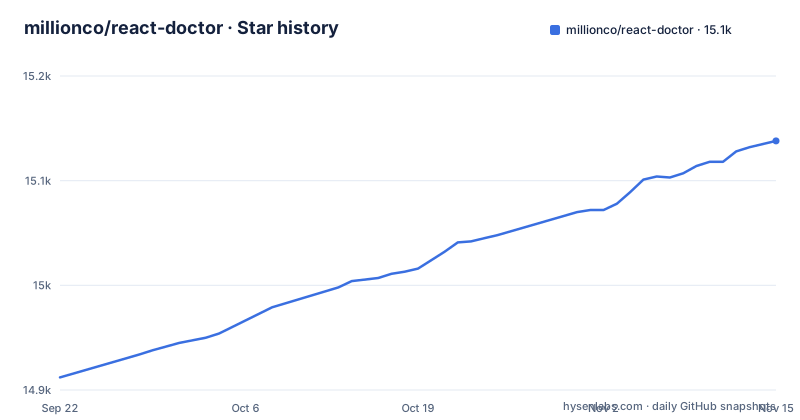
Star history
- millionco/react-doctor15,138 ★ · +226
| Repository | 2026-09-22 | 2026-11-15 |
|---|---|---|
| millionco/react-doctor | 14.9k | 15.1k |
226 Stars in the last 54 days, measured from the daily GitHub snapshot. Compare with other projects
Editorial analysis
Deterministic rules, not a model, decide what gets flagged
The project's tagline is blunt: your agent writes bad React, and this catches it. The interesting design choice is that the catching is not done by another language model. React Doctor runs deterministic checks on your code and groups what it finds into six areas: state and effects, performance, architecture, security, accessibility, and maintainability. That matters for anyone who already distrusts agent output. A deterministic checker gives the same answer on the same input, so a finding that appears on Monday will still be there on Tuesday, and a clean run means the rules found nothing rather than that a model felt confident. The trade is the usual one for static analysis: it only knows the patterns its rules encode. A design mistake that no rule describes will pass, however obviously wrong it looks to a human reviewer, so the scan is a floor for review rather than a replacement for it.
One npx entry point covers scans, agent skills and CI
Everything starts from the same published package, run through npx from the project root. A plain scan is the first step:
npx react-doctor@latestThe second subcommand installs a skill so that a coding agent can find and fix React issues itself. Claude Code, Cursor, Codex and OpenCode are the agents named as supported:
npx react-doctor@latest installThe repository layout backs this up. Alongside packages/ there are top-level skills/, .agents/, .claude and .cursor-plugin/ entries, plus AGENTS.md and CLAUDE.md, so the agent integration is part of the source tree rather than an afterthought. What the skill changes inside each agent, and which files it writes into your project, is covered on react.doctor rather than in the repository front page, so read that before letting it modify an agent setup that other people on your team share. The supported framework list is Next.js, Vite, Astro, TanStack, React Native and Expo; if your stack is outside that list, confirm support in the docs before treating a clean scan as meaningful.
CI mode reports what a pull request introduces, not the whole backlog
The third command sets the tool up to scan each pull request and report the issues that pull request introduces:
npx react-doctor@latest ci installScoping findings to the diff is the right default for an existing codebase. Running a new checker against a mature React app usually produces a long list of old problems, and a gate that fails on all of them gets switched off within a week. Reporting only new issues lets a team adopt the tool without first paying down every historical finding. The flip side is that the old problems stay invisible in CI. If you want a full inventory, you still need the plain scan run separately. The repository also carries a top-level action.yml, which points at GitHub integration, but which CI providers are supported and what ci install writes into your repository is detailed at react.doctor/ci, not on the repository front page. Check that page before running it on a repository with an existing workflow layout.
doctor.config.ts and the customRulesOnly switch
Rule selection and scan settings live in a TypeScript file, doctor.config.ts, at the project level. The one option spelled out on the repository front page is customRulesOnly, and it changes the meaning of the rest of the file. With customRulesOnly: true, only rules you set explicitly to "warn" or "error" in rules are enabled among the ported rules. Legacy rule names are still accepted, so an older config does not break when rules are renamed. Every other ported rule stays off, and so does the React Compiler plugin. In practice this turns the default deny list into an allowlist. That is useful when you want React Doctor to enforce a small, agreed set of checks without the noise of the full catalogue, but it also means a newly added rule will never reach you unless you name it. A team that flips this switch and forgets about it can end up with a gate that quietly checks far less than the six categories it advertises. The full schema is on the configuration docs page.
Runtime traces need a running app and a URL
Static checks cannot see how an app behaves when a user clicks around, so React Doctor adds a second mode. Point the scan subcommand at a running development server and it records a Chrome DevTools performance trace while you interact with the app:
npx react-doctor@latest scan http://localhost:3000This is a different kind of evidence from the rule findings. It depends on the app actually starting, on the pages you visit, and on what you do while the trace is recording. A slow interaction you never trigger will not appear in the trace, and the results will differ between runs because the interactions differ. The mode also relies on Chrome DevTools tracing, so it is a tool for a developer machine with the app served locally rather than a drop-in for the per pull request CI gate. How the trace is analysed and reported back is covered in the CLI reference under runtime performance traces.
Telemetry is on unless you pass --no-telemetry
The CLI collects crash reports and anonymous usage data by default. The opt-out is a flag: npx react-doctor@latest --no-telemetry. For individual developers this may be acceptable, but it has consequences for anyone running the tool in a regulated environment or on a client codebase. Because the opt-out is a per-invocation flag, every script, CI job and agent skill that calls the CLI has to carry it, and one forgotten call site sends data. The release script in package.json also runs a Sentry sourcemap upload step, which is consistent with crash reporting being part of how the maintainers debug the tool. What is collected, and where it goes, is set out on the Data use page at react.doctor/docs/legal/data-use. Read that before installing the agent skill, since an agent running the CLI on your behalf will not add the flag unless you configure it to.
Three packages at 0.9.22 and a moving @latest
React Doctor ships as more than a CLI. The latest release, published on 2 November 2026, tagged three packages at the same version: [email protected], [email protected] and [email protected]. The test script in package.json also names internal workspace packages including @react-doctor/core, @react-doctor/api, @react-doctor/fuzz and @react-doctor/evals, and the monorepo uses pnpm workspaces, turbo and changesets for versioning. The plugin packages mean the same rules can run inside an existing oxlint or ESLint setup rather than only through the standalone CLI. Two cautions follow. First, every documented command uses react-doctor@latest, so a CI job built from those commands will pick up new rules the day they are published, and a pull request that passed yesterday can fail today without any code change. Second, the project is still below 1.0, which gives no promise that rule names or config keys stay stable. Pin an explicit version in CI if you need reproducible results. The last push to main was on 2 November 2026, so the project is under current development.
License labels that do not agree
The repository front page ends with the words MIT-licensed, and there is a LICENSE file at the root. GitHub's own license detection, however, reports NOASSERTION for the repository, meaning it could not match the file to a standard license automatically. That does not by itself mean the code is not MIT, but it is a gap a legal or procurement review will notice. Before adding the ESLint or oxlint plugin to a commercial codebase, or vendoring any of the packages, open the LICENSE file and confirm its text rather than relying on either label. Running the CLI through npx carries the same question, since the package is fetched from npm on each run.
Editorial conclusion
React Doctor suits teams whose React code is increasingly written by agents such as Claude Code, Cursor, Codex or OpenCode and who want a deterministic gate on each pull request. Teams that need a frozen toolchain or no outbound data should wait or configure carefully: pin a version instead of @latest, pass --no-telemetry, and read the Data use page and the CI docs before wiring it into a pipeline.
Frequently asked questions
How to install React Doctor?
There is no separate install for a scan: run npx react-doctor@latest from the project root. Use npx react-doctor@latest install to add the skill for coding agents, and npx react-doctor@latest ci install to scan pull requests in CI.
What does React Doctor do?
React Doctor runs deterministic checks on React code and reports issues in state and effects, performance, architecture, security, accessibility, and maintainability. It can also record a Chrome DevTools performance trace against a running app with npx react-doctor@latest scan http://localhost:3000.
Is React Doctor free?
The repository states that React Doctor is MIT-licensed, and the CLI runs through npx without a separate install. GitHub's license detection reports NOASSERTION, so check the LICENSE file if licensing matters to you.
Is React Doctor safe to run?
The CLI collects crash reports and anonymous usage data by default. You can opt out with npx react-doctor@latest --no-telemetry, and the Data use page at react.doctor explains what is collected.
Official sources
Add this badge to your README
If you maintain this project, the badge below links readers to this analysis and shows its maintenance status from the daily GitHub snapshot. Paste the markdown into your README; add ?metric=license or ?metric=stars to the image URL for a different field.

[](https://hysenlabs.com/projects/millionco-react-doctor)Star history chart for your README
[](https://hysenlabs.com/projects/millionco-react-doctor)Was this useful?