Vertico for Emacs: vertical completion through the built-in minibuffer
:dizzy: vertico.el - VERTical Interactive COmpletion
At a glance
- What is it?
- Vertico.el replaces Emacs completion presentation with a vertical candidate interface while retaining the built-in completion system. It suits Emacs users who want predictable candidate navigation, history-aware sorting, and modular extensions without replacing completion tables.
- Who is it for?
- Emacs users who want a focused vertical completion interface backed by standard completion tables should adopt Vertico, especially if their editing workflow already relies on `completion-styles`, history, annotations, or categories. Users seeking fuzzy matching should verify Orderless separately, while users expecting a replacement for Emacs's candidate sources should review whether preserving the built-in system meets their requirements.
- Can I use it commercially?
- Yes, with conditions. GPL-3.0 is a copyleft licence: if you distribute software that includes it, you must release that software's source code under the same licence. Running it internally without distributing it does not trigger that obligation.
- Is it still maintained?
- Yes. The repository last received commits 12 days ago.
- What is it written in?
- Mainly Emacs Lisp, according to GitHub's language statistics.
Answers come from the project's GitHub data, last synced on October 23, 2026, and from our analysis. They are not legal advice.
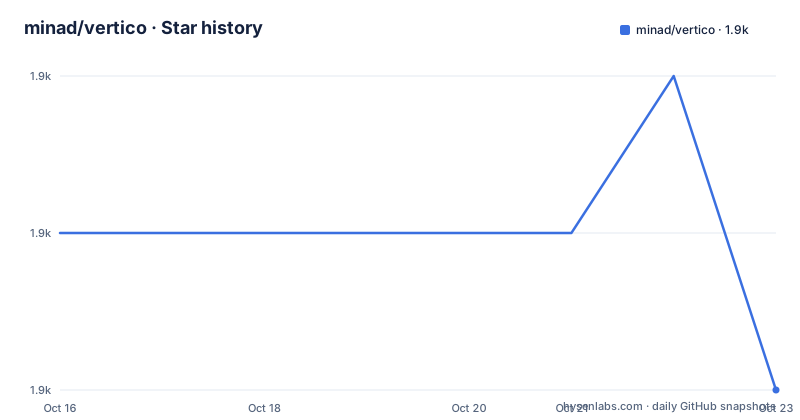
Star history
- minad/vertico1,894 ★ · -1
| Repository | 2026-10-16 | 2026-10-23 |
|---|---|---|
| minad/vertico | 1.9k | 1.9k |
-1 Stars in the last 7 days, measured from the daily GitHub snapshot. Compare with other projects
Editorial analysis
Vertico's place in the Emacs minibuffer
Vertico addresses candidate presentation in GNU Emacs. The default completion system can return a useful set of candidates, but Vertico changes how those candidates appear while it is selected: they are shown vertically, the current index is visible beside the prompt, and ordinary Emacs movement commands operate on the candidate list. This makes Vertico relevant to anyone who selects commands, buffers, files, symbols, or other completion values through the minibuffer.
The project deliberately stays within the built-in completion architecture. According to the README, it reuses the system facilities and therefore remains compatible with built-in completion commands and completion tables. Vertico is not presented as a separate fuzzy search engine or candidate database. It supplies the completion UI, while Emacs and the user's configured completion infrastructure determine which values are available.
That boundary is the central design decision. A user can retain familiar completion styles and still receive a different interface. The trade-off is that simply installing Vertico will not guarantee a particular kind of matching. Matching behavior belongs to `completion-styles` and related Emacs settings.
Candidate navigation in the vertico-local keymap
Vertico derives its minibuffer keymap from `minibuffer-local-map` and preserves most `fundamental-mode` bindings. Its replacements map movement and completion-related keys to Vertico commands. `next-line` and `previous-line` invoke `vertico-next` and `vertico-previous`, while `beginning-of-buffer` and `end-of-buffer` select the first and last entries. Vertical scrolling has corresponding Vertico commands.
The completion keys have a distinction worth checking before adoption. `TAB` runs `vertico-insert`, which inserts the selected candidate, while `RET` runs `vertico-exit`, which exits with the selected candidate. `M-RET` runs `vertico-exit-input` and exits with the minibuffer input itself. The README gives a concrete reason: creating a new file with `find-file` or opening a new buffer with `switch-to-buffer` requires submitting input that is not already an existing candidate.
Candidate groups are also included in the base interaction. `forward-paragraph` and `backward-paragraph` move through groups through `vertico-next-group` and `vertico-previous-group`. The README lists annotations, affixation, candidate formatting for multiline values, and lazy highlighting as part of the package.
Installing Vertico from ELPA or MELPA
Vertico is available through ELPA and MELPA. The shortest documented installation path uses Emacs's built-in package installation command. Run `M-x package-install RET vertico RET`, select the documented package source if it is not already configured, and then enable the global minor mode. The README gives activation as `M-x vertico-mode RET`; putting `(vertico-mode)` in the Emacs initialization file makes the setting persistent.
The repository also contains `vertico.el`, extensions, and an Emacs Lisp source layout. However, the README does not give a separate load-from-checkout command, dependency installation sequence, or test procedure. Based on the documented setup, package installation plus activation is the supported first step.
Vertico has no GitHub releases according to the repository listing, so the documented ELPA and MELPA distribution paths matter more than looking for versioned release assets on GitHub. The project uses `main` as its default branch.
A persistent Emacs configuration for Vertico
The following is the README's base `use-package` configuration, including the history and minibuffer settings associated with normal use. The `savehist` configuration persists history across Emacs restarts, which matters because Vertico sorts candidates using history position. The recursive-minibuffer setting allows new minibuffers to be opened from existing ones, and the prompt settings make the input portion read-only and intangible.
(use-package vertico
  :custom
  :init
  (vertico-mode))

(use-package savehist
  :init
  (savehist-mode))

(use-package emacs
  :custom
  (context-menu-mode t)
  (enable-recursive-minibuffers t)
  (read-extended-command-predicate
   #'command-completion-default-include-p)
  (minibuffer-prompt-properties
   '(read-only t cursor-intangible t face minibuffer-prompt)))
Start Emacs and invoke completion through a normal minibuffer command. Use the arrow keys to move through candidates, press `TAB` to insert the selected entry, or press `RET` to exit with it. If the input has no existing candidate, use `M-RET` to submit the input itself. The prompt should show the selected candidate's current index and the total candidate count.
Sorting, matching, and the scope of Vertico
Vertico sorts candidates using several documented criteria, including history position, frequency, length, and alphabetical order. This applies to the candidate set produced by the completion system rather than creating candidates independently. It also preserves standard completion categories, annotation functions, affixation functions, and group functions.
The README does not claim that the base package includes fuzzy or orderless matching. Instead, it directs readers toward Orderless as an optional complementary package and shows an `orderless` configuration that places `orderless` before `basic` in `completion-styles`. It also documents a file-specific override using `partial-completion` and enables a leading wildcard through `completion-pcm-leading-wildcard`.
That separation gives Vertico a smaller responsibility than some completion packages. It handles the visible list, navigation, insertion, exit behavior, grouping, and presentation. Emacs continues to handle collection and completion styles. The trade-off is that evaluating matching quality requires inspecting the active Emacs completion configuration as well as Vertico itself.
Vertico extensions, limitations, and alternative approaches
The repository has a dedicated `extensions/` directory, and the README states that additional display modes are available as extensions. Vertico-multiform-mode, for example, can add a minibuffer context menu for switching display modes. Extensions expand presentation and interaction, but they also enlarge the configuration surface and can introduce key bindings or behavioral settings outside the main package.
Vertico is the wrong choice if the goal is to replace Emacs's completion data model with a standalone fuzzy finder. Its documented mechanism is intentionally the opposite: it presents candidates from the built-in completion system. Users who need fuzzy matching should evaluate Orderless or configure another matching style, rather than assuming the vertical interface supplies it.
A useful alternative approach is to keep the default completion UI and modify `completion-styles`, or to install a package centered on fuzzy candidate matching. Such a setup leaves more of the interaction unchanged, but it does not gain Vertico's vertical candidate model. The actual decision depends on whether presentation and candidate navigation matter more than matching semantics.
Maintenance, licensing, and upgrade considerations
The repository is not archived, and its last push was on 2026-10-11. The repository has no GitHub releases, so users should not infer a release cadence or upgrade compatibility history from GitHub release metadata.
Vertico is licensed under GPL-3.0. Distribution and use therefore involve the terms of that license, including its notice and license obligations. This article does not interpret those terms; the repository's `LICENSE` file is the relevant source for the exact license text.
Because Vertico builds on built-in Emacs completion commands and tables, upgrades should be evaluated together with changes to Emacs configuration, completion styles, and enabled extensions. The base package is separate from packages such as Orderless and savehist, so a working setup can involve several independently configured components.
Editorial conclusion
Emacs users who want a focused vertical completion interface backed by standard completion tables should adopt Vertico, especially if their editing workflow already relies on `completion-styles`, history, annotations, or categories. Users seeking fuzzy matching should verify Orderless separately, while users expecting a replacement for Emacs's candidate sources should review whether preserving the built-in system meets their requirements. Before changing an existing Emacs setup, check key bindings, recursive minibuffers, history configuration, and the boundary between Vertico itself and its extensions.
Frequently asked questions
How do I install and enable Vertico in Emacs?
Install it from ELPA or MELPA with `M-x package-install RET vertico RET`, then activate it with `M-x vertico-mode RET`. The README recommends placing `(vertico-mode)` in the Emacs initialization file.
What is the difference between pressing TAB, RET, and M-RET in Vertico?
`TAB` runs `vertico-insert` to insert the current candidate, `RET` runs `vertico-exit` to exit with the selected candidate, and `M-RET` runs `vertico-exit-input` to submit the current minibuffer input.
Does Vertico provide fuzzy or orderless completion by itself?
The README describes Vertico as a completion UI based on Emacs's default completion system. It presents Orderless as an optional complementary package and documents separate settings for using the `orderless` style.
Official sources
Add this badge to your README
If you maintain this project, the badge below links readers to this analysis and shows its maintenance status from the daily GitHub snapshot. Paste the markdown into your README; add ?metric=license or ?metric=stars to the image URL for a different field.

[](https://hysenlabs.com/projects/minad-vertico)Star history chart for your README
[](https://hysenlabs.com/projects/minad-vertico)Was this useful?