anarlog: A Local-First Meeting Notetaker That Keeps the Bot Out of Your Call
Open source Granola AI Alternative. How to use it Download the latest release for your platform: github.com/fastrepl/anarlog/releases/latest Open it and join a meeting.
At a glance
- What is it?
- anarlog is an open-source, MIT-licensed desktop app that records and transcribes meetings on your own device, stores data in SQLite, and lets you bring your own AI. It is a practical alternative to Granola for privacy-conscious individuals and organizations that need to pass a security review.
- Who is it for?
- Adopt anarlog if you need AI meeting notes without a bot in the participant list and you want the data to live on your machine, or if you must get a notetaker through a security review and need readable source. Skip it if you require a polished mobile app or a fully managed cloud service, since the mobile client is a beta and cloud features are opt-in.
- Can I use it commercially?
- Yes. MIT is a permissive licence: you can use, modify and sell software built on it, as long as you keep its copyright and licence notices.
- Is it still maintained?
- Yes. The repository last received commits 2 days ago.
- What is it written in?
- Mainly TypeScript, according to GitHub's language statistics.
Answers come from the project's GitHub data, last synced on November 14, 2026, and from our analysis. They are not legal advice.
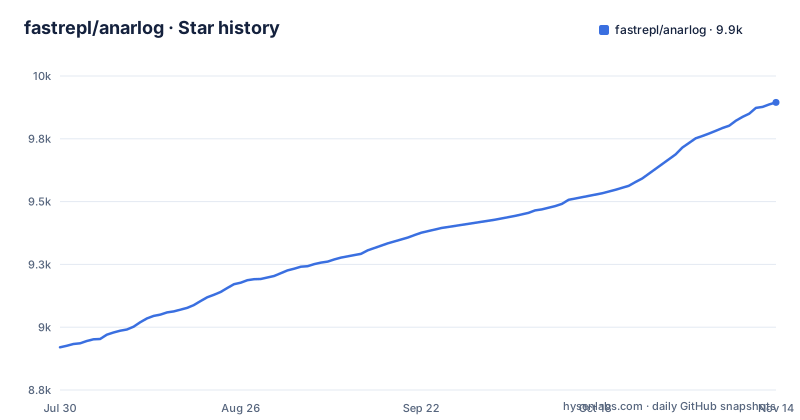
Star history
- fastrepl/anarlog9,895 ★ · +975
| Repository | 2026-07-30 | 2026-11-14 |
|---|---|---|
| fastrepl/anarlog | 8.9k | 9.9k |
975 Stars in the last 107 days, measured from the daily GitHub snapshot. Compare with other projects
Editorial analysis
What anarlog Actually Does Differently
Most AI meeting notetakers either join the call as a participant or upload the audio to a vendor's cloud. anarlog takes a different route: it captures audio directly from your device, so nothing appears in the participant list and no separate bot is involved. The README is explicit that it is built for people who want AI meeting notes without handing conversations to someone else's cloud, and for anyone who needs to get a notetaker past a security review. That positioning is the core of the project. It is not a cloud service with a local skin; it is a local-first application where cloud features like encrypted CloudSync and sharing are off by default and optional. The repository map shows a desktop app built with Tauri v2, a React and TypeScript UI, and a Rust backend, which is a sensible stack for a local audio-processing tool that needs to be cross-platform but still feel native.
The Data Flow: From Device Audio to Editable Notes
The workflow is divided into distinct stages, and each stage can use a different engine. Audio capture and recording happen on your device. Transcription can also happen on your device, on supported Macs, using built-in models. The README lists Soniqo or Apple Speech as local transcription options when available. For summaries, titles, and chat, you can choose a local model, your own API key, or an OpenAI-compatible local server such as Ollama, LM Studio, or Unsloth. The key design choice is that transcription and intelligence are decoupled. You can change the transcription model without touching the language model used for summaries, and vice versa. The active provider and model are always visible under Settings → Transcription and Settings → Intelligence. That transparency is rare in this category and directly addresses the auditability that security teams ask for.
Storage: SQLite and Plain Files, No Hidden Formats
Sessions, notes, and transcripts are stored in a local SQLite database. Recordings and attachments are plain local files. That means you can read the data without the application, which is a significant advantage over proprietary notetakers that lock notes into their own format. The README also mentions export to Markdown, so you can move notes into any other tool. The repository map confirms that the desktop app includes plugins for local STT, database access, calendar, export, and notifications. These are Tauri capabilities, which suggests the app is designed to be extended at the system level. For a security review, the ability to point at a SQLite file and say 'this is where everything lives' is more convincing than a promise of encrypted cloud storage.
Getting It Running: Commands and Requirements
The easiest path is to download the latest release from the GitHub releases page, open it, and join a meeting. The latest desktop release on GitHub is desktop_v1.4.34, published on 2026-10-29. For developers who want to build from source, the README points to its Local development section, and package.json defines dev scripts such as pnpm dev:desktop and pnpm dev:web, uses pnpm 11.1.1 as its package manager and requires Node 22.23.4 or later on the 22 line (or 24.22.1+, or 26.12.1+). The README says cloud features are opt-in, not required.
The Cloud Path: Optional but Not a Sideshow
While the core is local-first, anarlog does offer hosted services. The apps/api directory contains optional hosted services for AI, sync, sharing, and integrations. The README describes two managed options: Pro (Cloud) transcription, which prefers Soniox 5 for live and batch transcription, with eligible fallbacks based on language and mode, and Auto intelligence, which uses the latest Claude Sonnet alias through OpenRouter. These are current routes, and the docs page Models and providers is the source of truth for what is active. The important nuance is that these cloud routes are not the default for everything. The README says cloud is opt-in, not required. That means an organization can run the app entirely locally, but if a user wants the convenience of managed transcription, they have to trust anarlog's cloud path. The privacy boundary is therefore not absolute; it is a choice per feature.
Limitations: Where anarlog Is the Wrong Tool
The mobile client is still a beta: the README describes apps/mobile as an iOS and Android client available through TestFlight and Google Play, and apps/watch/apple as a watchOS companion source built with the mobile app. Another limitation is that the README describes built-in on-device transcription on supported Macs, so check the docs for local options on other platforms. The README also notes that the team is now building char, and that anarlog remains maintained as the community application. That split could mean slower feature development for anarlog, though the repository shows ongoing releases. Finally, the enterprise components are source-visible but commercially licensed, so the MIT license does not cover everything in the repo. If you plan to fork the entire repository, you need to respect that boundary.
Alternatives: Granola and the Bring-Your-Own-AI Approach
The direct alternative is Granola, the app that anarlog explicitly positions against. anarlog's differentiator is that it can transcribe on-device, stores data in SQLite, and lets you bring your own AI provider. That is a fundamentally different approach from a vendor that controls both the app and the AI pipeline. Another alternative is to use a generic OpenAI-compatible local server like Ollama or LM Studio directly, but then you lose the meeting-specific features such as audio capture, diarization, and note editing. anarlog sits in between: it handles the meeting logistics locally, and you plug in the model. The trade-off is that you have to configure the model yourself, which is more work than a fully managed service, but it gives you control over where your conversation data goes.
Maintenance and License: What to Expect
The repository is actively maintained, with releases coming out frequently, the latest on 2026-10-29. The project uses a monorepo structure with apps, plugins, crates, and packages, which suggests a mature codebase. The license is MIT for the community application, which is permissive and allows commercial use. However, the enterprise/ directory is source-visible but commercially licensed, so you cannot freely reuse that part. The README also mentions that the team is now focused on char, which could affect long-term maintenance of anarlog. There is a CONTRIBUTING.md file, and a DeepWiki link for code-indexed explanations. For an organization, the maintenance cost is manageable if you stick to the stable desktop releases, but you should expect to handle your own AI provider configuration and possibly build from source if you need the latest features. The optional hosted services add complexity, but they are not required for the core local-first experience.
Editorial conclusion
Adopt anarlog if you need AI meeting notes without a bot in the participant list and you want the data to live on your machine, or if you must get a notetaker through a security review and need readable source. Skip it if you require a polished mobile app or a fully managed cloud service, since the mobile client is a beta and cloud features are opt-in. Before adopting, verify the current transcription and intelligence provider routes in the docs, confirm that your Mac supports the on-device models you intend to use, and check whether the commercial license for enterprise components affects your deployment. The project is MIT-licensed for the community app, but the enterprise directory is source-visible and commercially licensed, so read that boundary before building on it.
Frequently asked questions
What are some open source meeting transcription software options?
anarlog is one open source option: MIT licensed for the community application, recording audio on your own device instead of sending a bot into the call, keeping sessions and transcripts in local SQLite, and offering macOS, Windows, and Linux downloads with iOS and Android clients in beta through TestFlight and Google Play.
Does anarlog join my meeting as a participant?
No. It listens to your device audio and nothing appears in the participant list, with nothing recording from inside the meeting. The tradeoff is that capture depends on the machine you are already using, so a meeting joined from a shared or borrowed computer produces no recording and no transcript.
Which models does the managed cloud option use in anarlog?
For transcription, Managed Pro (Cloud) prefers Soniox 5 for live and batch transcription, with eligible fallbacks based on language and mode. For summaries, titles, and chat, Managed Auto, also shown as Pro (Cloud), currently uses the latest Claude Sonnet alias through OpenRouter.
Can anarlog transcribe and summarize without sending audio anywhere?
On supported Macs the available built-in transcription models run on-device and Local Intelligence providers keep summaries and chat on your computer too. The other local route is an OpenAI-compatible server such as Ollama, LM Studio, or Unsloth, or your own API key, since the built-in on-device models described are Soniqo or Apple Speech and eligible Apple Intelligence.
Is everything in the anarlog repository covered by the MIT license?
No. The community application is MIT licensed, while source-visible enterprise components are commercially licensed, and the repository carries LICENSE, LICENSE.enterprise, and LICENSING.md separately. Check LICENSING.md before assuming an internally hosted build falls under the MIT terms.
Official sources
Where developers are discussing it
Posts on Hacker News, dev.to and Lobsters that link to this repository, found by our scan of those communities. 1 in the last 30 days; newest first.
- Anarlog: Open-Source Granola AI AlternativeHacker News · Nov 9, 2026 · 4 points · 0 comments
Add this badge to your README
If you maintain this project, the badge below links readers to this analysis and shows its maintenance status from the daily GitHub snapshot. Paste the markdown into your README; add ?metric=license or ?metric=stars to the image URL for a different field.

[](https://hysenlabs.com/projects/fastrepl-anarlog)Star history chart for your README
[](https://hysenlabs.com/projects/fastrepl-anarlog)Was this useful?