ghostty-ubuntu packages a terminal emulator for Ubuntu and Debian
Ubuntu/Debian (.deb) packages for Ghostty
At a glance
- What is it?
- This repository holds the build scripts that produce an unofficial Debian package and a Launchpad PPA for the Ghostty terminal, for people who want a version newer than their distribution ships. It is a packaging effort rather than a fork, and the author is explicit about the division of labour.
- Who is it for?
- Adopt this repository if you run Ubuntu or Debian and want the Ghostty terminal from a package rather than a tarball, since the PPA gives you automatic updates through apt. Do not adopt it if your distribution already ships a current enough version, because the project says so itself: the official Ubuntu repositories have carried Ghostty since 26.04 and may be the better route.
- Can I use it commercially?
- Not without permission. GitHub finds no licence file in the repository, and without a licence all rights are reserved by default: you may read the code but not reuse it. Check the README, or ask the authors, before using it.
- Is it still maintained?
- Yes. The repository received new commits within the last day.
- What is it written in?
- Mainly Shell, according to GitHub's language statistics.
Answers come from the project's GitHub data, last synced on November 7, 2026, and from our analysis. They are not legal advice.
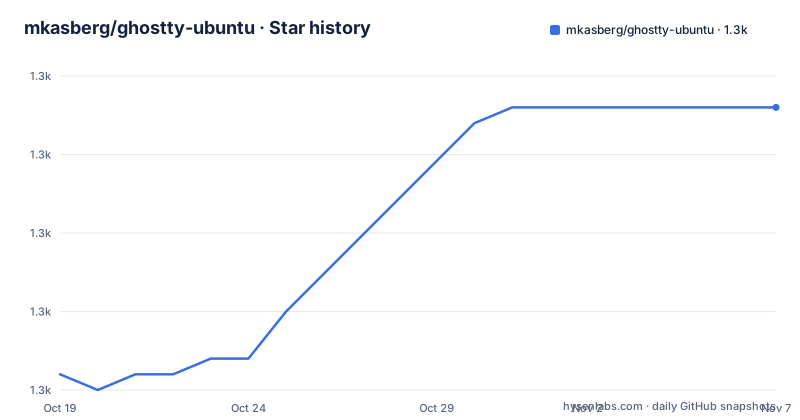
Star history
- mkasberg/ghostty-ubuntu1,283 ★ · +17
| Repository | 2026-10-19 | 2026-11-07 |
|---|---|---|
| mkasberg/ghostty-ubuntu | 1.3k | 1.3k |
17 Stars in the last 19 days, measured from the daily GitHub snapshot. Compare with other projects
Editorial analysis
This is packaging, not a fork of the terminal
The scope is stated in the first paragraph and it is worth being precise about it. The repository contains build scripts to produce an unofficial Ubuntu and Debian package and a PPA for Ghostty, and it is described as an unofficial community project to provide a package that is easy to install on Ubuntu. It is not the terminal's source code: for that the README points to the ghostty-org/ghostty repository, and the homepage link goes to ghostty.org. The reason the project exists is that Ghostty relies on the community to produce packages for the non-macOS platforms, so someone had to do it for Debian derivatives, and this is that someone. The author's stated goal is simple, to have an easy-to-install Ghostty package for Ubuntu, and he invites issues and pull requests on the scripts.
The PPA is the recommended path, and it is three commands
For anyone who can use a PPA, the install is adding the Launchpad repository and installing the package:
sudo add-apt-repository ppa:mkasberg/ghostty-ubuntu
sudo apt update
sudo apt install ghostty
After that, updates happen automatically through apt, which is the main practical advantage over any other install method on a distribution with a package manager. The alternatives exist for people who cannot use a PPA, do not want to use one, or are on a distribution the PPA does not support. The curl route pipes an install script straight into a shell, which is the fastest option and the one with the least review opportunity, and the manual route is to download the .deb for your OS, version and architecture from the releases page and install it with apt. Updating is the same as installing, since there is no need to uninstall the old version first and it will be updated correctly.
The official Ubuntu package may already be enough
The note at the top of the README is the most useful thing in the document, and it changes the decision for a lot of people. Ghostty is in the official Ubuntu repositories for Ubuntu 26.04 and later, so a plain `sudo apt install ghostty` works there. The caveat is version lag: as of May 2026 the official repositories provide Ghostty 1.3.0 while the PPA provides 1.3.1, so the distributions can be behind by a release. The project takes an even-handed view of it, saying that if the official packages are recent enough that may be the better option, and that the PPA is for people who want the most recent version. That is a good default position for a community packaging project, and it means the right answer for a given machine depends on what its distribution already ships.
Which distributions and architectures are covered
The supported operating systems list is short and specific, and there are amd64 and arm64 builds for each. The list covers Ubuntu 26.04 Resolute Raccoon, Ubuntu 24.04 LTS Noble Numbat with the caveat that it is supported up to Ghostty 1.3.1, Debian Forky and Debian Trixie. That the Ubuntu 24.04 entry carries a version ceiling is a useful detail, since it tells you the PPA will not track newer Ghostty releases on that release. The release tags follow the Debian versioning convention for the PPA builds, with names like 1.3.1-0~ppa1 and 1.3.1-0~ppa2, where the ppa suffix distinguishes the successive rebuilds of the same upstream version. The most recent of those is 1.3.1-0~ppa2 from 2026-04-01, and the last push to the main branch was on 2026-08-07.
Building locally means a Docker image with a pinned Zig
The binary build is the easier of the two to reproduce, and the documented path goes through a container so that your laptop is not the build environment. The image is built with the distribution, its version and a Zig version as build arguments:
docker build -t ghostty-ubuntu:latest --build-arg DISTRO=ubuntu --build-arg DISTRO_VERSION=26.04 --build-arg ZIG_VERSION=0.15.2 build-binary/That container is then used to produce the .deb, with the workspace mounted so the output lands in your checkout:
docker run --rm -v$PWD:/workspace -w /workspace ghostty-ubuntu:latest /bin/bash build-binary/build-ghostty.shYou can run the same script on your own system if you install all the build dependencies listed in the Dockerfile. The repository top level shows the shape of the project, with `build-binary/` and `build-ppa/` directories, the `install.sh` script, a `ppa_stats.py` helper and a `.github/` directory. The PPA package build is explicitly left as an exercise for the reader, which is a candid way of saying that path is not documented.
The workflows are the build documentation
The contributing section says something that is true of a lot of packaging repositories: the GitHub Actions workflows are the most up-to-date documentation of the build process. Three of them are named, `binary-build.yml`, `ppa-build-zig.yml` and `ppa-build-ghostty.yml`, and the split is informative. A separate Zig build workflow and a separate Ghostty build workflow mean the packaging of the Zig compiler toolchain and the packaging of the terminal itself are independent steps, which is the right structure when the compiler toolchain and the application have different release cadences. CI runs on each pull request to test that a build can be produced, which for a packaging repository is the test that matters: a package that does not build is a package that cannot be published. The repository has no licence identifier recorded, which is a small oddity for a project you might want to reuse the scripts from.
Editorial conclusion
Adopt this repository if you run Ubuntu or Debian and want the Ghostty terminal from a package rather than a tarball, since the PPA gives you automatic updates through apt. Do not adopt it if your distribution already ships a current enough version, because the project says so itself: the official Ubuntu repositories have carried Ghostty since 26.04 and may be the better route. Verify first which Ghostty version the official repository gives you against the PPA version, and note that the repository carries no licence identifier, so treat the build scripts accordingly if you plan to reuse them.
Frequently asked questions
How do I install Ghostty on Ubuntu using this PPA?
Add the Launchpad PPA with `sudo add-apt-repository ppa:mkasberg/ghostty-ubuntu`, then run `sudo apt update` and `sudo apt install ghostty`. After that, updates to Ghostty come automatically through apt.
Is Ghostty in the official Ubuntu repositories?
Yes, for Ubuntu 26.04 and later, where `sudo apt install ghostty` works. The README notes that as of May 2026 the official repositories provide Ghostty 1.3.0 while the PPA provides 1.3.1, so the official package may be recent enough for your needs.
Which Ubuntu and Debian versions does ghostty-ubuntu support?
amd64 and arm64 builds for Ubuntu 26.04 Resolute Raccoon, Ubuntu 24.04 LTS Noble Numbat up to Ghostty 1.3.1, Debian Forky and Debian Trixie.
How do I install the package without a PPA?
There is a curl one-liner that runs the install script from the repository, or you can download the .deb for your OS, version and architecture from the releases page and install it with `sudo apt-get install ./ghostty_*.deb`.
How do I build the .deb package locally?
Build the Docker image with `docker build -t ghostty-ubuntu:latest --build-arg DISTRO=ubuntu --build-arg DISTRO_VERSION=26.04 --build-arg ZIG_VERSION=0.15.2 build-binary/`, then run it with the workspace mounted to produce the package using build-binary/build-ghostty.sh.
Official sources
Add this badge to your README
If you maintain this project, the badge below links readers to this analysis and shows its maintenance status from the daily GitHub snapshot. Paste the markdown into your README; add ?metric=license or ?metric=stars to the image URL for a different field.

[](https://hysenlabs.com/projects/mkasberg-ghostty-ubuntu)Star history chart for your README
[](https://hysenlabs.com/projects/mkasberg-ghostty-ubuntu)Was this useful?