Pegasus Frontend for Cross-Platform Emulator Libraries
A cross platform, customizable graphical frontend for launching emulators and managing your game collection.
At a glance
- What is it?
- Pegasus Frontend is a customizable C++ and Qt application for browsing game collections and launching emulators across desktop, mobile, and embedded systems. Its main appeal is theme control and compatibility with EmulationStation gamelist files, while its source build requires Qt 5.15 or later.
- Who is it for?
- Pegasus Frontend is a reasonable choice for users who want a highly themeable launcher across desktop, mobile, and Raspberry Pi systems, especially when they already use EmulationStation-style gamelists. It is less suitable for users who need documented emulator configuration, setup automation, or a clear platform-specific installation path in the repository README.
- Can I use it commercially?
- Check first. The repository uses a licence we do not classify automatically, so read its LICENSE file before any commercial use.
- Is it still maintained?
- Yes. The repository last received commits 15 days ago.
- What is it written in?
- Mainly C++, according to GitHub's language statistics.
Answers come from the project's GitHub data, last synced on October 23, 2026, and from our analysis. They are not legal advice.
Star history
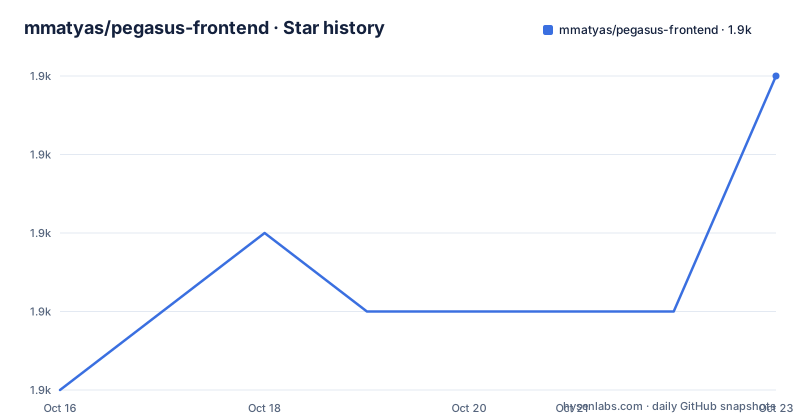
- mmatyas/pegasus-frontend1,915 ★ · +4
| Repository | 2026-10-16 | 2026-10-23 |
|---|---|---|
| mmatyas/pegasus-frontend | 1.9k | 1.9k |
4 Stars in the last 7 days, measured from the daily GitHub snapshot. Compare with other projects
Editorial analysis
Pegasus Frontend's Problem and Intended Users
Pegasus Frontend addresses the fragmentation that appears when a person owns games for emulators running on several systems. Instead of opening each emulator separately, the project provides one graphical interface for browsing a library and starting games. The README identifies Windows, Linux, Mac, Android, Raspberry Pi systems, and Odroids as supported or possible targets. It also states that the application can run on embedded devices, with hardware acceleration and operation with or without X11.
The intended user is someone who already has an emulator setup and wants a single presentation layer for it. Pegasus does not document itself as an emulator, a ROM manager, or a tool that downloads game content. Its role is the frontend: organizing the collection, displaying metadata and artwork, presenting menus, and handing a selected game to an emulator. The project also targets users who care about interface design. Its documentation says themes can add or remove visual elements, menu screens, and animations, and the README shows that custom shader code is possible.
This makes Pegasus different from a conventional launcher whose interface is fixed by the application. It is also relevant to users moving between a full desktop and a small embedded system, provided they can prepare the metadata, themes, and emulator commands for each environment. The project is less suitable for a user who expects the frontend to discover, install, and configure every emulator automatically. The repository does not promise that behavior.
Qt and QML Architecture Behind Pegasus
Pegasus is written primarily in C++ and uses Qt 5.15.0 or later. The stated Qt modules are QML and QtQuick2, Multimedia, SVG, and SQL with SQLite v3. Gamepad input comes from either SDL, version 2.0.4 or later, or Qt Gamepad. This combination places the application in the Qt Quick and QML ecosystem, while still using C++ for the executable.
The repository includes `src/`, `assets/`, `lang/`, `doc/`, and `thirdparty/`, along with both `pegasus.pro` and `CMakeLists.txt`. Those files indicate a project with an application layer, packaged resources, translations, documentation, dependencies, and test coverage under `tests/`. The README does not provide a complete data-flow diagram, so the exact division between C++ services and QML views is not documented here. It does, however, state that themes can change the entire screen and that live theme reload is supported. That implies that the presentation layer is intended to be replaceable or reloadable rather than fixed in the executable.
SQLite is named as a dependency, and the project describes compatibility with EmulationStation gamelist files. The documented compatibility boundary is important: Pegasus can use an existing gamelist format, but that does not mean every EmulationStation deployment, metadata extension, or artwork convention is supported in the same way. Users should inspect the relevant configuration guide before assuming that an existing collection will work unchanged.
Downloads, Build Dependencies, and a First Source Build
The README sends users to the project website for downloads and platform-specific notes, and to the documentation site for configuration guides. It does not give a single installation command for Windows, Linux, Mac, Android, or Raspberry Pi systems. For a first source build, the documented prerequisites are a C++11-compatible compiler, Qt 5.15.0 or later, QML and QtQuick2, Multimedia, SVG, SQL with SQLite v3, and either SDL 2.0.4 or later or Qt Gamepad.
The repository uses Git submodules. After cloning or updating the repository, initialize them with this command:
git submodule update --initThe README says to call this after every repository update. Once the required Qt development files and the source dependencies are present, the documented manual build starts by creating a build directory and invoking `qmake`:
mkdir build && cd build
qmake ..
make
This produces the build in the `build` directory. The README does not specify the resulting executable name, so users should consult the build output and the platform documentation rather than assume one. The source tree also includes tests. They can be invoked with the documented target:
make checkAn optional installation step is available:
make installThe README points to the build guide for additional parameters. It also says that Qt Creator can be used. The commands above are therefore a source-build path, not a replacement for the website's platform-specific installation instructions.
Theme Control and EmulationStation-Compatible Collections
The most distinctive feature is the degree of control offered over the interface. According to the README, a theme can change everything visible on screen, including the arrangement of interface elements, menu screens, and animations. The project documentation presents this as a way to make the frontend resemble other launcher styles or create a different visual layout. A clock, multiple aspect ratios, portable mode, gamepad support, and gamepad configuration are listed as expected features.
The project also supports EmulationStation gamelist files. That compatibility reduces the need to create a separate toolchain or collection format when a user already has metadata prepared for an EmulationStation setup. It does not eliminate configuration work. The README does not document a complete field mapping, conflict policy, or automatic repair process for malformed or incomplete gamelist entries. Those details need to be checked in the configuration documentation before migrating a large library.
Custom shader support gives theme authors a lower-level presentation option, but it also raises the knowledge required to maintain a theme. A broken shader, missing asset, or incompatible Qt rendering behavior could affect the frontend even when the underlying emulator and game files remain unchanged. Pegasus gives theme authors considerable freedom, so the cost of that freedom is that the project cannot guarantee every custom theme will work identically across every supported platform.
Platform Boundaries and Practical Failure Modes
Pegasus is broad in its platform claims, but the repository provides more detail about building the source than about validating every target. Windows, Linux, Mac, Android, Raspberry Pi systems, and Odroids are named, while other devices are described as possible rather than guaranteed. The README does not document a universal dependency installer, emulator discovery mechanism, or per-platform command format. A user deploying Pegasus on an embedded device will still need the platform notes from the project website.
A second limitation is the separation between launching and configuring. Pegasus is the frontend, so the emulator executable, game directory, arguments, permissions, and platform-specific path syntax remain outside the frontend unless the theme or configuration supplies them. The README does not provide a complete emulator setup example in the displayed installation section. A missing emulator binary or an incorrect command can therefore look like a launcher failure even when Pegasus itself is functioning.
The project also does not claim to manage game acquisition. Users must provide the collection and whatever assets their theme and metadata reference. The repository's compatibility with EmulationStation gamelists helps with metadata, but it does not create missing ROMs, repair artwork, or resolve rights to distribute game files.
Pegasus Frontend Compared with Fixed-Launcher Workflows
The closest practical alternative is to use separate emulator frontends or launch emulators directly, with the operating system's file browser, shortcuts, or a fixed launcher interface. That approach has less theme customization, but it avoids adding a separate Qt-based application between the user and the emulator. It can also be simpler when a user has one emulator and one directory.
Another alternative is an EmulationStation-style frontend that treats its own gamelist and theme conventions as the primary interface. Pegasus explicitly supports EmulationStation gamelist files, so the practical difference is not necessarily the metadata format alone. It is the stated emphasis on fully theme-controlled QML presentation, cross-platform and embedded deployment, and features such as live theme reload. Users who need a highly customized interface have a reason to choose Pegasus. Users who need a fixed, immediately familiar launcher may prefer a solution with fewer presentation choices.
The repository does not provide a benchmark comparison or claim that Pegasus is faster than other launchers. Any performance decision should therefore be based on the target hardware and the selected theme, not on an undocumented claim in the README.
Pegasus Frontend Maintenance, Releases, and License
The repository is not archived. Its last push was on 2026-10-08. The release list includes a `continuous` build dated 2026-09-15, a weekly release from 2024, and an earlier weekly release from 2023. This shows both continuous-build and weekly-release naming, but the repository information does not define a support window for either channel. The last push date is a repository fact, not a guarantee that every platform or theme has received a recent fix.
The README identifies Pegasus Frontend as GPLv3 and directs readers to `LICENSE.md`. It also warns that some included assets, including product logos and symbols, may not be available for commercial use and may require permission from their owners. Trademark use may be limited under GPLv3 section 7. The repository metadata describes the license as a custom license that GitHub cannot classify, so the practical license status should be resolved by reading `LICENSE.md` and checking the terms for any separately distributed assets. This is a licensing review point, not legal advice.
For upgrades, the README specifically says to run the Git submodule update command after repository updates. Users maintaining custom themes should also account for the possibility that theme APIs, Qt dependencies, or platform packaging details may change, because the repository does not publish a detailed compatibility matrix in the displayed documentation.
Editorial conclusion
Pegasus Frontend is a reasonable choice for users who want a highly themeable launcher across desktop, mobile, and Raspberry Pi systems, especially when they already use EmulationStation-style gamelists. It is less suitable for users who need documented emulator configuration, setup automation, or a clear platform-specific installation path in the repository README. Verify the platform download instructions, theme format, emulator command configuration, and the exact terms in LICENSE.md before adoption. The repository's last push was on 2026-10-08, but that does not by itself establish how stable each platform build is.
Frequently asked questions
How do I build Pegasus Frontend from source?
Install a C++11-compatible compiler, Qt 5.15.0 or later, the listed Qt modules, and either SDL 2.0.4 or later or Qt Gamepad. Initialize submodules with `git submodule update --init`, then run `qmake ..` and `make` from a build directory.
Does Pegasus Frontend support EmulationStation game libraries?
Yes. The README states that Pegasus can use EmulationStation's gamelist files, so an existing collection may not require a separate metadata format. It does not document every field or conflict case, so compatibility with a particular library should be checked in the configuration guide.
Can Pegasus Frontend be customized for Raspberry Pi and other embedded devices?
The README names Raspberry Pi systems, Odroids, and other possible embedded targets, and says the application supports cross-platform use and operation with or without X11. It does not provide a Raspberry Pi installation recipe in the displayed README, so platform notes must come from the project website.
Official sources
Add this badge to your README
If you maintain this project, the badge below links readers to this analysis and shows its maintenance status from the daily GitHub snapshot. Paste the markdown into your README; add ?metric=license or ?metric=stars to the image URL for a different field.

[](https://hysenlabs.com/projects/mmatyas-pegasus-frontend)Star history chart for your README
[](https://hysenlabs.com/projects/mmatyas-pegasus-frontend)Was this useful?