Arduino_GFX: one graphics layer for many displays and many buses
Arduino GFX developing for various color displays and various data bus interfaces
At a glance
- What is it?
- Arduino_GFX is a C graphics library for microcontrollers that separates the data bus from the display driver, so an ILI9341 panel over hardware SPI, an OLED over I2C or a parallel RGB screen are all constructed the same way. It grew out of a rewrite combining Adafruit_GFX, LovyanGFX, TFT_eSPI and Ucglib, and it carries U8g2 fonts including UTF-8 sets for several languages.
- Who is it for?
- Adopt Arduino_GFX if you move between display panels or boards and want one drawing API instead of one per library, and if you need the U8g2 font sets and the UTF-8 support it adds. Do not adopt it if you already have a working Adafruit_GFX or TFT_eSPI setup with no plan to change hardware, since a rewrite brings a configuration step and a new set of trade-offs.
- Can I use it commercially?
- Check first. The repository uses a licence we do not classify automatically, so read its LICENSE file before any commercial use.
- Is it still maintained?
- Yes. The repository last received commits 10 days ago.
- What is it written in?
- Mainly C, according to GitHub's language statistics.
Answers come from the project's GitHub data, last synced on November 7, 2026, and from our analysis. They are not legal advice.
Star history
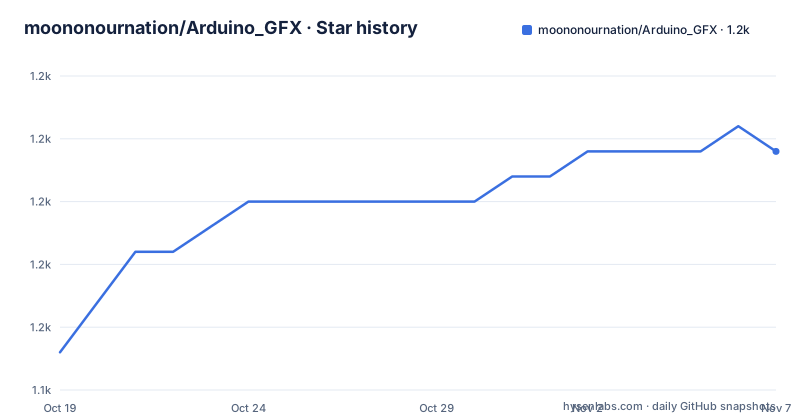
- moononournation/Arduino_GFX1,157 ★ · +8
| Repository | 2026-10-19 | 2026-11-07 |
|---|---|---|
| moononournation/Arduino_GFX | 1.1k | 1.2k |
8 Stars in the last 19 days, measured from the daily GitHub snapshot. Compare with other projects
Editorial analysis
The bus is an object, the panel is another object
Arduino_GFX is described as an Arduino graphics library supporting various displays with various data bus interfaces, and it started as a rewrite from Adafruit_GFX, LovyanGFX, TFT_eSPI, Ucglib and more.
The design is visible in three lines of setup:
#include <Arduino_GFX_Library.h>
Arduino_DataBus *bus = new Arduino_HWSPI(16 /* DC */, 5 /* CS */);
Arduino_GFX *gfx = new Arduino_ILI9341(bus, 17 /* RST */);
A data bus is constructed first, and a display is constructed with that bus. The bus here is hardware SPI, with the DC and CS pins, and the display is an ILI9341 with a reset pin. The library's topics list the range: avr, esp32, esp8266, pico, stm32 and teensy boards, and spi, parallel, rgb and dpi interfaces, so the pairing in the example is one of many.
That separation is the practical point. A panel does not know whether it is on SPI, I2C or a parallel RGB bus, and a bus does not know what it is driving. When a project changes from a SPI TFT to an I2C OLED, the drawing code stays the same and only the two construction lines change.
The draw calls are the familiar Arduino ones, which is the other half of why the library is easy to pick up:
gfx->begin();
gfx->fillScreen(RGB565_BLACK);
gfx->setCursor(10, 10);
gfx->setTextColor(RGB565_RED);
gfx->println("Hello World!");
Colour constants are 16-bit RGB, which is the format most small panels use, and the drawing API follows the Adafruit_GFX vocabulary the rewrite started from.
Start with PDQgraphicstest, not with a blank file
For someone new to the library, the README gives a specific recommendation: try the Library Example PDQgraphicstest first. It is found in the Arduino IDE under the File menu, Examples, GFX Library for Arduino, PDQgraphicstest.
That advice is well chosen, because the example is a multi-tab project. The first tab is the PDQgraphicstest main program, and the second is the related header files, Arduino_GFX_databus.h and the rest, which is where the library's actual configuration lives.
This is a library whose surface area is mostly configuration, so the example doubles as the manual. Everything a new user needs to understand, the bus classes, the display classes, the draw calls, is visible in the tabs of one sketch that the author keeps working on.
For a supported device, the configuration is a single define. You select Arduino_GFX_dev_device.h and uncomment the define for your board, for example:
...
// #define JC3248W535
#define LILYGO_T_DECK
// #define LILYGO_T_DISPLAY
...
For a custom device and display, the README names the two files to edit. The default data bus uses Arduino SPI, and other buses are changed in Arduino_GFX_databus.h. The default display is an ILI9341 LCD, and other displays are changed in Arduino_GFX_display.h.
So the configuration model is two headers and one define, which is simple to learn and simple to get wrong, and the PDQgraphicstest example is the check that you got it right.
U8g2 fonts, and UTF-8 across languages
The library supports U8g2 fonts, which the README explains in terms that matter on a microcontroller: U8g2 provides various font types stored in compressed format, so the fonts give more UI design possibilities and still fit in the limited storage space of the MCU.
Using them is a matter of include order and one call. You include U8g2lib.h before Arduino_GFX_Library.h:
#include <U8g2lib.h>
#include <Arduino_GFX_Library.h>
and then set the font you want:
gfx->setCursor(10, 20);
gfx->setFont(u8g2_font_maniac_tr);
gfx->println("Hello World!");
The Unicode support builds on that. A second U8g2 advantage is glyph coverage for Unicode scripts, and you enable it with setUTF8Print:
gfx->begin();
gfx->fillScreen(RGB565_BLACK);
gfx->setUTF8Print(true);
after which you print UTF-8 strings as usual, using the unifont family for full coverage:
gfx->setFont(u8g2_font_unifont_t_polish);
gfx->println("Witaj świecie!");

gfx->setFont(u8g2_font_unifont_t_vietnamese1);
gfx->println("Chào thế giới!");

gfx->setFont(u8g2_font_unifont_t_japanese1);
gfx->println("こんにちは世界!");
The point for an embedded product with a multilingual interface is that the same code path prints Polish, Vietnamese, Chinese, Japanese and Korean, and the font choice is the only thing that changes. The README links the U8g2 font list and the unifont glyph list for the full catalogue.
The bundled font sets, and what they cost in flash
Beyond the U8g2 generated fonts, the README lists some useful font sets the project generated itself, each with a glyph count, a size and the script used to produce it.
Chill-Bitmap v2.400 becomes u8g2_font_chill7_h_cjk, with 13478 glyphs out of 13478 and a size of 254,960. Cubic 11 v1.013 becomes u8g2_font_cubic11_h_cjk, with 10167 glyphs and a size of 337,650. QuanPixel becomes u8g2_font_quan7_h_cjk with 18082 glyphs at 335,225. The unifont_jp-17.0.03 set produces several variants, and the sizes show why the choices matter: u8g2_font_unifont_h_chinese has 22145 of 57086 glyphs at 1,023,955, u8g2_font_unifont_h_chinese4 has 7199 glyphs at 317,506 with a traditional Chinese common list, u8g2_font_unifont_h_cjk has 41364 glyphs at 1,822,602, and u8g2_font_unifont_h_utf8 has the full 57086 glyphs at 2,243,252.
Those numbers are the real argument. Full UTF-8 coverage is 2.2 megabytes of font data, which does not fit on an AVR with 32 kilobytes of flash, while a Chinese subset at 317 kilobytes fits on a comfortable part of an ESP32 and a 254 kilobyte font fits on almost anything with room to spare.
The generation scripts are published with each set, using otf2bdf to convert an outline font to a bitmap description and bdfconv to turn that into the U8g2 header format, with a glyph range argument that is exactly the subset you want. Anyone who needs a language the project has not pre-generated can produce the header themselves with the same two commands.
Where Arduino_GFX is the wrong choice
The first wrong-tool case is an existing project that already works. If you have a sketch running against Adafruit_GFX or TFT_eSPI, moving to Arduino_GFX is not a package swap, it is a reconfiguration of the bus and display objects and a review of the drawing calls, and the reward is portability across panels you may never use. The README's own lineage list, Adafruit_GFX, LovyanGFX, TFT_eSPI and Ucglib, names libraries that each solve the problem well in their own way.
The second is a display that is not on the list. The library covers a wide range of panels, but the cost of a new panel is writing a display class against its command set and its init sequence, and the library does not pretend that part is free. A very unusual controller means reading the display's datasheet.
The third is a project where the configuration model is a liability. Everything routes through Arduino_GFX_dev_device.h, Arduino_GFX_databus.h and Arduino_GFX_display.h, and for a library that is usually a strength because it makes the supported combinations explicit. For a team with a strict build system that compiles everything from source with no per-board configuration, having a header that is edited per project is an awkward thing to carry.
The fourth is a project with a hard flash budget and a large script. The bundled CJK and full UTF-8 fonts are hundreds of kilobytes to megabytes, and choosing the wrong one will silently push a sketch past the size limit of the board, or force you to pick a subset that does not cover your text.
A custom licence, version 1.6.9, and a project that ships often
The project is published under terms GitHub cannot classify, with a LICENSE file at the repository root, so that file is the one to read before you vendor the library or the fonts into a product. The bundled fonts come from several upstreams, Chill-Bitmap, Cubic 11, QuanPixel and unifont, and each of those carries its own terms, so a commercial deployment is a licence question about several artefacts rather than one.
The release history shows a project that ships steadily. The versions are v1.6.9 from 2026-10-07, v1.6.8 from 2026-09-18 and v1.6.7 from 2026-07-18, so roughly monthly patch releases through 2026 with a few weeks between them, and the last push was on 2026-10-07, the same day as the newest tag. That cadence matters for an embedded library, because display drivers break when a board's board definition changes.
The structure of the project follows the consumption model. The library is a single header, Arduino_GFX_Library.h, with the configuration headers beside it, and the README points at the library manager route as the normal installation path with the IDE's Examples menu as the place to start.
One small detail worth knowing is that the project solicits sponsorship through GitHub Sponsors and advertises a Twitter account, which is the usual signal that this is a maintainer-run project rather than a company-backed one, and that continuity of maintenance depends on one person.
Editorial conclusion
Adopt Arduino_GFX if you move between display panels or boards and want one drawing API instead of one per library, and if you need the U8g2 font sets and the UTF-8 support it adds. Do not adopt it if you already have a working Adafruit_GFX or TFT_eSPI setup with no plan to change hardware, since a rewrite brings a configuration step and a new set of trade-offs. Before you start, run the PDQgraphicstest example the README recommends, and read the licence file, since the project is published under custom terms that GitHub cannot classify and the fonts it bundles carry their own upstream licences.
Frequently asked questions
How do I set up a display with Arduino_GFX?
Create a data bus object and then a display object that takes it, for example Arduino_DataBus *bus = new Arduino_HWSPI(16, 5) followed by Arduino_GFX *gfx = new Arduino_ILI9341(bus, 17), then call gfx->begin(). For a supported board, uncomment its define in Arduino_GFX_dev_device.h instead.
Where do I start with Arduino_GFX?
The README recommends the PDQgraphicstest library example first, found in the Arduino IDE under File, Examples, GFX Library for Arduino. The example is a multi-tab project whose second tab holds the related header files, so it doubles as an introduction to the configuration.
How do I use U8g2 fonts in Arduino_GFX?
Include U8g2lib.h before Arduino_GFX_Library.h, then select the font with gfx->setFont(u8g2_font_maniac_tr) before printing. For Unicode output, call gfx->setUTF8Print(true) and use the unifont family, which covers Polish, Vietnamese, Chinese, Japanese and Korean in the examples.
How big are the bundled CJK fonts in Arduino_GFX?
The README lists sizes for each generated set, from 254,960 for the Chill-Bitmap CJK font with 13478 glyphs, through 1,023,955 for the Chinese unifont variant with 22145 glyphs, to 2,243,252 for the full 57086 glyph UTF-8 set. The generation scripts using otf2bdf and bdfconv are published with each font.
What licence does Arduino_GFX use?
Custom terms that GitHub cannot classify, recorded in the LICENSE file at the repository root. The bundled fonts come from separate upstream projects with their own terms, and the most recent release is v1.6.9, dated 2026-10-07.
Official sources
Add this badge to your README
If you maintain this project, the badge below links readers to this analysis and shows its maintenance status from the daily GitHub snapshot. Paste the markdown into your README; add ?metric=license or ?metric=stars to the image URL for a different field.

[](https://hysenlabs.com/projects/moononournation-arduino-gfx)Star history chart for your README
[](https://hysenlabs.com/projects/moononournation-arduino-gfx)Was this useful?