LuminaEngine: A Vulkan Game Engine That Demands Modern Hardware and a 2026 Toolchain
Advanced Open Source C++ Game Engine with multi-threaded Vulkan rendering.
At a glance
- What is it?
- LuminaEngine is an open-source C++ game engine built on Vulkan mesh shaders, with a fiber-based task system and C# scripting. It targets learners and experimenters, but its hardware and compiler requirements make it a niche choice.
- Who is it for?
- Adopt LuminaEngine if you are a student or hobbyist who wants to study a modern Vulkan engine's internals, and you already own a GPU with mesh shader support plus a 2026-era compiler and .NET 10 SDK. Skip it if you need stability, support for older hardware, or a production-ready tool.
- Can I use it commercially?
- Yes. Apache-2.0 is a permissive licence: you can use, modify and sell software built on it, as long as you keep its copyright and licence notices.
- Is it still maintained?
- Yes. The repository last received commits 6 days ago.
- What is it written in?
- Mainly C++, according to GitHub's language statistics.
Answers come from the project's GitHub data, last synced on November 12, 2026, and from our analysis. They are not legal advice.
Star history
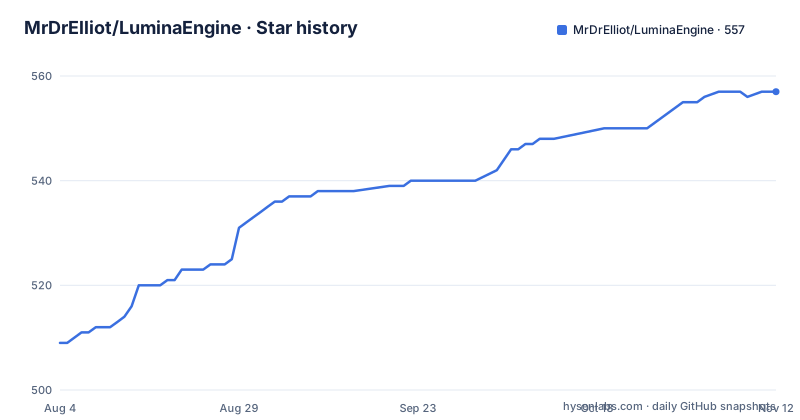
- MrDrElliot/LuminaEngine557 ★ · +48
| Repository | 2026-08-04 | 2026-11-12 |
|---|---|---|
| MrDrElliot/LuminaEngine | 509 | 557 |
48 Stars in the last 100 days, measured from the daily GitHub snapshot. Compare with other projects
Editorial analysis
What LuminaEngine Actually Is
LuminaEngine is a C++ game engine built from scratch around Vulkan, with a strong emphasis on education. The README states it is 'designed for learning and experimentation with real-world engine architecture.' It is not a product aimed at shipping commercial games. The intended audience is people who want to understand how engines like Unreal or Godot work internally, or who want to experiment with Vulkan rendering techniques. The project is under active development, and the README carries a caution that APIs may change and some features are experimental. That framing matters: you should not treat this as a stable foundation for a long-term project.
The Mesh Shader Hard Requirement
The most striking constraint is the renderer's dependence on Vulkan mesh shaders, the VK_EXT_mesh_shader extension. The README is explicit: the geometry pipeline is built on them, and the editor refuses to start on GPUs that lack the extension. The supported list is NVIDIA Turing (GTX 16-series or RTX 20-series) or newer, AMD RDNA2 (RX 6000) or newer, and Intel Arc. This is a deliberate design choice, not an oversight. It means the engine will not run on a typical integrated GPU from a few years ago, nor on many laptops. If you are evaluating this engine, the first thing to check is your GPU. The README even notes that on Linux, Setup.sh will tell you whether any installed GPU actually reports the extension. That is a sensible gate, but it also narrows the user base considerably.
How the Engine Is Put Together
The architecture is a mix of modern C++ patterns and custom systems. The rendering side uses a Forward+ pipeline with clustered lighting, which is a common approach for scenes with many lights. Materials are authored through a material graph that compiles to shader code. The engine also includes an in-house sparse-set Entity Component System (ECS) with per-type storage layouts and typed views. A reflection system drives automatic serialization and editor integration. On the performance side, the README mentions a multi-threaded task system built with fibers, custom memory allocators based on RPMalloc, and Tracy integration for profiling. These are real, concrete features, but the README gives no benchmark numbers. The C# scripting layer, called LuminaSharp, hosts the .NET 10 runtime and allows EntityScript-based gameplay with full ECS access. Bindings are generated automatically by a tool called the Reflector, and scripts are hot-reloadable.
Getting It Running: Commands and Configuration
Installation is straightforward but demanding. On Windows, you clone the repository and run Setup.bat. The README warns that Visual Studio 2026 (18.0 or newer) is required, because the C# layer targets net10.0. VS 2022 fails with error NETSDK1209, even if you install the standalone .NET 10 SDK, because VS uses its own bundled MSBuild. Setup.bat validates the environment and stops with a clear message if something is missing. On Linux, you need GCC 13 or newer, or Clang against a recent libstdc++, because the tree uses <format>. The README gives the exact apt-get commands for Debian or Ubuntu, including build packages like g++-13 and libx11-dev, and runtime packages like libvulkan1 and mesa-vulkan-drivers. The Vulkan headers are vendored, and volk resolves entry points with dlopen, so you can compile without a driver, but you cannot launch the editor. No IDE is required; on Linux, CLion can read the generated compile_commands.json.
Where It Falls Short
The strict requirements are the obvious limitation, but there are others. The README is upfront that the project is educational and under active development, so APIs may change. That means any code you write against it today could break with the next push. The documentation is hosted on a separate website, not in the repository, which adds a dependency on that site remaining available. The README also notes that newer pre-release compilers tend to reject vendored third-party code for reasons that are not bugs in the engine. That is a maintenance headache: you are tied to a narrow compiler range. The editor is ImGui-based, which is fine for prototyping, but it is not a full-featured editor like Unreal's. There is no mention of networking, audio, or animation systems, so you would need to add those yourself. If you need a complete engine out of the box, this is the wrong tool.
A Real Alternative: Godot
If LuminaEngine's constraints are too much, Godot is a direct alternative with a different approach. Godot uses its own rendering abstraction that can fall back to OpenGL or older Vulkan features, so it runs on much older hardware. It has a built-in editor, a scene system, and a scripting language (GDScript) that is tightly integrated, plus C# support via Mono. The key difference is that Godot hides the rendering pipeline behind a high-level API, while LuminaEngine exposes Vulkan mesh shaders directly. If your goal is to learn low-level rendering, LuminaEngine gives you that. If your goal is to make a game quickly, Godot is more practical. The trade-off is between control and convenience.
Maintenance and License Implications
The project is licensed under Apache-2.0, which is permissive. You can use, modify, and distribute the code, including in commercial projects, as long as you preserve the license notice and state changes. That is a low barrier for adoption. However, the maintenance cost is real. The README lists third-party dependencies. The vendored Vulkan headers and the dependency on a specific compiler range mean you must stay within the supported toolchain. The project's last push was June 2026, and the only release is 'external-deps', which suggests the project is still in early packaging. You should expect to track the repository closely if you adopt it, and be prepared to handle breaking changes. The README encourages reaching out on Discord for build issues, which is a sign that documentation is not yet complete.
Editorial conclusion
Adopt LuminaEngine if you are a student or hobbyist who wants to study a modern Vulkan engine's internals, and you already own a GPU with mesh shader support plus a 2026-era compiler and .NET 10 SDK. Skip it if you need stability, support for older hardware, or a production-ready tool. Before committing, verify your GPU actually exposes VK_EXT_mesh_shader using vulkaninfo, confirm your compiler supports <format>, and check the current API stability on the documentation site, since the README warns that APIs may change.
Frequently asked questions
What hardware does LuminaEngine require?
A GPU supporting Vulkan mesh shaders, from NVIDIA Turing or RTX 20-series, AMD RX 6000, or Intel Arc, plus at least 4 GB of graphics memory with 6 GB recommended. The editor refuses to start below those, and the page states that a card under the memory minimum renders corrupt frames rather than degrading.
Which compilers can build LuminaEngine on Linux?
GCC 16 or newer, because the tree uses a builtin that only appeared in that release. Clang is not usable regardless of standard library, as it rejects an attribute ordering in three headers that GCC accepts.
What Visual Studio version does LuminaEngine need?
Visual Studio 2026, version 18.0 or newer, with the current C++ toolset and the .NET desktop development workload. Version 17.x fails with a named SDK error even with the standalone .NET 10 SDK installed, because the IDE uses its own bundled build engine.
How does C# scripting work in LuminaEngine?
Through a host that bundles the .NET 10 runtime, with bindings generated automatically by a reflection tool. Entity scripts get registry queries, entity systems, and component access, plus higher level services for physics, navigation, input, messages, and gameplay tags, and scripts hot-reload.
Official sources
Add this badge to your README
If you maintain this project, the badge below links readers to this analysis and shows its maintenance status from the daily GitHub snapshot. Paste the markdown into your README; add ?metric=license or ?metric=stars to the image URL for a different field.

[](https://hysenlabs.com/projects/mrdrelliot-luminaengine)Star history chart for your README
[](https://hysenlabs.com/projects/mrdrelliot-luminaengine)Was this useful?