The -c flag is gone because fzf thinks sad is bash
CLI search and replace | Space Age seD
At a glance
- What is it?
- sad is a batch file edit tool that shows a diff of proposed changes before writing them, piping file names in from find and selecting changes in fzf. Its default branch is senpai, -c is deliberately unavailable, and fzf always makes it exit 130.
- Who is it for?
- sad suits someone making a scripted replacement across many files who wants to read the diff before anything is written, especially when fzf and a git-compatible pager are already installed on the machine. It does not suit a single-file edit, and it gives you no count of how many files matched.
- Can I use it commercially?
- Yes. MIT is a permissive licence: you can use, modify and sell software built on it, as long as you keep its copyright and licence notices.
- Is it still maintained?
- Yes. The repository last received commits 167 days ago.
- What is it written in?
- Mainly Rust, according to GitHub's language statistics.
Answers come from the project's GitHub data, last synced on October 24, 2026, and from our analysis. They are not legal advice.
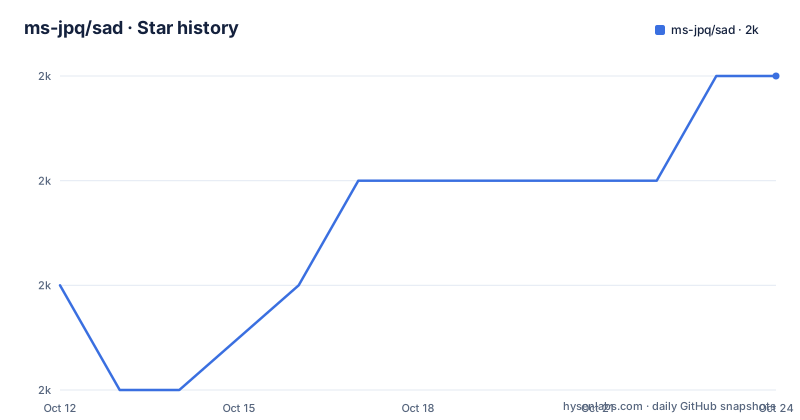
Star history
- ms-jpq/sad2,046 ★ · +2
| Repository | 2026-10-12 | 2026-10-24 |
|---|---|---|
| ms-jpq/sad | 2k | 2k |
2 Stars in the last 12 days, measured from the daily GitHub snapshot. Compare with other projects
Editorial analysis
One pipeline: find on the left, a pattern and replacement
The interface is one pipeline, and it is designed around the tools already on a Linux machine. The README's non-fzf form is the clearest statement of it:
find "$FIND_ARGS" | sad '<pattern>' '<replacement>'A pattern, a replacement and a list of files read from stdin. Output goes to stdout, which means it pipes straight into a colourizer, or into a pager named with --pager, or into nothing at all if you set GIT_PAGER in your shell profile and let sad match git's pager. The proposal is described as a batch file edit tool whose whole point is a diff of proposed changes before you commit them, with the comparison drawn against sed, where a mistyped edit is applied immediately. The other selling point is per-change granularity: the clustering factor for changes is controlled with --unified=<n>, the same flag GNU diff uses for hunk size, so you can review a large change as one hunk or as many. Four flags shape the run: -f for regex flags, -k to commit without preview, -0 to treat a null byte as the stdin delimiter instead of a newline, and -e for string literal mode. The read0 option is the one worth knowing when you are feeding sad from a tool whose output can contain newlines in filenames, because the default newline delimiter silently ends a filename at the first line break in it.
Download assets are named after the Rust target triple
The install section gives one template and fills in the platform yourself: wget the latest download with the package name replaced for your system, with x86_64-unknown-linux-gnu.deb given as the example for a Debian package on that architecture. The name follows the Rust target triple convention, which means the same file name logic applies to the other formats the project publishes and that a script fetching the newest build has to know its own target triple rather than a generic name. That is a small thing, and it is also why the instruction is phrased as replacing that name with your desired package rather than as a line to copy and paste. Everything else about installation is left to the release page rather than described in the README.
fzf is the interface, and sad ships none of its own
The preview experience is built on fzf, and the README is explicit that sad does not come with a UI and instead uses fzf to perform selection. When fzf is present, you select which changes to apply, and --multi is passed through so Shift+tab selects multiple files. The no-fzf path is just the same pipeline without the selector, and --commit or -k applies everything at once without previewing. Two entries in the flags table make sense only in this context. --pager takes a colourizing program and accepts never to disable it, and --fzf takes additional fzf options with never as the disable value, which is how you pass flags to a program you do not own. The requirements section calls fzf, delta and diff-so-fancy things that are technically not required but make sad so much happier, and describes the relationship as progressive enhancement: install them and sad uses them.
Exit codes are part of the contract, including 130
There are three exit codes and the third one is the interesting one. Zero is good, one is bad, and 130 is interrupted, meaning the user cancelled. The README then adds a warning in bold: if you are using fzf, sad will always exit 130. That is not a bug in the cancellation path, it is fzf's exit code propagating, so a cancel is distinguishable from a failure in a script. The linked issue explains it. The practical consequence is that any wrapper checking for exit 1 to mean something went wrong will treat a user pressing escape as an error, and the README's own advice is to structure around that: for the fast path, preview to verify the edit, then run with --commit and redirect stdout to a file or to /dev/null.
Regex defaults to smartcase with multiline on
The regex behavior is not sed's defaults and it is stated in one line: sad uses smartcase and multiline matching by default. On top of that there is a five-row flag table where lowercase toggles a behavior on and the uppercase version of the same letter toggles it off, so i enables and I disables. The behaviors are i for case-insensitive matching, which also works in --exact mode; m for multiline, where ^ and $ match each line; s to allow the dot to match a newline; u to swap the meaning of the * and *? patterns, since normally * is lazy and *? greedy; and x to ignore whitespace and allow # comments. That inversion rule is worth internalizing before you write a pattern, because reading u as enabling something rather than swapping a quantifier is an easy mistake that produces a wrong match rather than an error.
-c is unavailable because sad impersonates bash to fzf
One line in the preview section explains an apparent gap in the flags. It says use --commit or -k to commit changes all at once, and then: -c is taken because sad has to trick fzf into thinking it's bash. In other words, a short option is spent on making fzf believe the program is a shell, which is a hack rather than a design, and the consequence is that the obvious mnemonic cannot be used. The same section also recommends --pager 'delta -s' if you have delta installed, for --pager 'delta -s' for a side by side view. It is a small story, and it is a useful one for anyone reading the flag table and looking for the obvious letter: the absence is explained, and the reason is compatibility with a third-party tool rather than a design preference.
Where sad is the wrong tool
Four cases. The first is a single file. If you are editing one file, a diff preview adds a step and fzf adds a keystroke to something your editor already shows you, and sad is built for the batch case named in its own description. The second is a substitution that has no diff worth reading. Renaming an import across four hundred files is the good case, while changing a single magic number is not, and the fast path documented here acknowledges this by telling you to preview once and then use --commit with output discarded. The third is a project where fzf is unavailable. The tool works without it, but then every change is applied together with no per-change selection, which removes the reason to use sad rather than sed. The fourth is scripted use where you also need to know whether the pattern matched anything. There is no count or dry-run reporting described in the flags, so a pattern that silently matches nothing and one that matches a thousand times look identical from the exit code alone, and the review step is doing the job a dry run would do elsewhere. Note also that the default branch is senpai rather than main, so a plain clone gives you that branch.
Editorial conclusion
sad suits someone making a scripted replacement across many files who wants to read the diff before anything is written, especially when fzf and a git-compatible pager are already installed on the machine. It does not suit a single-file edit, and it gives you no count of how many files matched. Before adopting, note that smartcase and multiline matching are on by default, use -0 when your file list can contain newlines in names, and reach for -k only after previewing the same pattern once.
Frequently asked questions
How do I use sad for a batch edit?
Pipe file names in and give it a pattern and replacement: find "$FIND_ARGS" | sad '<pattern>' '<replacement>'. Output goes to stdout, so you can pipe it into a colourizing program or set GIT_PAGER to reuse git's pager.
Does sad require fzf?
No. fzf, delta and diff-so-fancy are described as things that make sad happier, and sad uses them automatically when installed. Without fzf there is no preview and no per-change selection, so --commit applies everything at once.
Why does sad exit with code 130 when I use fzf?
Because fzf always exits 130, and that code propagates through sad. The exit code table lists 0 as good, 1 as bad and 130 as interrupted, so a cancel is distinguishable from a failure.
What are sad's default regex settings?
Smartcase and multiline matching. Flags are toggled with lowercase letters for on and uppercase for off: i for case-insensitive, m for multiline anchors, s to let the dot match a newline, u to swap the meaning of * and *?, and x to ignore whitespace and allow comments.
How do I control how many changes are grouped in the diff?
With --unified=<n>, which has the same meaning as in GNU diff and affects hunk size. Larger values group more context around each change.
Official sources
Add this badge to your README
If you maintain this project, the badge below links readers to this analysis and shows its maintenance status from the daily GitHub snapshot. Paste the markdown into your README; add ?metric=license or ?metric=stars to the image URL for a different field.

[](https://hysenlabs.com/projects/ms-jpq-sad)Star history chart for your README
[](https://hysenlabs.com/projects/ms-jpq-sad)Was this useful?