xremap: a key remapper that sits below X11 and reaches Wayland
Key remapper for X11 and Wayland
At a glance
- What is it?
- A Rust remapper built on evdev and uinput, so it does not care whether your session is X11 or Wayland. Configuration is YAML with two distinct sections, one of which behaves nothing like the other, and the project is now shipping a full build alongside per-desktop ones.
- Who is it for?
- xremap earns its place when xmodmap cannot follow you, which in practice means any Wayland session and any application that ignores X keyboard settings. The two things to internalise before writing a config are that modmap rewrites keys before keymap ever sees them, and that keymap accepts extra modifiers unless you turn on exact_match.
- Can I use it commercially?
- Yes. MIT is a permissive licence: you can use, modify and sell software built on it, as long as you keep its copyright and licence notices.
- Is it still maintained?
- Yes. The repository received new commits within the last day.
- What is it written in?
- Mainly Rust, according to GitHub's language statistics.
Answers come from the project's GitHub data, last synced on October 23, 2026, and from our analysis. They are not legal advice.
Star history
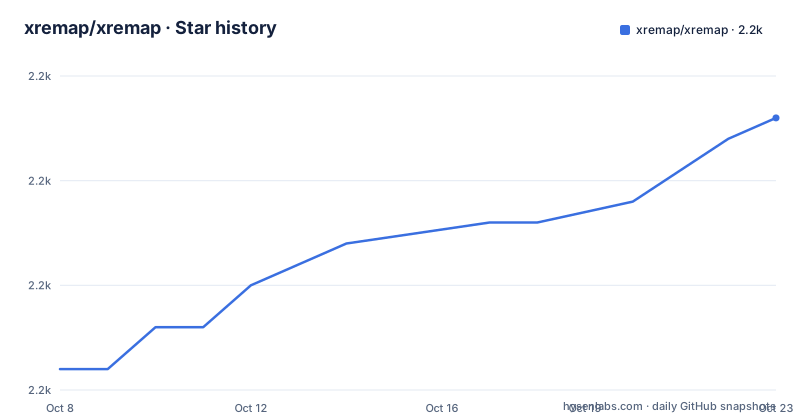
- xremap/xremap2,203 ★ · +12
| Repository | 2026-10-08 | 2026-10-23 |
|---|---|---|
| xremap/xremap | 2.2k | 2.2k |
12 Stars in the last 15 days, measured from the daily GitHub snapshot. Compare with other projects
Editorial analysis
A remapper that works before X ever sees the keystroke
The positioning is one sentence long: unlike `xmodmap`, xremap supports app-specific remapping and Wayland. That difference is the whole reason the project exists, and it comes down to where in the stack the remapping happens.
xmodmap works through the X keyboard extension, which means it only exists inside an X session. On Wayland there is no X keyboard extension to configure, so an xmodmap configuration is inert. xremap instead reads raw input events from the kernel through `evdev` and writes modified events back out through `uinput`, creating a virtual keyboard device that the compositor and every client on the system read from. Nothing about that path cares whether the session is X11 or Wayland, which is why the same binary and the same config work on both.
The stated reason for choosing Rust is performance: it is faster than JIT-less interpreters like Python. That matters more than it sounds for a program sitting in the keyboard path of every event, running with elevated privileges, where latency is visible as input lag and where you do not want a garbage collection pause landing in the middle of a held modifier.
The third design choice is that the config is described as JSON-compatible, meaning you can generate it from any language. The README points at community projects that emit xremap config from Ruby and Python, and the repository ships an `example/scripting/` directory for the same purpose. For a tool whose job is turning a GUI-heavy intention like make CapsLock be Control into machine-readable form, having a programmatic path in is not a nicety.
Two sections, and they do not behave the same way
A config file has three parts: `modmap`, `keymap`, and a set of configuration options documented separately. The first two look interchangeable and are not. This is the single most important thing to understand about the file format, and the README is explicit about it.
modmap:
  - remap:
      CapsLock: Esc
keymap:
  - remap:
      Ctrl-P: Up
      Ctrl-N: Down
`modmap` is for key-to-key rewriting in the xmodmap sense, mapping one key name to another key name or to an empty list. Mapping a key to `F9: []` disables that key entirely. Mapping one key to several, as in `KEY_XXX2: [KEY_YYY, KEY_ZZZ]`, presses them together simultaneously.
`keymap` handles combinations and sequences. `Ctrl-P: Up` sends Up, `Ctrl-C` style sequences like Emacs's `C-x C-c` work, and a non-modifier key can act as a virtual modifier. A key can also dispatch different results depending on whether it is tapped or held, using the `held` and `pressed` keys.
The two sections are ordered in a way that has a practical consequence. The README states that the output of `modmap` goes through `keymap`, which is why a `keymap` definition mentioning `Esc` will match a physical press of CapsLock once CapsLock is remapped in `modmap`. That chaining is useful when you want a whole layer rebuilt, and it is a genuine surprise the first time you write a config where both sections mention the same physical key and cannot work out which rule fired.
Extra modifiers match by default, which is usually what you want
The `keymap` section has a behaviour that trips people up, and the README documents it in terms of what your hands are doing rather than in terms of the rule.
keymap:
  - remap:
      Ctrl-P: Up
      Ctrl-N: Down
This configuration allows extra modifiers to be pressed. If Ctrl, Shift and P are all down, the result is `Shift-Up`, so you can select text up and down a line at a time. The rule matches on the modifiers you specified and ignores the rest.
If you want the opposite, there is `exact_match`, which is the option you reach for when a binding keeps firing during an unrelated chord:
keymap:
  - exact_match: true
    remap:
      Ctrl-P: Up
      Ctrl-N: Down
With this set, Ctrl-Shift-P will not match at all. The keys pass through untouched, so the combo does exactly what it would do with xremap not running. For editor-style single-key bindings this is almost always what you want, since a binding that swallows Ctrl-Shift-P breaks a shortcut other people rely on.
Modifier identity is also finer than left versus right in name alone. `Ctrl_R-C: End` binds End to the combo using the right Ctrl, leaving `Ctrl-C` on the left Ctrl free for copy. And remapping a key *to* a modifier, such as CapsLock to `Control_L`, is supported only in `modmap`, because `keymap` treats modifiers by a different mechanism entirely. Trying to express it in `keymap` will not do what you expect.
Key names are case-insensitive and the `KEY_` prefix is optional, so `KEY_CAPSLOCK`, `CAPSLOCK` and `CapsLock` are the same key. Custom aliases including `Shift_R` and `Control_L` also exist. When a name is not what you expect, the debug output names the key for you as you press it, which is the fastest way to resolve a typo rather than guessing from a list of several hundred scancodes.
Running it means taking a position in the input stack
There are two ways to run xremap and the choice is not about convenience, it is about how much of your system you hand control to.
The simple path needs root:
sudo xremap config.ymlThe path without root exists and is documented separately, and it requires setup work before xremap will run that way, involving udev rules so the process can read and write input devices without being root. The README splits these into two separate documents, `doc/running_with_sudo.md` and `doc/running_without_sudo.md`, and points at both. The `--watch` flag makes xremap remap newly connected devices automatically, which matters on a laptop where you plug in an external keyboard after the daemon has started.
Reload without restarting is a key binding, and it is a good one to have:
keymap:
  - remap:
      f9: { action: reload }
The full list of available actions is documented in `doc/reference_actions.md`, and the feature list also includes triggering shell commands on key press and release events, which turns the config into a general-purpose automation hook rather than only a rebinding table. Emacs-style remapping including mark mode is shipped as a worked example at `example/emacs.yml`, and a more realistic everyday config lives at `example/config.yml`.
Installation itself is deliberately distribution-agnostic. There are packages in the Arch AUR, a NixOS flake, a Fedora Copr, a community apt repository for Debian and Ubuntu, and a Gentoo guru overlay. Failing all of those, the release page carries a single static binary for all Linux distributions with the claim that there are generally no extra requirements, plus separate source instructions for FreeBSD. The Cargo manifest pins `udev = "0.9.3"` as an optional dependency, which is the piece that ties the no-sudo story to the desktop variants.
The full variant changed what the package name means
Since v0.15.13 xremap ships a full variant that includes support for all desktops and window managers. Before that change, a specific variant was chosen, each supporting exactly one. This is a packaging decision that reached into distribution repositories, and the README documents the fallout rather than hiding it.
The community has an open task to discuss what the meaning of `xremap` should be in distro packages and on the release page: should the plain name mean `xremap-minimal` with no desktop support, or `xremap-full` with every supported desktop and automatic selection? Until that is settled, a package called `xremap` may not do what you assumed it did.
The features list in `Cargo.toml` shows exactly what the full variant drags in:
full = ["gnome", "x11", "hypr", "kde", "wlroots", "niri", "cosmic", "pantheon", "socket"]
gnome = ["zbus"]
x11 = ["x11rb"]
hypr = ["hyprland"]
kde = ["zbus"]
wlroots = ["wayland-client", "wayland-protocols-wlr"]
niri = ["niri-ipc"]
Read that as a portability statement. GNOME, KDE and Pantheon all arrive through `zbus` over D-Bus. Hyprland has its own crate. wlroots compositors go through the Wayland client libraries and the wlr protocols. Niri has an IPC crate. Cosmic pulls in its own set including a Wayland scanner. The `x11` feature is `x11rb`, which is what lets the same tool keep working on X11 sessions, and `socket` is what makes the command-execution actions possible.
Each entry is an independent feature, so you can build for exactly one environment. That is a well-shaped design for a package maintainer who wants a small binary, and it explains why the naming question is hard: the answer depends on how many desktops the distributor intends to support out of the box.
Where the project actually lives, and where the changelog does
The repository is `xremap/xremap`, MIT licensed, written in Rust, with the default branch `master` and a last push on 2026-09-28. At 2184 stars and 126 forks it is comfortably established rather than merely popular, and it has one open issue, which for a tool in the input path of thousands of configurations is a small number.
There is a mismatch worth knowing about before you follow any link. `Cargo.toml` sets `repository = "https://github.com/k0kubun/xremap"` and the README badges at the top point at the Actions workflow under `k0kubun/xremap` as well. The project has moved to the `xremap` organisation while parts of the metadata still reference the original maintainer's personal namespace. Old issues, blog posts and forum answers will send you to the old path, and the crates.io and README download links both still use it.
Release notes are not part of that story. v0.15.14 published on 2026-09-27, v0.15.13 on 2026-09-12 and v0.15.12 on 2026-08-27, and all three have empty release bodies. Nothing on the release page tells you what changed in the version that introduced the full variant. That information is in `CHANGELOG.md` at the root, and `UPGRADE.md` sits next to it for breaking changes. If you are upgrading across the v0.15.13 boundary, those two files are the documentation to read rather than the release list.
The tree is small and deliberately organised: `src/` for code, `tests/` for tests, `doc/` for the reference material referenced throughout the README, `example/` for the shipped configs including the Emacs one and a systemd service file, `.github/` for workflows, and `Cargo.lock`, `rustfmt.toml` and `LICENSE` at the root. The `doc/` directory is the shape of the project's real documentation strategy. Every concept the README raises, key names, config options, actions, sudo and non-sudo running, source builds, and troubleshooting, has its own file there rather than a wiki page that will rot.
Editorial conclusion
xremap earns its place when xmodmap cannot follow you, which in practice means any Wayland session and any application that ignores X keyboard settings. The two things to internalise before writing a config are that modmap rewrites keys before keymap ever sees them, and that keymap accepts extra modifiers unless you turn on exact_match. Neither is obvious from the field names. Beyond that, the packaging question is real: since v0.15.13 there is a full variant and per-desktop variants, and the project has an open community discussion about which one a distribution should ship under the plain name xremap, so check what your package actually contains before filing a bug about a missing desktop integration. The repository lives at xremap/xremap while Cargo.toml still points its repository field and README badges at k0kubun/xremap, so the split has moved recently enough that older links in issues and forum posts may still send you to the old path. Three empty release bodies in a row, v0.15.12 through v0.15.14, mean CHANGELOG.md is the only place the changes are described.
Frequently asked questions
How do I remap my keyboard keys on Linux?
The most common route on a modern Linux system is to remap below the display server rather than inside it, because X keyboard settings have no effect on Wayland. xremap does this by reading events through `evdev` and writing them back through `uinput`, so one config works on both X11 and Wayland. Load it with `sudo xremap config.yml` and define your bindings under `modmap` for key-to-key swaps or `keymap` for combinations and sequences.
What is the difference between modmap and keymap in xremap?
`modmap` rewrites one key name into another, or into an empty list to disable it, or into several keys pressed at once, in the manner of xmodmap. `keymap` handles key combinations, key sequences such as Emacs style `C-x C-c`, and held versus pressed behaviour. The output of `modmap` passes through `keymap`, so a keymap rule mentioning a name will match the physical key that `modmap` produced it from.
Does xremap work on Wayland?
Yes, and that is the main reason to choose it over `xmodmap`. xremap operates at the kernel input layer through `evdev` and `uinput` rather than through the X keyboard extension, so it is indifferent to whether the session is X11 or Wayland. Beyond that, the per-desktop Cargo features cover GNOME, KDE, Hyprland, wlroots compositors, niri, COSMIC and Pantheon, all bundled under the `full` feature.
Why does my keymap binding fire when I press extra modifier keys?
Because `keymap` rules match on the modifiers you named and ignore any others, so `Ctrl-P: Up` also matches Ctrl-Shift-P and sends `Shift-Up`. That is deliberate, since it is what lets you extend a binding into a selection command. If you need the rule to match only the exact modifiers, add `exact_match: true` to that keymap entry and non-matching chords will pass through untouched.
Official sources
Add this badge to your README
If you maintain this project, the badge below links readers to this analysis and shows its maintenance status from the daily GitHub snapshot. Paste the markdown into your README; add ?metric=license or ?metric=stars to the image URL for a different field.

[](https://hysenlabs.com/projects/xremap-xremap)Star history chart for your README
[](https://hysenlabs.com/projects/xremap-xremap)Was this useful?