Linutil: A Distro-Agnostic Linux Toolbox With a Rust TUI and Scriptable Config
Project brief: Chris Titus Tech's Linux Toolbox - Linutil is a distro-agnostic toolbox designed to simplify everyday Linux tasks.
At a glance
- What is it?
- Linutil is a shell-and-Rust toolbox from Chris Titus Tech that automates common Linux setup tasks. It offers a TUI, a TOML config for unattended runs, and a simple curl installer, but its active development and reliance on community scripts mean you should verify what it will change on your system.
- Who is it for?
- Adopt Linutil if you are a Linux user who wants a quick, interactive way to install common applications and apply system tweaks without memorizing distro-specific commands, and you are comfortable with a tool that is still in active development. Do not use it on production systems or machines where you cannot afford unexpected changes, because the README says the project is still in active development and you may encounter issues.
- Can I use it commercially?
- Yes. MIT is a permissive licence: you can use, modify and sell software built on it, as long as you keep its copyright and licence notices.
- Is it still maintained?
- Yes. The repository received new commits within the last day.
- What is it written in?
- Mainly Shell, according to GitHub's language statistics.
Answers come from the project's GitHub data, last synced on November 13, 2026, and from our analysis. They are not legal advice.
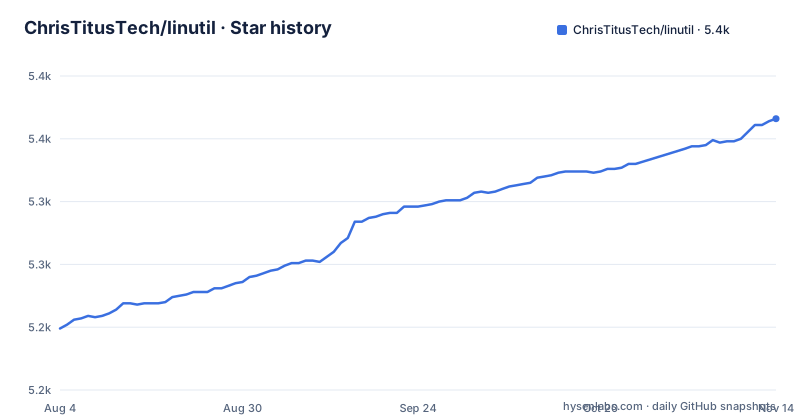
Star history
- ChrisTitusTech/linutil5,364 ★ · +165
| Repository | 2026-08-04 | 2026-11-13 |
|---|---|---|
| ChrisTitusTech/linutil | 5.2k | 5.4k |
165 Stars in the last 101 days, measured from the daily GitHub snapshot. Compare with other projects
Editorial analysis
What Linutil Actually Does and Who It Targets
Linutil is a toolbox that bundles a set of shell scripts into a single terminal interface. Its stated purpose is to simplify everyday Linux tasks, which in practice means installing applications and applying system optimizations for specific use cases. The target user is someone who runs Linux on a desktop or workstation and wants to avoid typing the same install commands repeatedly, especially when moving between distributions. It is not a package manager replacement, nor does it claim to be. It is a front-end that invokes the underlying package manager and configuration tools of whatever distro you are on. The README calls it distro-agnostic, which is a strong claim. The reality is that the scripts must account for differences between apt, dnf, pacman, zypper, and others. That is a lot of surface area, and it is where the tool is most likely to break or behave unexpectedly. The project is written in Rust, which gives it a compiled binary and a responsive TUI, but the actual work is done by the Bash scripts it runs. That split is worth keeping in mind when you evaluate reliability.
The Rust TUI and the Bash Scripts Beneath It
The architecture is a two-layer design. The top layer is a Rust TUI, originally developed by a contributor named JustLinuxUser and later improved by others. The TUI presents a list of options in a left column, allows multi-selection, and lets you navigate with the keyboard. The bottom layer is a collection of Bash scripts that perform the actual system changes. The README does not specify exactly how the TUI invokes the scripts, but the design is clear: the Rust binary provides the interface and orchestration, while the scripts contain the distro-specific commands. This separation has a benefit. If a script fails, you can inspect it directly because it is just a text file. It also means the TUI can be updated independently of the script content. The downside is that the scripts are the real product, and they are not written in a type-safe language. A typo in a Bash script can do real damage, and because the scripts are community-contributed, the quality varies. The README notes that the project is in active development and suggests submitting feedback if you encounter issues. That is a polite way of saying you should expect rough edges.
Getting It Running: Curl, Packages, and the TOML Config
The quickest way to try Linutil is the one-liner installer. For the stable branch, run curl -fsSL https://christitus.com/linux | sh. For the dev branch, replace linux with linuxdev. That command pipes a remote script directly into sh, which is convenient but also a security consideration. The README also lists package installs for Arch Linux via AUR packages (linutil, linutil-bin, linutil-git) and for OpenSUSE via sudo zypper install linutil. If you prefer Rust's package manager, cargo install linutil_tui works, but the README notes that cargo install requires manual updates with cargo install --force, and that Linutil has its own update functionality. Once installed, you can run linutil --help to see available options. The TUI itself is interactive, but there is also a non-interactive path. The configuration file is TOML, and you point to it with --config or -c. The config supports three keys: auto_execute, a list of command names to run automatically; skip_confirmation, a boolean that skips confirmation prompts; and size_bypass, a boolean that bypasses a size check. The README gives an example config that auto-executes Fastfetch, Alacritty, and Kitty, with both booleans set to true. That is a useful pattern for unattended setup, so you should be sure about what those commands do.
The TOML Config as an Automation Tool
The TOML config is the most interesting part of Linutil because it turns an interactive tool into a scriptable one. The auto_execute key takes a list of command names, which presumably match the names of scripts or TUI entries. Combined with skip_confirmation and size_bypass, you can run a setup routine with a single command. This is a real differentiator from a typical TUI that requires manual navigation every time. The README shows that you can pass the config path via --config, and the same options are available as CLI flags: --skip-confirmation and --size-bypass. That means you can achieve the same effect without a config file, which is useful for one-off runs. However, the README does not explain what size_bypass actually checks. The name suggests it bypasses a check on the size of something, perhaps a download or the script itself, but the details are absent. That lack of documentation is a limitation. You are left to guess what the size check protects against, and whether bypassing it is safe. The config also does not support variables or conditionals, so you cannot express complex logic like 'install this only if the distro is Fedora'. For that, you would need to write your own shell script and call Linutil from it, which defeats some of the purpose.
Limitations and Failure Modes
The most obvious limitation is the trust model. The curl installer fetches a script from a URL and runs it with sh. That script then downloads and runs the Linutil binary and its associated Bash scripts. You are placing a lot of trust in the maintainer and the CDN. Even if the maintainer is trustworthy, a compromised server or a man-in-the-middle attack could inject malicious code. The README does not mention checksum verification or a signature for the installer. That is a genuine gap. Another limitation is the active development status. The README explicitly says you may encounter issues and asks for feedback. That means the tool is not stable in the sense of a long-term support release. The release cadence, with dates like 2026.07.17, suggests frequent updates, which is good for features but also means behavior can change between releases. The scripts themselves are not isolated. They run with your user's permissions, or with sudo if the script requests it. A script that assumes a specific package manager or a specific distro version will fail on others, and the failure may be silent if the script does not check the exit code. The README does not describe any rollback mechanism. If a script removes a package or changes a config file, you are on your own to undo it.
Alternatives and How They Differ
The closest alternative is a manual approach: writing your own shell scripts or using your distro's package manager directly. That is not a tool comparison, but it is the real baseline. If you already know what packages you need, a simple for loop in Bash is more transparent and more controllable than a TUI that hides the commands. Another alternative is something like Ansible, which is a configuration management tool that can automate package installation across many machines. Ansible uses YAML playbooks and has a module system for different package managers. The difference in approach is significant. Ansible is declarative and idempotent, meaning you can run a playbook multiple times and it will only make necessary changes. Linutil is imperative and task-oriented. Ansible also has a large ecosystem and a mature testing process, whereas Linutil is a smaller project with a faster, more casual development cycle. For a single machine, Linutil is faster to set up than Ansible. For fleet management or repeatable provisioning, Ansible is the more robust choice.
Maintenance, Upgrade Cost, and License
The project is under the MIT license, which is permissive and allows commercial use, modification, and redistribution with attribution. That is a low-friction license for both personal and enterprise use, though you should read the full license text for exact terms. The maintenance cost is moderate. The Rust binary is compiled, so updates come as new releases, which appear frequently based on the dates in the release list. The README notes that cargo install requires manual updating with cargo install --force, but Linutil has its own update functionality. That is convenient, but it also means the tool can update itself, which is another trust consideration. The AUR packages have different update paths: linutil and linutil-bin track stable releases, while linutil-git tracks the last commit and is explicitly not recommended. For OpenSUSE, zypper handles updates through the system package manager. The biggest maintenance cost is not the binary but the scripts. As distros change their package names and default configurations, the scripts must be updated to keep working. The README does not describe a testing pipeline or a CI system, so you cannot know whether a new release has been tested across all supported distros. That is a risk you take when you adopt a tool that depends on community-maintained scripts. The documentation lives on a separate site, and the README points to it, but the README itself is thin on details about what each script does.
Editorial conclusion
Adopt Linutil if you are a Linux user who wants a quick, interactive way to install common applications and apply system tweaks without memorizing distro-specific commands, and you are comfortable with a tool that is still in active development. Do not use it on production systems or machines where you cannot afford unexpected changes, because the README says the project is still in active development and you may encounter issues. Before running the curl installer, inspect the script it downloads by piping it to a pager or saving it to a file, and check the linutil --help output to understand flags like --skip-confirmation and --size-bypass. Verify that the TOML config keys (auto_execute, skip_confirmation, size_bypass) match your intent, and test the tool in a VM or container first. Linutil is a convenience layer, not a system administration framework, and its value depends on the quality of the scripts you choose to run.
Frequently asked questions
What is the Chris Titus Tech linutil utility for Linux?
Linutil is Chris Titus Tech's distro-agnostic Linux toolbox: a Rust TUI for installing applications and setting a system up for a particular use case. You install it by piping a curl script into sh, from a distribution package, or with cargo install linutil_tui.
What is a Linux utility in linutil's case?
It is one of the applications or system changes linutil can install for you, listed from inside the TUI. The repository language is Shell, with a Rust core crate and a tui crate sitting beside the shell scripts.
What are some fun linutil utilities in Linux?
The parts unique to linutil are its two install endpoints, its three Arch packages named linutil, linutil-bin and linutil-git, the openSUSE package, and the crates.io crate linutil_tui. The TOML config with auto_execute, skip_confirmation and size_bypass is the piece that feels least like a stock package manager.
What are some common util-linux packages compared with linutil?
The linutil repository is not the util-linux suite and documents none of its packages. What it names for itself is linutil from the AUR or zypper, linutil_tui on crates.io, and linutil.desktop with man/ for desktop and manual integration.
Official sources
Add this badge to your README
If you maintain this project, the badge below links readers to this analysis and shows its maintenance status from the daily GitHub snapshot. Paste the markdown into your README; add ?metric=license or ?metric=stars to the image URL for a different field.

[](https://hysenlabs.com/projects/christitustech-linutil)Star history chart for your README
[](https://hysenlabs.com/projects/christitustech-linutil)Was this useful?