Reviewing mwakidenis/portfolio_website: A Vite React TypeScript Portfolio With a Live GitHub Feed
💼 Portfolio | 🌐 Web & Mobile Projects | 💻 Clean Code | 🎨 UI/UX Design | 🚀 Fast & Interactive | 🌟 Modern Tech | 📫 Connect | 🔗 Live Demos | 🤝 Collaboration | ✨ Enjoy!
At a glance
- What is it?
- A personal portfolio site built with Vite, React, TypeScript, Tailwind CSS, and shadcn/ui. It pulls projects from the GitHub API and ships with dark mode, a chat section, and a testimonial carousel.
- Who is it for?
- Adopt this repository if you are a developer who wants a ready-made, single-page portfolio that pulls real projects from GitHub and needs no backend. Skip it if you need a multi-page site, a CMS, or a template that is cleanly maintained without merge conflict artifacts.
- Can I use it commercially?
- Not without permission. GitHub finds no licence file in the repository, and without a licence all rights are reserved by default: you may read the code but not reuse it. Check the README, or ask the authors, before using it.
- Is it still maintained?
- Yes. The repository received new commits within the last day.
- What is it written in?
- Mainly TypeScript, according to GitHub's language statistics.
Answers come from the project's GitHub data, last synced on October 22, 2026, and from our analysis. They are not legal advice.
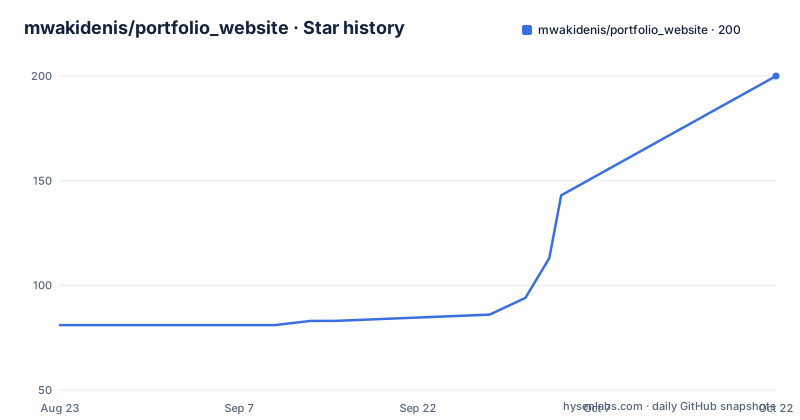
Star history
- mwakidenis/portfolio_website200 ★ · +119
| Repository | 2026-08-23 | 2026-10-22 |
|---|---|---|
| mwakidenis/portfolio_website | 81 | 200 |
119 Stars in the last 60 days, measured from the daily GitHub snapshot. Compare with other projects
Editorial analysis
What This Portfolio Solves and Who It Is For
The repository is a personal portfolio for Mwaki Denis, a software engineer. It solves the problem of presenting a developer's projects, skills, certifications, and career timeline in one responsive page. The intended audience is the owner himself, but the code is open for anyone to fork and adapt. The README lists features that go beyond a static resume: a chat section, animated GIFs, a testimonial carousel, an interactive rating form, and a contact form with validation. It also integrates live GitHub data, which means the projects section can update without editing HTML. This is useful for a developer who wants a low-maintenance way to show recent repositories.
The Architecture: Vite, React, TypeScript, and a Custom Hook
The stack is Vite for the build tool, React for components, TypeScript for typing, Tailwind CSS for styling, and shadcn/ui for accessible components. The project structure separates concerns into folders: components, data, hooks, lib, pages, and types. A notable piece is the custom hook useGithubProjects.ts, which handles fetching repositories from the GitHub API. The README shows that a VITE_GITHUB_TOKEN environment variable can be used to raise API rate limits. This design means the portfolio is a client-side application: no server code is present. The data flow is simple: the hook fetches from GitHub, the component renders the list, and Tailwind classes handle the responsive layout. The color system is defined with coal black backgrounds and multiple accent colors that rotate for tech stack tags.
Running It Locally and Deploying to Vercel
The README gives clear steps. First, clone the repository, then install dependencies with npm install. Create a .env file with VITE_GITHUB_TOKEN and VITE_GITHUB_USERNAME. The token is optional but recommended for higher rate limits. Then run npm run dev, and the site appears at http://localhost:5173. For deployment, the README offers two paths: using the Vercel CLI with vercel login and vercel, or importing the GitHub repository into the Vercel dashboard. In the dashboard, you set the framework preset to Vite, the build command to npm run build, and the output directory to dist. You add the same environment variables there. The token needs the public_repo scope. This is a standard Vite deployment flow, and the instructions are accurate enough for a beginner.
A Real Limitation: Merge Conflict Markers in the README
The README contains unresolved Git merge conflict markers. For example, the features list has <<<<<<< HEAD and >>>>>>> 650c615b... markers, with duplicated lines like 'Fully responsive across all devices' appearing in both branches. The clone command also differs: one section says cd portfolio_website-main, another says cd mwakidenis-portfolio. This suggests the repository history has unmerged changes or the README was not cleaned after a merge. This is a genuine problem for anyone who forks the project: the documentation is not reliable as a single source of truth. You might end up with the wrong folder name or miss the environment variable step because it only appears in one branch. The live demo at https://mwakidenis.pages.dev/ may work, but the source is in a messy state. This is the wrong tool if you need a clean, well-maintained template.
The GitHub API Integration: Useful but Rate-Limited
The portfolio fetches projects from the GitHub API instead of hardcoding a list. This is a smart approach for a developer who wants the site to reflect new repositories automatically. However, the README warns that the token is optional for higher rate limits. Without a token, the GitHub API has a low limit for unauthenticated requests, typically 60 per hour. A portfolio page that fetches on every load could hit that limit quickly, especially if the site gets traffic. The README suggests creating a classic personal access token with the public_repo scope, which raises the limit to 5000 per hour. That token is stored in a .env file, which is fine for local development, but you must add it to the Vercel environment variables for production. The hook name, useGithubProjects, implies a single fetch, so there is no caching or pagination logic visible in the README. This could be a bottleneck if you have many repositories.
Licensing and Maintenance Cost
The README states the project is open source under the MIT License and links to a LICENSE file. However, the repository metadata says the license is unknown, and no releases were retrieved. This is a discrepancy. If you plan to reuse the code, you should verify the LICENSE file exists in the repository before assuming MIT terms. The maintenance cost is low because it is a static site with no backend. But the README contains outdated timestamps and the conflict markers suggest the author is not actively cleaning up the repository. The last push date is unknown, and there are no recent releases. This means you cannot rely on regular updates or security patches. For a personal portfolio, this is acceptable, but for a production template, it is a risk. The dependency on a GitHub token also adds a small operational cost: you must create and manage a token, and rotate it if it leaks.
Alternatives: Static Site Generators and Portfolio Templates
A direct alternative is to use a static site generator like Astro or Next.js with a portfolio template. The difference in approach is that these tools generate HTML at build time, so there is no client-side fetching from the GitHub API. You would write a script to fetch repositories at build time and embed the data as JSON. This avoids rate limits and the need for a token in the browser. Another alternative is to use a dedicated portfolio template from a service like GitHub Pages with Jekyll, which has built-in support for listing repositories via the github-metadata gem. The key difference is that this project is a single-page React app that fetches data on the client, while those alternatives are server-rendered or build-time. If you want a React-based portfolio, this repository is a starting point, but you will need to clean up the merge conflicts and decide how to handle the API rate limit.
What to Verify Before You Fork
Before using this repository, check three things. First, look at the actual main branch to see if the merge conflict markers are present in the source files, not just the README. If they are, you will need to resolve them manually. Second, test the GitHub API integration with your own username and token. The README says the default username is mwakidenis, so you must change VITE_GITHUB_USERNAME to your own. Third, confirm the license file exists. The README claims MIT, but the repository metadata says unknown. If you plan to distribute a modified version, you need to know the exact license terms. The live demo is a good reference for the final look, but the source may not match it if the deployed version is from an older commit. The project structure is clean and modular, so fixing these issues is straightforward, but you should budget time for it.
Editorial conclusion
Adopt this repository if you are a developer who wants a ready-made, single-page portfolio that pulls real projects from GitHub and needs no backend. Skip it if you need a multi-page site, a CMS, or a template that is cleanly maintained without merge conflict artifacts. Before using it, verify the current state of the main branch: the README contains unresolved conflict markers, the folder name in the clone step is inconsistent, and the license file is not confirmed despite the README claiming MIT. Check that the GitHub token environment variable is set correctly and that the API rate limits are acceptable for your usage.
Frequently asked questions
What is in a portfolio website?
In this repository the sections are about and career timelines, skills with progress bars, certifications, blog highlights, an education history, a testimonials carousel, a ratings block, a chat section, a validated contact form, a resume download link and a project portfolio with live demo and repository links.
Which environment variables does mwakidenis/portfolio_website need?
Two, both optional. VITE_GITHUB_USERNAME is your GitHub username with a default of mwakidenis, and VITE_GITHUB_TOKEN is a personal access token used for higher GitHub API rate limits, created as a classic token with the public_repo scope.
How do I run the portfolio_website project locally?
Clone the repository, install with npm install, and run npm run dev, which serves the site at http://localhost:5173. Node 18 or newer is required, and the README recommends installing the latest LTS through nvm.
How is mwakidenis/portfolio_website deployed?
Two documented routes, both inside unresolved merge conflict markers in the README. Either install the Vercel CLI globally and run vercel login then vercel, or import the repository from the Vercel dashboard with Framework Preset Vite, Build Command npm run build and Output Directory dist.
Where does the portfolio fetch its project data from?
From the GitHub API at runtime, through the single named hook useGithubProjects.ts in src/hooks/. Static content such as projects and certificates lives separately in src/data/, so the username and the data file are the two things to replace.
Official sources
Add this badge to your README
If you maintain this project, the badge below links readers to this analysis and shows its maintenance status from the daily GitHub snapshot. Paste the markdown into your README; add ?metric=license or ?metric=stars to the image URL for a different field.

[](https://hysenlabs.com/projects/mwakidenis-portfolio-website)Star history chart for your README
[](https://hysenlabs.com/projects/mwakidenis-portfolio-website)