The Nature of Code 2024, a book whose source lives in Notion
The 2024 edition of The Nature of Code with p5.js. Includes Notion workflow and build system.
At a glance
- What is it?
- The noc-book-2 repository holds the files for the 2024 p5.js edition of The Nature of Code, and the interesting part is the pipeline: the prose is written in a private Notion database, imported as raw HTML, and then built into both a print PDF and a Gatsby website. The repository is the output of that workflow rather than the source of the text.
- Who is it for?
- nature-of-code/noc-book-2 suits a reader who wants the 2024 p5.js edition of The Nature of Code as a website or a printable PDF, and it suits a writer who wants to see how a book can be authored in a tool they already use and published through an automated pipeline. It is the wrong repository for anyone who wants to edit the prose, because the source content is private and corrections have to go through the Notion database, so pull requests cannot be accepted.
- Can I use it commercially?
- Not without permission. GitHub finds no licence file in the repository, and without a licence all rights are reserved by default: you may read the code but not reuse it. Check the README, or ask the authors, before using it.
- Is it still maintained?
- Activity is slowing. The repository last received commits 6 months ago.
- What is it written in?
- Mainly HTML, according to GitHub's language statistics.
Answers come from the project's GitHub data, last synced on November 7, 2026, and from our analysis. They are not legal advice.
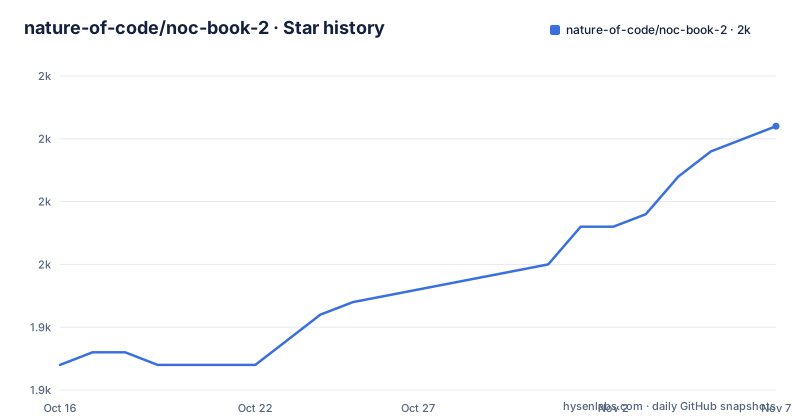
Star history
- nature-of-code/noc-book-21,961 ★ · +19
| Repository | 2026-10-16 | 2026-11-07 |
|---|---|---|
| nature-of-code/noc-book-2 | 1.9k | 2k |
19 Stars in the last 22 days, measured from the daily GitHub snapshot. Compare with other projects
Editorial analysis
The text is in Notion, the HTML is in the repository
The repository contains all the files for The Nature of Code book, and the first thing the README explains is where the words come from. The source content for the book is stored in a private Notion database and imported here as raw HTML files, which are then used to build the print PDF and the Gatsby website.
That sentence defines the whole repository. What is in git is the imported HTML, not the authoring format, and the two outputs, a PDF and a website, are generated from the same intermediate files. The import step is the source of truth and the repository is a build artefact that happens to be public.
The build process is documented with a data flow diagram showing three parts, edit, store and output, and the details split into two sections. The Edit and Import section describes the Notion database, which has a set of attributes, each with a specific job. Type is a Page or a Chapter, handled differently during builds, currently only used in the website build. Title defines the title. Status is Draft or Published, and only Published content will be imported. File Name defines the page sequence in a PDF build. Slug defines the path in the web page URL.
Each entity also contains a page of its content, which is transformed into html files based on a schema documented in docs/import-schemes.md. The transformation script, nature-of-code/fetch-notion, is written in Node.js and used as a GitHub action.
So the attributes are doing real work. The same content produces a book and a website, and the two outputs need different things from the source, a linear order for the PDF and a URL path for the web, and the database carries both. The Type attribute is the exception that proves the rule, since it is only used in the website build, which tells you the PDF build does not distinguish a chapter from a page and takes its order purely from File Name.
Building it, and the one step you cannot run
The build instructions come with an honest caveat attached. The following steps describe how to build the book and website. However, you will need to skip the import-notion-docs step, as it requires the Notion API key associated with the book. You can find the latest HTML version of the book in /content.
That is the shape of it. A contributor can rebuild the PDF and the site from the committed HTML, but cannot re-import from Notion, because the API key belongs to the book and is not shared. The /content directory is therefore the practical starting point for anyone who wants to change something and see the result.
The commands are:
# Install Dependencies
npm install

# Build PDF (Magicbook) in `build` directory
npm run build:pdf

# Build Website in `public` directory
npm run build
Two build systems are involved, which is worth noting because it is more moving parts than a book usually needs. The PDF is produced by Magicbook, with the configuration in magicbook.json and the magicbook/ directory, and the website is a Gatsby site with gatsby-config.js, gatsby-node.js, gatsby-browser.js and a gatsby/ directory, built into the public/ directory. The netlify.toml is there for deployment.
The package.json also shows how much test infrastructure the project has. There is jest, and three specific test scripts: test:examples for the exercise examples, test:snippets for the code snippets embedded in the prose, and test:screenshots. That last one is the interesting choice, because testing the screenshots of a book means the visual output of every code example is checked, which is a way of catching a p5.js upgrade that changes how a sketch renders.
The site itself uses Tailwind with a postcss.config.js and tailwind.config.js, katex for the maths, cheerio for HTML processing, hast-util-to-html, and the usual Gatsby plugin set including gatsby-plugin-sharp and gatsby-transformer-sharp for images. There is a .prettierrc for formatting and a tests/ directory.
Contributing, and why a pull request cannot change a typo
The errata policy is the first thing the README handles, and it is a good example of a project that has thought about who can change what.
The Errata page at errata.md tracks all uncorrected errors in the print edition since the publication date of September 3, 2024. If you would like to submit an error, you are asked to open an issue on GitHub. And then the constraint: all corrections must go through the Notion database, so unfortunately pull requests cannot be accepted.
So a reader who spots a typo can report it, and the author fixes it at the source and the next import carries it through to both the website and the next print run. The trade-off is real and worth naming. A public repository where anyone can fix a typo is a faster loop for the community, but a book that is also a printed artefact has to keep the two in sync, and a single source of truth is the only way to guarantee that. The errata file then becomes the public record of what is still wrong in the printed copies, which is the part that has to exist in a world where the PDF is frozen at publication.
The exercise solutions follow a different and more open process, because the exercises are explicitly open-ended and invite multiple creative solutions. You open an issue with the exercise number and a link to your p5.js sketch, and to ensure consistency across the website you set your sketch dimensions to createCanvas(640, 240). Whenever possible, avoid external HTML elements or non-p5.js functions, and if they are required, place them below the 640x240 canvas.
Those two requirements are the interesting part. A fixed canvas size means the site can lay the sketches out consistently, and the rule about external elements existing below the canvas is what allows a sketch to use a p5.js-only interface while still allowing a stray control or a slider. If your sketch is selected for the website it will be re-saved under the Nature of Code web editor account, and you are asked to include your name and URLs in the code comments so you can be properly credited.
There is also a showcase on the Coding Train website where you can submit creative interpretations of the book content and exercises, and a resources page for ports of the examples to other languages and environments, which contributors can add to by opening an issue with the links.
What this repository is, and the edition it replaces
The scope of this repository is narrower than the name suggests, and the README makes the boundaries clear.
It is the 2024 p5.js edition of The Nature of Code, and the previous edition is explicitly out of scope. If you are looking for the 2012 edition of The Nature of Code, the website is archived at noc-processing-archive.netlify.app along with a GitHub source archive under nature-of-code/Nature-of-Code-Website-Archive. That archive is a different repository, and the reason for the split is the technology: the 2012 edition was built on Processing, and the 2024 one on p5.js.
The topic list on the repository covers creative-coding, nature-of-code, p5js, physics and simulation, and the book's own subject is what the topics say it is. The Nature of Code is about simulating natural systems, so the reader arriving here is someone who wants to build a particle system, a flocking behaviour or a cellular automaton and wants the physics rather than the API calls.
The homepage is natureofcode.com, the last push was on 2026-05-06, the default branch is main, and the repository has no GitHub releases, which is consistent with a book rather than a software package. The version in package.json is 1.0.0 and the name is noc2, with the description saying it is a repo to test out a workflow with Notion for the Nature of Code book, which is the honest description of what the repository originally was.
Two small details in the packaging are worth a mention for anyone reusing the workflow. The repository and homepage fields in package.json still point at github.com/nature-of-code/noc-notion, a name that does not match the current repository, so those fields are leftovers from the experiment. And the licence field says ISC while the repository's own licence metadata is not classified, so the licensing of the prose and the code is a separate question from the licensing of the illustrations, which the attributions section handles for the OpenMoji icons under CC BY-SA 4.0.
For a reader deciding whether to look, the answer is simple. The website is the book, and the repository is the machinery behind it, which is worth reading if you are thinking about authoring a long document in a tool like Notion and publishing it as both a PDF and a site.
Editorial conclusion
nature-of-code/noc-book-2 suits a reader who wants the 2024 p5.js edition of The Nature of Code as a website or a printable PDF, and it suits a writer who wants to see how a book can be authored in a tool they already use and published through an automated pipeline. It is the wrong repository for anyone who wants to edit the prose, because the source content is private and corrections have to go through the Notion database, so pull requests cannot be accepted. Before contributing, read the errata policy, and if you want to contribute an exercise solution, note the requirement to set your sketch dimensions to createCanvas(640, 240) and to include your name and URLs in the code comments.
Frequently asked questions
Where is the source content for The Nature of Code 2024 stored?
The source content is stored in a private Notion database and imported into the repository as raw HTML files, which are then used to build the print PDF and the Gatsby website. The import script is nature-of-code/fetch-notion, written in Node.js and used as a GitHub action.
How do I build the PDF and the website locally?
Run npm install, then npm run build:pdf for the Magicbook PDF in the build directory and npm run build for the Gatsby website in the public directory. You have to skip the import-notion-docs step because it needs the Notion API key for the book, and the latest HTML version of the book is in the /content directory.
Can I send a pull request to fix a typo in the book?
No. The errata page tracks uncorrected errors in the print edition since September 3, 2024, and the README asks you to open an issue instead, because all corrections must go through the Notion database and pull requests cannot be accepted.
What are the requirements for a contributed exercise solution?
Set your sketch dimensions to createCanvas(640, 240) for consistency across the website, avoid external HTML elements and non-p5.js functions where possible, and if they are required place them below the 640x240 canvas. Include your name and URLs in the code comments so you can be credited.
Where can I find the 2012 edition of The Nature of Code?
The 2012 website is archived at noc-processing-archive.netlify.app, with the source archived in the nature-of-code/Nature-of-Code-Website-Archive repository. The 2024 edition is the p5.js one and lives in this repository.
Official sources
Add this badge to your README
If you maintain this project, the badge below links readers to this analysis and shows its maintenance status from the daily GitHub snapshot. Paste the markdown into your README; add ?metric=license or ?metric=stars to the image URL for a different field.

[](https://hysenlabs.com/projects/nature-of-code-noc-book-2)Star history chart for your README
[](https://hysenlabs.com/projects/nature-of-code-noc-book-2)Was this useful?