NDLOCR-Lite for local Japanese document OCR
NDLOCR-Liteアプリケーションのリポジトリ(ソースコードを含む)NDLOCR‑Lite application repository (including source code)
At a glance
- What is it?
- NDLOCR-Lite is a CPU-oriented Japanese OCR application for turning digitized books, magazines, and handwritten pages into structured text. It suits local, privacy-sensitive processing on ordinary computers, but its optional GPU path remains beta and requires specific server-side dependencies.
- Who is it for?
- NDLOCR-Lite is appropriate for researchers, libraries, and individual users who need Japanese book and magazine OCR on a local CPU machine without sending images to a hosted service. It is less suitable for users who require a production GPU workflow, since `--device cuda` is marked beta and requires `onnxruntime-gpu`.
- Can I use it commercially?
- Yes, with credit. CC-BY-4.0 allows commercial use as long as you credit the authors and indicate what you changed. It is written for creative content, so check how it applies to any code.
- Is it still maintained?
- Yes. The repository last received commits 2 days ago.
- What is it written in?
- Mainly Python, according to GitHub's language statistics.
Answers come from the project's GitHub data, last synced on November 7, 2026, and from our analysis. They are not legal advice.
Star history
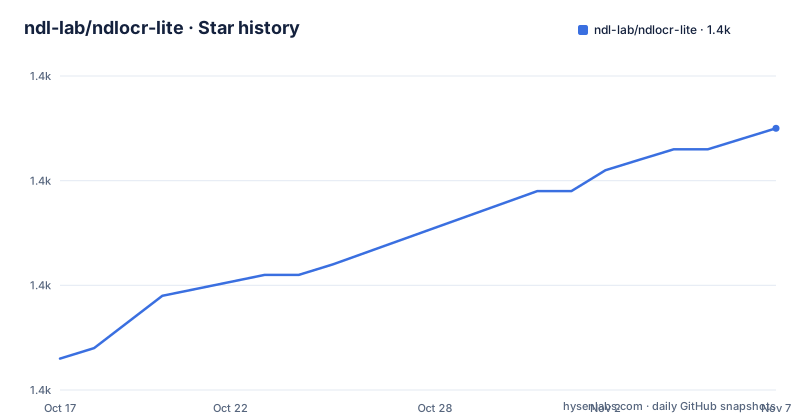
- ndl-lab/ndlocr-lite1,375 ★ · +22
| Repository | 2026-10-17 | 2026-11-07 |
|---|---|---|
| ndl-lab/ndlocr-lite | 1.4k | 1.4k |
22 Stars in the last 21 days, measured from the daily GitHub snapshot. Compare with other projects
Editorial analysis
Why NDLOCR-Lite targets local Japanese OCR
NDLOCR-Lite solves a specific digitization problem: creating text data from images of books, magazines, and other Japanese-language documents without sending those images to a remote OCR service. Its intended environment includes ordinary laptops and desktop operating systems rather than dedicated GPU servers. The documentation says the OCR does not require a GPU and identifies Windows 11, Mac systems using Apple M4 and macOS Sequoia, and Linux systems using Ubuntu 22.04 as tested environments.
The project is aimed more at document collections and Japanese publishing material than at general-purpose scene text. Its examples include historical Japanese books, a library staff manual, horizontal modern text, and classical vertical writing. The bundled models were developed internally by the National Diet Library staff using findings from its research, including experience from NDL Classical OCR-Lite.
There are two interfaces. The desktop application offers graphical operation and a screenshot mode that converts captured content without first saving it as an image file. The command-line application handles individual images or entire directories. This split makes NDLOCR-Lite relevant both to occasional users processing a few pages and to technical users building a local batch workflow.
How NDLOCR-Lite turns page images into ordered text
The processing architecture consists of three named modules: layout recognition, text recognition, and reading-order arrangement. NDLOCR-Lite uses DEIMv2 for layout recognition and PARSeq for text recognition. Its reading-order module follows the approach used by NDLOCR. Together, these components infer where text regions appear on a page, recognize characters within those regions, and arrange the recognized regions into a reading sequence.
The trained layout and character-recognition models were developed with PyTorch and converted to ONNX for application use. The layout model uses a ViT-Tiny backbone based on knowledge distilled from DINOv3. The repository includes the models as ONNX files and YAML configuration files according to the package-data declarations in `pyproject.toml`.
Recognition is not presented as infallible. The README explicitly labels its example OCR excerpt as containing recognition errors, including cases with an incorrectly recognized historical character. This matters because vertical text, old character forms, complex layouts, and handwriting can all affect transcription quality. The `--viz True` option produces images with blue boxes around recognized text, giving users a way to inspect where recognition occurred. The `--enable-tcy` option is intended to improve the reading of vertical text containing horizontal sequences.
Results are written to a chosen output directory. By default, the CLI can produce JSON and related outputs, while `--json-only` restricts output to JSON. The documentation links sample XML results, although the default output behavior should be checked against the selected release rather than inferred from those examples alone.
Installing NDLOCR-Lite and running the first OCR job
The simplest documented starting point is the desktop application. Download the archive for Windows, Mac, or Linux from the repository's Releases page. Place the application in a path that contains no Japanese full-width characters. The README warns that the desktop application may fail to start when such characters appear in the path.
For command-line use, Python 3.10 or newer is required. Clone the repository, install its dependencies, and enter the source directory with these documented commands:
git clone https://github.com/ndl-lab/ndlocr-lite
cd ndlocr-lite
pip install -r requirements.txt
cd src
The command reads one named image and writes its results to `tmpdir`:
python3 ocr.py --sourceimg digidepo_1287221_00000002.jpg --output tmpdirFor batch processing, `--sourcedir` processes supported image files in a directory. The documented supported extensions are `jpg`, `jpeg`, `png`, `tiff`, `tif`, `jp2`, `bmp`, and `webp`.
python3 ocr.py --sourcedir 9892834_0001 --output tmpdirUsers of `uv` can instead install the project as a command:
git clone https://github.com/ndl-lab/ndlocr-lite
cd ndlocr-lite
uv tool install .
The installed entry point is then invoked with `ndlocr-lite`. The README gives this single-image example:
ndlocr-lite --sourceimg digidepo_1287221_00000002.jpg --output tmpdirThe command should create or use the specified output location for OCR results. The README does not provide an exact expected file listing for that directory, so first-time users should inspect the generated contents rather than assume a single filename.
Batch formats and OCR controls for document collections
NDLOCR-Lite exposes the controls most relevant to scanning and digitization batches. `--sourcedir` and `--sourceimg` separate collection processing from single-page work, while `--output` accepts either an absolute or relative destination. `--viz True` adds visualization images with blue rectangles around recognized text. This is useful for diagnosing whether failures come from missing or incorrect text-region detection.
`--json-only` changes the output policy rather than the recognition model. It produces JSON alone, which can simplify ingestion into another application when XML or other generated files are not needed. Conversely, omitting it retains the documented default output set. The README links XML examples for books and classical writing, but it does not enumerate every file generated in a particular output directory.
The input is image data, not PDF ingestion through the CLI. The dependency list includes `pypdf` and `pypdfium2`, but the README does not document either library through a user-facing PDF conversion command. It would therefore be unsupported to claim that the documented CLI accepts PDFs directly.
The CPU path is the normal documented mode. A GPU option exists through `--device cuda`, but the README labels it beta and limits it to compatible servers that already have `onnxruntime-gpu`. The ordinary requirements install `onnxruntime`, not `onnxruntime-gpu`, so CUDA cannot be treated as an automatic capability of the standard installation.
Recognition limits, licence conditions, and upgrade checks
NDLOCR-Lite publishes evaluation data, but a benchmark average does not remove the need to inspect representative pages. For handwritten text in version `1.2.1`, the README reports an overall CER of `0.268` across `1065` files, with separate figures for vertical and horizontal writing. It also links a separate Japanese print evaluation CSV. These figures describe the published evaluation sets, not every type of scan a user may submit.
Image quality and document structure can still affect results. Historical fonts, old character forms, mixed writing directions, unusual layouts, and handwritten material are visible in the project's own examples and evaluation categories. Recognition output should therefore be checked against the page image, particularly before using it as authoritative transcription data. The `--viz` output provides one inspection aid, but the README does not claim that it evaluates transcription correctness automatically.
The application code is released under CC BY 4.0. The README separately points to `LICENCE_DEPENDENCIES` for libraries used at runtime. It also requires compliance with the DINOv3 license when using the bundled trained model based on DINOv3. These are separate licence obligations, not one blanket permission to redistribute every bundled component without checking its terms.
Maintenance activity is recent. The last push was on 2026-10-08, and the repository is not archived. Releases include `v1.3.1` dated 2026-09-07, `v1.3.0-preview` dated 2026-09-04, and `v1.2.3` dated 2026-06-09. However, the repository's `pyproject.toml` currently declares `version = "1.3.0"` while the release list contains `v1.3.1`. That discrepancy should be checked before building an internal package or treating package metadata as the definitive release identifier.
How NDLOCR-Lite differs from cloud OCR and NDLOCR
The clearest alternative described by the project is NDLOCR, from which NDLOCR-Lite aims to provide a lighter-weight approach. NDLOCR-Lite is intended for common computers and CPU processing, while the alternative reference points to the fuller NDLOCR project. The README does not provide a direct feature matrix, resource comparison, or identical accuracy table between these two applications, so the practical distinction should not be reduced to an unsupported claim that one is always more accurate.
A hosted OCR service would differ in deployment model because image material leaves the local environment, whereas NDLOCR-Lite is executed on the user's computer. The project documentation does not promise that every cloud service uploads images, nor does it compare service accuracy or cost. The traceable distinction is local execution and the absence of a GPU requirement in NDLOCR-Lite's normal mode.
For developers changing the models, the repository also offers a different path from application use. The training documentation in `train/README.md` covers model retraining and conversion. This makes NDLOCR-Lite more than a fixed executable when researchers need to adapt layout or text recognition, but it also adds model-conversion and machine-learning work beyond ordinary CLI installation.
Editorial conclusion
NDLOCR-Lite is appropriate for researchers, libraries, and individual users who need Japanese book and magazine OCR on a local CPU machine without sending images to a hosted service. It is less suitable for users who require a production GPU workflow, since `--device cuda` is marked beta and requires `onnxruntime-gpu`. Before adoption, verify output quality on representative printed and handwritten pages, confirm the desktop application path contains no full-width Japanese characters, and reconcile the package metadata version of `1.3.0` with the listed `v1.3.1` release.
Frequently asked questions
Does NDLOCR-Lite require a GPU?
No. The documented normal mode is CPU-based. GPU processing is available only through the beta `--device cuda` option on compatible servers with `onnxruntime-gpu` installed.
How do I install and run NDLOCR-Lite from the command line?
Python 3.10 or newer is required. Clone the repository, run `pip install -r requirements.txt`, enter `src`, then invoke `python3 ocr.py` with `--sourceimg` or `--sourcedir` and `--output`.
Which image formats can NDLOCR-Lite process?
The CLI documents `jpg`, `jpeg`, `png`, `tiff`, `tif`, `jp2`, `bmp`, and `webp` inputs. `--sourceimg` selects one image, while `--sourcedir` processes supported images in a directory.
Can I use NDLOCR-Lite with CUDA?
The README marks `--device cuda` as beta. It requires a compatible GPU server and a separate installation of `onnxruntime-gpu`; the standard requirements list installs `onnxruntime`.
Official sources
Add this badge to your README
If you maintain this project, the badge below links readers to this analysis and shows its maintenance status from the daily GitHub snapshot. Paste the markdown into your README; add ?metric=license or ?metric=stars to the image URL for a different field.

[](https://hysenlabs.com/projects/ndl-lab-ndlocr-lite)Star history chart for your README
[](https://hysenlabs.com/projects/ndl-lab-ndlocr-lite)Was this useful?