nest-modules/mailer: transactional email inside a NestJS application
📨 A mailer module for Nest framework (node.js)
At a glance
- What is it?
- The nest-modules mailer package is a NestJS module that sends email through Nodemailer, with template adapters for Handlebars, Pug, EJS, Liquid and MJML, multiple transporters, CSS inlining and browser preview. Version 3 shipped in October 2026 and the package is CommonJS even though NestJS 12 is published as ES modules.
- Who is it for?
- nest-modules/mailer suits a NestJS team that wants email sending to look like the rest of the application, with dependency injection, a template adapter chosen per project and transporter configuration that can be switched per message. It does not suit a team that has outgrown Nodemailer or that wants an ESM-only package, since this one is CommonJS.
- Can I use it commercially?
- Yes. MIT is a permissive licence: you can use, modify and sell software built on it, as long as you keep its copyright and licence notices.
- Is it still maintained?
- Yes. The repository last received commits 5 days ago.
- What is it written in?
- Mainly TypeScript, according to GitHub's language statistics.
Answers come from the project's GitHub data, last synced on November 7, 2026, and from our analysis. They are not legal advice.
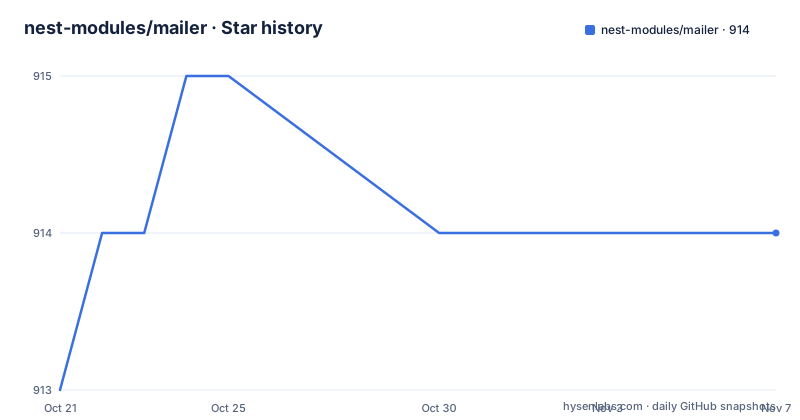
Star history
- nest-modules/mailer914 ★ · +1
| Repository | 2026-10-21 | 2026-11-07 |
|---|---|---|
| nest-modules/mailer | 913 | 914 |
1 Stars in the last 17 days, measured from the daily GitHub snapshot. Compare with other projects
Editorial analysis
Email as a NestJS service
The package is a mailer module for NestJS using Nodemailer, published to npm as @nestjs-modules/mailer, and it is described in the repository as part of a monorepo that also holds the documentation site.
The design decision is that the transport is Nodemailer's, not its own. The feature list says it is built on Nodemailer and supports SMTP, SES, sendmail and more. That means the messy parts of email delivery, the connection handling, the various authentication mechanisms, the provider quirks, are handled by a library that has been solving them for years, and this package's job is to fit that into NestJS's conventions.
What NestJS adds is the module pattern, dependency injection and async configuration. A MailerService is injected into your own providers the same way a repository or a queue client would be, so a component that sends mail does not construct a transport, does not read environment variables, and does not know which SMTP server is in use. That is the whole value proposition, and it is a real one in a large application where a dozen features each need to send mail and each would otherwise repeat the same setup.
The audience is therefore an existing NestJS codebase. This is not a package for a script, and it is not a marketing mail system; it is infrastructure inside an application that sends transactional messages as part of its normal work.
forRoot, adapters and the service call
The quick start shows the whole shape of the integration. The module is imported with a forRoot call that carries the transport and the defaults:
// app.module.ts
import { join } from 'node:path';
import { Module } from '@nestjs/common';
import { MailerModule } from '@nestjs-modules/mailer';
import { HandlebarsAdapter } from '@nestjs-modules/mailer/adapters/handlebars.adapter';

@Module({
  imports: [
    MailerModule.forRoot({
      transport: {
        host: 'smtp.example.com',
        port: 587,
        auth: {
          user: 'username',
          pass: 'password',
        },
      },
      defaults: {
        from: '"No Reply" <[email protected]>',
      },
      template: {
        dir: join(__dirname, 'templates'),
        adapter: new HandlebarsAdapter(),
      },
    }),
  ],
})
export class AppModule {}
Three pieces of configuration are visible. The transport describes how to reach the server, here over SMTP on port 587 with credentials. The defaults carry the From address, so individual messages do not have to repeat it. And the template section names the adapter that will render the templates.
Sending is then a method call on the injected service, with a template name and a context object:
// example.service.ts
import { Injectable } from '@nestjs/common';
import { MailerService } from '@nestjs-modules/mailer';

@Injectable()
export class ExampleService {
  constructor(private readonly mailerService: MailerService) {}

  async sendEmail() {
    await this.mailerService.sendMail({
      to: '[email protected]',
      subject: 'Hello',
      template: 'welcome',
      context: {
        name: 'John',
      },
    });
  }
}
Place a `welcome.hbs` file in the configured templates directory, for example with the content `Hello {{name}}`. Make sure that directory is present beside the compiled module at runtime. The context object supplies the name to the template; there is no separate template registry to manage.
Template engines are optional peer dependencies
The module supports multiple template engines: Handlebars, Pug, EJS, Liquid or MJML. The installation section makes them optional, stating that they are optional peer dependencies and are not installed automatically.
The install command is the package plus Nodemailer:
pnpm add @nestjs-modules/mailer nodemailerand then one engine of your choice, with each option shown as its own command:
pnpm add handlebars
# or
pnpm add pug
# or
pnpm add ejs
# or
pnpm add liquidjs
# or
pnpm add nunjucks
# or
pnpm add mjml
The peer dependency approach is the right call for a library. If the engines were direct dependencies, every consumer would install all six, and the ones they did not use would sit in node_modules waiting to break on a dependency audit. With peer dependencies, the choice is explicit and the lockfile reflects only what is actually used.
One thing to notice is that nunjucks appears in the install list even though the feature list names Liquid. The feature list describes Liquid, the install commands cover Nunjucks as a separate option, and the adapters are imported from a path such as @nestjs-modules/mailer/adapters/handlebars.adapter, so the engine specific code lives in per-engine adapter files rather than in the core. The repository ships a samples/custom-template-adapter/ example alongside samples/basic/, which suggests writing an adapter for an engine the project does not ship is a supported path rather than a hack.
Multiple transporters, CSS inlining and preview
Three of the features address problems that only appear once you send real email from an application.
Multiple transporters means you can configure several SMTP servers and switch per message. In practice this is the escape hatch for a system with several sending identities: transactional mail from one server, password resets from another, marketing from a third, each with its own credentials and its own deliverability reputation. The alternative, changing the transport configuration at runtime from a global variable, is the kind of thing that ends up with a password reset going out through the wrong server at 3am.
CSS inlining is described as built-in css-inline, which ensures emails render correctly across all clients. This is a genuine problem rather than a nicety: email clients do not share a CSS engine, and the safe subset that renders in one client frequently does not render in another. Inlining the styles onto each element removes the dependency on the client's stylesheet support, at the cost of larger messages.
Preview emails lets you preview in the browser during development, which turns a slow feedback loop into a fast one. Normally you send a test message and open it in a mail client, which shows you a rendering approximation rather than the real thing, and you wait for a round trip. Previewing in a browser shows the HTML and CSS as a browser would, which is closer to what several clients do and much closer than what an email client does.
Taken together, these three features are what separates a package aimed at production use from a thin wrapper over a send function.
A CommonJS package in an ESM NestJS
The compatibility section is the most technical part of the README and it exists because of a specific version boundary.
The table covers @nestjs-modules/mailer 2.x and 3.x against NestJS 7 through 12, with the note that NestJS 12 requires Node.js at least 20.19, or at least 22.12. The Node floor therefore moves with the NestJS major, which is worth checking before you pin a Node version in your Dockerfile.
The next paragraph explains the packaging. NestJS 12 is published as ES modules. This package is CommonJS and loads it through Node.js native require(esm) support, so no extra configuration is needed in your application. That is the pragmatic answer to a genuinely awkward problem: a CommonJS package depending on an ESM-only dependency, in an ecosystem where the interoperability story was still being written.
The catch comes with testing. If you run Jest on a NestJS 12 project, the README says to use Node.js at least 24.9 with NODE_OPTIONS=--experimental-vm-modules. So the same application can build and run on Node 20, but its test suite needs Node 24 and an experimental flag.
That is the cost of the CommonJS choice, and it is not trivial: a Node floor of 24 for tests pushes against many CI images, and an experimental module flag in a test command is the kind of thing that gets removed by someone tidying up a package.json script six months later.
A monorepo with changesets and a docs site
The repository is a pnpm workspace with turbo as the task runner and Biome for formatting and linting. The root manifest is named @nestjs-modules/mailer-monorepo, marked private, with a version of 0.0.0, and pins pnpm at 10.32.1.
The scripts are the turbo wrappers: build, test, lint and check run through turbo, format runs Biome's formatter, and the changeset scripts drive versioning and publishing. The release script is specific:
"release": "turbo run build --filter=@nestjs-modules/mailer && changeset publish"Changesets means every user-visible change is described in a changeset file, and the version bump is computed from those descriptions rather than decided by hand. That is a sensible convention for a package whose consumers upgrade on a schedule.
The pnpm overrides block in the root manifest is long, with entries for ajv, body-parser, brace-expansion, picomatch, postcss and others. Overrides like that are usually the residue of dependency audit work, pinning transitive versions that a downstream package would otherwise resolve to something vulnerable or broken.
The documentation is an app in the same workspace: apps/website, served by Docusaurus, with a compose file that builds it and publishes port 3000, and a Dockerfile based on node:lts that copies apps/website and runs npm install and npm start. The Dockerfile is for the docs, not for the mailer itself.
On licensing and cadence, the package is MIT, and the release list shows v3.0.0, v3.0.1 and v3.0.2 all published on 2026-10-04, with the last push on 2026-10-17. Three same-day releases for a major version usually means the version was held back, then cut and fixed quickly, so treat 3.0.2 as the first one to try on a real project.
Editorial conclusion
nest-modules/mailer suits a NestJS team that wants email sending to look like the rest of the application, with dependency injection, a template adapter chosen per project and transporter configuration that can be switched per message. It does not suit a team that has outgrown Nodemailer or that wants an ESM-only package, since this one is CommonJS. Before adopting, install the package and the template engine you want, register MailerModule.forRoot with your transport settings, and check the compatibility table for your NestJS and Node.js versions, since the Node.js floor moves with the NestJS major and the Jest path needs a newer Node with experimental VM modules.
Frequently asked questions
How do I install nest-modules/mailer?
Run pnpm add @nestjs-modules/mailer nodemailer, then install one template engine of your choice such as handlebars, pug, ejs, liquidjs, nunjucks or mjml. The template engines are optional peer dependencies and are not installed automatically.
How do I configure and send an email with nest-modules/mailer?
Import MailerModule.forRoot with a transport block, a defaults block and a template adapter, then inject MailerService and call sendMail with to, subject, a template name and a context object that the template engine renders.
Which template engines does nest-modules/mailer support?
Handlebars, Pug, EJS, Liquid and MJML are listed as supported, and the install commands also cover Nunjucks. Adapters are imported from paths such as @nestjs-modules/mailer/adapters/handlebars.adapter, and a samples/custom-template-adapter project shows how to add your own.
Is nest-modules/mailer compatible with NestJS 12?
Yes, the compatibility table covers mailer 2.x and 3.x against NestJS 7 to 12. NestJS 12 requires Node.js 20.19 or 22.12 or newer, and running Jest on a NestJS 12 project requires Node.js 24.9 or newer with NODE_OPTIONS=--experimental-vm-modules.
Can I use several SMTP servers with nest-modules/mailer?
Yes. The feature list states that multiple transporters are supported, so you can configure multiple SMTP servers and switch per message, with built-in css-inline for rendering and browser preview for development.
Official sources
Add this badge to your README
If you maintain this project, the badge below links readers to this analysis and shows its maintenance status from the daily GitHub snapshot. Paste the markdown into your README; add ?metric=license or ?metric=stars to the image URL for a different field.

[](https://hysenlabs.com/projects/nest-modules-mailer)Star history chart for your README
[](https://hysenlabs.com/projects/nest-modules-mailer)Was this useful?