better-upload: file uploads for React that talk straight to S3
Simple and easy file uploads for React. Upload directly to any S3-compatible service with minimal setup.
At a glance
- What is it?
- Better Upload is a React library for uploading files directly to any S3-compatible service, split into a client package and a server package so the browser never holds storage credentials. It suits a Next.js or TanStack Start application that needs uploads without hand-writing presigned URL flows, and its design leans on a separate server to mint them.
- Who is it for?
- Adopt better-upload if you are building a React application that needs file uploads to S3 or an S3-compatible store and want the presigned URL flow handled for you. Skip it if your framework already has an upload primitive you are happy with, since the library is deliberately thin and the work is in the server package rather than the client one.
- Can I use it commercially?
- Yes. MIT is a permissive licence: you can use, modify and sell software built on it, as long as you keep its copyright and licence notices.
- Is it still maintained?
- Yes. The repository last received commits 19 days ago.
- What is it written in?
- Mainly TypeScript, according to GitHub's language statistics.
Answers come from the project's GitHub data, last synced on November 7, 2026, and from our analysis. They are not legal advice.
Star history
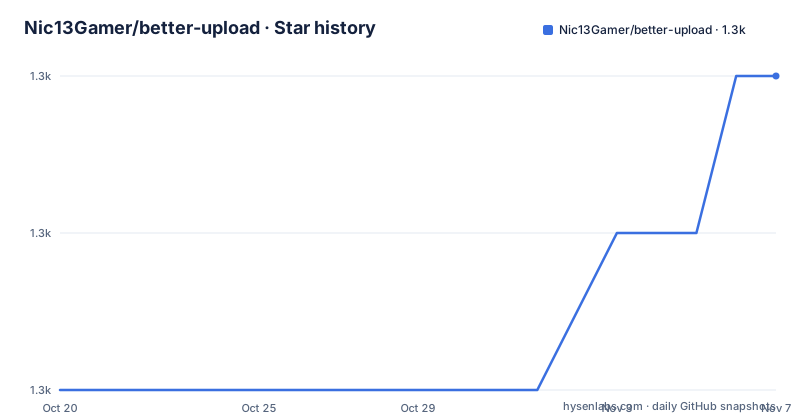
- Nic13Gamer/better-upload1,291 ★ · +2
| Repository | 2026-10-20 | 2026-11-07 |
|---|---|---|
| Nic13Gamer/better-upload | 1.3k | 1.3k |
2 Stars in the last 18 days, measured from the daily GitHub snapshot. Compare with other projects
Editorial analysis
What the library does
Better Upload is a simple and easy file upload library for React, letting you upload directly to any S3-compatible service with minimal setup. The word that carries the weight is directly. The browser takes the file and sends it to the storage service itself, rather than streaming the bytes through your application server on the way, which is what makes it scale and what removes the file size ceiling that comes with a server-side upload endpoint. The word S3-compatible is the other half, because the service does not have to be Amazon's. It works with any framework, the README names Next.js and Tanstack Start, or any other React-based framework. The primary language is TypeScript, the licence is MIT, the last push was on 2026-08-23, and the releases are `@better-upload/server` 3.0.19 and 3.0.18 and `@better-upload/client` 3.0.19, all on 2026-05-04, with the two packages versioned in lockstep.
Two packages, and the split is the security boundary
The package names in the release list tell you the architecture. There is `@better-upload/client` and there is `@better-upload/server`, and they are published and versioned together. That separation is the whole design. The client half runs in the browser and handles the file, the progress reporting and the direct PUT to the storage service. The server half runs where your application code runs and is the part that knows your storage credentials, so it is the part that can mint a presigned URL telling the browser exactly where and for how long it may upload. Keeping that split means the storage secret never reaches the browser and never appears in a client bundle, which is the thing you would otherwise get wrong. It also means a deployment has two halves to install and two halves to keep in step, which is the trade for that guarantee.
The monorepo, and how it releases
The repository is a pnpm and turbo monorepo, and the root package manifest is the build and release orchestration rather than a published package. The name is `better-upload-turbo` and it is private. The workspaces are `packages/` and `apps/`, with a `pnpm-workspace.yaml` and a `turbo.json` driving the task graph, so `turbo build`, `turbo dev` and `turbo lint` fan out across the workspace. The release script is the interesting part:
"release": "pnpm run build --filter \"./packages/*\" && changeset publish"The filter restricts the build to the packages rather than the apps, and publishing is done through changesets, with `@changesets/changelog-github` generating the changelog entries from pull requests. There is also `pkg-pr-new` in the dev dependencies and a badge for it in the README, which is the pull-request-preview service that publishes a temporary package version per pull request so a change to a library can be tested in a consuming application before it is released for real. The test script follows the same shape, `turbo --filter "./packages/*" test --continue`, where the continue flag keeps a failure in one package from stopping the others.
The toolchain, and it is a strict one
The root manifest's `engines` block asks for node `24.x` and pnpm `11.x`, and the package manager is pinned to `[email protected]`. That is worth pausing on, because it is a much newer floor than most React projects carry, and it applies to contributors working on the library rather than only to consumers. The dev dependencies are also a signal about the era of the project. `typescript` is at `^6.0.3`, `turbo` at `^2.9.12` and `prettier` at `^3.2.5` with a `prettier-plugin-tailwindcss` alongside it. The formatting script runs Prettier across TypeScript, TSX and markdown files, so the documentation is formatted too, which is the sort of detail that tells you a project cares about the docs living in the same repository as the code.
What the contributing rules say about the project
The contributing section is short and contains one policy that says more about the project than the feature list does. Contributions are welcome, but for new functionality or anything that adds major behavior, the README asks you to start with a short design conversation in an issue instead of opening a pull request, and to share the problem, your proposed approach, and why it belongs in Better Upload. That is a maintainer protecting an API surface, which is the right instinct in a library whose value is that the surface is small. The repository also carries a `.changeset/` directory, which is where a change that needs a version bump gets its note, and a `.github/` directory, and the presence of `apps/` alongside `packages/` suggests the documentation site and the example applications live in the same tree, which is a common and practical arrangement for a library whose documentation needs to be runnable.
Why direct-to-S3 is the right shape here
The reason this pattern exists is worth stating, because it explains the design rather than the feature list. A traditional upload posts the file to your application, your application writes it to disk or streams it to storage, and the request occupies a server worker for the duration. That design costs you memory and connections proportional to the number of concurrent uploads, it gives your server a file size limit you did not choose, and it makes uploading a large file a long request that a proxy may cut. Direct upload inverts it. The browser asks your server for permission, the server grants it with a scoped, time-limited URL, and the bytes travel straight from the client to the storage service. Your application server handles a small metadata request instead of a body of bytes, and the storage service, which is built for large transfers, does the transfer. The trade is that you now have two steps instead of one, and the client cannot upload anything without the server's cooperation, which is exactly why the library ships two packages.
What to check before you adopt it
Three things. First, whether your storage is S3-compatible enough. The library targets the S3 API, so a provider that implements only a subset of it, or a different presigning scheme, will not work, and that is worth confirming with your provider before you design around the library. Second, that the two-package split matches your deployment. If your React application is fully static and has no server of its own, you will need somewhere to run the server package, and the library does not remove that requirement. Third, the version. The two public packages are versioned in lockstep at 3.0.19, and the client and server must agree, so treat them as one dependency with two names rather than two independent choices. The README points at the quickstart guide in the documentation site, and the project description is honest that setup is minimal, so the quickstart is where the specifics live rather than the README.
Editorial conclusion
Adopt better-upload if you are building a React application that needs file uploads to S3 or an S3-compatible store and want the presigned URL flow handled for you. Skip it if your framework already has an upload primitive you are happy with, since the library is deliberately thin and the work is in the server package rather than the client one. Before you start, note the toolchain floor, where the root manifest asks for Node 24.x and pnpm 11.x, and read the quickstart in the documentation, because the client package on its own cannot mint upload URLs and the server package is what connects to your storage.
Frequently asked questions
What is Better Upload?
A simple and easy file upload library for React that uploads directly to any S3-compatible service with minimal setup. It works with any React-based framework, and the README names Next.js and Tanstack Start.
Which packages does Better Upload publish?
Two, versioned in lockstep: @better-upload/client for the browser half and @better-upload/server for the half that holds your storage credentials. The latest releases are 3.0.19 for both, published on 2026-05-04.
What Node and pnpm versions does the Better Upload repo need?
The root package manifest requires node 24.x and pnpm 11.x, with the package manager pinned to [email protected]. These are the requirements for working on the repository itself.
How are Better Upload releases published?
With changesets. The root release script builds only the packages with a filter and then runs changeset publish, and the changelog entries are generated from pull requests by @changesets/changelog-github. Pull request previews use pkg-pr-new.
Official sources
Add this badge to your README
If you maintain this project, the badge below links readers to this analysis and shows its maintenance status from the daily GitHub snapshot. Paste the markdown into your README; add ?metric=license or ?metric=stars to the image URL for a different field.

[](https://hysenlabs.com/projects/nic13gamer-better-upload)Star history chart for your README
[](https://hysenlabs.com/projects/nic13gamer-better-upload)Was this useful?