NitroStack: a decorator-driven TypeScript framework for MCP servers
The full-stack TypeScript framework to build, test, and deploy production-ready MCP servers and AI-native apps.
At a glance
- What is it?
- NitroStack wraps MCP server construction in NestJS-style decorators, dependency injection, middleware and React widgets. It is a good fit if you already think in that idiom, and a poor one if you want a thin protocol implementation you can read in an afternoon.
- Who is it for?
- Adopt NitroStack if your team already builds NestJS-style TypeScript services and you want MCP tool definitions to look like the rest of your backend: decorators, a DI container, guards and Zod schemas in one place. Do not adopt it if you want a minimal protocol layer you can audit quickly, or if you cannot run Node.js 20.18 or newer.
- Can I use it commercially?
- Yes. Apache-2.0 is a permissive licence: you can use, modify and sell software built on it, as long as you keep its copyright and licence notices.
- Is it still maintained?
- Yes. The repository last received commits 4 days ago.
- What is it written in?
- Mainly TypeScript, according to GitHub's language statistics.
Answers come from the project's GitHub data, last synced on November 15, 2026, and from our analysis. They are not legal advice.
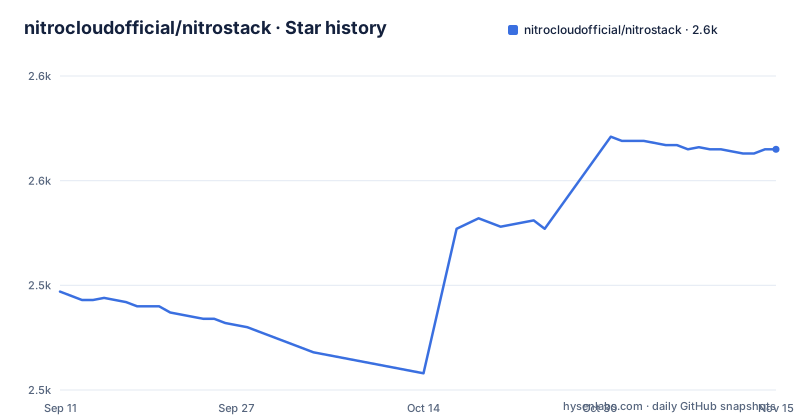
Star history
- nitrocloudofficial/nitrostack2,565 ★ · +68
| Repository | 2026-09-11 | 2026-11-15 |
|---|---|---|
| nitrocloudofficial/nitrostack | 2.5k | 2.6k |
68 Stars in the last 65 days, measured from the daily GitHub snapshot. Compare with other projects
Editorial analysis
The boilerplate NitroStack is trying to remove
A Model Context Protocol server is not hard to write. The hard part is everything around it. You need a tool registry, JSON Schema or Zod validation on every input, a way to inject shared services into handlers, request logging, authentication, and a test loop that does not involve restarting your editor host for every change. NitroStack's README frames the problem directly: building MCP servers today means "stitching together boilerplate, reinventing authentication, and hoping your tooling scales." That sentence is marketing, but the underlying observation is fair for teams shipping more than three or four tools.
The target user is a TypeScript backend developer who already knows decorators and dependency injection from NestJS or Angular. NitroStack assumes that vocabulary. If you have never written a guard or an interceptor, the framework will feel like indirection layered over a protocol you have not learned yet. If you have, the sample in the README reads as ordinary service code with @Tool and @Widget attached.
Decorators, a DI container, and where the pieces sit
The central object is a class decorated with @McpApp, which takes a module and a server descriptor containing name and version. Modules are declared with @Module and an imports array, so the composition model is the same one NestJS uses: an application root that pulls in feature modules.
Tools are methods, not standalone registrations. The README example defines a SearchTools class whose search method carries a stack of decorators: @Tool with name, description and a Zod inputSchema; @UseGuards(ApiKeyGuard); @Cache with a ttl of 300; and @Widget pointing at a component named product-grid. The handler receives parsed input plus an ExecutionContext, which exposes a logger. The README summarises the stack as "API definition + validation + auth + caching + UI" from one decorator chain.
That is the real architectural claim. Validation, authentication, caching and UI binding are cross-cutting concerns expressed as metadata on the handler, resolved by the runtime rather than written into the function body. The DI container is described as supporting singleton, transient and scoped lifecycles, and the middleware pipeline as having guards, interceptors, pipes and exception filters.
Getting a server running
The documented prerequisites are Node.js 20.18 or newer and npm 9 or newer. Scaffolding is one command:
npx @nitrostack/cli init my-server
Then cd my-server, npm install, npm run dev. The README states the server is running at that point and can be connected to any MCP-compatible client.
The packages are split three ways. @nitrostack/core holds the decorators, DI container and server runtime. @nitrostack/cli covers scaffolding, the dev server and code generators, and the README installs it globally with npm i -g @nitrostack/cli. @nitrostack/widgets is the React SDK for interactive tool output. The implementation workspace lives under typescript/ in the repository, with packages at typescript/packages/core, typescript/packages/cli and typescript/packages/widgets.
NitroStudio is a separate desktop application, downloaded from nitrostack.ai/studio rather than installed from npm. The README says you open your project folder in it and it handles the dev server for you, offering tool execution, payload inspection, an integrated chat client and widget preview with hot reload. Note the split: the CLI runs the server, NitroStudio is a GUI that can also run it. Teams that only want a terminal workflow can ignore NitroStudio entirely.
The widget layer is the part with no obvious precedent
Most MCP server frameworks stop at returning JSON. NitroStack attaches React components to tool outputs through @Widget and ships @nitrostack/widgets as a runtime dependency for rendering them. The README describes widget preview as a NitroStudio feature and lists a Widgets Guide in the documentation table.
This is the most opinionated design decision in the project. It does not say how a widget is delivered to a client that has no renderer, whether the tool still returns a text or structured payload alongside the component, or what happens in a plain MCP client that only understands tool results. If your consumers are Claude Desktop, ChatGPT apps or a custom client, the widget path may simply be ignored, which is harmless but also means the decorator is dead weight on that server. Treat the widget layer as a feature for clients you control, and confirm the fallback behaviour in the Widgets Guide before designing tools around it.
Where the framework gets in the way
The cost of decorator-driven design is indirection. A method carrying @Tool, @UseGuards, @Cache and @Widget does not tell you, by reading it, when the guard runs relative to validation, whether a cache hit skips the guard, or how a thrown exception is converted into an MCP error response. The README lists exception filters as part of the pipeline but gives no example. In a NestJS codebase you accept that trade because the framework is mature and the answers are documented. Here the documentation table points to a Tools Guide, an Authentication overview and a Server Concepts page, and the README does not reproduce their contents.
The second constraint is version churn. The repository shows two releases: v1.0.0 on 2026-07-06, labelled "Safest Stable Release", and 1.0.1 on 2026-07-13, labelled "Updated sdk". A patch release seven days after 1.0.0 that updates the SDK is normal for a young project, but it also means pinning matters. If you adopt NitroStack, pin @nitrostack/core and @nitrostack/cli to exact versions rather than carets, because a minor SDK bump can change decorator behaviour underneath you.
The third case is the wrong-tool case: a single-purpose server exposing two read-only tools. NitroStack's value comes from the DI container, the middleware pipeline and the auth layer. If you have no shared services, no auth and no widgets, you are paying for a module system and a decorator transpilation step to avoid writing a switch statement over tool names. The official MCP TypeScript SDK is the thinner path there, and the difference is not cosmetic: the SDK gives you a transport and a request handler you wire by hand, while NitroStack gives you a container that resolves your dependencies and a pipeline that runs your guards. One is a library, the other is a runtime with conventions.
Licence and what upgrading actually costs
NitroStack is Apache-2.0, which permits commercial use, modification and redistribution, and includes an explicit patent grant. The practical implication for a company embedding it in a product is that you can vendor or fork the packages without a copyleft obligation. Apache-2.0 does require that you preserve licence and notice files, and state significant changes if you modify files. This is a general description of the licence, not legal advice; check the LICENSE file and your own counsel for anything that matters.
Maintenance cost is harder to estimate. The repository is not archived and the most recent push is 2026-09-07, roughly two months after the 1.0.1 release. There is a Discord community and a documentation site, both linked from the README. Upgrading from 1.0.0 to 1.0.1 is described only as "Updated sdk", which tells you nothing about whether your decorators keep working. Budget for reading the SDK diff on each patch if you depend on the middleware pipeline, since that is the layer most likely to change behaviour without a major version bump.
Editorial conclusion
Adopt NitroStack if your team already builds NestJS-style TypeScript services and you want MCP tool definitions to look like the rest of your backend: decorators, a DI container, guards and Zod schemas in one place. Do not adopt it if you want a minimal protocol layer you can audit quickly, or if you cannot run Node.js 20.18 or newer. Before committing, verify two things in the repository rather than the README: whether the OAuth 2.1 and JWT authentication paths are implemented in @nitrostack/core or only documented, and whether @nitrostack/widgets is required at runtime for servers that never return a widget. Both answers change how much of the framework you are actually taking on.
Frequently asked questions
What is the nitrostack framework?
A TypeScript framework for building MCP servers, structured like an enterprise backend. It provides decorator-driven tool, resource and prompt definitions, a dependency injection container with singleton, transient and scoped lifecycles, three authentication schemes out of the box, a middleware vocabulary of guards, interceptors, pipes and exception filters, runtime schema validation, and React widgets attached to tool output.
Where is the nitrostack source code?
Not at the repository root. The readme states that the implementation workspace lives in a subdirectory named for the language, and every package link points into that subdirectory. The root holds the readme, licensing and governance files, documentation, assets and two directories for notes and sample applications.
How do you scaffold a nitrostack project?
With one command that invokes the CLI package through npx, which downloads and runs the tool at that moment with no version named. The same CLI is also published for global installation, which the quick start does not use. Then you install dependencies and run the development script.
What authentication does nitrostack support?
Three schemes out of the box: JSON web tokens, a version 2.1 of the OAuth authorisation framework, and API keys. Guards attach authentication to individual tool methods, and the documentation has a page covering setup for all three.
What is NitroStudio?
A downloadable desktop application for developing MCP servers, listed separately from the open-source packages. It opens your project folder and handles the development server for you, and offers real-time tool testing, payload inspection, an integrated assistant for chatting with your server, widget preview and hot reload.
How many releases does nitrostack have?
Two. The first is tagged with a version prefix and titled as the safest stable release, and the second drops the prefix and is described as an updated development kit. The last recorded change to the repository is dated 2026-09-25, so the working tree is ahead of the published packages.
Official sources
Add this badge to your README
If you maintain this project, the badge below links readers to this analysis and shows its maintenance status from the daily GitHub snapshot. Paste the markdown into your README; add ?metric=license or ?metric=stars to the image URL for a different field.

[](https://hysenlabs.com/projects/nitrocloudofficial-nitrostack)Star history chart for your README
[](https://hysenlabs.com/projects/nitrocloudofficial-nitrostack)Was this useful?