comma: a comma prefix that runs any nixpkgs package
Comma runs software without installing it. [maintainers=@Artturin,@burke,@DavHau]
At a glance
- What is it?
- The nix-community/comma tool puts a comma in front of a command and runs it straight out of nixpkgs, without installing anything. It wraps nix shell -c and nix-index, and it caches both the choice of derivation and the evaluated path, which is the difference between a second and a millisecond.
- Who is it for?
- Adopt comma if you use Nix and want to try a command from nixpkgs without adding it to your configuration or a long nix shell invocation. Do not adopt it if you need the newest version of a package, because the path cache deliberately keeps an evaluated path until Nix garbage collects it.
- Can I use it commercially?
- Yes. MIT is a permissive licence: you can use, modify and sell software built on it, as long as you keep its copyright and licence notices.
- Is it still maintained?
- Yes. The repository last received commits 43 days ago.
- What is it written in?
- Mainly Rust, according to GitHub's language statistics.
Answers come from the project's GitHub data, last synced on November 7, 2026, and from our analysis. They are not legal advice.
Star history
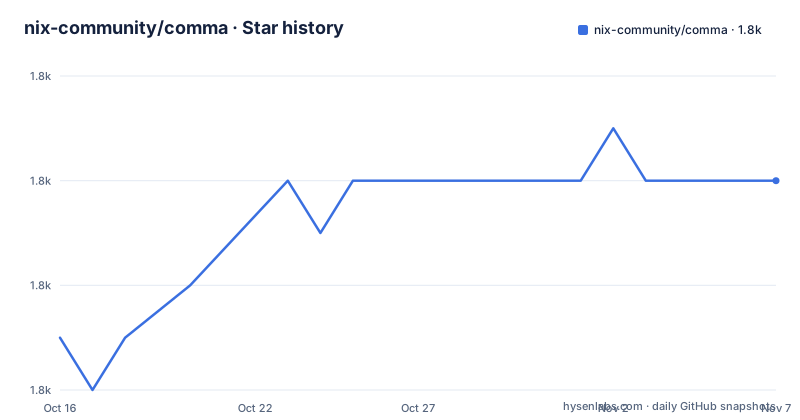
- nix-community/comma1,804 ★ · +3
| Repository | 2026-10-16 | 2026-11-07 |
|---|---|---|
| nix-community/comma | 1.8k | 1.8k |
3 Stars in the last 22 days, measured from the daily GitHub snapshot. Compare with other projects
Editorial analysis
A prefix character as the whole interface
Comma runs software without installing it, and the interface is a single character. You put a comma in front of a command and it runs:
, cowsay neatoThe README explains the mechanism in one sentence, which is the most efficient description of the project you will find. It basically just wraps together nix shell -c and nix-index. You stick a comma in front of a command to run it from whatever location it happens to occupy in nixpkgs without really thinking about it.
That is the entire value proposition, and it is worth understanding what it removes. Without comma, running a one-off tool from nixpkgs means invoking nix shell with a package attribute.. With comma, the command line is the command you already know, prefixed with one character, and the tool resolution happens underneath.
The "from whatever location it happens to occupy in nixpkgs" part is the other half. The name is resolved against the nixpkgs index rather than against a package name you look up, so a name that exists in several attributes, as many tools do, is disambiguated for you.
The project is MIT licensed, written in Rust with a package version of 2.4.2, and the maintainers are listed as @Artturin, @burke, and @DavHau. The last push to the repository was on 2026-09-25, and the recent releases are v2.4.2 from 2026-09-01, v2.4.1 from 2026-05-11, and v2.4.0 from 2026-03-17.
Installing it, and the index it depends on
Comma is in nixpkgs, so it installs like any other package, and there are two routes.
The preferred one is to add comma to systemPackages in your NixOS configuration:
environment.systemPackages = with pkgs; [ comma ];The alternative is to install it into your nix environment, and the README marks that route as discouraged:
nix-env -f '<nixpkgs>' -iA commaThe reason for the preference is not stated, but it is the usual one: a package declared in the NixOS configuration is declarative and reproducible, while nix-env mutates a profile that nothing else records.
The second requirement is the nix-index database, and it is not optional. You get the required nix-index database from the ad-hoc download section of the nix-index-database repository, and the README says to remember to keep it up to date.
There is a cleaner alternative to fetching it by hand. You may use programs.nix-index-database.comma.enable in the module from nix-index-database, and in that case you do not add comma to systemPackages yourself, because the module handles the installation and the database together.
That last detail is a nice piece of design. A tool that needs a large index is awkward to install by hand, and a module that wires the index and the tool together in one configuration option removes the failure mode where you install the tool and forget the index.
The prebuilt index itself lives at the nix-community/nix-index-database repository, which is maintained separately from comma itself, and the two projects being separate is what lets the index be updated on its own cadence.
Two caches, and the number that explains the design
The caching section is the most interesting part of the README, because it comes with a benchmark that quantifies exactly what the tool is trading away.
Comma supports caching both the choices, meaning that once you select a derivation for a command it will always return the same derivation, and paths, meaning that once the path is evaluated by Nix, the same path is returned until it is garbage collected.
The levels are controlled with the --cache-level flag or the COMMA_CACHING environment variable. Level 0 completely disables caching. Level 1 only caches choices. Level 2, which is the default, also caches paths.
The default is level 2 because it makes subsequent usage of a command much faster, and the benchmark in the README shows the magnitude. The two commands are hyperfine runs of comma with --cache-level=1 and with --cache-level=2, both resolving the same command:
Benchmark 1: ./result/bin/comma --cache-level=1 ls
  Time (mean ± σ):      1.050 s ±  0.021 s    [User: 0.540 s, System: 0.210 s]
  Range (min … max):    1.009 s …  1.075 s    10 runs

Benchmark 2: ./result/bin/comma --cache-level=2 ls
  Time (mean ± σ):       6.6 ms ±   1.0 ms    [User: 3.0 ms, System: 3.5 ms]
  Range (min … max):     5.8 ms …  11.3 ms    297 runs
The summary line states that the level 2 run was 159.25 times faster than the level 1 run, so a second becomes seven milliseconds. The reason for the difference is what the level 1 cache does not store. Without the path cache, every invocation re-evaluates the derivation in Nix, and that evaluation is the expensive part. With it, the resolution is a lookup.
The cost is stated in the same breath, and it is a real one. It also means you may not run the most up-to-date version of a command, especially if you do not run Nix's garbage collector often. If that is an issue, the README says to set COMMA_CACHING=1, which gives up the path cache and keeps the derivation choice.
Running with sudo, and the environment variable that matters
There is one wrinkle that comes up when the command needs root, and the fix is a specific environment variable.
If your nix-index is not at the default location then you will need to pass the NIX_INDEX_DATABASE variable, and the way to do it while keeping the variable through a privilege escalation is sudo --preserve-env=NIX_INDEX_DATABASE:
sudo --preserve-env=NIX_INDEX_DATABASE , helloThe reason --preserve-env is needed is that sudo scrubs the environment by default, and without the database path the tool cannot resolve anything. This is a small example of a general property of the tool: comma inherits the nix environment, so anything that changes that environment changes what comma can see.
The same reasoning explains the environment variable used for the cache level. COMMA_CACHING is read as an alternative to the --cache-level flag, which means it can be set once in a shell profile or in a session rather than repeated on every invocation, and the README uses it for the case where you want to make sure you get the newest version of a command.
So the tool has exactly two knobs, and both are about the same underlying question. The cache level is about freshness, and the database path is about where the index lives.
A small Rust binary, and what is in the repository
The Cargo manifest shows how little this is. The dependencies are clap at 4.5.41 with the derive, cargo, and env features, xdg at 2.5.2, bitcode at 0.6.6, log at 0.4.27, env_logger at 0.11.8, and two clap helpers, clap_mangen and clap_complete.
Those last two are the interesting ones. clap_mangen generates a man page and clap_complete generates shell completions, and both being dependencies rather than scripts means the man page and the completions are built as part of the release rather than maintained by hand. For a tool whose entire interface is a prefix character, autocomplete that completes,cowsay into a full command line is a real usability win, since the whole value depends on you typing the command correctly.
The xdg dependency is there to find the nix-index database in the XDG locations rather than in a fixed path, which is the same concern as the NIX_INDEX_DATABASE override, handled properly when the default works and overridable when it does not.
The repository layout is small and Nix-native. There is a flake.nix and a flake.lock, a default.nix, a shell.nix, and an etc/ directory, plus a release.sh and the src/ directory. The flake and the default.nix together mean the project is consumable both as a Nix flake and as a plain nixpkgs-style package definition, which matches the fact that comma itself lives in nixpkgs and that its primary audience is Nix users.
There is also a.envrc alongside the Nix files.
Editorial conclusion
Adopt comma if you use Nix and want to try a command from nixpkgs without adding it to your configuration or a long nix shell invocation. Do not adopt it if you need the newest version of a package, because the path cache deliberately keeps an evaluated path until Nix garbage collects it. Verify first that your nix-index database is present and reasonably fresh, because comma cannot find anything without it.
Frequently asked questions
What does the comma tool do?
It runs software without installing it. It basically wraps together nix shell -c and nix-index, so you put a comma in front of a command and it runs that program from wherever it happens to sit in nixpkgs, for example , cowsay neato.
How do I install comma and the index it needs?
Comma is in nixpkgs, so you can add it to systemPackages in your NixOS configuration, which is the preferred route, or install it with nix-env, which is discouraged. You also need the nix-index database from the nix-index-database repository, or you can enable programs.nix-index-database.comma.enable in that module instead of adding comma yourself.
What do the comma cache levels mean?
Level 0 completely disables caching, level 1 only caches the choice of derivation so the same command always resolves to the same derivation, and level 2, the default, also caches the evaluated path until Nix garbage collects it. You set the level with the --cache-level flag or the COMMA_CACHING environment variable.
Why does comma sometimes run an older version of a command?
Because the default cache level also caches paths, so once a path is evaluated by Nix, the same path is returned until it is garbage collected. The README notes that this means you may not run the most up-to-date version of a command, especially if you do not run Nix's garbage collector often, and suggests setting COMMA_CACHING=1 if that matters.
How do I use comma with sudo?
If your nix-index is not at the default location, pass the NIX_INDEX_DATABASE variable and preserve it across the privilege escalation, as in sudo --preserve-env=NIX_INDEX_DATABASE , hello. Without the database path the tool cannot resolve anything.
Official sources
Add this badge to your README
If you maintain this project, the badge below links readers to this analysis and shows its maintenance status from the daily GitHub snapshot. Paste the markdown into your README; add ?metric=license or ?metric=stars to the image URL for a different field.

[](https://hysenlabs.com/projects/nix-community-comma)Star history chart for your README
[](https://hysenlabs.com/projects/nix-community-comma)Was this useful?