NLUX for building LLM chat interfaces in JavaScript and React
The 𝗣𝗼𝘄𝗲𝗿𝗳𝘂𝗹 Conversational AI JavaScript Library 💬 — UI for any LLM, supporting LangChain / HuggingFace / Vercel AI, and more 🧡 React, Next.js, and plain JavaScript ⭐️
At a glance
- What is it?
- NLUX is a TypeScript library for adding conversational interfaces to React, Next.js, or plain JavaScript applications. It supplies chat UI, adapters, themes, and streaming support, but its custom licence and provider-specific packages require review before adoption.
- Who is it for?
- Web developers should consider NLUX when they need a packaged chat interface across React, Next.js, or plain TypeScript and have accepted its custom licence. Developers requiring a fully controlled UI, a single provider-specific API, or a stable GitHub release history should look elsewhere.
- Can I use it commercially?
- Check first. The repository uses a licence we do not classify automatically, so read its LICENSE file before any commercial use.
- Is it still maintained?
- Yes. The repository last received commits 25 days ago.
- What is it written in?
- Mainly TypeScript, according to GitHub's language statistics.
Answers come from the project's GitHub data, last synced on November 6, 2026, and from our analysis. They are not legal advice.
Star history
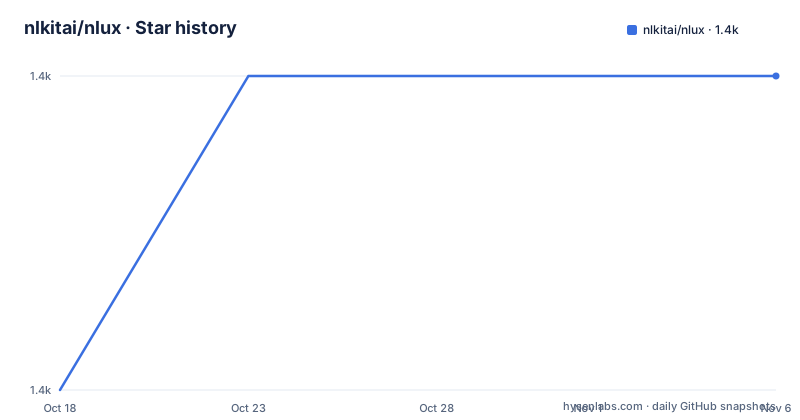
- nlkitai/nlux1,388 ★ · +1
| Repository | 2026-10-18 | 2026-11-06 |
|---|---|---|
| nlkitai/nlux | 1.4k | 1.4k |
1 Stars in the last 19 days, measured from the daily GitHub snapshot. Compare with other projects
Editorial analysis
What NLUX solves for browser-based LLM applications
NLUX addresses the interface work required around an LLM endpoint. A model response is only one part of a conversational application. The application also needs a message area, user input, participant presentation, response rendering, and a connection to the selected model service. The README positions NLUX as a library for building these browser interfaces in React or plain JavaScript rather than as a model hosting service.
The intended users are frontend developers who want to add chat behavior to a Next.js, React, or Vite application. NLUX offers a React component named `<AiChat />`, a `useChatAdapter` hook, and a framework-neutral `@nlux/core` package. The repository also separates integrations for LangChain LangServe, OpenAI, Hugging Face Inference, and the NLUX team's `nlbridge` Express.js middleware.
This scope has boundaries. NLUX does not replace the server that owns model credentials or invokes the LLM. The listed adapters connect an interface to existing APIs, while the documented guides point to separate backends for LangServe, Vercel AI, or Node.js. A team still has to decide where inference runs, how credentials remain out of browser code, and how application data is handled.
NLUX package layout and adapter data flow
The repository is a Yarn workspaces monorepo. Its workspaces include separate JavaScript and React packages for the core library, LangChain, OpenAI, Hugging Face, `nlbridge`, and Amazon Bedrock. Additional workspaces cover themes, Markdown parsing, and syntax highlighting. This separation means an application can choose the React surface, the framework-neutral core, or only the adapter and rendering extensions relevant to its stack.
Based on the documented adapter design, the interaction path begins when a user submits input through the NLUX interface. An adapter connects that request to an LLM API, and NLUX can handle either streamed or batch responses. Provider integrations package the differences among services such as OpenAI, Hugging Face Inference, and LangServe. The React package then exposes the chat component and hook to the application.
Rendering is extensible rather than fixed to plain text. `@nlux/markdown` is described as a parser for rendering Markdown while it is generated, while `@nlux/highlighter` uses Highlight.js for syntax highlighting. The default `Luna` theme and styles are available through `@nlux/themes`. These packages are separate from the core, which the README describes as having zero dependencies and no external UI library.
The layout does not imply that every provider integration is interchangeable. Each adapter remains tied to a particular API and its expected request or response format. Applications outside the listed services therefore need a custom adapter. The README explicitly permits custom adapters in streaming or batch modes, but it does not document their full interface contract, so that boundary should be checked in the documentation before selecting NLUX for an unsupported backend.
React, Next.js, RSC, and vanilla TypeScript coverage
NLUX is aimed at several browser application shapes. For React applications, the documented building blocks are `<AiChat />` and `useChatAdapter`. For Next.js, the README links a Vercel AI guide and states that the library supports React Server Components and Generative UI. It also documents a React-with-Node.js backend path through `nlbridge`.
The framework-neutral option is `@nlux/core`, described as the core vanilla JavaScript library for any web framework. The CLI templates distinguish Next.js, React with Vite, and vanilla TypeScript with Vite. That distinction matters because it changes the generated application structure even though the conversational interface remains the central feature.
For teams wanting to implement all interaction state and markup themselves, NLUX may be more abstraction than required. A hand-built React interface using the provider's own browser or server SDK can offer direct control over request handling and presentation. NLUX instead focuses on the reusable chat layer and provider adapters, including themes and optional Markdown rendering. The README does not provide a feature-by-feature comparison with Vercel AI or LangServe, so the choice should be based on the stack and interface requirements rather than an implied overall ranking.
Creating a first NLUX application
The shortest documented starting point uses `nlux-cli`. Run the Next.js command when the target application is a Next.js project. The command creates a directory named `my-next-app` through the CLI rather than requiring the library to be wired into an existing application manually.
npx nlux-cli create next my-next-appFor a React application using Vite, use the React template. The generated directory is `my-react-app`.
npx nlux-cli create react my-react-appFor plain TypeScript with Vite, select `vanilla`. This template creates `my-vanilla-app`, matching the README's distinction between framework-specific and framework-neutral use.
npx nlux-cli create vanilla my-vanilla-appThese commands establish a project shell. They do not document which model endpoint is configured in every generated project, nor do they show the generated adapter file. For a repository checkout rather than a new application, the README specifies Node 24.21.0 and Yarn 1.22.22. Its development sequence generates workspace artifacts before installing and building.
yarn generate
yarn install --frozen-lockfile --non-interactive
yarn build:dev
yarn dev
After `yarn dev`, the README says to open `http://127.0.0.1:9090`. That page is a local streaming chat demo that requires no API key, which makes it the clearest first use described by the project. It is a development demo, not proof that every provider adapter works without additional backend credentials.
Development verification and workspace scope
NLUX does not present the repository as a single React package. Development starts with generation because package relationships and build outputs are coordinated by scripts under `pipeline`. The root `package.json` declares a `generate` script, and its `preinstall` hook runs a workspace check. This makes the monorepo workflow more involved than installing one published package in isolation.
The repository lists separate commands for its main verification activities. `yarn test:pipeline` covers pipeline-related checks, `yarn lint` runs linting, and `yarn build` invokes the build script. The README also lists `yarn test` and `yarn build-demo` as commands for checking changes.
yarn test:pipeline
yarn lint
yarn build
yarn test
yarn build-demo
The repository includes `packages/`, `examples/`, `docs/`, `specs/`, and `pipeline/` at the top level. The example areas include baseline and development examples, framework starters, Next.js demos, and UI components. This is useful when evaluating how the library is intended to fit different application structures.
The README does not describe a compatibility matrix across browsers, Node releases, React versions, or provider SDK versions. It does name a Node and Yarn pair for repository development, but that is not the same as a published-package support policy. There are also no GitHub releases listed. Consumers who depend on stable version tags must therefore inspect the package version and repository history directly.
Custom licence, maintenance, and adoption limits
The root `package.json` declares `SEE LICENSE IN ROOT LICENSE FILE`, and the repository metadata reports a custom licence that GitHub cannot classify. The README does not reproduce the permissions or restrictions, so this article cannot establish whether commercial use, modification, redistribution, or private use is permitted. That is a concrete adoption gate, especially for organizations that need an approved internal licence classification.
The repository is not archived, and its last push was on 2026-10-14. The recent repository change supports considering the project current, but no GitHub releases are listed. Package-level upgrade planning must therefore account for changes in the monorepo, generated workspace artifacts, and the relevant npm package rather than assuming that each commit corresponds to a release tag.
NLUX is also the wrong choice when the application needs only a direct model API client and a few custom controls. Its package count, provider adapters, theme layer, Markdown extension, highlighter, and CLI templates add more choices than a small embedded chat widget may require. The right tool is NLUX when the reusable conversational interface is central and the team accepts React or core abstractions around it.
Where NLUX fits against a custom chat interface
The clearest alternative is building the interface directly with React and a provider or backend API. In that approach, the application owns component markup, message state, request submission, response parsing, and rendering. It can use OpenAI, Hugging Face Inference, LangServe, Vercel AI, or another service through whatever client or server route the project already owns.
NLUX takes a different approach. It supplies a conversational UI layer, React components and hooks, reusable personas, theming and layout options, and adapters that connect selected services. It also offers optional Markdown and syntax-highlighting packages. The trade-off is abstraction and package selection in exchange for less interface plumbing.
For an unsupported LLM, both paths require extra work. NLUX documents custom adapters in stream or batch modes, while a hand-built implementation must write the provider-specific transport and update logic directly. The README does not state that every custom adapter can produce identical rendering or streaming behavior. Verify the selected adapter and React component boundary in the docs before committing to that extension path.
Editorial conclusion
Web developers should consider NLUX when they need a packaged chat interface across React, Next.js, or plain TypeScript and have accepted its custom licence. Developers requiring a fully controlled UI, a single provider-specific API, or a stable GitHub release history should look elsewhere. Review `LICENSE`, then inspect the generated adapter configuration for the selected LLM before adoption.
Frequently asked questions
How do I create a React application with NLUX?
Use the documented `nlux-cli` React template: `npx nlux-cli create react my-react-app`. The README identifies this as a React application using Vite with NLUX.
Does NLUX support Next.js and plain TypeScript?
Yes. The README documents a Next.js template, a React-with-Vite template, and a vanilla TypeScript template. It also lists `@nlux/core` for use with a vanilla JavaScript library.
Can I use NLUX with an LLM that is not built in?
The README says that users can create their own adapter for an LLM, with streaming or batch support. It does not document the complete custom adapter contract.
What licence does NLUX use?
The root `package.json` points to the repository's `LICENSE` file, and the repository metadata classifies it as a custom licence. The README does not reproduce its permissions or restrictions.
Official sources
Add this badge to your README
If you maintain this project, the badge below links readers to this analysis and shows its maintenance status from the daily GitHub snapshot. Paste the markdown into your README; add ?metric=license or ?metric=stars to the image URL for a different field.

[](https://hysenlabs.com/projects/nlkitai-nlux)Star history chart for your README
[](https://hysenlabs.com/projects/nlkitai-nlux)Was this useful?