NoSuggest: A YouTube Viewer That Removes the Algorithm, Not the Content
A distraction-free YouTube experience. Your channels, your feed, no algorithm.
At a glance
- What is it?
- NoSuggest is a source-available, PWA-based YouTube client that strips out recommendations, autoplay, and Shorts, leaving only your subscriptions and search. It is a deliberate trade-off: privacy and focus in exchange for a closed backend and a restrictive license.
- Who is it for?
- Adopt NoSuggest if you want a no-account, mobile-friendly YouTube client that shows only your subscriptions and search results, and you are comfortable with a frontend-only open source license and a private backend. Do not adopt it if you need to self-host the full stack, modify the server-side logic, or redistribute the app commercially.
- Can I use it commercially?
- Check first. The repository uses a licence we do not classify automatically, so read its LICENSE file before any commercial use.
- Is it still maintained?
- Yes. The repository last received commits 6 days ago.
- What is it written in?
- Mainly HTML, according to GitHub's language statistics.
Answers come from the project's GitHub data, last synced on October 22, 2026, and from our analysis. They are not legal advice.
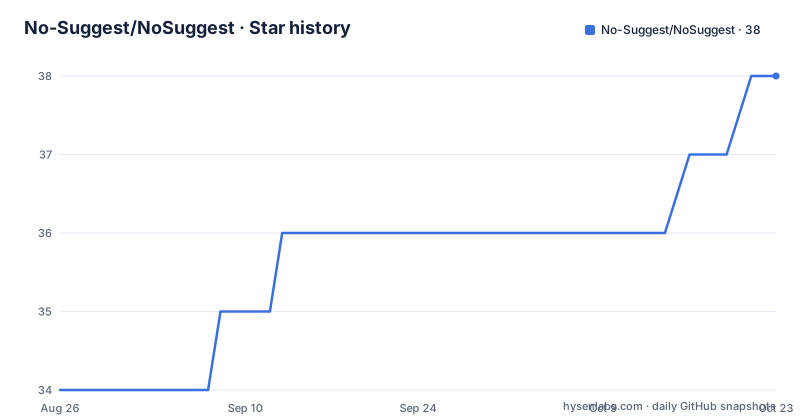
Star history
- No-Suggest/NoSuggest38 ★ · +4
| Repository | 2026-08-26 | 2026-10-22 |
|---|---|---|
| No-Suggest/NoSuggest | 34 | 38 |
4 Stars in the last 57 days, measured from the daily GitHub snapshot. Compare with other projects
Editorial analysis
The Problem: YouTube's Algorithm as a Default
The problem is real, but it is also narrow. NoSuggest does not aim to replace YouTube's entire feature set. It does not offer comments, playlists, or channel management beyond following. It is a tool for a specific behavior: intentional viewing. If you rarely use subscriptions and mostly watch trending videos, this tool has little to offer.
How NoSuggest Works: Frontend, Backend, and the Embed Player
NoSuggest is a web application, not a browser extension or a native app. The repository is described as 'the frontend source code,' written primarily in HTML. The application retrieves publicly available YouTube data, the same information visible to any browser. Videos play through YouTube's official embed player, which means creators still receive watch time and ad revenue. This is a key architectural choice: NoSuggest does not rehost content or bypass ads. It simply changes the surrounding interface. The frontend stores user data in the browser's localStorage: followed channels, saved videos, a short-lived video cache (cleared every three hours), and the Kids Mode PIN. Nothing is sent to a server, according to the README. The backend, however, is not open. The README states that 'the backend worker that handles API requests is kept private to protect service reliability and prevent abuse.' This means the data-fetching layer is a black box. You can inspect how the interface behaves, but not how it talks to YouTube. That asymmetry is worth noting before you trust it with your viewing habits.
Getting Started: Commands and Configuration
The README does not provide installation commands, build steps, or a package.json. The project is a static frontend, so running it locally likely means opening the HTML files in a browser or serving the directory with a simple HTTP server. For example, you could use 'python3 -m http.server' in the repository root and navigate to the local address. There is no configuration file documented, no API keys to set, and no account creation. The primary way to use NoSuggest is the hosted site at nosuggest.com. The PWA aspect means you can install it on your phone or desktop from the browser, but the README does not specify the manifest file or service worker details. The lack of setup instructions is a limitation for developers who want to self-host or contribute. You are left to infer the structure from the repository layout. The only explicit configuration is the Kids Mode PIN, which is set within the app and stored in localStorage.
Privacy and Data Storage: What's Local, What's Not
NoSuggest makes strong privacy claims. The README says it collects no personal data, uses no cookies, and has no tracking pixels. It does use Cloudflare Web Analytics, which it describes as 'cookie-free' and recording only aggregate data like page views and country. Your channels, saved videos, and PIN stay in your browser's localStorage. The video cache is cleared every three hours. This is a straightforward, client-side storage model. However, there is a gap between the frontend and backend. The backend worker that fetches YouTube data is not open, so you cannot verify whether it logs requests or stores anything. The README asserts that 'nothing ever leaves your device,' but that statement applies to the frontend data. Every video request still goes through the private backend, which sees your IP address and the channel or search query you requested. The privacy policy at nosuggest.com/privacy may clarify this, but the repository itself does not. For users who want full transparency, this is a genuine limitation.
Kids Mode: A PIN-Protected Wall
One distinctive feature is Kids Mode. The README describes it as 'YouTube for kids without recommendations, where you choose the channels and lock them with a PIN.' This is a parental control layer that restricts navigation to approved channels only. The PIN is stored in localStorage, which means it is device-specific. If a child clears the browser data, the PIN is gone, and so is the mode. That is a practical weakness: the protection is only as strong as the browser's data persistence. Also, because the backend is private, there is no way to audit how channel approvals are enforced. The feature is a differentiator, but it is not a substitute for dedicated parental control software. It works only within the NoSuggest interface; a child could open a regular browser and access YouTube directly. The README does not claim otherwise, but parents should understand the scope.
Licensing and Maintenance: Source-Available, Not Open Source
The repository license is listed as 'NOASSERTION,' and the README clarifies the terms. The frontend source is available for 'personal non-commercial use.' You may read and inspect it, but you may not redistribute, rebrand, or redeploy the application commercially or publicly without explicit permission. This is a source-available license, not an open source license in the OSI sense. The backend is not included at all. For developers, this means you cannot fork the project and run your own instance for a public audience. The project is actively maintained, with a v1.0 release in May 2026 and a v1.1 release in June 2026, but the maintenance is controlled by the original author. The last push date is the same as the v1.1 release, suggesting a steady but single-maintainer pace. Upgrade costs are low for users because the PWA updates automatically, but there is no community contribution path. If the maintainer stops, the hosted service may vanish, and you cannot legally take over the codebase.
Alternatives: PocketTube and the Browser Extension Approach
The README explicitly names PocketTube as an alternative. PocketTube is a browser extension that organizes YouTube subscriptions into groups and filters the subscription feed. It works inside the YouTube website, so it does not remove all recommendations; it adds a layer of organization. NoSuggest takes a different approach: it is a separate web application that replaces the YouTube interface entirely. That difference matters. An extension like PocketTube is easier to install and updates with the browser. NoSuggest requires you to trust a third-party domain and a private backend. Another alternative is to use YouTube's own 'Subscriptions' tab and disable autoplay in settings, but that still leaves the sidebar and homepage. NoSuggest is more aggressive in removing distractions. The trade-off is that you lose the native YouTube experience, including comments and playlists, and you depend on an unofficial data-fetching backend. For users who want minimal intervention, the extension route is lighter. For users who want a clean room, NoSuggest is more thorough.
Editorial conclusion
Adopt NoSuggest if you want a no-account, mobile-friendly YouTube client that shows only your subscriptions and search results, and you are comfortable with a frontend-only open source license and a private backend. Do not adopt it if you need to self-host the full stack, modify the server-side logic, or redistribute the app commercially. Before relying on it, verify the backend's stability and the privacy policy's claims about Cloudflare Web Analytics, since the worker code is not inspectable.
Frequently asked questions
How does NoSuggest deal with the Recommended feed on YouTube?
YouTube's recommendation algorithm is designed to maximise watch time rather than to serve you, and it keeps pushing autoplay, end cards, homepage suggestions and a sidebar of suggestions even when you opened the app for one specific video. NoSuggest removes all of those and leaves your followed channels, your search and your saved videos.
How does NoSuggest differ from switching off auto suggestions in YouTube?
NoSuggest is a separate viewer rather than a YouTube setting. It exposes only the channels you follow, a latest uploads feed, keyword search and saved videos, with no suggested videos, no autoplay and no Shorts spiral anywhere in the interface.
Why does Not Interested not fix YouTube, and what does NoSuggest do instead?
YouTube's recommendation machinery is built to maximise watch time, so dismissing one item leaves the rest of the interface intact. NoSuggest removes the machinery from the picture: only channels you chose to follow, your own search results and videos you bookmarked are surfaced.
How do I undo a don't recommend channel choice in NoSuggest?
There is no recommendation state to undo, because NoSuggest does not carry YouTube's recommendation controls. What you set lives in your browser's localStorage: followed channels, saved videos, a video cache that clears itself every three hours, and your Kids Mode PIN.
Official sources
Add this badge to your README
If you maintain this project, the badge below links readers to this analysis and shows its maintenance status from the daily GitHub snapshot. Paste the markdown into your README; add ?metric=license or ?metric=stars to the image URL for a different field.

[](https://hysenlabs.com/projects/no-suggest-nosuggest)Star history chart for your README
[](https://hysenlabs.com/projects/no-suggest-nosuggest)