EchoMuse repoints an Echo Dot 2nd gen at Home Assistant, and older firmware streams in every mode
Alexa replacement and controller for Echo Dot 2nd Generation device.
At a glance
- What is it?
- A software replacement for one Amazon speaker, run as a Home Assistant add-on or Docker container, with a custom Linux userspace on the device and a controller that does the wake word. The honest parts are the risks: a USB unlock that can soft-brick the Dot, and firmware that streams continuously until you update it.
- Who is it for?
- EchoMuse is for one specific speaker and one specific home automation stack, and it says so before it says anything else. If you have an Echo Dot 2nd gen and Home Assistant already doing voice, it is the difference between a 2016 device in a drawer and a satellite on your network.
- Can I use it commercially?
- Yes. MIT is a permissive licence: you can use, modify and sell software built on it, as long as you keep its copyright and licence notices.
- Is it still maintained?
- Yes. The repository last received commits 2 days ago.
- What is it written in?
- Mainly Python, according to GitHub's language statistics.
Answers come from the project's GitHub data, last synced on November 25, 2026, and from our analysis. They are not legal advice.
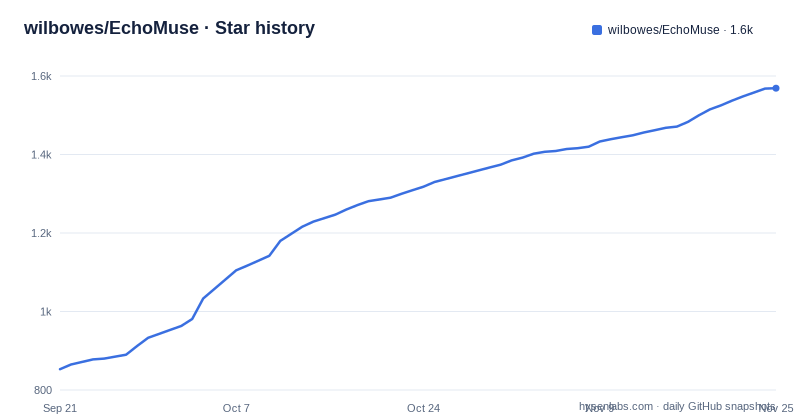
Star history
- wilbowes/EchoMuse1,569 ★ · +716
| Repository | 2026-09-21 | 2026-11-25 |
|---|---|---|
| wilbowes/EchoMuse | 853 | 1.6k |
716 Stars in the last 65 days, measured from the daily GitHub snapshot. Compare with other projects
Editorial analysis
Not Alexa, not standalone, and only one model of Dot
The project opens with a list of what it is not, which is the most useful paragraph in the file.
Not Alexa: no skills, no shopping, no calling, no Drop In, no Amazon account. The assistant on the other end is Home Assistant's Assist, so the device can do whatever Home Assistant can do and nothing else. Not standalone: you need a working Home Assistant with an Assist pipeline, and Home Assistant does the speech recognition, the understanding and the voice. Not ready out of the box, which is the unlock covered separately below. And not for other Echo models yet: only the Echo Dot 2nd generation works, with ports to the Echo Dot 3, the Echo 2 and the Echo Show 8 described as in progress with community help.
What it is, then: a replacement for the software on a 2016 Echo Dot, with the microphones, speaker, LED ring and buttons all still working, plus a controller you run on your own network as a Home Assistant add-on or a Docker container. That controller detects the wake word, manages your devices, and has a web dashboard.
The integration point is deliberately boring. The Dot shows up in Home Assistant as an ordinary ESPHome voice satellite, so there is nothing extra to install on the Home Assistant side. That is the design decision that makes adoption cheap, and it is also what limits the feature set to what a voice satellite can do.
The unlock needs Linux and a Chromium browser, and it can soft-brick the Dot
Everything else depends on one irreversible step, and the project puts a warning around it rather than after it.
The Dot has to be unlocked over USB with a third-party tool, amonet-biscuit by R0rt1z2. Either version works: v1.1.0 leaves the device on FireOS 5, v2.0.0 moves it to FireOS 6, and a separate rooting guide explains which to choose. The file says plainly that you do this at your own risk, and then says why that sentence is there: if a step goes wrong the Dot can end up soft-bricked, with a linked community thread covering recovery.
The hardware list is where most people stop reading, so it is worth flattening. Beyond the Dot and a Home Assistant with Assist, you need an always-on computer for the controller, where the Home Assistant machine itself will do if it runs add-ons. You need a Linux computer and a micro-USB cable, once, because the unlock does not run on macOS. And you need Chrome or Edge, once, because the setup wizard talks to the Dot over USB from the browser.
So a Mac owner needs a live USB and a Chromium browser before they can start. The unlock is the project's hard floor: nothing in the rest of the system is testable until that hour is spent, and the failure mode is a speaker that no longer boots.
Past the unlock, the controller starts as a Home Assistant add-on or with Docker in four commands:
mkdir echomuse && cd echomuse
curl -O https://raw.githubusercontent.com/wilbowes/EchoMuse/main/controller/docker-compose.deploy.yml
curl -o .env https://raw.githubusercontent.com/wilbowes/EchoMuse/main/controller/.env.example
docker compose -f docker-compose.deploy.yml up -d
The third step is the setup wizard, run from the dashboard with the Dot plugged in over USB. It installs everything and joins the Dot to your WiFi, you approve the Dot in the dashboard, and Home Assistant discovers it.
emOS replaces Amazon's Android and restores in about ten seconds
Once unlocked, the wizard offers two ways to run the software, and the naming is confusing enough to be worth spelling out.
emOS is the default. It replaces Amazon's Android with the project's own small Linux userspace and keeps only the Dot's kernel. It runs on FireOS 5 and FireOS 6 devices, and the 3.5mm jack works properly on it, which the alternative does not promise. The wizard keeps a copy of the original boot image, and restoring that image takes about ten seconds.
FireOS with root is the older path: it keeps Amazon's Android 5 and runs EchoMuse on top of it, on FireOS 5 devices only. It is described as the option with the most hours behind it.
So the two options differ on three axes at once: which Android is underneath, whether the device needs to have been on FireOS 5 or can be on 6, and whether there is a quick escape. emOS gives up Amazon's software entirely and buys a ten-second restore; FireOS with root keeps the original stack running an extra layer above it.
That backup is the load-bearing detail in this whole design. A ten-second restore is what makes an experimental userspace on a second-hand speaker a reasonable thing to try, and the wizard takes the copy without asking.
Wake word detection can move to the controller, which means always-on streaming
By default the controller listens for the wake word, not the Dot. The Dot can do it itself instead, switched on in the dashboard's wake word settings, either for every Dot or for one.
The fallback matters: if a Dot cannot do it, because of older firmware or because its wake word model is not installed yet, the controller takes over, so the device never goes deaf.
The privacy trade is real in both directions, and the project describes both. When the Dot listens for itself, nothing leaves the device until it hears the wake word, and then what you say goes to the controller on your LAN and on to Home Assistant, stopping when you stop speaking. When the controller listens instead, that Echo streams its microphone to the controller all the time, on the LAN and nowhere else, and the dashboard says so.
So the mode that keeps audio inside the LAN is also the mode with no wake-word gate on the wire. Neither is wrong, and the choice is per device.
Two behaviours ride on top of the same setting. Barge-in works by saying the wake word over a reply, and with more than one Dot the first to hear the wake word answers while the rest stay quiet.
Firmware older than the wake word change streams in every mode
This is the line in the privacy section that deserves to be read twice: firmware that predates the wake word setting streams in every mode, and is labelled that way until you update it.
There is no user choice on that hardware. A Dot that is too old to know about the setting will send audio continuously regardless of what the dashboard shows, and the project's answer is a label rather than a fix. The label is the honest thing to do, since a user who believes they have a wake-word gate and do not is the exact failure this whole category keeps producing.
There is a related version of the same problem for settings rather than firmware. Installs made before the wake word detection option existed keep whatever setting they had until somebody changes it, at Config, Wake word detection. A preference that predates its own control is not neutral.
The rest of the privacy picture is short and checkable. There is no telemetry, no analytics and no install counter. The controller connects out to GitHub for one purpose, checking for and downloading releases.
Where audio goes after the controller is not the project's decision: it depends on the Assist pipeline you configured, fully local with Whisper and Piper, or a cloud service if you chose one. A false wake sends a few seconds of audio you did not mean to, and the file notes that is true of every wake word system, Amazon's included.
Three release trains in one week, and a documented floor above the newest tag
The release list holds three artifacts from three days, under three different naming schemes. emOS emos-v0.10 on 2026-10-02, which is the device-side userspace. EchoMuse v2.17.0 on 2026-09-29, which is the controller. And EchoMuse v2.17.0-ea.1 on 2026-09-27, an early access build of the same controller version.
So the project ships a stable line and an early access line of one component, and a separate version line for another component, and the two are numbered independently. That is a coherent choice for a device plus controller project, and it means a version number alone does not tell you what you are installing.
The documented update path is where it gets confusing. Firmware and emOS are updated over WiFi, each with automatic rollback if the new version fails. An emOS update needs emOS 0.10 as the release to install and a controller newer than 2.25.0, and before that version emOS is updated by re-running the wizard.
That floor is worth checking before you plan an install, because the most recent controller release listed is v2.17.0, which is below it. Either the list of recent releases is not showing the newest tags, or the documented requirement has moved ahead of the release stream. Either way, the two numbers in the same file do not obviously belong to the same timeline, and that is worth resolving before you rely on over-the-air updates.
The rollback guarantee is the part that makes the whole arrangement safe to attempt on hardware you care about.
A submodule, an early access directory, and six documents at the root
The top level shows how much of this project is firmware. There is an emos/ directory for the Linux userspace that runs on the Dot, a device/ directory, a controller/ directory and a controller-ea/ directory sitting side by side for the stable and early access controllers, oww_forge/ for the wake word trainer you run yourself, porting/ for the work on other Echo models, tools/, docs/ and a controller-ea sibling.
There is also a submodule. .gitmodules is committed and the checkout includes GoTinyAlsa, which is an audio library, so the audio path goes through vendored native code rather than something the project wrote.
Six documents sit at the root next to the README: EM_CONTROLLER_SPEC.md, which is a specification rather than documentation, SETUP.md, JOURNAL.md, NOTICE.md, CLAUDE.md and CONTRIBUTING.md. A journal kept in version control next to the source is unusual, and for a project that is effectively an operating system for a repurposed consumer device it starts to look like the record of that work rather than a changelog.
repository.yaml is the Home Assistant repository descriptor, which is what lets the add-on install from a GitHub URL rather than a build.
The wake word tooling is worth noting separately: custom wake words are trained with oww_forge, which has its own README, and installed from the dashboard. So the voice model that decides whether the speaker hears you is something you can retrain for your own room, and the training happens on your machine.
Editorial conclusion
EchoMuse is for one specific speaker and one specific home automation stack, and it says so before it says anything else. If you have an Echo Dot 2nd gen and Home Assistant already doing voice, it is the difference between a 2016 device in a drawer and a satellite on your network. If you have a third generation Dot or want Alexa skills, this is not that project. Two things to settle before you start. The unlock is a one-time irreversible step that can leave the Dot soft-bricked, on Linux only, and it is the single point where this project can cost you hardware. And check what firmware your Dot is on, because firmware older than the wake word setting change streams its microphone continuously with no option to stop it.
Frequently asked questions
What is EchoMuse?
A replacement for the software on an Echo Dot 2nd generation from 2016, which turns the speaker into a local Home Assistant voice satellite. The Dot keeps its microphones, speaker, LED ring and buttons, appears in Home Assistant as an ordinary ESPHome satellite, and runs a controller on your own network as an add-on or Docker container.
What does EchoMuse need before it will work?
A working Home Assistant with an Assist pipeline, an always-on computer for the controller, and a one-time USB unlock of the Dot performed on a Linux machine with Chrome or Edge, because the unlock does not run on macOS. After that the setup wizard runs from the dashboard with the Dot plugged in over USB.
Does EchoMuse need an Amazon account?
No. There is no Amazon account, no Alexa and no cloud service of the project's own. The assistant is Home Assistant's Assist, so there are no Alexa skills, shopping, calling or Drop In, and the device can do what Home Assistant can do.
Can EchoMuse run on a third generation Echo Dot or an Echo Show?
Not yet. Only the Echo Dot 2nd generation works today. Ports to the Echo Dot 3, the Echo 2 and the Echo Show 8 are described as in progress with community help, and the repository keeps that work in a porting/ directory.
Does EchoMuse send my voice data anywhere?
Nothing leaves the Dot until it hears the wake word, then the audio goes to the controller on your LAN and on to Home Assistant. There is no telemetry, no analytics and no install counter; the controller connects out to GitHub only to check for and download releases.
Official sources
Where developers are discussing it
Posts on Hacker News, dev.to and Lobsters that link to this repository, found by our scan of those communities. 0 in the last 30 days; newest first.
- EchoMuse – Alexa replacement and controller for Echo Dot 2nd Generation deviceHacker News · Sep 16, 2026 · 1 points · 0 comments
Add this badge to your README
If you maintain this project, the badge below links readers to this analysis and shows its maintenance status from the daily GitHub snapshot. Paste the markdown into your README; add ?metric=license or ?metric=stars to the image URL for a different field.

[](https://hysenlabs.com/projects/wilbowes-echomuse)Star history chart for your README
[](https://hysenlabs.com/projects/wilbowes-echomuse)Was this useful?