NuxtHub core: four backing services for a Nuxt app
Add database, KV, blob storage, and cache to your Nuxt application. NuxtHub works on Vercel, Cloudflare, Netlify, and more.
At a glance
- What is it?
- The @nuxthub/core module adds a SQL database with automatic migrations, blob storage for static assets, a cache and a key-value store to a Nuxt application, and it abstracts the differences between running on Vercel, Cloudflare, Netlify and others. The package also ships two CLI binaries and keeps a legacy 0.9 line on a separate branch.
- Who is it for?
- Adopt NuxtHub core if you are building a full-stack Nuxt application and want a database, file storage, cache and key-value store without writing a provider integration for each one, and you are ready to use a hosted service rather than run these yourself. Do not adopt it if you need self-hosted storage you control, since the whole design is a thin abstraction over platform services.
- Can I use it commercially?
- Yes. MIT is a permissive licence: you can use, modify and sell software built on it, as long as you keep its copyright and licence notices.
- Is it still maintained?
- Yes. The repository last received commits 6 days ago.
- What is it written in?
- Mainly TypeScript, according to GitHub's language statistics.
Answers come from the project's GitHub data, last synced on November 6, 2026, and from our analysis. They are not legal advice.
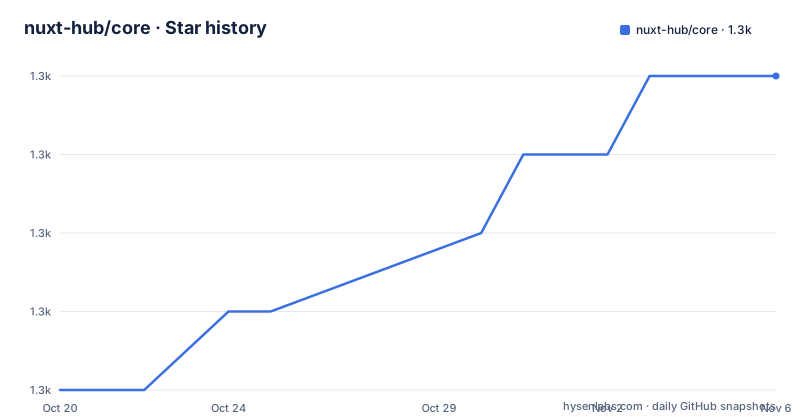
Star history
- nuxt-hub/core1,302 ★ · +4
| Repository | 2026-10-20 | 2026-11-06 |
|---|---|---|
| nuxt-hub/core | 1.3k | 1.3k |
4 Stars in the last 17 days, measured from the daily GitHub snapshot. Compare with other projects
Editorial analysis
Four services behind one Nuxt module
The repository description says it plainly: add database, KV, blob storage, and cache to your Nuxt application, and it works on Vercel, Cloudflare, Netlify and more. The README frames the goal as building and deploying powerful full-stack Nuxt applications with ease, and the summary is that NuxtHub supercharges the development workflow so you can focus on shipping features. The four capabilities are listed as optional features, which is the important word. There is a SQL database to store the application's data with automatic migrations, a files storage for static assets such as images and videos, a caching system for Nuxt pages, API routes or server functions, and a key-value store for JSON data accessible globally with low latency. The topics of the repository give a hint at how the abstraction is built, since they name Cloudflare D1, KV and R2 alongside Redis, S3, Vercel, Netlify, Vue, SSR and Workers AI. In other words, each capability is backed by whichever service the deployment target provides, and the module's job is to hide that difference from the application code.
The exports map is the API surface
The package manifest is more informative than the README here, because it shows exactly what a consumer can import. The root export carries the types at ./dist/types.d.mts and the module at ./dist/module.mjs, and alongside it there are subpath exports for ./blob with a driver wildcard at ./blob/drivers/*, for ./db, and for ./kv, each pointing at its own built output. That structure tells you two things. The first is that the database, the blob storage and the key-value store are usable as separate entry points rather than only through the Nuxt module, so application code can import the database client or a specific blob driver directly. The second is the driver wildcard, which is where the provider abstraction lives, since the blob capability is exposed per driver rather than as a single implementation. The package is an ES module with type: module, the main field points at ./dist/module.mjs, and the published files are dist and cli, so the runtime code and the command line tools ship together. The TypeScript declaration files are shipped alongside each entry point, which means a consumer gets types for the subpath it imports rather than only for the root.
Two command line tools, one for the database
The bin field registers two executables. nuxt-hub points at ./cli/bin/nuxthub.mjs and nuxt-db points at ./cli/bin/nuxt-db.mjs, and the separate nuxt-db binary is the one that matches the automatic migrations feature. That combination is the interesting design decision: a module that gives you a SQL database with automatic migrations needs a way to define and run those migrations, and a dedicated command for it keeps that out of the general purpose CLI. The application-level script is the one that sets the project up, and the database one is the tool you reach for when the schema changes. Automatic migrations are the feature that decides whether this module is worth it for a small team, because the alternative is running a separate migration tool against whatever database the deployment target provides, and a deployment target that swaps its database engine between environments is exactly the case where a second tool has to be configured twice.
Building the module: a playground, mkdist and a stubbed build
The contributing section is short and the scripts are the whole story. The workflow is pnpm based, and it starts with installing dependencies, generating the type stubs, developing with the playground, building the playground, running ESLint and running Vitest:
# Install dependencies
pnpm i

# Generate type stubs
pnpm dev:prepare

# Develop with the playground
pnpm dev
The package scripts show how that is wired. The dev script is nuxi dev playground and the dev:build script is nuxi build playground, so the playground/ directory in the tree is a real Nuxt application used as the development harness, which is the pattern Nuxt modules use to test the module inside a host application. The dev:prepare script is the most interesting one, because it does three separate things: it runs a stubbed module build, then it uses mkdist twice to compile the blob library and the database library into their own dist directories, and then it runs the module preparation and the Nuxt prepare step for the playground. That split is what produces the separate./blob,./db and./kv entry points in the exports map. The documentation site has its own scripts, with the docs served on port 4000 through nuxi dev docs and built with nuxi generate docs, and the release script runs lint, tests and changelogen. The tree also has a vitest.config.ts, an eslint.config.js, a build.config.ts, a renovate.json for dependency updates and a.nuxtrc.
A legacy branch, and a licence line that disagrees with the manifest
Two things in the repository deserve a note. The first is the legacy version. If you are looking for the legacy version of NuxtHub, which is 0.9, the README points to a 0.9 branch in the repository and to a separate documentation site at legacy.hub.nuxt.com, which means the current line and the previous one have genuinely diverged and a project that pinned the older version will be following a different set of behaviour. The second is the licence, and here the two sources disagree. The README's licence section links a file called LICENSE and labels it MIT, while the package manifest declares the licence as Apache-2.0. That is not a trivial inconsistency in a package that people deploy, because the two licences differ in their notice requirements and in what they oblige you to do when you redistribute. The manifest field is the one package managers read and display, and the file in the repository is the one a legal review would read, and they do not currently say the same thing. Anyone shipping this as a dependency should settle that with the project before relying on either statement.
Where NuxtHub is the wrong tool
Four limits are clear. The first is that the abstraction is only as portable as the providers. It works on Vercel, Cloudflare, Netlify and more, but the features available on a given target depend on what that target offers, and the repository topics name a fairly long list of specific services, D1, KV, R2, Redis, S3, Workers AI, which is a sign that the module is a set of provider-specific implementations rather than one uniform API. A team that wants the same behaviour on every environment should check the platform matrix before designing around it. The second is that this is a hosted-service story. If your requirement is that the data stays on infrastructure you control, an abstraction over a platform's own database and storage is the wrong shape, and you would be back to writing the integrations yourself. The third is the dependency on a service and a vendor for what are quite basic needs. A key-value store and a blob store are not exotic, and the operational simplicity of NuxtHub is bought with a service relationship. The fourth is the size of the surface you are adopting. The README is short because the real documentation is on hub.nuxt.com, and the module ships two CLI binaries, a playground, a docs site and a legacy branch, so the amount to read before you know what it does on your target platform is more than the README suggests.
Editorial conclusion
Adopt NuxtHub core if you are building a full-stack Nuxt application and want a database, file storage, cache and key-value store without writing a provider integration for each one, and you are ready to use a hosted service rather than run these yourself. Do not adopt it if you need self-hosted storage you control, since the whole design is a thin abstraction over platform services. Before you upgrade, note the licence discrepancy, because the README links an MIT licence while the package manifest declares Apache-2.0, and check the current release, which is v0.10.8 from 2026-07-13 with the last push on 2026-10-13.
Frequently asked questions
What does the @nuxthub/core module add to a Nuxt application?
It adds four optional capabilities: a SQL database with automatic migrations, files storage for static assets such as images and videos, a caching system for Nuxt pages, API routes or server functions, and a key-value store for JSON data accessible globally with low latency.
Which deployment platforms does NuxtHub work on?
The repository description says it works on Vercel, Cloudflare, Netlify and more. The repository topics name the underlying services it abstracts, including Cloudflare D1, KV and R2, Redis, S3, Vercel, Netlify and Workers AI.
What does the NuxtHub package export?
The root export provides the Nuxt module with its types, and there are subpath exports for ./blob, with a ./blob/drivers/* wildcard, for ./db and for ./kv, each with its own type declarations. The package also registers two binaries, nuxt-hub and nuxt-db.
How do I work on the NuxtHub module locally?
Run `pnpm i` to install dependencies, `pnpm dev:prepare` to generate the type stubs and build the blob and db libraries with mkdist, and `pnpm dev` to develop against the playground application. The repository also has `pnpm dev:build`, `pnpm lint` and `pnpm test` for the playground build, ESLint and Vitest.
What licence is NuxtHub under?
The README links an MIT licence, while the package manifest declares Apache-2.0, so the two sources disagree and the file should be checked before relying on either. The current release is v0.10.8 from 2026-07-13, with the legacy 0.9 line kept on a separate branch.
Official sources
Add this badge to your README
If you maintain this project, the badge below links readers to this analysis and shows its maintenance status from the daily GitHub snapshot. Paste the markdown into your README; add ?metric=license or ?metric=stars to the image URL for a different field.

[](https://hysenlabs.com/projects/nuxt-hub-core)Star history chart for your README
[](https://hysenlabs.com/projects/nuxt-hub-core)Was this useful?