AlpaSim is a uv workspace of thirteen Python packages with an empty dependency list, and it builds a different base image on ARM
AlpaSim is an open-source autonomous vehicle simulation platform designed for development and testing of end-to-end AV policies
At a glance
- What is it?
- AlpaSim is NVIDIA's closed-loop research simulator for end-to-end autonomous driving policies, with pluggable renderer services, a gRPC component interface, and four supported driving policies. The interesting parts are in the build: two different base images selected by architecture, a Rust toolchain installed by piping a remote script, and three separate version schemes for the same project.
- Who is it for?
- AlpaSim is the right base for research on end-to-end driving policies if you already have NVIDIA GPU infrastructure and a Prometheus stack, because the telemetry, operations, and data pipeline documents treat it as something you run rather than a library you import. It is a poor fit as a Python dependency, because the root package declares no dependencies at all and everything arrives through one of eleven extras or the composite `all`.
- Can I use it commercially?
- Yes. Apache-2.0 is a permissive licence: you can use, modify and sell software built on it, as long as you keep its copyright and licence notices.
- Is it still maintained?
- Yes. The repository last received commits 1 day ago.
- What is it written in?
- Mainly Python, according to GitHub's language statistics.
Answers come from the project's GitHub data, last synced on November 13, 2026, and from our analysis. They are not legal advice.
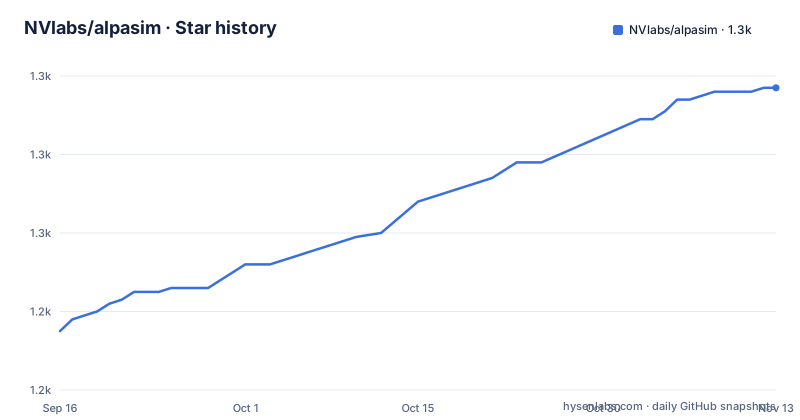
Star history
- NVlabs/alpasim1,297 ★ · +62
| Repository | 2026-09-16 | 2026-11-13 |
|---|---|---|
| NVlabs/alpasim | 1.2k | 1.3k |
62 Stars in the last 58 days, measured from the daily GitHub snapshot. Compare with other projects
Editorial analysis
Three version schemes describe the same project
The published releases are calendar-versioned: v2026.4 on 2026-04-24 and v2026.5 on 2026-06-04. The build metadata says something else entirely, with `version = "0.134.0"` in a root package named `alpasim_workspace`. The citation the README asks you to use is a third scheme again, keyed `alpasim_2025` with the year 2025 and the month October, and carrying a list of eighteen authors. Three numbering systems, none of them referencing the others. The citation block is also unfinished: it ends on a `url` field with no value after it. The contributor section at the bottom of the README has the same problem in a smaller way, listing project lead, tech leads, and topic groups through architecture, open sourcing, infrastructure, runtime, and CI, then stopping mid-word on a heading that begins with D. So the two sections a paper would most want to quote are the two that are cut off.
The root package has no dependencies and eleven extras
`pyproject.toml` describes a workspace rather than a library. The `dependencies` array is empty, and everything arrives through extras, one per member package: plugins, controller, eval, grpc, runtime, utils, physics, tools, driver, wizard, and trafficsim. There is a composite `all` that lists eleven of those, a `recipes` extra that pulls the driver with its recipes, and a `transfuser` extra for that one policy adapter. The uv workspace has thirteen members rather than eleven, because it includes `src/utils_rs` and globs `plugins/*`. That Rust member explains a build step that would otherwise be inexplicable. The `[tool.uv.sources]` block pins one dependency to a git URL at a fixed revision of another NVlabs repository, `trajdata-alpasim` from `NVlabs/trajdata`, with every other package resolved from the workspace. Python is pinned to `>=3.11,<3.13`, which is a narrow window for a project whose images ship Python 3 from two different upstream bases.
Two base images, chosen by architecture
The Dockerfile declares both bases and then picks between them with `FROM base-${TARGETARCH}`. On x86_64 that resolves to `nvidia/cuda:12.4.1-cudnn-devel-ubuntu22.04`, a CUDA development image on Ubuntu 22.04. On aarch64 it resolves to `nvcr.io/nvidia/pytorch:25.08-py3`, and the comment gives the reason plainly: the NGC PyTorch base is the only CUDA-enabled PyTorch source on ARM. So the two architectures do not share an operating system, a CUDA base, or a Python build, and any difference you see between an x86 result and an ARM result is not the simulator. GPU observability is handled by a third image, the DCGM exporter, pinned by digest so that layer cannot drift. The image then installs ffmpeg, curl, build-essential, the OpenGL library, prometheus with its node and process exporters, and the CUDA 12 datacenter GPU manager, and symlinks `libdcgm.so` to the versioned `libdcgm.so.4` that the manager package installed.
The image installs Rust by piping a script, and uv by a moving tag
Two unpinned downloads happen at image build time, and they are the reason the Dockerfile is worth reading closely. The first is the package manager, copied from `ghcr.io/astral-sh/uv:latest`, a floating tag. The second is a whole Rust toolchain:
RUN curl --proto '=https' --tlsv1.2 -sSf https://sh.rustup.rs | sh -s -- -yThe comment above it says why: the toolchain is required for the `utils_rs` maturin build. So a Python research simulator needs a Rust compiler in its image because one workspace member is not Python. The build then sets `UV_LINK_MODE=copy`, changes into `src/grpc` to compile the protocol buffers with a secret-mounted `~/.netrc` for private dependencies, and copies the whole repository in. The two documented build commands reflect the private-dependency situation, one plain and one passing a build secret for the credentials:
docker build -t alpasim-base .
docker build --secret id=netrc,src=$HOME/.netrc -t alpasim-base .
Four policies, one provisional, one with a broken link
The supported driver list has four entries and they come from two companies. Alpamayo-R1 is NVIDIA's VLA driving policy with chain-of-causation reasoning, Alpamayo 1.5 adds support for a public checkpoint, and VaVAM is ValeoAI's autoregressive video-action driving policy. The fourth is Transfuser, specifically Latent TransFuser v6, developed for NAVSIM and marked provisional, which is the only policy in the list the documentation declines to stand behind. The link on that line is also malformed: the LTFv6 reference wraps its URL in angle brackets inside the parentheses, so a renderer that follows it literally gets nonsense. Neither problem is fatal, and both are the kind of thing that survives in a README because nobody renders the page. Sensor fidelity rests on a pluggable renderer service with NuRec as the default and OmniDreams through FlashDreams as the video-model alternative, with configurable field of view, resolution, and frame rate.
Bugs, questions, and security go to three different places
The support section splits its audience rather than merging them. Usage questions and discussion go to the Alpamayo NV Developer Forum. Code-level bugs, documentation issues, and feature requests go to GitHub issues filed from a template, and the templates carry an `assignees:` field so the relevant NVIDIA responder is attached automatically rather than by triage. Security vulnerabilities go somewhere else entirely, NVIDIA's Vulnerability Disclosure Program, with an explicit instruction not to file security issues publicly in the repository. The project lead is Maximilian Igl, with Michal Tyszkiewicz and Michael Watson as tech leads, and the same two names recur across architecture, infrastructure, runtime, and CI, so the bus factor for most subsystems is one person. Research hackability is the design argument for all of it: a Python implementation, a modular gRPC interface so components can be swapped for custom implementations, and extensive configuration and debugging tools.
Data arrives over Git LFS and the observability stack is in the image
The documentation set is unusually long for a simulator, and two of its entries matter before you run anything. The telemetry guide covers Prometheus metrics, persistence, and central discovery, which matches what the image installs: prometheus, prometheus-node-exporter, and prometheus-process-exporter are all baked in, so the metrics plumbing ships whether or not you use it. The data pipeline guide covers the ASL log format and how to read the logs. Sample data is a Hugging Face dataset, `PhysicalAI-Autonomous-Vehicles-NuRec 26.01`, recommended for new runs, with release selection and legacy dataset commands documented under the test suites and scenes page; sample artifacts also ship inside the repository through Git LFS, so a shallow clone without LFS will not have the data. Running locally is Docker Compose on a single machine, the default tutorial path uses NuRec, and cluster or SLURM deployment lives in `src/tools/run-on-slurm`.
Editorial conclusion
AlpaSim is the right base for research on end-to-end driving policies if you already have NVIDIA GPU infrastructure and a Prometheus stack, because the telemetry, operations, and data pipeline documents treat it as something you run rather than a library you import. It is a poor fit as a Python dependency, because the root package declares no dependencies at all and everything arrives through one of eleven extras or the composite `all`. Before building, pick your architecture deliberately, since the x86_64 and aarch64 images are not the same base, and read the telemetry guide before you assume metrics exist, because the observability stack is installed in the image rather than declared in the package.
Frequently asked questions
What is AlpaSim and what is it for?
It is an open-source autonomous vehicle simulation platform for research and development, letting you test end-to-end driving policies in a closed-loop setting by simulating sensor data, vehicle dynamics, and traffic scenarios in a modular testbed. The named use cases are algorithm validation, safety analysis, performance benchmarking and regression testing, and debugging.
Which driving policies does AlpaSim support?
Four. Alpamayo-R1, an NVIDIA VLA driving policy with chain-of-causation reasoning, Alpamayo 1.5 for public checkpoint support, VaVAM, ValeoAI's autoregressive video-action policy, and Latent TransFuser v6 developed for NAVSIM, which is the only one marked provisional in the documentation.
How do I install AlpaSim's Python packages?
The root pyproject.toml declares no dependencies at all. You install by extra: plugins, controller, eval, grpc, runtime, utils, physics, tools, driver, wizard, or trafficsim, or the composite `all`, plus `recipes` for the driver's recipes and `transfuser` for that policy adapter. Python is constrained to >=3.11,<3.13 and the workspace is managed with uv, with one dependency pinned to a fixed git revision of NVlabs/trajdata.
How do I build the AlpaSim container?
With `docker build -t alpasim-base .` from the repository root, or with `docker build --secret id=netrc,src=$HOME/.netrc -t alpasim-base .` when private dependencies need credentials. The image selects its base by architecture: the CUDA 12.4.1 cuDNN development image on Ubuntu 22.04 for x86_64, and the NGC PyTorch image for aarch64.
Where do I report a security issue in AlpaSim?
Through NVIDIA's Vulnerability Disclosure Program, not in the repository. The support section says explicitly not to file security issues publicly there. Code-level bugs and documentation issues go to GitHub issue templates that auto-assign the relevant responder, while usage questions go to the Alpamayo NV Developer Forum.
Official sources
Add this badge to your README
If you maintain this project, the badge below links readers to this analysis and shows its maintenance status from the daily GitHub snapshot. Paste the markdown into your README; add ?metric=license or ?metric=stars to the image URL for a different field.

[](https://hysenlabs.com/projects/nvlabs-alpasim)Star history chart for your README
[](https://hysenlabs.com/projects/nvlabs-alpasim)Was this useful?