beautify-github-readme ships two modes and a four-file reference set, and it never pushes without approval
Organizes and designs repository READMEs to make a project's value, real-world examples, installation steps and usage boundaries easier to understand.
At a glance
- What is it?
- beautify-github-readme is an agent skill that restructures a repository README around real project material and produces GitHub-safe SVG, GIF and raster assets. Its two modes draw a hard line at what each may change, the readme promises four hero directions and describes one, and the repository has no tagged release.
- Who is it for?
- This skill suits someone whose README already contains the facts and fails only on order, and who wants a designed page without losing the ability to search and edit the text. Its central claim is the one worth believing: it reads the repository first, and the visual system is derived from the project rather than from a house template, which is why the four reference files matter more than the example screenshots.
- Can I use it commercially?
- Yes. MIT is a permissive licence: you can use, modify and sell software built on it, as long as you keep its copyright and licence notices.
- Is it still maintained?
- Yes. The repository last received commits 6 days ago.
- What is it written in?
- Mainly Python, according to GitHub's language statistics.
Answers come from the project's GitHub data, last synced on November 22, 2026, and from our analysis. They are not legal advice.
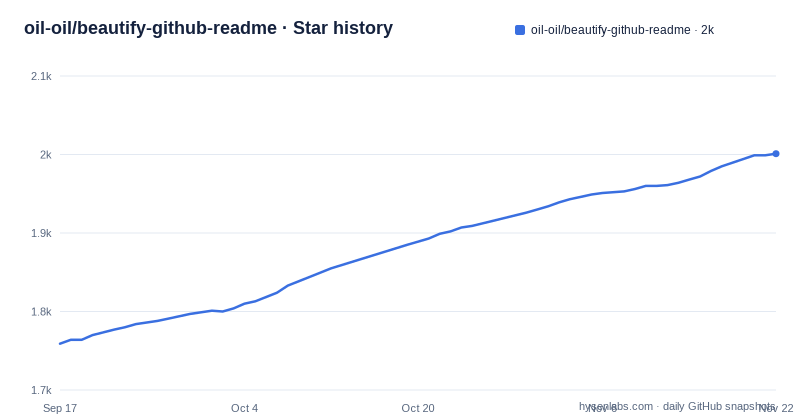
Star history
- oil-oil/beautify-github-readme2,001 ★ · +242
| Repository | 2026-09-17 | 2026-11-22 |
|---|---|---|
| oil-oil/beautify-github-readme | 1.8k | 2k |
242 Stars in the last 66 days, measured from the daily GitHub snapshot. Compare with other projects
Editorial analysis
Two modes, and each one names what it will not touch
The mode table is the part of this readme that does real work, because it defines the boundary of the tool rather than its capability. Whole README changes reading order, copy hierarchy, proof, Markdown and the complete visual system. Asset-only changes a static SVG hero, section headers, a workflow, a badge, a diagram, or an optional GitHub-safe GIF with its SVG source.
Each mode carries an explicit restraint. Whole README will not commit, push or publish without approval. Asset-only will not edit README copy, order, image references or links. So the more destructive mode is the one that stops before the git boundary, and the narrower mode is the one that stops before touching the words.
The readme is explicit that these are not the same operation. Reading a README for context does not grant permission to edit it, and in asset-only mode embedding the new assets requires a separate, explicit approval. That second sentence covers the easy-to-miss case: producing a hero is one step, getting that hero into the file is another, and they are gated separately.
Entry is conditional rather than assumed. If a request already states the scope, the skill starts directly. If someone only says beautify this repository, or pastes a URL, the agent is asked whether the whole README or only visual assets are wanted, and if asset-only, which specific artifact is needed.
Four reference files hold the guidance the readme only links to
The reusable production guidance is not in the readme. It sits in four documents under a skills directory, and the readme links each one by name: a project-native hero guide, a guide to writing GitHub-safe README SVGs, a guide to composing SVG with generated raster material, and a guide to producing GitHub-safe motion.
The split tells you what the author considers separate problems. A hero is a design question about deriving style from a project. SVG has production constraints specific to how GitHub renders and sanitises it. Hybrid composition is the harder case, mixing deterministic vector layout with generated raster subjects. Motion is treated as its own production problem rather than as a decoration step.
The repository tree is small enough to see the shape: a gitignore, a license, three readme translations, an assets directory and a skills directory. There is no package manifest, no source directory and no test suite at the top level, which is consistent with a skill whose content is instructions and references rather than code.
A readme that says its guidance lives in linked documents is not a flaw, but it does mean the visible page is a summary. Anyone judging whether the method holds up should read at least the hero and SVG documents, since those carry the claims the readme only asserts.
The promise is real material, no invented capabilities, no publishing
Three promises are stated, and they are the whole thesis of the tool. Use real project material. Never invent capabilities. Never publish without explicit approval.
The first promise is the one that does the work. The readme's diagnosis is that most repositories already contain enough information, and the failure is ordering: visitors meet internal terminology, installation commands and directory trees before they understand what the project is for. So the skill reads the repository, identifies the clearest value and proof, and only then decides how the page should look. Design follows from evidence rather than the other way round.
The second promise is about content editing, and it is what the whole mode divides on. Rewriting a readme is where a tool can quietly overstate what a project does, so the claim is that the rewrite works from what the project demonstrably has.
The third is the git boundary again, stated independently of the mode table. Between them, the promises explain the two-mode design: the tool that can rewrite your copy is the one that needs the strongest gate before anything is committed.
What is not written down anywhere is a failure report. There is no stated behaviour for a repository with too little material to work from, and no documented outcome when a request asks for something outside GitHub's rendering constraints.
The visual layer is split by what GitHub will and will not render
The readme names the constraint that shapes the whole method: a GitHub README does not have the layout freedom of a website. So the visual and content layers are separated, and each format is assigned the job it survives.
SVG handles editable heroes, section transitions, comparisons, diagrams and identity. PNG and WebP handle screenshots, generated artwork and dense walls of images. Markdown handles explanations, commands, links, configuration and contribution details. GIF handles approved motion, with the static SVG left as the editable fallback.
Two rules there are worth keeping in view. Motion is opt-in and is never generated by default, which is a design decision about diff noise as much as about taste. And the fallback rule means a motion asset is not the only copy of the design, so a repository that ships a GIF still ships something editable underneath it.
The hybrid case is called out separately because it is the hard one. Deterministic SVG layout is combined with optional AI-generated, background-removed subjects for characters, organic texture, complex materials and cinematic lighting. The stated result is a page that can feel designed without becoming one long image that nobody can search, copy or maintain.
The engineering column of the layers table names the acceptance criteria: assets GitHub-safe, images accessible, commands copyable, body text searchable.
Four hero directions promised, one worked through
The readme announces four independent hero directions and states that they do not share one house style, each deriving typography, color, composition and proof from the project itself. Only one is then worked through in the visible text.
That one is called Block World and is described as a playful hybrid. SVG builds the pixel typography, grid, labels and scene structure, while image generation and chroma-key removal supply the character that would be cumbersome to draw deterministically. The case study is Wolfcha, where image generation made a project-specific wolf game master, a fixed chroma-key workflow removed the background, and SVG kept typography, a moonlit table, a seat map and the composition precise.
The other three directions are named by the surrounding structure but their descriptions are not present in this file. The Block World example also works as a second gallery entry, since Wolfcha appears both as a hybrid case and in the project list above with SVG typography and an AI-generated character cutout.
The project list itself is worth reading as evidence of scope. Eight repositories are cited, five of them under the same owner, and the two outside it are a vehicle telemetry dashboard and an interactive town map. The descriptions are specific about method rather than outcome, naming real UI outputs, real icon sets, OBD-II PID data and a real dashboard screenshot. That is the standard the skill claims for itself, applied to its own showcase list.
Install is a registry command or a sentence to an agent
There are two documented install paths and neither is a package manager. The command line path is:
npx skills add oil-oil/beautify-github-readmeThe second is a prompt to paste into an agent, which is the same install performed by asking:
Install this Skill: https://github.com/oil-oil/beautify-github-readmeA repository that documents a sentence as an install method is a skill built for agent hosts rather than for a person at a terminal, which is consistent with the trigger syntax the mode examples use, where the skill is named with a dollar sign prefix inside the request.
The invocation examples are also written as complete prompts rather than as commands. The whole-README example asks for a redesign around the real project theme, asks for a local preview first, and asks that nothing be pushed. The asset-only example asks for the README to stay unchanged and for one animated GIF hero with its SVG source, with the style derived from the existing project and a rendered preview shown first. Both prompts state the constraint inline, which suggests the approval expectations are meant to be part of the request rather than assumed by the tool.
The last documented entry is a read-only audit, and its example prompt ends partway through the sentence at the word c.
Three readme translations, no release, and an optional signature
The repository carries the readme in three languages, linked at the top of the page: English, Simplified Chinese and Japanese, with the language switcher aligned to the right. The two non-English files sit at the root as README.zh-CN.md and README.ja.md, and the project description itself is written in Chinese.
The gallery list carries a clause that is easy to miss. If the skill helped create a public readme, authors are welcome to propose it, and the readme is explicit that this is completely optional: the footer signature is appreciated but never required, and submissions remain subject to maintainer review. So the visible list of eight projects is curated rather than a wall of self-submissions, and the terms of inclusion are stated rather than assumed.
The distribution story is thin in a way worth noting. The repository has no GitHub releases, so there is no tag to point an installation at and no version to record in a project that depends on it. The last push to the default branch is dated 2026-09-10, and the repository is not archived.
The license is MIT and a license file is present at the root. For a tool whose entire output is a design opinion applied to someone else's repository, that combination of a permissive license and an explicitly optional credit requirement is coherent: the skill can be used freely, and being listed is a courtesy rather than a condition.
Editorial conclusion
This skill suits someone whose README already contains the facts and fails only on order, and who wants a designed page without losing the ability to search and edit the text. Its central claim is the one worth believing: it reads the repository first, and the visual system is derived from the project rather than from a house template, which is why the four reference files matter more than the example screenshots. Two things to check before you run it on anything you care about. Confirm the approval boundary holds on your agent setup, because the mode split only means something if the agent honours it, and the skill's own protection is a rule rather than a permission. And read the four reference documents, since they hold the production guidance the readme itself only links to. Anyone who needs the readme rewritten in place, committed and pushed in one step is asking for something this skill deliberately refuses.
Frequently asked questions
What does beautify-github-readme change in my repository?
It has two modes. Whole README changes reading order, copy hierarchy, proof, Markdown and the visual system, but will not commit, push or publish without approval. Asset-only produces a static SVG hero, section headers, a workflow, a badge, a diagram or an optional GIF with SVG source, and leaves README copy, order, image references and links alone.
How do I install beautify-github-readme?
Run npx skills add oil-oil/beautify-github-readme, or give an agent the sentence Install this Skill: https://github.com/oil-oil/beautify-github-readme . There is no package manifest, source directory or test suite in the repository, and no GitHub release to pin.
Can beautify-github-readme rewrite my README text?
Only in whole-README mode. Asset-only mode leaves copy, order, image references and links untouched, and embedding a generated asset into the file still needs a separate, explicit approval. Reading a README for context is stated not to grant permission to edit it.
Where are the beautify-github-readme production rules written down?
In four reference documents under a skills directory, linked from the readme: project-native hero, GitHub-safe README SVGs, composing SVG with generated raster material, and GitHub-safe motion. The readme itself is a summary of those documents.
Does beautify-github-readme use AI-generated images?
Optionally. Hybrid SVG composition combines deterministic vector layout with AI-generated, background-removed subjects for characters, organic texture, complex materials and lighting. The readme also states that motion is opt-in and never generated by default, with the static SVG kept as the editable fallback.
Official sources
Add this badge to your README
If you maintain this project, the badge below links readers to this analysis and shows its maintenance status from the daily GitHub snapshot. Paste the markdown into your README; add ?metric=license or ?metric=stars to the image URL for a different field.

[](https://hysenlabs.com/projects/oil-oil-beautify-github-readme)Star history chart for your README
[](https://hysenlabs.com/projects/oil-oil-beautify-github-readme)Was this useful?