openScale: an Android weight tracker that talks to your Bluetooth scale
Open-source weight and body metrics tracker, with support for Bluetooth scales
At a glance
- What is it?
- A GPL Android app that reads measurements from dozens of Bluetooth scales, keeps the data on the device with no account required, and also ships the microcontroller firmware for building your own scale.
- Who is it for?
- openScale is a good fit if your scale speaks BLE over a vendor profile openScale already supports, and you want measurement history on your own phone with no account and no internet permission. It is the wrong tool if you want an iOS app, a hosted sync service included in the box, or continuous integration of body metrics into a larger health system, because the repository is Android-only and ships sync as a separate companion project.
- Can I use it commercially?
- Yes, with conditions. GPL-3.0 is a copyleft licence: if you distribute software that includes it, you must release that software's source code under the same licence. Running it internally without distributing it does not trigger that obligation.
- Is it still maintained?
- Yes. The repository last received commits 4 days ago.
- What is it written in?
- Mainly Kotlin, according to GitHub's language statistics.
Answers come from the project's GitHub data, last synced on October 22, 2026, and from our analysis. They are not legal advice.
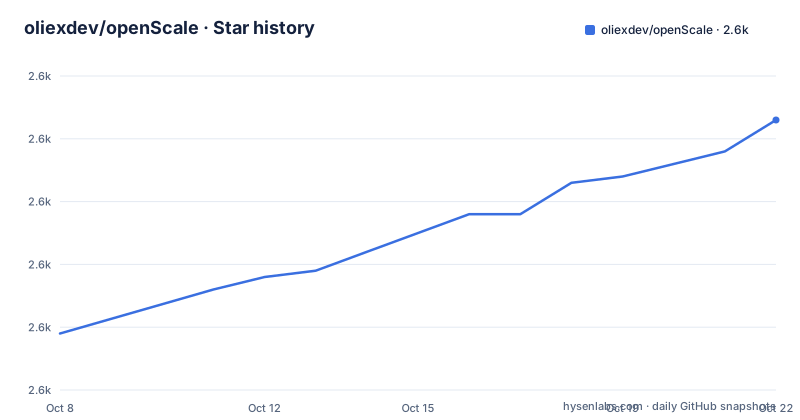
Star history
- oliexdev/openScale2,603 ★ · +34
| Repository | 2026-10-08 | 2026-10-22 |
|---|---|---|
| oliexdev/openScale | 2.6k | 2.6k |
34 Stars in the last 14 days, measured from the daily GitHub snapshot. Compare with other projects
Editorial analysis
A weight app whose real subject is the scale protocol
Most weight tracking apps treat the scale as a solved problem: you step on, a number appears. openScale inverts that, treating the interesting engineering in talking to the hardware. The README lists built-in support for a custom made Bluetooth scale plus models from Beurer, Digoo, Excelvan, Exingtech, Hesley, MGB, Medisana, Runtastic, Sanitas, Silvercrest, Vigorun, Xiaomi, Yunmai, iHealth and Easy Home, and points to a wiki page carrying the full list with a support level for each model.
That level matters. Some scales broadcast a standard BLE measurement characteristic and work immediately. Others use a vendor protocol that has to be reversed and reimplemented per model, which is why the project asks contributors to read a how-to-support-a-new-scale guide before starting. The measurement side is unremarkable once the bytes decode: the app records weight, and optional body fat, water, muscle and bone readings if the scale reports them.
Where a scale does not speak BLE, or is not supported yet, the README is direct about the fallback: measurements can be entered manually. No account, no sync, no ceremony.
arduino_mcu/ is the part most reviewers miss
The top-level tree holds ten entries, and one of them is `arduino_mcu/`. Alongside `android_app/`, `docs/`, `fastlane/`, `CREDITS`, `Gemfile` and `LICENSE`, it establishes that this is not only an Android application repository. It also contains firmware for building a scale that openScale can read.
That reframes the project. The supported-scales list includes a line for a custom made Bluetooth scale, which is the openScale side of the `arduino_mcu/` work: a scale whose advertisement the app already knows how to decode. The practical value is coverage. A user whose scale is unsupported can build hardware that speaks a profile openScale understands, rather than waiting for a pull request that adds a new vendor profile.
The `Gemfile` and `fastlane/` pair belongs to the Android release pipeline, which is how a GPL app with translations gets to F-Droid and Google Play without the maintainer doing it by hand each time.
Privacy by permission rather than by promise
The privacy section makes a claim that can be checked rather than trusted. The app has no ads and requests no unnecessary permissions. The location permission exists only to find a Bluetooth scale, and once the scale is found the permission can be revoked or never granted at all if Bluetooth is not used. The strongest line is that openScale sends nothing to a cloud, and that lacking the internet permission is a guarantee of that rather than a setting.
That is a real architectural constraint, and it is what makes the app different from a commercial tracker that stores your weight history on someone else's servers. If you want synchronisation, the README sends you to a separate project, openScale-sync, which is installed alongside rather than built in. The cost of the local-only design is that your history lives on one device unless you set up the companion yourself.
For anyone whose weight data is sensitive, this is the feature that decides the question, and it is verifiable by inspecting the app's permission list after install.
Metrics you can switch off, and three channels to install from
The metrics list is long: weight, BMI, body water, muscle, lean body mass, body fat, bone mass, waist circumference, waist-to-height ratio, hip circumference, waist-hip ratio, visceral fat, chest, thigh, biceps and neck circumference, body fat caliper, BMR, TDEE, calories, and custom metrics. Each entry can carry a comment. The README anticipates the obvious objection, that nobody wants a body composition dashboard, and answers it: metrics you do not use can be disabled and hidden.
Beyond measurement, the app offers a home screen widget for the latest reading, a choice of kg, lb or st, goal setting, a chart and a table view, a visual check of whether a measurement sits inside the recommended range for your age, sex and height, and CSV import and export. There is support for multiple users, for assisted weighing such as a baby or a pet, and for people with amputations, which is a detail that says more about who actually weighs themselves than any feature list.
The distribution story is where the caveats are. F-Droid carries the regular build. Google Play offers the openScale version as an open beta. For the latest development state the README points to the dev-build tag on the GitHub releases page, with the warning that the development version may contain bugs and will not receive automatic updates. Three channels, three different upgrade behaviours.
Estimations, translations, and the honest limits of the measurements
openScale will estimate body fat, body water and lean body mass from scientific publications when the scale does not measure them directly. That is a useful feature and a source of noise: consumer scales estimate the same quantities with consumer-grade electrodes, and a model in an app is not a clinical measurement. The README presents the estimations as useful when your scale does not support those measurements, which is honest, and a reader should still treat an estimated body fat figure as an estimate.
Translation is handled through Weblate, with a project site listing the languages, and the README explains how to help complete a language that is missing or incomplete. The wiki FAQ has a page on why a language might be absent.
The limitation worth naming for anyone planning a real health workflow: this is a tracking app with manual CSV import and export, not an integration point. There is no API mentioned for pushing measurements elsewhere. The last push to the master branch was on 2026-09-27, with v3.1.3 published on 2026-09-06 and v3.1.2 on 2026-08-09, so releases are frequent and the repository is not archived.
Android only, and that is the boundary
The application is Kotlin and Android. The README's supported platform is the phone, the tree's application directory is `android_app/`, and there is no iOS code. Searches for an iOS version of this app land on unrelated products, which is worth saying plainly for anyone who arrives expecting a cross-platform app.
The comparison to make is with the vendor apps that ship with the scale, and with general fitness trackers. Against the vendor app, openScale wins on the long tail of models: a manufacturer that stops maintaining its app still has a working scale, and openScale keeps parsing it. It also wins on data ownership. It loses on polish, on the integrations a commercial app builds over years, and on the fact that a new scale model may simply not be supported yet.
For a reader deciding whether to switch, the wiki's supported-scales page with per-model support levels is the page to open first. It is the only place that answers the question that actually matters, and the README says so itself by linking it rather than restating it.
Editorial conclusion
openScale is a good fit if your scale speaks BLE over a vendor profile openScale already supports, and you want measurement history on your own phone with no account and no internet permission. It is the wrong tool if you want an iOS app, a hosted sync service included in the box, or continuous integration of body metrics into a larger health system, because the repository is Android-only and ships sync as a separate companion project. Before installing, check the supported-scales wiki page for your exact model and pick a distribution channel deliberately: the Play Store build is labelled an open beta, the dev build on the GitHub releases page will not receive automatic updates, and F-Droid carries the regular build.
Frequently asked questions
Does openScale work without creating an account?
Yes. The README states the app does not require you to create an account, and it does not send data to a cloud. Synchronising measurements with external services is handled by a separate companion project called openScale-sync, which you install yourself.
Which Bluetooth scales does openScale support?
Built-in support covers models from Beurer, Digoo, Excelvan, Exingtech, Hesley, MGB, Medisana, Runtastic, Sanitas, Silvercrest, Vigorun, Xiaomi, Yunmai, iHealth and Easy Home, plus a custom made scale. The wiki page on supported scales carries the full list with a support level for each model.
Is there an openScale app for iOS?
There is no iOS application in this repository. The code is Kotlin under `android_app/`, and the project's own documentation does not list an iOS build. Measurements can still be entered manually on any platform through CSV import and export.
Where should I install openScale from?
Three channels exist. F-Droid carries the regular build, Google Play offers it as an open beta, and the dev-build tag on the GitHub releases page has the latest development state. The README warns that development builds may contain bugs and do not receive automatic updates.
Official sources
Add this badge to your README
If you maintain this project, the badge below links readers to this analysis and shows its maintenance status from the daily GitHub snapshot. Paste the markdown into your README; add ?metric=license or ?metric=stars to the image URL for a different field.

[](https://hysenlabs.com/projects/oliexdev-openscale)Star history chart for your README
[](https://hysenlabs.com/projects/oliexdev-openscale)Was this useful?