ollaya turns classifiers into a local model daemon
Run open decision models locally: pull and serve Laya, decider, NLI and GLiClass behind a TypeSafe-compatible API. Ollama for decision models.
At a glance
- What is it?
- ollaya pulls open decision models and serves them from a local Rust daemon, answering typed choice, score and noul questions with calibrated probabilities instead of generated text. It speaks TypeSafe's /v1/systemone wire format, so existing Jev clients work by changing one environment variable.
- Who is it for?
- ollaya fits teams whose work is already phrased as decisions: routing, safety gating, ticket triage, zero-shot labelling, all answered by one binary with calibrated probabilities and no token stream. It is a poor fit for generation, and for CPU-only machines the choice of model matters more than the tooling, since laya answers in milliseconds while a 4B GGUF is a different order of work.
- Can I use it commercially?
- Yes. Apache-2.0 is a permissive licence: you can use, modify and sell software built on it, as long as you keep its copyright and licence notices.
- Is it still maintained?
- Yes. The repository last received commits 2 days ago.
- What is it written in?
- Mainly Rust, according to GitHub's language statistics.
Answers come from the project's GitHub data, last synced on November 7, 2026, and from our analysis. They are not legal advice.
Star history
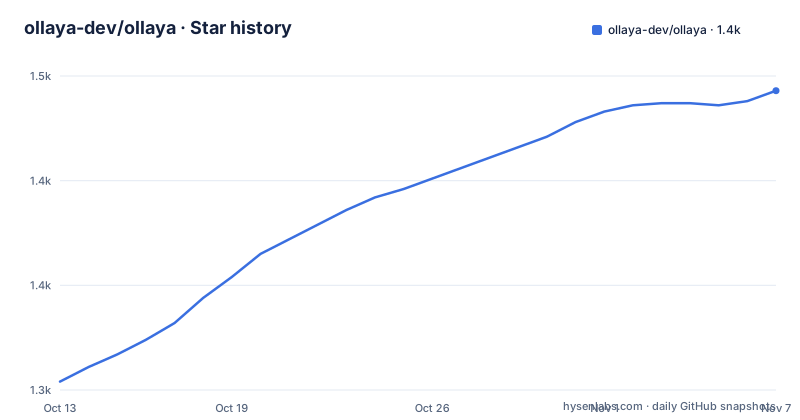
- ollaya-dev/ollaya1,443 ★ · +139
| Repository | 2026-10-13 | 2026-11-07 |
|---|---|---|
| ollaya-dev/ollaya | 1.3k | 1.4k |
139 Stars in the last 25 days, measured from the daily GitHub snapshot. Compare with other projects
Editorial analysis
Typed questions, not generated text, define the contract
A decision model here reads a state, which can be a message, an email, a ticket or any JSON, plus typed questions, and returns calibrated probabilities from one forward pass. The question types are `choice`, `score` and `noul`. Nothing is sampled and no tokens stream back, which is the whole difference between ollaya and a text server: the caller gets a fixed set of named labels with numbers attached.
The triage example in the README makes the shape concrete. A complaint about being double-charged comes back as five rows, each a question name, an answer and a probability.
ollaya run winnow:e4b --preset triage "Third time this year you've double-charged me. Refund it today or I'm cancelling and moving to a competitor."intent refund ███████████████░ 0.91
is_urgent yes ███████████████░ 0.92
frustration 2.89 / 3 very angry or using stron… ██████████████░░ 0.86
refund_requested yes ████████████████ 0.99
churn_risk yes ████████████████ 0.99Note the `noul` type doing real work in the third row: `frustration` is not a label picked from a list but a continuous 2.89 out of 3, and the score still carries a confidence. A system that must decide between a fixed taxonomy and a graded signal at the same time gets both from one call.
Two wire formats share port 11435
The daemon answers two API families at once. The TypeSafe-compatible set is `POST /v1/systemone`, `/v1/decisions` and `GET /v1/models`, described as wire-identical to TypeSafe. Point the official SDK at the local daemon and existing clients run unchanged, which in practice means exporting one variable before the client starts.
TYPESAFE_BASE_URL=http://localhost:11435On top of that sits a native API: `/api/decide` returns routing information and timings alongside the answers, and `/api/pull` streams NDJSON progress lines instead of a single blocking response, which matters when a pull fetches a multi-gigabyte GGUF file. `/api/tags`, `/api/show` and `/api/ps` mirror the familiar Ollama verbs.
The two surfaces are not redundant. A client that only needs decisions can use the compatible endpoints and ignore everything ollaya adds, while a client that wants to know which router fired or how long each model took uses `/api/decide`. The README points at `docs/api.md` for the full list, so the exact payload shapes are documented outside the README rather than in it.
Small ONNX graphs borrow the author's original weights
ollaya publishes only the ONNX graph, about 3 MB each. That graph does not contain the trained parameters. At pull time it fetches the original weight files, usually `model.safetensors`, straight from the author's own Hugging Face repository, pinned to a specific commit and verified by sha256. The repository says plainly that it never re-hosts weights, and the `sha2` crate in the workspace is what does the verification.
Some authors publish GGUF instead. For the models named winnow, jevk5 and jeb, ollaya runs the author's file directly on llama.cpp, pulling in the shared libraries under lib/ollaya/llama at run time.
The consequence for operators is concrete: the first pull needs huggingface.co reachable, and an air-gapped deployment has to mirror the upstream author's repository as well as ollaya itself. You also inherit upstream availability, because the pin is to a commit hash, not to a name the project controls.
install.sh, one binary, and a daemon the CLI starts for you
Installation is a single shell pipeline, and every other verb lives in the same binary as the daemon.
curl -fsSL https://ollaya.dev/install.sh | sh`ollaya serve` runs the daemon. `ollaya run`, `pull`, `list`, `ps`, `show`, `rm`, `cp`, `stop` and `create` mirror the Ollama vocabulary, and if the daemon is not up the CLI starts it, so the first command after installing is a model run rather than a service setup. A pull by name fetches the graph and then the upstream weights; `list` and `ps` report what is stored on disk and what is loaded in memory.
Model choice is where a CPU-only machine diverges. The README calls `winnow:e4b` the recommended model, a 4B-class language model, and tells you that without an NVIDIA GPU you should start with `laya` instead, which answers in a fraction of a second on a CPU. Where latency is the constraint, `laya:en`, a ModernBERT-large encoder of 421M parameters, is the faster one at 8 to 10 ms for five questions on an RTX 4090, against 89 ms for `winnow:e4b` on the same five questions.
A Modelfile bakes a question set into the model name
Questions need not live in the client. A Modelfile pins a base model, a question file and a numeric setting, after which the result behaves like any other model you can run by name.
FROM laya
QUESTIONS ./triage.json
PARAMETER precision fp32ollaya create triage -f ModelfileAfter that, the model name is enough: run it like any other. Baking the questions into the model means a routing layer can invoke the triage model without knowing which fields to ask for, and the same question set then travels with the model between machines. `PARAMETER precision` selects fp32 or fp16 for the ONNX path.
Several models carry questions already. `qwen3guard` ships built-in questions that classify a state as safe, controversial or unsafe and name the category. `laya` is a router rather than a decision model: it detects the script and language of the request and answers as `laya:en` or `laya:multilingual`, the latter a 322M mmBERT-base covering more than 100 languages. Vision questions are handled by `decider:2b-vision` through the `--image` flag and the `images` field on `/api/decide`.
fp32 parity is a claim about the ONNX path, not every model
Read the accuracy line carefully. fp32 exports give the same decision as the PyTorch reference on 100% of 2,383 questions per checkpoint. That is a strong statement about export fidelity, and it applies to the ONNX models. The precision bullet in the same list says GGUF models keep their own quantization on either device, so the parity claim carries no weight for `winnow`, `jevk5` and `jeb`, which run quantized files on llama.cpp.
Accuracy and speed also pull in opposite directions across the catalogue. `winnow:e4b` scores 0.722 on typed decisions and `kev:9b` scores 0.722 as well, while `kev:4b` gives 0.669 and the 2B `decider` gives 0.591 against 0.680 for `decider:4b`. `nimble` reads a whole request as a JSON schema and supports up to 255 options, and pays for it at about 2.3 s for five questions on an RTX 4090, roughly 25 times the `winnow:e4b` figure. `clm` scores 0.357 on the same benchmark and is built for agent, game and tool-calling states, which is a different job from the typed-decision suite the numbers come from.
The declared Rust minimum and the build image disagree
The workspace declares `rust-version = "1.90"` in Cargo.toml, edition 2024, version 0.12.0. The Dockerfile builds with `ARG RUST_VERSION=1.98`. Nothing is wrong here, but it means the compiler used to produce the images is newer than the toolchain floor advertised for the library crates, so a contributor who compiles exactly at the declared minimum is exercising a configuration the release artifacts never saw.
Two other layout details matter. The workspace takes `crates/*` as members and excludes `desktop`, so the Tauri desktop app keeps its webview dependencies out of the engine builds. And the member list includes `ollaya-mlx` and `ollaya-mlx-sys`, yet the hardware section names only ONNX Runtime on CPU and CUDA, plus llama.cpp with Vulkan on Windows, CUDA on NVIDIA GPUs and Metal on Apple silicon. The README does not document an MLX backend, so the crates exist ahead of any documented use.
The last push was on 2026-10-06, and Cargo.toml declares `license = "Apache-2.0"`, so redistribution terms come with the code rather than being negotiated per model.
Container defaults expose 11435 on every interface
The Dockerfile builds three targets: cpu is the default and covers linux/amd64 and linux/arm64, while cuda and cuda12 are linux/amd64 only. All three run `ollaya serve` as an unprivileged user ollaya with uid 1000, listen on 0.0.0.0:11435 and keep models in the volume /home/ollaya/.ollaya. Binding to all interfaces by default means the decision API is reachable from anything that can route to the container, so a deployment needs its own authentication or network policy in front of it.
docker run -d --gpus=all -v ollaya:/home/ollaya/.ollaya -p 11435:11435 ghcr.io/ollaya-dev/ollaya:cudaDriver requirements are stated in the image comments: the `cuda` target needs the NVIDIA Container Toolkit and a host driver with CUDA 13 support, R580 or newer, while `cuda12` needs CUDA 12 support, R525 or newer. Both the unprivileged user and the pinned volume are deliberate. The volume holds the pulled weights, and the first pull fetches from the upstream author's Hugging Face repository as described above.
The real alternative is to run the same GGUF files yourself through llama.cpp and write the question loop in your own code. What you lose is the typed question contract, the calibration layer and the sha256-pinned weight resolution; what you keep is full control of the serving process and no second daemon. For a single scripted use of one author's file, taking the trade removes a daemon from the request path.
Editorial conclusion
ollaya fits teams whose work is already phrased as decisions: routing, safety gating, ticket triage, zero-shot labelling, all answered by one binary with calibrated probabilities and no token stream. It is a poor fit for generation, and for CPU-only machines the choice of model matters more than the tooling, since laya answers in milliseconds while a 4B GGUF is a different order of work. Verify first that the original author's Hugging Face repository stays reachable at pull time, because ollaya pins a commit, checks sha256 and never re-hosts the weights itself.
Frequently asked questions
Does ollaya host the model weights itself?
No. It publishes only small ONNX graphs of about 3 MB each, and the graph reads the original weight files, usually model.safetensors, from the author's Hugging Face repository at a pinned commit, verified by sha256. Models whose authors publish GGUF are run directly from the author's file on llama.cpp.
Can existing Jev clients talk to an ollaya daemon?
Yes. POST /v1/systemone, /v1/decisions and GET /v1/models are described as wire-identical to TypeSafe, and the official SDK works unchanged once TYPESAFE_BASE_URL points at http://localhost:11435.
Which ollaya model should I run without an NVIDIA GPU?
Start with laya, the English decision model, because winnow:e4b is a 4B-class language model. laya is a ModernBERT-large encoder of 421M parameters and answers in a fraction of a second on a CPU, while winnow:e4b is timed at 89 ms for five questions on an RTX 4090.
How do I run ollaya with an NVIDIA GPU in Docker?
Use the cuda image and pass the host GPU through, with a named volume for pulled models. The cuda target needs a host driver with CUDA 13 support, R580 or newer, while the cuda12 target accepts R525 or newer.
Does ollaya generate text like a normal LLM server?
No. A decision model reads a state plus typed questions of type choice, score or noul and returns calibrated probabilities in a single forward pass. Nothing is generated, so the choice, score and noul questions in a Modelfile define the entire output surface.
Official sources
Add this badge to your README
If you maintain this project, the badge below links readers to this analysis and shows its maintenance status from the daily GitHub snapshot. Paste the markdown into your README; add ?metric=license or ?metric=stars to the image URL for a different field.

[](https://hysenlabs.com/projects/ollaya-dev-ollaya)Star history chart for your README
[](https://hysenlabs.com/projects/ollaya-dev-ollaya)Was this useful?