oneAPI-samples: a catalog of Intel toolkit code you edit in place
Samples for Intel® oneAPI Toolkits
At a glance
- What is it?
- oneAPI-samples is Intel's catalogue of C++, Python and Fortran samples for the oneAPI Toolkits, browsable through a separate catalog site and organised by category instead of installed as a package. It works as source you copy and strip down, and offers little of what you would expect from a supported library.
- Who is it for?
- This is a catalog to borrow from, not a library to depend on. Engineers who need a working SYCL, oneDNN or oneMKL reference for a CPU or Data Center GPU can clone it, build Simple Add, then strip the sample down as a starter project.
- Can I use it commercially?
- Yes. MIT is a permissive licence: you can use, modify and sell software built on it, as long as you keep its copyright and licence notices.
- Is it still maintained?
- Yes. The repository last received commits 102 days ago.
- What is it written in?
- Mainly C++, according to GitHub's language statistics.
Answers come from the project's GitHub data, last synced on November 7, 2026, and from our analysis. They are not legal advice.
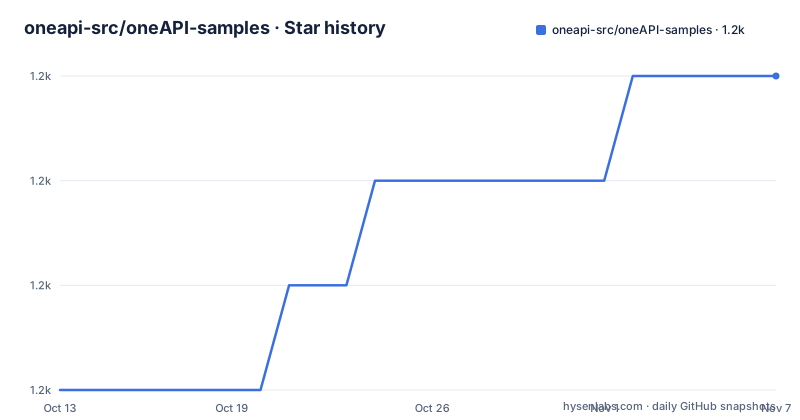
Star history
- oneapi-src/oneAPI-samples1,170 ★ · +3
| Repository | 2026-10-13 | 2026-11-07 |
|---|---|---|
| oneapi-src/oneAPI-samples | 1.2k | 1.2k |
3 Stars in the last 25 days, measured from the daily GitHub snapshot. Compare with other projects
Editorial analysis
Why a sample catalog and not a tutorial track
The repository answers a narrow question: what does a oneAPI component look like when it is written for a named device. Its default branch is tied to the most recent released version of the Intel oneAPI Toolkits, so the code tracks the toolchain rather than a line that stands still. Nobody is meant to read it end to end. Each sample is indexed by a separate oneAPI Samples Catalog published at the project homepage, searchable on sample titles and descriptions, and the repository acts as the payload behind that index. The split matters for anyone learning oneDNN, oneMKL, oneTBB, oneDPL, oneDAL or oneCCL behaviour on a CPU, GPU or FPGA: the catalog decides which file you open, the repository decides what actually compiles. A reader who came looking for a package to install will find nothing of the sort, because no directory in the tree is built for consumption as a dependency.
Expertise, language and device filters leave gaps
Browsing narrows through three filters. Expertise separates Getting Started entries from Tutorial entries and whatever else the catalog labels. Programming language covers C++, Python and Fortran, which lines up with the language folders under DirectProgramming. Target device covers CPU, GPU and FPGA. Two gaps deserve naming before you plan around them. The device filter lists FPGA, yet the platform validation section records only an Intel Xeon Platinum 8468V and an Intel Data Center GPU Max 1100, so FPGA entries have no matching validation record here. The language filter also understates the tree: the repository topics include cuda, pytorch, tensorflow and scikit-learn, and a Training directory exists at the root, yet no filter entry describes any of that. The catalog search is the only other route in, and it runs on title and description text rather than on code.
Cloning the mainline or pinning an older toolkit tag
Fetching the code is one clone, and the whole repository is the unit you take:
git clone https://github.com/oneapi-src/oneAPI-samples.gitThat gives the branch aligned with the toolkits you already have installed. A zip route is offered instead: press the Code button, choose Download ZIP, then unzip the archive. If your toolkit is older than the current one, take the GitHub tag that matches your toolkit version, 2025.2.0 for instance:
git clone -b <tag> https://github.com/oneapi-src/oneAPI-samples.gitExpect no build at the top level. Nothing is compiled when you clone, no dependency file sits at the root, and each sample carries instructions for the operating systems it supports.
Simple Add hides inside a DenseLinearAlgebra path
Two samples are named as starting points, and both sit in directories that do not match their reputation. Simple Add and Vector Add live under DirectProgramming/C++SYCL/DenseLinearAlgebra, so someone hunting for a first vector program looks inside a linear algebra folder. The stated intent is reuse as a project skeleton: the README calls these samples starter projects once you remove the elements you do not need and add your own code and build requirements. For artificial intelligence the pointer is a directory rather than a program, Getting Started Samples for AI Tools under AI-and-Analytics/Getting-Started-Samples. That path never appears in the high-level structure list, which is the first sign that the structure section is a partial map. Two languages of documentation also collide here: the notebook route assumes Python tooling, while the named starters are C++ with SYCL.
Per sample READMEs, extra Jupyter dependencies, one IDE
Build instructions live inside each sample. A README.md ships with the code and holds the build path for the supported operating systems, so it is the only place a compiler flag, a build preset or a make target appears. Notebook samples carry an extra cost: the README warns that running them may require installing or configuring frameworks or package managers you do not already have, which means a sample can fail before any toolkit code is reached. The editor story is narrow. Visual Studio Code is offered for Windows or Linux, no other IDE is named, and macOS is absent from that paragraph. At the root there is a .gitmodules file, and the README says nothing about initialising submodules, so a plain clone can leave some sample directories unpopulated. That failure reads like a missing sample rather than a missing checkout step.
MSB6003 on Windows is a directory length problem
Two Windows failures are documented, and both carry concrete remedies. Microsoft Visual Studio 2019 is accepted only from version 16.4.0 onward, so an older 2019 install fails at the tool level instead of inside sample code. The second failure is a build system error with a path length cause. Error MSB6003 The specified task executable ... could not be run appears when the directory path is long, and the fix is to move the build directory to a shorter path and build the sample there. Nothing equivalent appears for Linux, and the README does not say whether the same MSBuild limit reaches later Visual Studio builds, which matters because the sample paths under DirectProgramming are already nested several directories deep. Ignore the error text and you will chase a compiler problem that has nothing to do with your flags.
One Ubuntu machine validates the whole catalog
Validation is a single configuration, and reading it closely exposes the gap. The machine is Ubuntu 22.04.3 with an Intel Xeon Platinum 8468V and an Intel Data Center GPU Max 1100, an OpenCL driver recorded as 2025.20.5.0.15_220340 and a Level Zero driver at 12.60.7 [1.3.27642]. The toolkit listed there is the Intel oneAPI HPC Toolkit at build version 2025.2.0.463, while the default branch is described as matching the most recent toolkits, so the validation record sits a version behind the branch it describes. The HPC Toolkit is also a single slice of what the repository carries: the topics name onednn, onedal, onetbb, onedpl and oneccl, and no driver or toolkit numbers exist for those. A pass on this machine says nothing about your host.
Upgrading means moving the whole repository
Upgrade cost is mostly bookkeeping. Every sample is self-contained, with its own README and its own build path, so moving to a newer toolkit means moving the repository to another tag and re-reading the samples you use, instead of editing one version constraint in one file. The high-level map in the README lists DirectProgramming, Libraries, Publications/GPU-Opt-Guide and Tools, while the root also carries Training, Templates, common, third-party-programs.txt and a .gitmodules file, so the published structure understates the tree you receive. Nothing pins a toolkit version at sample level, which means a copied sample can drift away from the toolkit you installed without any error appearing in your own code. The repository is not archived, and its last push was on 2026-07-28.
Editorial conclusion
This is a catalog to borrow from, not a library to depend on. Engineers who need a working SYCL, oneDNN or oneMKL reference for a CPU or Data Center GPU can clone it, build Simple Add, then strip the sample down as a starter project. Teams pinned to an older toolkit can move the whole repository to the matching GitHub tag, and the MIT terms at the root leave that reuse uncomplicated. Verify one thing before you trust any of it: .gitmodules sits in the root with no documented initialisation step, so confirm the sample directory you cloned is actually populated.
Frequently asked questions
How do I get oneAPI-samples for an older oneAPI toolkit version?
Use the GitHub tag matching your toolkit version, for example 2025.2.0, and clone with git clone -b <tag> pointing at the repository. The README sends you to the repository tags list to pick the right value.
Which oneAPI-samples should a beginner run first?
Simple Add or Vector Add under DirectProgramming/C++SYCL/DenseLinearAlgebra, or Getting Started Samples for AI Tools under AI-and-Analytics/Getting-Started-Samples. The first two are meant to be stripped down into your own starter projects.
Does oneAPI-samples support Apple macOS?
The IDE paragraph names Visual Studio Code for Windows or Linux, and platform validation records only Ubuntu 22.04.3 with an Intel Xeon Platinum 8468V and an Intel Data Center GPU Max 1100. macOS appears in neither place.
Why does a oneAPI-samples build fail with Error MSB6003 on Windows?
The README attributes MSB6003 to a long directory path rather than to the sample code. Move the build directory to a shorter path and build the sample there again.
Why is a cloned oneAPI-samples directory empty after git clone?
The repository root carries a .gitmodules file, and the README documents no submodule initialisation step. Populated sample directories cannot be assumed from a plain clone.
Official sources
Add this badge to your README
If you maintain this project, the badge below links readers to this analysis and shows its maintenance status from the daily GitHub snapshot. Paste the markdown into your README; add ?metric=license or ?metric=stars to the image URL for a different field.

[](https://hysenlabs.com/projects/oneapi-src-oneapi-samples)Star history chart for your README
[](https://hysenlabs.com/projects/oneapi-src-oneapi-samples)Was this useful?