onnx-tensorrt tracks one TensorRT release at a time, and main means 11.3
ONNX-TensorRT: TensorRT backend for ONNX
At a glance
- What is it?
- onnx-tensorrt is the parser that turns ONNX models into TensorRT engines, and its main branch is pinned to TensorRT 11.3 with full-dimensions and dynamic shape support. The release names are branch names, the supported operator list lives in a generated file, and the build, the install and the test sections each spell the interpreter differently.
- Who is it for?
- Use onnx-tensorrt when you need TensorRT engines built from ONNX graphs and you are on TensorRT 11.3, and pin your ONNX release to 1.21.0 because that is the release this parser supports. Do not treat it as a version-agnostic bridge: the main branch exists for one TensorRT GA at a time, older versions live on their own branches, and each branch names its own release.
- Can I use it commercially?
- Yes. Apache-2.0 is a permissive licence: you can use, modify and sell software built on it, as long as you keep its copyright and licence notices.
- Is it still maintained?
- Yes. The repository last received commits 36 days ago.
- What is it written in?
- Mainly C++, according to GitHub's language statistics.
Answers come from the project's GitHub data, last synced on November 14, 2026, and from our analysis. They are not legal advice.
Star history
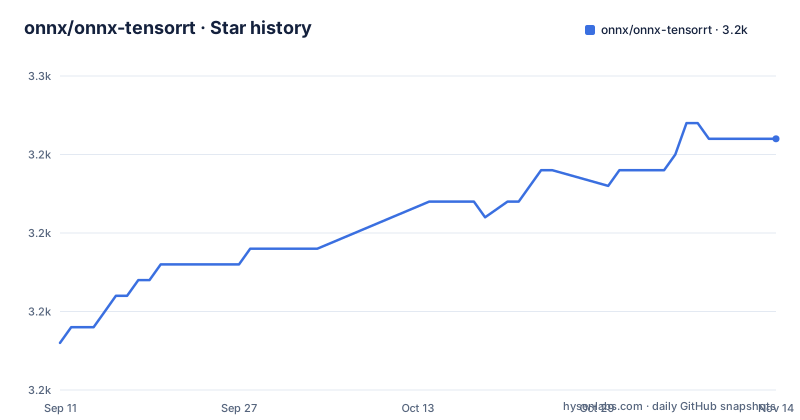
- onnx/onnx-tensorrt3,246 ★ · +13
| Repository | 2026-09-11 | 2026-11-14 |
|---|---|---|
| onnx/onnx-tensorrt | 3.2k | 3.2k |
13 Stars in the last 64 days, measured from the daily GitHub snapshot. Compare with other projects
Editorial analysis
The main branch exists for one TensorRT release at a time
The supported versions section states that development on this branch is for the latest version, TensorRT 11.3, with full-dimensions and dynamic shape support, and that previous versions of TensorRT are found on their respective branches. The releases follow the same shape. The three most recent are release/11.1-GA on 2026-06-22, release/11.2-GA on 2026-08-03 and release/11.3-GA on 2026-09-14, each titled a parser update for its TensorRT GA version. So the release name is a branch name with a slash in it rather than a version tag, and there is no single artifact that covers several TensorRT releases. The gaps between those three dates are about six weeks each, which matches a cadence set by NVIDIA's own TensorRT schedule rather than by anything in this repository. The last push to main, 2026-09-14, is the same day as release/11.3-GA, so the branch tip and the newest release are the same moment.
Unsetting one parser flag changes which InstanceNorm you get
InstanceNormalization has two implementations in this parser, and they can behave differently depending on parameters. By default the parser uses the native TensorRT implementation of InstanceNorm. To benchmark the plugin implementation instead, unset the parser flag kNATIVE_INSTANCENORM before parsing the model:
// Unset the NATIVE_INSTANCENORM flag to use the plugin implementation.
parser.clear_flag(trt.OnnxParserFlag.NATIVE_INSTANCENORM)
The catch is stated in the same paragraph: the plugin implementation cannot be used for building version compatible or hardware compatible engines, and attempting to do so results in an error. That makes the flag a benchmarking switch rather than a deployment choice, since the engines you produce with it are the ones you cannot build compatibly. The C++ spelling of the same call uses the fully qualified enum, nvonnxparser::OnnxParserFlag::kNATIVE_INSTANCENORM, through parser->unsetFlag. Two smaller details sit around it: the section heading spells InstanceNormalization with the letters transposed, and the Python sample is missing the semicolon its C++ counterpart carries.
Both tools that check a model live in the TensorRT repository
If you want to know whether an ONNX model parses and builds, the README names two officially supported tools and neither of them is in this repository. For C++ users there is the trtexec binary, which comes from the TensorRT samples tree and is typically found in the <tensorrt_root_dir>/bin directory. Its basic command is `trtexec --onnx=model.onnx`. For Python users there is polygraphy, and its basic command is `polygraphy run model.onnx --trt`. Each tool documents its own options behind a help flag, trtexec -h and polygraphy run -h, so the README hands you to two upstream projects for the command line surface as well. What this repository contributes is the parser those tools call, libnvonnxparser.so, with its C++ API declared in NvOnnxParser.h. Anything you read about trtexec options belongs to the TensorRT project, not here.
The build assumes a CUDA path, and Docker instructions are elsewhere
The build is a plain CMake project at the repository root, and the documented sequence is short:
cd onnx-tensorrt
mkdir build && cd build
cmake .. -DTENSORRT_ROOT=<path_to_trt> && make -j
# Ensure that you update your LD_LIBRARY_PATH to pick up the location of the newly built library:
export LD_LIBRARY_PATH=$PWD:$LD_LIBRARY_PATH
Two adjustments are documented as overrides rather than flags you set once. The build looks for the CUDA toolkit in /usr/local/cuda by default, and a different location is handled by passing -DCUDA_TOOLKIT_ROOT_DIR=<path_to_cuda_install> in the same cmake command. Protobuf is an optional dependency at version 3.20.3 or newer, and building against protobuf-lite means adding -DUSE_ONNX_LITE_PROTO=1 to the end of the cmake command. The platform coverage has a gap of its own: for building within Docker or on Windows the README points you at the build instructions in the main TensorRT repository instead of giving commands here, so two of the three environments have no in-repository recipe.
ONNX is pinned in one section and left open in the other
TensorRT 11.3 supports ONNX release 1.21.0, and the install line reflects that exactly:
python3 -m pip install onnx==1.21.0The packaging metadata does not. setup.py declares install_requires as three unpinned names, pycuda, numpy and onnx, so nothing at install time stops a different ONNX release from arriving next to a parser built against 1.21.0. The backend install itself is documented as running python3 setup.py install. Inside that script, the version field is read from the package rather than hardcoded, through onnx_tensorrt.__version__, the long description is read from README.md at build time, the author is recorded as NVIDIA with an nvidia.com contact address, and a small guard function raises if the word register appears anywhere in the command line, so publishing through that script is blocked while installing through it is not. The Python usage example loads a model, prepares it through onnx_tensorrt.backend with device='CUDA:1', and prints the output shape, so the sample is pinned to the second GPU rather than the first.
Install says python3 and the test section says python
The test instructions use a different interpreter spelling than the install instructions, which matters on systems where python is not Python 3. After installation, or inside the Docker container, the backend tests are run like this:
python onnx_backend_test.py OnnxBackendRealModelTestThat form runs the real model tests only. Dropping the argument, to run all tests, is `python onnx_backend_test.py`, and a -v flag makes the output more verbose. Meanwhile the Python module section says python3 -m pip install onnx==1.21.0 and python3 setup.py install. The test file itself sits at the repository root next to onnx_trt_backend.cpp and the onnx_tensorrt package directory, so a source checkout has everything needed to run it, provided the parser library from the earlier build step is on the library path. The real model tests also imply a set of models you have to supply yourself, since the pre-trained models the README points at are hosted in the separate ONNX Model Zoo rather than vendored here. That distinction matters when a test fails: the two invocations above are the only test entry points the document names, there is no make target for them in the instructions you were given earlier, and the repository's single CMakeLists.txt builds the parser rather than the test harness.
The supported operator list is a file, not a sentence
The Supported Operators section of the README is one sentence: the operators currently supported are in the operator support matrix under docs. Two other files sit beside it, a changelog and an FAQ for commonly seen issues, so three documents carry the parts of this parser's behaviour that change per release. That is the practical gap to plan around. Version support, operator coverage and known issues are all versioned artifacts that have to be read for the specific TensorRT release you are on, because main is explicitly scoped to 11.3. The tree also carries a getSupportedAPITest.cpp, so the supported surface has a test of its own, and the parsing code sits as flat files at the top of the repository: importer, op checkers, op importers, proto utilities, weights contexts, shape tensors and status handling all as .cpp and .hpp pairs beside a single CMakeLists.txt, along with locally carried half.h, ieee_half.h and bfloat16 headers. Two more root files explain what you are building. libnvonnxparser.version is the version file for the shared library, and .gitmodules shows the repository also has submodule dependencies, which the installation and build sections do not mention at all. Anyone reading only the documentation would not learn that either exists.
The license is an HTML comment, and the contacts are two inboxes
The README does not have a license section. It opens with an HTML comment carrying the SPDX identifier for Apache-2.0, the repository metadata declares Apache-2.0, and a LICENSE file sits at the root. Nothing in the prose repeats it. What the README does carry instead is a contact list: a research inquiries address for business questions and a named press contact. That is unusual for a component whose audience is developers wiring a parser into a build, and it says something about how this repository is positioned: it is the reference implementation of a vendor backend rather than a community project, which is also why the release cadence follows TensorRT GA dates and why the supported versions are pinned one at a time. Everything else in the document points outward as well, to the TensorRT documentation, to the TensorRT download page, to the operator matrix in docs, and to the build instructions in the TensorRT repository for Docker and Windows.
Editorial conclusion
Use onnx-tensorrt when you need TensorRT engines built from ONNX graphs and you are on TensorRT 11.3, and pin your ONNX release to 1.21.0 because that is the release this parser supports. Do not treat it as a version-agnostic bridge: the main branch exists for one TensorRT GA at a time, older versions live on their own branches, and each branch names its own release. Two things to check before you depend on it. The supported operator set is a document under docs/, not a list you can read in the README, so check the matrix for your operators rather than assuming coverage. And the InstanceNormalization choice is not free: the plugin implementation exists for benchmarking, but it cannot build version compatible or hardware compatible engines, so benchmarking with it produces engines you cannot deploy the way you planned. Anyone building outside Linux on a plain CPU-only workflow will also find that the Docker and Windows build instructions are not in this repository at all.
Frequently asked questions
What is onnx-tensorrt and what does it do?
It is the TensorRT backend for ONNX, a parser that reads ONNX models and builds them into TensorRT engines. The C++ side is libnvonnxparser.so, with its API declared in NvOnnxParser.h, and the Python side is the onnx_tensorrt package whose bindings ship in .whl files. Main targets TensorRT 11.3 with full-dimensions and dynamic shape support.
Which TensorRT version does the main branch of onnx-tensorrt support?
TensorRT 11.3, with full-dimensions and dynamic shape support. Earlier TensorRT versions are found on their respective branches, and the releases are named after those branches: release/11.1-GA, release/11.2-GA and release/11.3-GA.
How do I build onnx-tensorrt from source?
Create a build directory, run cmake with the TensorRT root and then make, then point the library path at the result: cmake .. -DTENSORRT_ROOT=<path_to_trt> && make -j followed by export LD_LIBRARY_PATH=$PWD:$LD_LIBRARY_PATH. The build looks for CUDA in /usr/local/cuda unless you pass -DCUDA_TOOLKIT_ROOT_DIR, and -DUSE_ONNX_LITE_PROTO=1 switches on protobuf-lite support.
How can I check whether my ONNX model parses with onnx-tensorrt?
Use one of two tools, both from the TensorRT repository rather than this one: trtexec --onnx=model.onnx for C++ users, typically found in the <tensorrt_root_dir>/bin directory, and polygraphy run model.onnx --trt for Python users. The parser's own suite is onnx_backend_test.py at the repository root, run as python onnx_backend_test.py.
Why would I unset kNATIVE_INSTANCENORM in onnx-tensorrt?
InstanceNormalization has two implementations that may perform differently. The parser uses the native TensorRT implementation by default, and unsetting kNATIVE_INSTANCENORM before parsing selects the plugin implementation for benchmarking. The plugin implementation cannot be used for building version compatible or hardware compatible engines, and attempting to do so results in an error.
Official sources
Add this badge to your README
If you maintain this project, the badge below links readers to this analysis and shows its maintenance status from the daily GitHub snapshot. Paste the markdown into your README; add ?metric=license or ?metric=stars to the image URL for a different field.

[](https://hysenlabs.com/projects/onnx-onnx-tensorrt)Star history chart for your README
[](https://hysenlabs.com/projects/onnx-onnx-tensorrt)Was this useful?