TensorFlow Serving swaps model versions behind a client contract that never moves
A flexible, high-performance serving system for machine learning models
At a glance
- What is it?
- A C++ inference server that loads SavedModels, exposes them over gRPC and HTTP, and keeps version selection out of client code. The project routes almost everyone through Docker, and its real sharp edges sit in model signatures and custom ops.
- Who is it for?
- TensorFlow Serving fits teams that already have TensorFlow models exported as SavedModel and want one inference endpoint per model that clients never have to rewrite. Look elsewhere if you need training in the same process, or if you cannot run containers, since the non-Docker path is explicitly labelled Not Recommended.
- Can I use it commercially?
- Yes. Apache-2.0 is a permissive licence: you can use, modify and sell software built on it, as long as you keep its copyright and licence notices.
- Is it still maintained?
- Yes. The repository last received commits 4 days ago.
- What is it written in?
- Mainly C++, according to GitHub's language statistics.
Answers come from the project's GitHub data, last synced on November 13, 2026, and from our analysis. They are not legal advice.
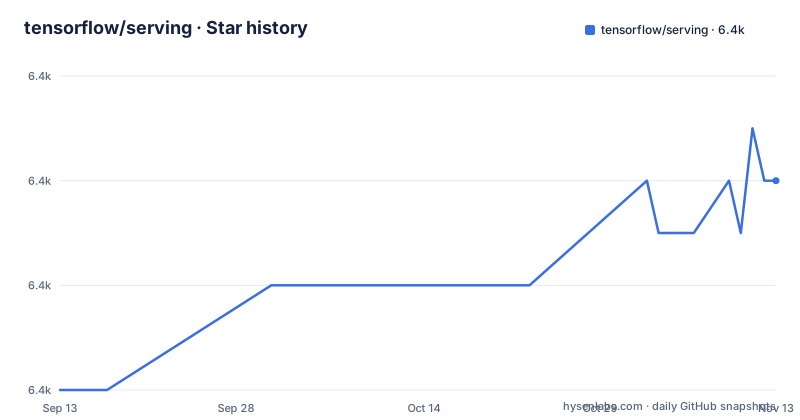
Star history
- tensorflow/serving6,366 ★ · +4
| Repository | 2026-09-13 | 2026-11-13 |
|---|---|---|
| tensorflow/serving | 6.4k | 6.4k |
4 Stars in the last 61 days, measured from the daily GitHub snapshot. Compare with other projects
Editorial analysis
The 60 second path mounts a test model onto port 8501
The quickest route to a running server pulls the published image and clones the repository so the demo SavedModels are on disk:
docker pull tensorflow/serving
git clone https://github.com/tensorflow/serving
The demo models live inside the clone, under tensorflow_serving/servables/tensorflow/testdata, and the run command bind mounts one of them into the container under /models:
docker run -t --rm -p 8501:8501 \
    -v "$TESTDATA/saved_model_half_plus_two_cpu:/models/half_plus_two" \
    -e MODEL_NAME=half_plus_two \
    tensorflow/serving &
Port 8501 is the HTTP surface, and the model name comes from the environment rather than from a config file. The predict call then posts a JSON body:
curl -d '{"instances": [1.0, 2.0, 5.0]}' \
    -X POST http://localhost:8501/v1/mod
That printed endpoint line stops partway through the model path, so read the REST API guide before typing the request yourself. The arrangement itself is the pattern to keep: a model directory mounted at /models, a MODEL_NAME telling the server what to call it, and clients pointing at one port.
Docker is the recommended route and the bare metal one is not
Four install paths are documented, and only one is endorsed. Installing with Docker is marked recommended. Installing without Docker is marked not recommended. Building from source with Docker gets its own page, and deploying on Kubernetes gets a fourth. The wording is unusually blunt for a project this old, and it is a signal worth taking at face value rather than reading around.
The reason shows in the repository root. WORKSPACE and .bazelrc sit next to each other, .gitmodules declares submodules, and a third_party/ directory carries vendored dependencies, so a from-source build is a Bazel build with its own dependency resolution step. None of that is reachable through the docker pull line. What you give up by staying in a container is some control over that build, and what you take on is a dependency on an image tag whose contents you did not compile. The model directory you mount is the one lever you still hold.
A reference counted lookup table is what hides version swaps
The design centres on versioned access through a high-performance, reference-counted lookup table. Clients address a model by name and get whichever version is currently serving. Because of that indirection, a new model version can be deployed without changing any client code, and the server can hold multiple versions of the same model at once, alongside multiple distinct models, in a single process.
That also gives you canarying and A/B testing without a separate routing service: load the new version, shift some traffic, and compare. The reference counting is the unglamorous part that makes it safe. A version being replaced is not deleted while requests still point at it, which is the property that lets a deploy overlap an old version and a new one rather than forcing a cutover.
The scope is inference only. The server takes models after training and manages their lifetimes; training, evaluation and experiment tracking are pointed elsewhere in the README, at the TensorFlow Extended tutorials. If you are looking for a system that also fits the model, this one starts after that line.
The batch scheduler groups requests for joint execution on GPU
Batching is a scheduler feature, not a client setting. The server groups individual inference requests into batches for joint execution on GPU, with configurable latency controls governing how long a request waits for company. That is the central trade the project makes: throughput rises as batches fill, and the latency you have promised your callers rises with it, so the controls have to be set against a real traffic profile rather than a default guess.
Latency is otherwise treated as a first-class concern. The feature list claims minimal added inference time from an efficient, low-overhead implementation, and there is a whole performance guide next to a TensorBoard page for profiling and optimising inference requests. The README does not publish numbers for any of this, so treat the claim as a design intent you should measure on your own model. The same modesty applies to batching on CPU: the joint execution path is described for GPU, and the demo model in the quickstart is mounted with a _cpu suffix in its directory name.
SavedModel Warmup exists because lazy graph init stalls the first requests
A serving system that loads a model and then discovers its graph on first request has a latency spike, and SavedModel Warmup is the page that addresses it. The README routes you there specifically when initial inference requests are slow due to lazy initialization of graph. The mechanism is that initialization work happens before traffic arrives rather than during the first call, so the first real user does not pay for it.
This is the kind of detail that only surfaces in production, which is why it has its own page rather than a config flag in the overview. It also implies a model directory is not just weights: whatever the warmup step touches has to be present in the mounted directory, and a directory prepared on one machine and mounted somewhere else has to carry it. If your deploy shows a slow first request after every version change and nothing else changes between versions, this is the first page to read.
SignatureDef and custom ops are where an exported model quietly fails
Two documented failure points sit between an exported model and a served one, and neither is about infrastructure. Model signatures have their own page, offered for anyone encountering issues regarding model signatures, because a SavedModel can load perfectly and still be rejected by the server when its inputs or outputs do not line up with what the API expects. Custom ops get a separate page too, for anyone using a model with custom ops, since the binary has to be able to execute op kernels that a standard install does not contain.
Both are properties of the model rather than the deployment, which makes them awkward to debug from a 500 response. The signature problem in particular looks like a server fault until you read the exported signature definition. The remedy in both cases is export work: get the SavedModel into a shape the server accepts, and for custom ops, compile the kernels the serving binary needs. Neither can be fixed by changing the command that started the container.
Extending it means writing a servable and a version source
The architecture is described as highly modular, with parts usable individually, batch scheduling named as the example, and extensions for new use cases. The two extension points have their own pages: creating a new type of servable, and creating a custom source of servable versions. That split matters, because a servable is the thing being served and a source decides which versions of it exist and when. Serving something that is not a TensorFlow model means writing to both interfaces.
The servable concept is wider than models. The list includes TensorFlow models, embeddings, vocabularies, feature transformations, and non-TensorFlow-based machine learning models, so a lookup table can serve an embedding table next to a classifier without either knowing about the other.
This is a C++ codebase with a published C++ API reference, which sets the bar for what an extension looks like. There is also an architecture page for reading the whole shape first, and the Kubernetes deployment page for anyone running several instances. Build knowledge from the from-source Docker page is the stated prerequisite for extending anything.
Editorial conclusion
TensorFlow Serving fits teams that already have TensorFlow models exported as SavedModel and want one inference endpoint per model that clients never have to rewrite. Look elsewhere if you need training in the same process, or if you cannot run containers, since the non-Docker path is explicitly labelled Not Recommended. Before committing, check your model signatures against the SignatureDef notes, confirm whether your model uses custom ops, and read the warmup page if your first requests after a deploy are slow.
Frequently asked questions
What does TensorFlow Serving actually do, and what does it leave out?
It handles the inference side of machine learning: taking models after training, managing their lifetimes, and giving clients versioned access through a reference-counted lookup table. Training and everything around it are pointed elsewhere, at the TensorFlow Extended tutorials.
Which TensorFlow Serving install path does the project recommend?
Installing with Docker, marked recommended. Installing without Docker is marked not recommended, and building from source with Docker and deploying on Kubernetes have their own separate pages.
How does TensorFlow Serving serve more than one model or version?
It can serve multiple models, or multiple versions of the same model, at the same time, which is what lets a new version ship without any client code changing and what makes canarying and A/B testing possible.
Why are the first inference requests after a deploy slow in TensorFlow Serving?
Lazy initialization of the graph is the usual cause. The project points at its SavedModel Warmup page for this case, which moves initialization ahead of traffic instead of letting the first caller pay for it.
Can TensorFlow Serving run a model that uses custom ops?
It can, with work on the model side rather than the deployment side. The repository has a page on serving models with custom ops, and a separate page on model signatures for anyone running into issues there.
Official sources
Add this badge to your README
If you maintain this project, the badge below links readers to this analysis and shows its maintenance status from the daily GitHub snapshot. Paste the markdown into your README; add ?metric=license or ?metric=stars to the image URL for a different field.

[](https://hysenlabs.com/projects/tensorflow-serving)Star history chart for your README
[](https://hysenlabs.com/projects/tensorflow-serving)Was this useful?