WyckoffTradingAgent, and the one tool its unattended daemon may run by itself
Open-source Wyckoff trading agent and AI stock screener for volume-price analysis, A-share screening, CLI workflows, and MCP tools. trader @Hoyooyoo.
At a glance
- What is it?
- WyckoffTradingAgent is a Python trading agent for A-shares, Hong Kong, and US stocks, shipped as a CLI, a React web app, an Electron desktop build, and MCP in both directions. The write operation gate is the part worth reading: the daemon executes one tool on its own and queues everything else for twelve hours.
- Who is it for?
- Read this as a research pipeline with a broker attached, not as an autopilot. It fits someone who wants the screening, the Wyckoff structure reading, the research report, and the position review assembled in one place and is willing to sit in front of the confirmation queue.
- Can I use it commercially?
- Yes, with strict conditions. AGPL-3.0 is a network copyleft licence: if people use a modified version over a network, for example as a hosted service, you must offer them its source code under the same licence.
- Is it still maintained?
- Yes. The repository received new commits within the last day.
- What is it written in?
- Mainly Python, according to GitHub's language statistics.
Answers come from the project's GitHub data, last synced on November 15, 2026, and from our analysis. They are not legal advice.
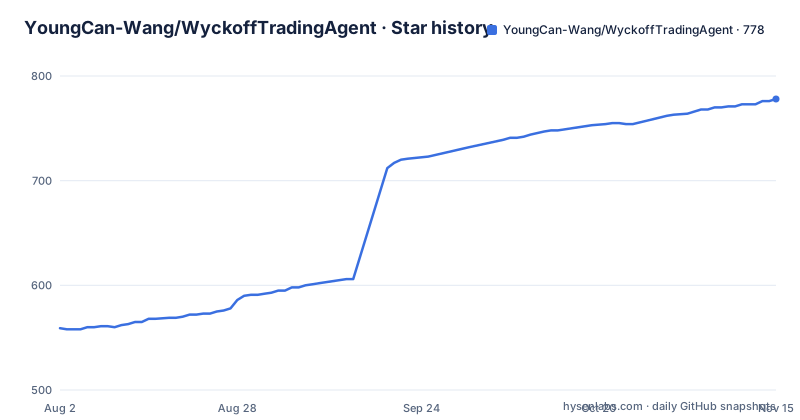
Star history
- YoungCan-Wang/WyckoffTradingAgent778 ★ · +219
| Repository | 2026-08-02 | 2026-11-15 |
|---|---|---|
| YoungCan-Wang/WyckoffTradingAgent | 559 | 778 |
219 Stars in the last 105 days, measured from the daily GitHub snapshot. Compare with other projects
Editorial analysis
Three install paths and two version lines that never meet
The Python distribution is published as `youngcan-wyckoff-analysis` while the repository is called WyckoffTradingAgent, and the overview page, which is written in Chinese with an English version linked at `docs/README_EN.md`, offers three ways in:
# 一键安装
curl -fsSL https://raw.githubusercontent.com/YoungCan-Wang/WyckoffTradingAgent/main/install.sh | bash

# 或 Homebrew / pip
brew tap YoungCan-Wang/wyckoff && brew install wyckoff
uv pip install youngcan-wyckoff-analysis
The first pipes a script into a shell, the second needs a tap, and the third assumes a working `uv`. The manifest requires Python 3.11 or newer and pins the version at `0.9.234`, a patch counter rather than a release train.
The desktop builds sit on a separate version line, tagged `desktop-v0.1.0`, `desktop-v0.1.1`, and `desktop-v0.1.2`, all published in the last week of August 2026 and all titled unsigned. A CLI user and a desktop user are therefore on different counters with nothing in the package metadata joining them. Releases to PyPI run through an automated patch flow with Trusted Publishing, which is also the reason the `uvx` command further down only ever reaches a version after it ships.
The unattended daemon is allowed to run exactly one tool
Scheduled tasks run only while the TUI window is open, and closing the window stops them. A launchd user service changes that:
scripts/daemon_install.sh      # 装成 launchd 用户级服务
wyckoff daemon --status        # 看运行状态
tail -f ~/.wyckoff/logs/daemon.log
scripts/daemon_uninstall.sh    # 卸载
When the daemon holds the lock, the TUI yields scheduling rights, so the two cannot fire the same job twice.
What happens when nobody is watching is the interesting part. The daemon first restores the locally saved CLI login state, because otherwise an automatic stop loss would be written to a local `USER_LIVE:local` record instead of the cloud portfolio. Then exactly one tool executes on its own: `set_stop_loss`, whose signature carries no share count, no cost, and no cash, so it can move a stop price but cannot move a position or spend money. Everything else enters a pending approval queue, bound to the account that was active at enqueue time, which is why switching accounts stops you approving somebody else's item.
wyckoff approve list           # 看待批项
wyckoff approve ok <id>        # 批准并立即执行队列中保存的精确参数
wyckoff approve no <id>        # 拒绝
`approve list` shows the full parameters with sensitive values redacted, and `approve ok` runs the exact arguments saved at enqueue time through the normal tool registry and records the outcome. Two failure rules sit underneath. A failed execution is not retried automatically, to avoid a duplicate fill. A pending item expires after twelve hours and can no longer be approved, with the stated consequence that an overnight rebalance would fill at the old price. `wyckoff run "盘前风控检查"` runs a single round without opening the TUI at all.
Nineteen public tools, writes refused, and a version only PyPI has
External clients can call the agent's tools over MCP with one command:
uvx --from 'youngcan-wyckoff-analysis[mcp]' wyckoff-mcp`mcp_server.py` stays in the tree as a compatibility entry point while 19 public tools are managed under `integrations/public_mcp/`. The handshake and tool discovery steps are deliberately inert: they load no business modules, read no login state, and initialise no database. Real work still needs the matching dependencies and credentials, portfolio writes are refused by default, and the page states plainly that this is not an anonymous multi tenant service.
The catch sits in the `uvx` form itself. Because it resolves from PyPI, you get whatever has been published, and the page notes that the current refactor does not shrink the main package's install dependencies and that a merge still has to be followed by a PyPI release before this command picks up the new version. The documented one line entry point lags the repository by design, which is a fair trade for not forcing a source checkout on anyone who only wants the tools.
Adding an external MCP server is a local command spawn
The same approval gate covers third party MCP servers, and that is where the security surface lives. Wiring one in takes four commands:
wyckoff mcp-add github --command npx \
  --args -y @modelcontextprotocol/server-github \
  --env GITHUB_TOKEN              # 从当前环境读取,避免把值写进命令历史

wyckoff mcp-test github     # 先试连,列出工具,不进会话
wyckoff mcp-enable github   # 确认没问题再启用
wyckoff mcp-list
Adding a server means allowing its command to be spawned on this machine, so the rules are drawn tightly. A new server is disabled by default, the configuration can only be written by you because the model is not permitted to add servers, and the project's own `mcp_server.py` is refused on the grounds that its tools are already built in and a second copy would produce two sets of same named tools. The `GITHUB_TOKEN` value is read from the current environment so it never lands in shell history.
Namespacing keeps the two worlds apart. External tools carry an `mcp__<server>__` prefix and cannot shadow a native tool. Write detection is heuristic, based on the tool name and its `annotations`, and the fallback is conservative: an unrecognised tool counts as a write and gets queued. When the daemon runs unattended it never executes an external write at all. A server that cannot connect only disables itself, native tools keep working, and the failure is written to `~/.wyckoff/logs/mcp-<server>.log`.
Two provider settings, and the funnel reads neither of them
The environment template sets `DEFAULT_LLM_PROVIDER=gemini` and lists keys for gemini, openai, openai_compatible, zhipu, deepseek, qwen, and volcengine. A comment immediately below says the funnel's step3 report channel is `STEP3_LLM_PROVIDER`, defaulting to an efficiency provider with Gemini as fallback, and that it does not read `DEFAULT_LLM_PROVIDER`. The setting you would naturally edit to change the model for the screening path therefore has no effect on the screening path.
The efficiency channel is described as the low cost option for compliance briefs, summaries, and formatting, with its own `EFFICIENCY_API_KEY`, `EFFICIENCY_MODEL`, and `EFFICIENCY_BASE_URL` for any OpenAI compatible vendor. Alongside it sit the RAG guard rails: `RAG_VETO_ENABLED=1`, a negative keyword list, a 12 second timeout, 6 workers, a 7 day news window, and at most 5 results, all skipped when no key is configured.
Two other entries deserve a second look. `WYCKOFF_BROWSER_CDP_URL` attaches the agent to a Chrome that you started yourself on a debugging port, which is a way of handing a research agent the cookies and sessions of a real browser profile. And `SUPABASE_SERVICE_ROLE_KEY` is marked as recommended for the step4 scripts, with the note that those scripts read and write the `USER_LIVE` record holding the portfolio.
Four data libraries, whole pool snapshots, and one recorded 504
Market data arrives from four libraries at once, `akshare`, `baostock`, `efinance`, and `tushare`, with `TUSHARE_TOKEN` and `TICKFLOW_API_KEY` as the two token bearing entries. TickFlow supplies the daily bars, and the approach is stated plainly: the full market snapshot uses the `universes` parameter of `GET /v1/quotes`, fetches the entire pool first, and filters locally. Historical daily bars default to 200 symbols per batch, and the US market channel is squeezed to 100 at the workflow layer rather than in the client.
The free TickFlow mode needs no key but serves historical daily bars only, while realtime quotes, minute bars, and financial data sit behind the full mode. The timeout is 12 seconds with 3 retries and a 1.5 second backoff, which is a short leash for a request that returns a whole market.
The template also carries an incident note. A single page of the signal feedback fetch returning 504 Gateway Timeout raises a RuntimeError for the entire round, which happened on 2026-09-12, so that fetch retries on the same policy with 3 attempts and a 1 second backoff. A project that writes down the date its own pipeline broke is easier to trust than one that does not. The same page notes that Supabase holds no quote cache at all, only user configuration, positions, pattern review, market signals, signal feedback, and task results.
Unsigned installers, and a CI that deliberately does not build them
The Electron desktop app covers Windows x64 and macOS on both Intel and Apple Silicon, and puts agent chat, positions, scheduled tasks, tracking attribution, reports, and charts into one local workbench. Write confirmations are asked inside the conversation and executed on the spot rather than on a separate page, and a confirmation record lists what was approved.
The build story is worth reading before installing. Daily CI on pull requests and main runs Electron tests on three platforms and builds no installers. An EXE and a DMG carrying a real bundled Python runtime are produced only by an explicit manual candidate build or by invoking the `desktop-release` skill, and a manual candidate is kept for one day at most. Public packages use a zero cost scheme, the Windows binaries are unsigned and the macOS binaries are temporarily signed, and the page says plainly that the operating system will warn you. The release titles agree, since each of the last three is marked unsigned.
Downloads point at GitHub Releases on purpose, with an explicit statement that Actions Artifacts are not used as a download site. The app also checks for a newer `desktop-v*` build from Settings and offers the download entry itself.
Streamlit is gone from main and still alive on a branch
The Streamlit MVP is retired: the page says it is no longer iterated, the main branch has removed all Streamlit runtime code, and the old code lives on the `release/streamlit` branch with the MVP architecture preserved as a document. The product forms today are React web, CLI, MCP, and GitHub Actions.
The counting definitions are unusually careful, which is where a screener usually fudges. The pattern review page reads the most recent 30 review trading days that actually exist in the database, and its counters differ on purpose. The review record count keeps the raw data source rows inside the window, the total selection count counts unique stock plus selection day, and the covered stock count and the change summaries deduplicate by ticker code. Key news that survives rule filtering is drawn onto the chart as interpretation only, and explicitly does not change funnel candidates. The funnel itself treats a candidate as a candidate rather than an order, and production NEUTRAL or RISK_ON states forbid opening new positions.
The observability split follows the same habit. Server errors go to Cloudflare Workers Logs for about three days, page views use Web Analytics, and the member click heatmap runs through a Clarity project named `y6albpfin1`, with the note that none of the three write to the business database. One inconsistency remains: the hosted app sits at `wyckoff-analysis.pages.dev` on Cloudflare Pages, while the homepage field points at a separate GitHub Pages site under the owner's namespace.
Editorial conclusion
Read this as a research pipeline with a broker attached, not as an autopilot. It fits someone who wants the screening, the Wyckoff structure reading, the research report, and the position review assembled in one place and is willing to sit in front of the confirmation queue. Before running it unattended, check four things. Whether `set_stop_loss` on its own is an acceptable level of automation for your account, since it is the single call the daemon makes without you. Whether a pending item expiring after twelve hours matches how you trade, because the page itself says an overnight rebalance would fill at the old price. Which key each step actually reads, since the funnel ignores the provider setting you would edit first. And what the unsigned desktop package warns you about before you install it.
Frequently asked questions
What does the WyckoffTradingAgent daemon do with nobody watching?
It restores the locally saved CLI login state and then executes exactly one tool by itself, set_stop_loss, whose signature carries no share count, no cost, and no cash. Every other write goes into a pending approval queue bound to the account that was active when it was enqueued.
How long does a pending WyckoffTradingAgent approval stay valid?
Twelve hours, after which it expires and can no longer be approved. The page states the consequence directly: an overnight rebalance would fill at the old price. A failed execution is not retried automatically either, to avoid a duplicate fill.
Does WyckoffTradingAgent accept anonymous portfolio writes over MCP?
No. The public MCP server exposes 19 tools, and portfolio writes are refused by default. Handshake and tool discovery load no business modules, read no login state, and initialise no database, and the page states it is not an anonymous multi tenant service.
Can the WyckoffTradingAgent agent add its own MCP server?
No. Adding a server means allowing its command to be spawned on the local machine, so new servers are disabled by default and only you can write the configuration. The agent's own mcp_server.py is refused on request, because those tools are already built in and a second copy would duplicate their names.
Is the WyckoffTradingAgent desktop installer code signed?
No. Public packages use a zero cost scheme, with Windows binaries unsigned and macOS binaries temporarily signed, and the operating system warning is called out explicitly. Each of the last three release titles is marked unsigned, and daily CI builds no installers at all.
What market data does WyckoffTradingAgent read?
Four libraries: akshare, baostock, efinance, and tushare, plus TickFlow for daily bars. The full market snapshot uses the universes parameter of GET /v1/quotes, fetches the whole pool first and filters locally, with 200 symbols per batch for historical daily bars and 100 on the US market channel.
Official sources
Add this badge to your README
If you maintain this project, the badge below links readers to this analysis and shows its maintenance status from the daily GitHub snapshot. Paste the markdown into your README; add ?metric=license or ?metric=stars to the image URL for a different field.

[](https://hysenlabs.com/projects/youngcan-wang-wyckofftradingagent)Star history chart for your README
[](https://hysenlabs.com/projects/youngcan-wang-wyckofftradingagent)Was this useful?