WorkAny's release tags stopped in March while the dev branch kept moving
Desktop Agent for Any Task
At a glance
- What is it?
- A Tauri desktop agent that runs tasks in a local sandbox across three workspaces, whose newest tag is four months behind its own package version, and whose license adds conditions the README never spells out.
- Who is it for?
- WorkAny suits a team that wants a Tauri desktop agent with a real local sandbox, per platform API binaries and MCP server support, and it is cheap to evaluate because the web path runs through Vite alone. Two things decide it.
- Can I use it commercially?
- Check first. The repository uses a licence we do not classify automatically, so read its LICENSE file before any commercial use.
- Is it still maintained?
- Yes. The repository last received commits 123 days ago.
- What is it written in?
- Mainly TypeScript, according to GitHub's language statistics.
Answers come from the project's GitHub data, last synced on November 21, 2026, and from our analysis. They are not legal advice.
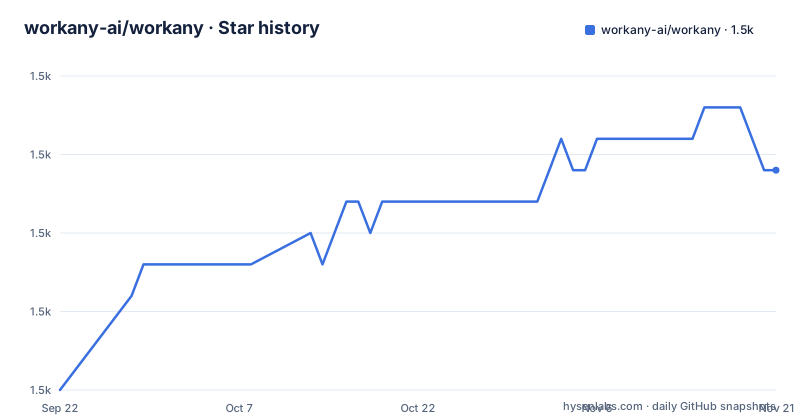
Star history
- workany-ai/workany1,527 ★ · +7
| Repository | 2026-09-22 | 2026-11-21 |
|---|---|---|
| workany-ai/workany | 1.5k | 1.5k |
7 Stars in the last 60 days, measured from the daily GitHub snapshot. Compare with other projects
Editorial analysis
package.json says 0.2.0, the newest tag says v0.1.19
The root package.json carries version 0.2.0 while the newest release tag on the project is v0.1.19, dated 2026-03-08. Before it sat v0.1.18 on 2026-03-05 and v0.1.17 on 2026-03-03, three tags in six days. The default branch is dev, and the last commit on it is dated 2026-07-22, more than four months after that final tag. A `ver` script points at scripts/version.sh, so version strings are edited inside the tree rather than derived from a tag. Taken together, the tag history describes a March snapshot and says nothing about the code that has moved since. Read the tag to know what shipped and read dev to know what exists, because here those are two different things.
The recommended start command is gated by two preflight scripts
The quick start marks `pnpm dev:app` as recommended, but that script is not the first thing pnpm runs. A `predev:app` hook fires ahead of it and executes two checks in sequence, `node scripts/check-rust.js` and `node scripts/check-api-binary.js`. If Rust is absent, or if the API binary has not been produced yet, the recommended path stops before Tauri starts. The whole documented setup sequence is:
# Install dependencies
pnpm install

# Start API server
pnpm dev:api

# Start Web and Desktop App (recommended)
pnpm dev:app

# Start Web only (Optional)
pnpm dev:web
Running the backend on its own with `pnpm dev:api` skips both checks, and `pnpm dev:web` serves the frontend through Vite with no desktop layer at all. The root `dev` script chains the two through concurrently, so a bare `pnpm dev` meets the same gate.
Linux has one build target and macOS has two
Four API binary targets exist: mac-arm, mac-intel, linux and windows. Each desktop build script pairs one of them with a matching Tauri target triple, `x86_64-unknown-linux-gnu` for Linux, `x86_64-pc-windows-msvc` for Windows, `x86_64-apple-darwin` for the Intel Mac build and `aarch64-apple-darwin` for the Apple Silicon one. Both Mac architectures are covered on both sides of the split, since the backend binary build and the Tauri build are separate commands. Linux has one triple and it is x86_64. No aarch64-unknown-linux-gnu entry appears anywhere in the script list, so an ARM Linux host has no declared build path at all. `tauri:build` with no suffix leans on the undifferentiated `build:api:binary` and whatever host happens to run it.
pnpm build runs Vite and stops there
The root `build` script is `vite build`, which produces the frontend bundle and ends. The API has separate entries, `build:api` for the filter and `build:api:binary` for the compiled backend, and neither is wired into `build`. The desktop path composes them instead: `tauri:build` runs `pnpm build:api:binary && tauri build`. A bare `pnpm build` in a fresh checkout therefore yields static assets with no backend and no application, while the packaged path assembles both in a stated order. Anyone scripting a release has to name a platform specific target rather than lean on the default, and the sequencing that matters lives in `tauri:build`, not in `build`.
Root lint and format scripts stop at the src directory
Four root scripts cover quality, and all four are scoped to the frontend. `lint` is `eslint src`, `lint:fix` adds `--fix`, `format` writes through prettier over the TypeScript, TSX and CSS files under `src/`, and `format:check` reads the same set of paths back. The backend in `src-api/` is a separate pnpm workspace that can be addressed by filter, as `dev:api` and `build:api` both do, yet no root lint or format entry reaches it. `src-tauri/` holds Rust code with no root level hook either. Nothing in the tree says the workspace member covers its own checks, so the plain reading is that these four commands inspect the frontend and leave the other two workspaces untouched.
The Architecture heading is empty and the runtime claim is untested
The README carries an Architecture heading with nothing under it. The heading is present and the text moves straight on to Development, so whatever diagram or explanation belonged there is not in the file. The shape has to be read from the tree instead: `src/` for the React and TypeScript frontend, `src-api/` for a Hono backend holding the agent SDK, and `src-tauri/` for the Tauri and Rust shell. The feature list describes the agent runtime as in process with no external CLI dependency, and the scripts compile a separate API binary for each platform while a predev hook checks for that binary before the desktop app starts. Both statements sit next to each other, and only one of them can be checked from the scripts.
The license is Apache 2.0 plus conditions nobody lists
The license metadata for this repository records no standard identifier, and the README points at a LICENSE file in the root under the name WorkAny Community License, described as Apache License 2.0 with additional conditions. Those conditions are not enumerated anywhere in the README, and the root LICENSE file is the only place they appear. Read the Apache 2.0 half as a starting point rather than the whole grant. The copyright line reads 2026, ThinkAny, LLC, all rights reserved, while the repository, the package name and the site are all WorkAny, so the entity named as owner is not named the way the product is. Anyone planning to build on this code needs the LICENSE text before deciding what the extra terms permit.
A tracked sponsor link sits above the feature list
A sponsor block appears before the feature list. It links to 302.AI with a campaign parameter appended, `https://302.ai/?utm_source=workany_github`, describes that service as a pay as you go AI application platform, and offers email sponsorship at [email protected]. The campaign parameter is the visible part, and worth noting when weighing what a project promotes on its own front page. The provider list is not sponsored: multi provider support covers OpenRouter, Anthropic, OpenAI and any compatible API endpoint, so the sponsor is not the only route to a model. Which provider a new install selects is not stated, and neither is what happens when none is configured.
Editorial conclusion
WorkAny suits a team that wants a Tauri desktop agent with a real local sandbox, per platform API binaries and MCP server support, and it is cheap to evaluate because the web path runs through Vite alone. Two things decide it. The release line stopped at v0.1.19 in March while the default branch moved on through July, so judge the code rather than the tags, and read the LICENSE file before assuming Apache 2.0 covers you, because the community variant adds conditions the README does not spell out. Expect to build for x86_64 Linux only on the server side, since ARM Linux hosts have no declared target.
Frequently asked questions
What is WorkAny and what is it built with?
A desktop AI agent application that executes tasks from natural language input, with real time code generation, tool execution and workspace management. The frontend is React 19 with TypeScript, Vite and Tailwind CSS 4, the backend is Hono on @codeany/open-agent-sdk, and the desktop shell is Tauri 2 with SQLite.
Does WorkAny build for arm64 Linux?
No declared target. The API binary builds cover mac-arm, mac-intel, linux and windows, and `tauri:build:linux` uses the x86_64-unknown-linux-gnu triple. No aarch64 Linux entry appears in the root script list.
Which model providers can WorkAny use?
OpenRouter, Anthropic, OpenAI, and any compatible API endpoint. Custom model providers can be set for the agent, and MCP servers are supported over stdio, SSE and HTTP.
What does it take to start WorkAny in development?
Node.js 20 or newer, pnpm 9 or newer and Rust 1.70 or newer. `pnpm install` comes first, then `pnpm dev:api` for the backend alone, `pnpm dev:app` for web and desktop together, or `pnpm dev:web` for the frontend only. The app path runs two preflight checks before Tauri starts.
What license is WorkAny distributed under?
The README names a WorkAny Community License held in the root LICENSE file, based on Apache License 2.0 with additional conditions that the README does not enumerate. The copyright line reads 2026 ThinkAny, LLC.
Official sources
Add this badge to your README
If you maintain this project, the badge below links readers to this analysis and shows its maintenance status from the daily GitHub snapshot. Paste the markdown into your README; add ?metric=license or ?metric=stars to the image URL for a different field.

[](https://hysenlabs.com/projects/workany-ai-workany)Star history chart for your README
[](https://hysenlabs.com/projects/workany-ai-workany)Was this useful?