OpenRPA: a download link with a hard-coded installer name inside the latest release, and a Python version in the fallback filename
Free Open Source Enterprise Grade RPA
At a glance
- What is it?
- An open source robotic process automation application for Windows whose README is a wall of links, whose repository homepage is actually the account portal for a companion server product, and whose three newest releases all share the same first three version components. It ships two Windows installers, one of them named with a Python version, and credits a third party for sponsoring the signing tool.
- Who is it for?
- OpenRPA fits a Windows shop that wants a self-hosted automation tool with a real integration surface and is prepared to read a wiki. Four things to know.
- Can I use it commercially?
- Yes, with conditions. MPL-2.0 is a weak copyleft licence: you can use it inside commercial and closed-source software, but if you distribute changes to its own files, you must publish those changes under the same licence.
- Is it still maintained?
- Yes. The repository last received commits 6 days ago.
- What is it written in?
- Mainly C#, according to GitHub's language statistics.
Answers come from the project's GitHub data, last synced on November 15, 2026, and from our analysis. They are not legal advice.
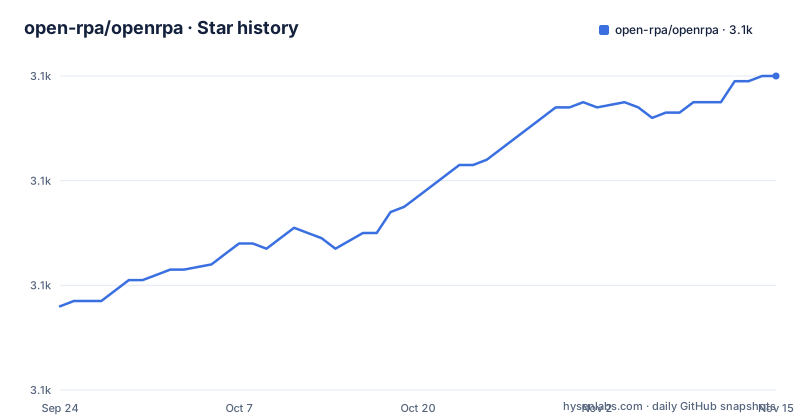
Star history
- open-rpa/openrpa3,120 ★ · +44
| Repository | 2026-09-24 | 2026-11-15 |
|---|---|---|
| open-rpa/openrpa | 3.1k | 3.1k |
44 Stars in the last 52 days, measured from the daily GitHub snapshot. Compare with other projects
Editorial analysis
The download link hard-codes an installer name inside the latest release
The README's main call to action is one link whose target is worth reading carefully. It points at the downloads endpoint of the latest release with a specific installer file name appended, rather than at a release page or at a versioned asset. Two things follow. The link is not pinned, so every click can fetch a different build, and the file name is part of the address, so the link breaks the first time a release drops or renames that file. For a project whose releases are named after individual fixes rather than after versions, and whose last visible release predates its most recent commit by about ten months, that combination means the advertised download and the newest code in the repository are unlikely to be the same thing. The README offers no other way to get a specific build.
A second installer named after a Python version is the Windows 11 fallback
One line after the main download, the README tells Windows 11 users that if the application does not start or crashes, there is a second installer. Its file name carries a Python version inside it, unlike the first one, which means the two builds embed different interpreter runtimes and are offered for different failure modes. The README does not say what differs between them beyond the symptom they are meant to fix, which is the opposite of what you want from a fallback: if the second build works and you do not know why, you have two runtimes to maintain and no documentation of the difference. What the line does establish is that shipping a desktop automation tool on Windows means shipping and debugging more than one interpreter configuration, and that the project knows it.
Three version components frozen while the fourth does all the moving
The three newest release tags share their first three version components exactly and differ only in the fourth, so every visible change to the product in this history is recorded in a counter rather than in the parts of the number people usually read. Two of the three are titled by what they fix rather than by the tag: one fixes arrays for a PowerShell entry point, another fixes logging attributes, and only the middle one carries a bare version number. Combined with the gap between the newest release and the most recent commit on the branch, the release history reads as a long-lived product line where version communication has been left to the commit titles. Anyone automating a deployment against these tags has to parse the fourth component to know whether anything they depend on changed.
The README carries an analytics beacon hosted in someone else's repository
The badge row at the top of the README contains the usual issue tracker, network, licence and commit activity links, and one that is not: a link to a file called a beacon, hosted in a repository belonging to an individual who is not the project. That is a web analytics tag embedded in the README, which means anyone viewing the readme on the forge executes a request to a third party's hosting, and the project's traffic measurement depends on another person's account staying up. It is a small thing, and it is common practice, but it is the only outbound request in a document that is otherwise entirely links to the project's own properties, and it is worth knowing if you fork the readme or read it in an environment that blocks third party requests.
About forty integration directories, and two checked-in indexing artifacts
The repository root is the documentation of what the tool integrates with. There are roughly forty directories named after their area, covering an image-based recorder, a code editor, databases, a file watcher, forms, browser automation, image handling, a Java bridge and a Java interface, a speech component, a native messaging host and its named-pipe wrapper, networking, office integration, PowerShell, SAP and its bridge, snippets, filesystem storage, a terminal emulator, utilities, Windows-specific pieces and work items. Three top-level directories sit outside that pattern: an embedded local database, a library for driving 3270 terminals, and a configuration file for distributed tracing. Two more are unusual: a source-index database and its project files are committed to the repository, alongside installer authoring files, a patch script and a batch file whose name is misspelled.
Windows signing is sponsored by a third party service
The credits at the bottom of the README name three things to thank. One organisation is credited with developing the automation application and its companion server, another with writing the documentation, and a third is credited for sponsoring the signing tool the project uses. That last one is the load-bearing detail: the application is distributed as a Windows installer, and a Windows installer that users are expected to run without a warning is signed with tooling whose cost is being covered by a vendor who sells signing services. So the trust path from a user double-clicking a file to a signed binary runs through a commercial arrangement that the readme mentions in a credit line and nowhere else. There is also a commercial support link one line above the credits, so the project sells support for the product it distributes through that sponsored tool.
The homepage field points at the companion server's account portal
Three of the README's links point at one domain rather than at the application. The homepage recorded for the repository is an account portal, and the README sends the reader there to manage an account for the companion product, which it describes as the backend for managing multiple robots and links to on its own subdomain. Documentation, the forum, the wiki and the commercial support page live on the same or related domains. The automation tool itself has no site of its own in the README: it is introduced by a heading, offered as a download link, and otherwise documented through a wiki and a wall of unlabelled video links. The result is a repository whose front door is the sign-up page for something else in the same family.
Editorial conclusion
OpenRPA fits a Windows shop that wants a self-hosted automation tool with a real integration surface and is prepared to read a wiki. Four things to know. The main download link is not pinned: it points at a named installer inside the latest release, so it breaks if a future release renames that file. A second installer, named with a Python version, is documented as the Windows 11 fallback without saying what differs. The version scheme has three frozen components and a fourth that carries every change, which makes releases hard to reason about from a tag. And the project offers commercial support and a companion server while the repository's own homepage is that server's account portal.
Frequently asked questions
What is OpenRPA?
An open source robotic process automation application for Windows, distributed as an installer from the repository's releases, with a companion server product described as the backend for managing multiple robots. The repository description calls it a free, open source, enterprise grade tool, and the README offers paid commercial support alongside it.
Which OpenRPA installer should I download?
Two are linked. The main download points at an installer with a plain file name inside the latest release, so it is neither pinned nor version specific. The README then offers a second installer whose file name carries a Python version, for Windows 11 users, if the first one fails to start or crashes.
How is OpenRPA signed for Windows?
The credits thank a commercial signing service for sponsoring the signing tool used by the project, so the Windows installer is signed with tooling paid for by a third party. The credits also name the organisation that develops the application and its companion server, and the company that wrote the documentation.
What does OpenRPA integrate with?
The repository tree is the integration list: about forty directories, one per area, covering an image-based recorder, a code editor, databases, a file watcher, forms, browser automation, office integration, a Java bridge, PowerShell, SAP and its bridge, a speech component, a terminal emulator, a 3270 terminal library, a native messaging host, work items and filesystem storage.
How often is OpenRPA released?
The three newest tags share the same first three version components and differ only in the fourth, and two of them are titled by what they fix, such as an array fix for a PowerShell entry point and a logging attribute fix. The newest visible release is from mid 2025 while the branch has a commit from April 2026.
Does OpenRPA need a separate server?
The README points at a companion product described as the backend for managing multiple robots, and the repository's homepage field is that product's account portal rather than a page about the automation tool. Documentation lives on a separate domain and a wiki in the repository.
Official sources
Add this badge to your README
If you maintain this project, the badge below links readers to this analysis and shows its maintenance status from the daily GitHub snapshot. Paste the markdown into your README; add ?metric=license or ?metric=stars to the image URL for a different field.

[](https://hysenlabs.com/projects/open-rpa-openrpa)Star history chart for your README
[](https://hysenlabs.com/projects/open-rpa-openrpa)Was this useful?