Syncthing-Fork keeps the previous maintainer's package id
Syncthing-Fork - A Syncthing Wrapper for Android.
At a glance
- What is it?
- A community continuation of the Android Syncthing client after the official app was deprecated, distributed through GitHub releases and F-Droid. The application identifier still belongs to the fork's original author, and the release tags show two candidates for one upstream version with no stable build between them.
- Who is it for?
- Adopt Syncthing-Fork if you need Syncthing on Android and the official app is gone from F-Droid, since this is the community line and it tracks upstream Syncthing versions closely enough to recognise. Check three things first.
- Can I use it commercially?
- Yes, with conditions. MPL-2.0 is a weak copyleft licence: you can use it inside commercial and closed-source software, but if you distribute changes to its own files, you must publish those changes under the same licence.
- Is it still maintained?
- Yes. The repository last received commits 2 days ago.
- What is it written in?
- Mainly Java, according to GitHub's language statistics.
Answers come from the project's GitHub data, last synced on November 14, 2026, and from our analysis. They are not legal advice.
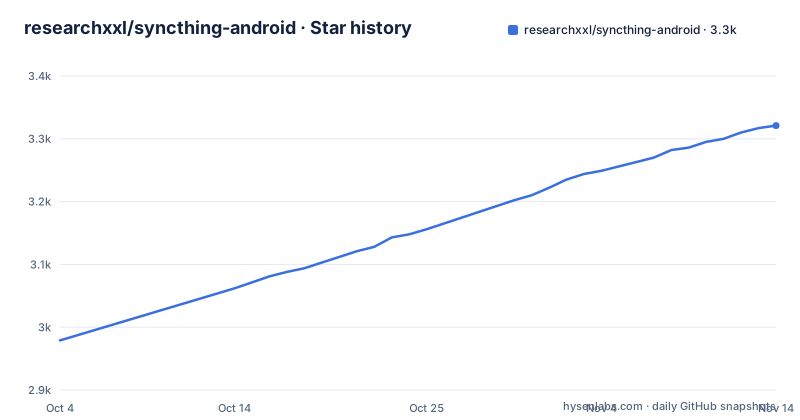
Star history
- researchxxl/syncthing-android3,321 ★ · +342
| Repository | 2026-10-04 | 2026-11-14 |
|---|---|---|
| researchxxl/syncthing-android | 3k | 3.3k |
342 Stars in the last 41 days, measured from the daily GitHub snapshot. Compare with other projects
Editorial analysis
The application identifier belongs to the fork's original author
The app id is not this project's. Every distribution badge points at the same identifier, com.github.catfriend1.syncthingfork, on F-Droid and in the Obtainium configuration, while the repository owner is a different account entirely and the application is named Syncthing-Fork. The identifier was inherited along with the code when the project was forked, and it has been kept. That has a concrete consequence worth stating: the fork retains the previous fork maintainer's package ID, while the former official app uses the distinct ID `com.nutomic.syncthingandroid`. They are separate Android application identities; replacing an existing fork installation also depends on matching signing certificates. It also means the naming a user searches for and the id the system uses disagree.
The official app was deprecated, and this is the continuation
The reason this fork exists is stated plainly in a section of its own. Switching from the deprecated official version, with a wiki article carrying the detailed instructions. The acknowledgments confirm the lineage: the project was forked from the upstream Android client repository, and three former maintainers are thanked by name, the first of whom is also the account the application identifier belongs to. So the shape of the project is a community takeover of a component that had an official home and lost it, with the migration path documented rather than left to be discovered. The four goals of the original project are replaced by something narrower in practice, which is keeping a working Android client available now that the official one is gone.
Support starts on the forum, not the issue tracker
The single instruction in the introductory paragraph is about where to ask for help: use the forum and the social media apps first, and only then open an issue on the tracker. That is a deliberate triage decision, and it has two sides. In practice it stops a large volume of usage questions, most of which are answered in chat or forums, from landing in a bug tracker where they dilute real defects. On the other hand it means there is no guarantee a question reaches anyone if it is only ever filed as an issue, and it inverts the usual convention that a public tracker is the record of what is broken. For a project with this few maintainers it is a defensible trade, and it is worth knowing before you decide where to report a problem.
Four Windows batch scripts sit at the repository root
The root is more than the usual Android project files. Alongside the Gradle wrapper for both platforms, a Gradle properties file and two Kotlin DSL build scripts, there are four command files whose names describe a maintenance routine: one to build, one to clean, one to kill, and one to lint. The kill script is the interesting one, since its existence implies a recurring need to stop something that outlives a build, most likely a daemon or a running instance holding a lock. Providing that as a named script rather than as an incantation in a wiki page means the workaround is versioned with the code. Everything is written for Windows, which fits an Android toolchain that has to run on that platform for many contributors, and it does mean the build path is not symmetric across operating systems.
The Syncthing core arrives as a submodule beside the app module
The wrapper arrangement is visible in the layout. There is a submodule definition file at the root and a directory named for Syncthing itself, next to the Android application module and a scripts directory. So the Go core that does the actual synchronisation is not vendored into the history of this repository; it is referenced as a submodule and checked out alongside the wrapper. The declared primary language is Java, consistent with the application module being the bulk of the tracked code, while the core underneath is a different language entirely. That structure is the right one for following upstream, since bumping the core is a submodule pointer change rather than a merge, and it is also the reason a shallow or partial clone can leave you without a core to build against.
Four badges reach out to three unrelated third-party services
The badge block at the top of the file is unusually wide-reaching. Besides the licence and the repository's own release and build badges, it embeds a release statistics widget hosted on somebody's personal GitHub Pages site, a package metrics dashboard served from a Streamlit application, a Weblate translation project, and a fully percent-encoded Obtainium configuration that carries the application identifier, the author, the preferred APK index, and two settings that verify the latest tag and filter APKs by identifier. Four badges, three external services, none of them under the project's control. Each one is a single point of failure for a badge, and taken together they tell an observer more about the surrounding community tooling than about the app.
Two candidates for one upstream version, no stable in between
The tag names encode two version numbers at once. The first three segments track the upstream Syncthing release, and the fourth belongs to this fork, with a zero for a stable build and a candidate suffix otherwise. Reading the recent tags: a stable build of upstream 2.1.5.0, then a first candidate for 2.1.6.0, then a fourth candidate for the same 2.1.6.0. So there is no stable 2.1.6 published, and the two candidates are fifteen days apart. Nothing appears between the first and fourth candidate, so the second and third were either not tagged or not published, which makes the numbering a little harder to reason about than a clean sequence would. The practical effect for an installer is that the newest tag they will find is a release candidate, and any workflow tracking latest will pick up candidates unless it filters them.
The README is a pointer document with no build steps in it
What the file contains fits in a couple of hundred words: one sentence saying it is a wrapper, one instruction to take builds from the releases section or from F-Droid, one instruction about where to seek help, and then links. Migration instructions, the knowledge base, the building and development notes, the privacy policy and the licence are all reached by following links into a wiki directory kept in the repository itself. No dependency list, no minimum Android version, no tool versions, no command of any kind. Keeping the documentation in the repository rather than on a separate wiki server is a genuine advantage, since the notes are versioned against the branch you are reading, but the cost is that the front page answers none of the practical questions a new user arrives with.
Editorial conclusion
Adopt Syncthing-Fork if you need Syncthing on Android and the official app is gone from F-Droid, since this is the community line and it tracks upstream Syncthing versions closely enough to recognise. Check three things first. The fork uses `com.github.catfriend1.syncthingfork`, while the former official app used `com.nutomic.syncthingandroid`; follow the project's migration guide and check package IDs and signing keys when changing builds. The newest tagged builds are release candidates of one upstream version with no stable 2.1.6 yet published, so decide whether a candidate is acceptable to you. And read the building notes in the wiki before contributing, because the README carries no build steps and no dependency versions at all.
Frequently asked questions
Is the Syncthing Android app discontinued?
The official one is. This repository carries a section on switching from the deprecated official version, with a wiki article covering the migration, and its acknowledgments state that the project was forked from the upstream Android client and thank three former maintainers by name.
Is Syncthing-Fork available on Android?
Yes. It is an Android wrapper around Syncthing, and builds are published through the repository's releases section and on F-Droid. The badges also link a Weblate translation project and an Obtainium configuration for tracking releases automatically.
What package identifier does Syncthing-Fork use?
com.github.catfriend1.syncthingfork, inherited from the original maintainer when the project was forked. The F-Droid listing and the Obtainium configuration both use it, so the app keeps the original identity rather than taking a new one.
How do I install Syncthing-Fork?
The README says to take builds from the releases section or from F-Droid. There are no install commands in the repository's README; the knowledge base and the building notes live in a wiki directory inside the repository.
How do the Syncthing-Fork version numbers work?
The first three segments track the upstream Syncthing version and the fourth belongs to the fork, with a zero for stable builds. The three most recent tags are a stable 2.1.5.0, then a first and a fourth release candidate for 2.1.6.0, so no stable 2.1.6 has been published.
Official sources
Add this badge to your README
If you maintain this project, the badge below links readers to this analysis and shows its maintenance status from the daily GitHub snapshot. Paste the markdown into your README; add ?metric=license or ?metric=stars to the image URL for a different field.

[](https://hysenlabs.com/projects/researchxxl-syncthing-android)Star history chart for your README
[](https://hysenlabs.com/projects/researchxxl-syncthing-android)Was this useful?