wa-automate: pick a runtime, own it, or ignore the flag that does nothing
💬 🤖 The most reliable tool for chatbots with advanced features. Be sure to 🌟 this repository for updates!
At a glance
- What is it?
- A Node toolkit that turns a messaging session into a local API, a remote client, an embeddable runtime, or a tool server for AI agents, delivered as a monorepo on a new major line. Its documentation is unusually honest about one command that no longer does anything.
- Who is it for?
- This toolkit fits a team that needs messaging automation behind an API they control, on their own infrastructure, rather than a hosted product. Two things to weigh first.
- Can I use it commercially?
- Check first. The repository uses a licence we do not classify automatically, so read its LICENSE file before any commercial use.
- Is it still maintained?
- Yes. The repository last received commits 17 days ago.
- What is it written in?
- Mainly TypeScript, according to GitHub's language statistics.
Answers come from the project's GitHub data, last synced on November 15, 2026, and from our analysis. They are not legal advice.
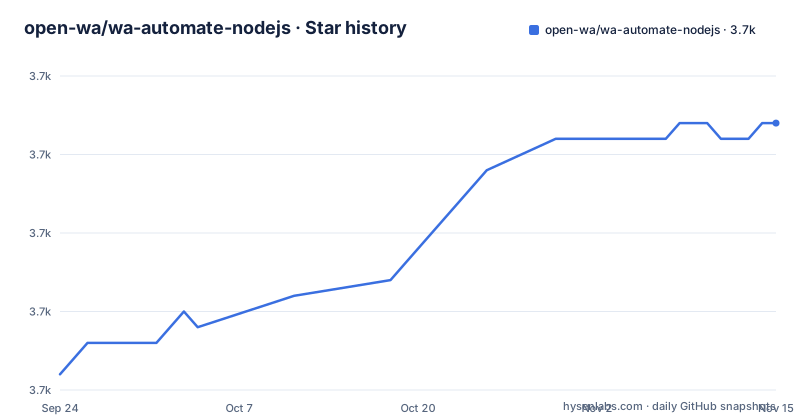
Star history
- open-wa/wa-automate-nodejs3,677 ★ · +16
| Repository | 2026-09-24 | 2026-11-15 |
|---|---|---|
| open-wa/wa-automate-nodejs | 3.7k | 3.7k |
16 Stars in the last 52 days, measured from the daily GitHub snapshot. Compare with other projects
Editorial analysis
Two warnings sit above the install command
The documentation opens with two blocks before it explains anything, and both are conditions of use rather than decoration. The first is a warning that using the project means you explicitly agree to a terms document kept in the repository, and the second is a statement that the project is unofficial, is not affiliated with the messaging platform or its parent company, and is used at your own risk. That framing is unusual in a readme and worth respecting on its own terms. The second block is a version statement: the current release line is the fifth major, applications built against the fourth should pin an explicit fourth version while they migrate, and unqualified installs resolve to the fifth. For anyone inheriting an existing integration, that sentence is the whole migration plan.
Two tags on one day, and a manifest that says something else
The release history shows two tags published the same morning, a minor and a patch about eleven hours apart, and the most recent push lands on the same day as the second of them. So the project is moving, quickly, on a major line that is itself young. The monorepo manifest tells a different version story: it is a private root package fixed at the fourth version of the fifth major, and the documentation says the packages inside it share that stable base version. Neither statement is wrong, and together they explain why the published package version and the tag name can differ without anything being broken. The practical consequence is that the tag is the thing to pin when you deploy, and the manifest's number tells you which release line the packages were cut from.
Four ways to attach to the runtime
The design decision is that the runtime is a thing you can host or a thing you can connect to, and the documentation is organised around which you want. The first surface is a ready-made local HTTP API with generated documentation and schemas, started from a single command.
npx @open-wa/wa-automate@latest --port 8080The second is a client package that connects another application to a running instance of that API, so your code never hosts the browser. The third is embedding: you construct the client yourself and own its lifecycle inside your own process. The fourth is the driver layer, where the runtime is backed by one of three browser automation engines, two of them well known and one a lighter alternative. That last row is the reason the phrase monorepo keeps appearing, since the driver choice is a package decision rather than a configuration flag, and the modules are split by role: runtime, drivers, API, and integrations.
The CLI parses a flag that does not deliver anything
One passage is worth quoting because of how plainly it admits a gap. If your goal is simply connecting the messenger to another service, the documentation says to configure a named integration in your config file. It then explains that the command-line interface does parse a webhook flag, but currently warns that command-line webhook registration parity is not restored, so that flag does not enable source-backed delivery, and points at a guide for the configuration that does work. This is a small sentence doing a lot of work. A library that tells you which of its own flags is inert has saved you an afternoon, and the fact that the gap is documented in the same section as the working alternative suggests the documentation is written by someone who debugs support requests. The rest of the surfaces, including a customer-service bridge to a third-party inbox product and a tunnel for reaching a local session without exposing local ports, follow the same pattern.
Pin the version, or the install will move under you
The quick start section is four lines of advice and they are the difference between a demo and a deployment. Use an explicit version in any deployment that needs repeatable installs, which is stated right after the command that otherwise fetches the latest. Set a session identifier early if you might run more than one account, since named accounts with isolated consumers are how multi-session automation works. Protect the API with a key before exposing it beyond your own machine. And keep your business logic in your own application, letting the toolkit own only the messaging runtime. The container section repeats the theme with its own notes: run the init process so zombies are reaped, treat the image as best suited to local testing or a disposable first run unless you have planned session persistence properly, and pin the library version through an environment variable. That example version number is from the previous major line, which is a small trap for anyone copying it.
The proof of life is a generated API document
After authentication the documentation tells you to open one page, and the page it names is the generated API reference for the live session. The framing is deliberate: that page proves three things at once, that the session is connected, that the API is reachable, and that you can see the method surface rather than guess at it. Two more generated artefacts are listed alongside it, a schema file and a collection file for an API client, so you can generate a client instead of writing requests by hand. Authentication itself has two shapes: scan the QR code the runtime prints, or use a link-code flow if scanning does not suit your setup. Both are presented as ordinary options rather than as workarounds, which is the right framing for a first-run experience.
The root directory is a migration in progress
The file list is the best documentation of what the project is doing, and it shows a large monorepo partway through a major transition. There is a backup of the old manifest, a file whose name is simply a version word, a migration log, and an audit document named after the pseudo-version audit for the new line. Two files carry a patch list and a cache alongside it, which means dependencies are being adjusted rather than merely version-pinned. The workspace covers four roots at once: packages, applications, integrations, and an SDK root that does not appear in the visible script list. There is also an architecture directory, a resources directory, and a skills directory. And then there are the assistant-tool configurations, several of them, next to the linting configuration and a repository ignore file for one particular tool. That combination is what a project under sustained development pressure looks like from the outside.
Editorial conclusion
This toolkit fits a team that needs messaging automation behind an API they control, on their own infrastructure, rather than a hosted product. Two things to weigh first. Read the terms notice at the top of the documentation, because using it is framed as agreeing to them and the project states plainly that it is unofficial and unaffiliated with the messaging platform. And pin versions explicitly, because the current major line changed recently, unqualified installs now land on the new one, and the container image example in the documentation still shows a version number from the old line.
Frequently asked questions
What is OpenWA?
OpenWA is the organisation behind the toolkit published under the scoped package name used in the install command. The project itself is a Node.js toolkit for automating the web client of a messaging platform, usable as a local API, a bot backend, a webhook source, a plugin host, or a tool server for AI agents.
What does WhatsApp automation mean in this project?
Driving the web client of the messaging platform from Node.js so that an account becomes an HTTP API with generated documentation, or an embedded runtime you own inside your own application. The documentation also describes a client package for connecting a separate app to a running instance without hosting the runtime.
Does the wa-automate command-line webhook flag work?
Not for source-backed delivery, according to the documentation. The interface parses the flag but warns that command-line webhook registration parity is not restored, so the working path is to configure the named webhook integration in your config file instead.
How do I pin a wa-automate version?
Pass an explicit version to the command in any deployment that needs repeatable installs, and for the container image use the documented environment variable to pin the library version. The documentation notes that existing fourth-major applications should stay on an explicit fourth version while they migrate, since unqualified installs now resolve to the current line.
Official sources
Add this badge to your README
If you maintain this project, the badge below links readers to this analysis and shows its maintenance status from the daily GitHub snapshot. Paste the markdown into your README; add ?metric=license or ?metric=stars to the image URL for a different field.

[](https://hysenlabs.com/projects/open-wa-wa-automate-nodejs)Star history chart for your README
[](https://hysenlabs.com/projects/open-wa-wa-automate-nodejs)Was this useful?